
Navigation
Install the app
How to install the app on iOS
Follow along with the video below to see how to install our site as a web app on your home screen.

Note: this_feature_currently_requires_accessing_site_using_safari
More options
Welcome to our community
Be a part of something great, join today!
You are using an out of date browser. It may not display this or other websites correctly.
You should upgrade or use an alternative browser.
You should upgrade or use an alternative browser.
ISO of Red
- Thread starter Shawn Nelson
- Start date

Sanjin Jukic
Well-known member
- Joined
- Dec 28, 2006
- Messages
- 8,929
- Reaction score
- 1
- Points
- 36
- Location
- Vienna, Austria
- Website
- www.sanjinjukic.com
RivaiC,
don't forget that ZGC or cookeoptics.com is still selling IMS front for RED1
But you have to consider this
"EXTREMELY IMPORTANT NOTE:
Using the P+S Technik IMS RED Mount will void the warranty on the RED One camera.
With your purchase of this item ZGC will require that you sign a waiver."
LINK>>>
don't forget that ZGC or cookeoptics.com is still selling IMS front for RED1
But you have to consider this
"EXTREMELY IMPORTANT NOTE:
Using the P+S Technik IMS RED Mount will void the warranty on the RED One camera.
With your purchase of this item ZGC will require that you sign a waiver."
LINK>>>

Ryan E. Walters
Well-known member
- Joined
- Sep 13, 2007
- Messages
- 1,213
- Reaction score
- 0
- Points
- 0
- Location
- Beaverton, Oregon
- Website
- www.ryanewalters.com
I've always wondered how, exactly, to use the "barber pole" or RGB parade as it is sometimes referred to.
If what you describe is true, why then, do I sometimes get the red clipping on the barber's pole, but only one or two channels clipped in the RGB path? You'd think the RGB channels would all show clip before the RAW (barber's pole) would clip?
That is a great question, and one I would like to know the answer to as well. According to the manual (Version 20.1.3) on page 47, it says that the traffic lights turn on for the RGB path once one of those channels has reached 1% of maximum clip. So as you say, you would think that they would turn on before the Red bar in the RAW barber pole turns on, but that is not always the case ...
Sanjin Jukic
Well-known member
- Joined
- Dec 28, 2006
- Messages
- 8,929
- Reaction score
- 1
- Points
- 36
- Location
- Vienna, Austria
- Website
- www.sanjinjukic.com
There is no a strictly formula(e) or a theorem to work with RED1 exposure.
There are certain VARIABLES.
The latest news told us that is coming up something like a simplified exposure approach soon.
But still not anything like this:
"In mathematics, the Pythagorean theorem (in American English) or Pythagoras' theorem (in British English) is a relation in Euclidean geometry among the three sides of a right triangle (right-angled triangle in British English). It states:
In any right triangle, the area of the square whose side is the hypotenuse (the side opposite the right angle) is equal to the sum of the areas of the squares whose sides are the two legs (the two sides that meet at a right angle).
The theorem can be written as an equation:
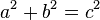
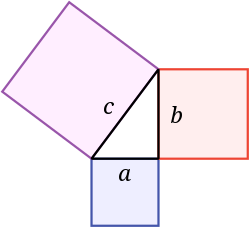
And go back to R1 exposure there is only a sort of guide that recommend you to use 320 ISO, then follow ETTR, pay attention to the traffic lights, use false color as it is described in the camera manual, etc,...
To conclude is to say that there is no help to somebody who looks for a simple formulae to expose with RED1.
Every shooting situation is different and requires to find a right way to reach a proper exposure.
Once more to repeat the quote from Anthony Dod Mantle, BSC, DFF,
Cinematographer, the ASC and Academy Award® Winner on his experience with RED1.
"American Cinematographer" Nov 2009, page 71>>>
where you could somehow read between the lines that there is no strictly formulae to expose RED1
and that a final picture result always comes later in post.
Shooting with RED1 cinematographer must follow a bunch og guidelines to achieve a right exposure
but there is no any strictly formulae for that, he or she must find his/her own way of doing that thing.
To get a proper exposure on RED1 is like dealing with a wild beast because in each situation can behave different.

There are certain VARIABLES.
The latest news told us that is coming up something like a simplified exposure approach soon.
But still not anything like this:
"In mathematics, the Pythagorean theorem (in American English) or Pythagoras' theorem (in British English) is a relation in Euclidean geometry among the three sides of a right triangle (right-angled triangle in British English). It states:
In any right triangle, the area of the square whose side is the hypotenuse (the side opposite the right angle) is equal to the sum of the areas of the squares whose sides are the two legs (the two sides that meet at a right angle).
The theorem can be written as an equation:
And go back to R1 exposure there is only a sort of guide that recommend you to use 320 ISO, then follow ETTR, pay attention to the traffic lights, use false color as it is described in the camera manual, etc,...
To conclude is to say that there is no help to somebody who looks for a simple formulae to expose with RED1.
Every shooting situation is different and requires to find a right way to reach a proper exposure.
Once more to repeat the quote from Anthony Dod Mantle, BSC, DFF,
Cinematographer, the ASC and Academy Award® Winner on his experience with RED1.
"American Cinematographer" Nov 2009, page 71>>>
where you could somehow read between the lines that there is no strictly formulae to expose RED1
and that a final picture result always comes later in post.
Shooting with RED1 cinematographer must follow a bunch og guidelines to achieve a right exposure
but there is no any strictly formulae for that, he or she must find his/her own way of doing that thing.
To get a proper exposure on RED1 is like dealing with a wild beast because in each situation can behave different.
Sanjin Jukic
Well-known member
- Joined
- Dec 28, 2006
- Messages
- 8,929
- Reaction score
- 1
- Points
- 36
- Location
- Vienna, Austria
- Website
- www.sanjinjukic.com
For those of you interested in this topic "ISO on RED1" there are two interesting articles
at the links that you can find below at the CML post that is quoted from Alfonso Parra AEC ,
a pretty good Spanish cinematographer:
"I have testing in deep IE and Exposure on REDOne and I found that
160ASA is a real IE for Daylight and 125 ASA for tungsten. At 160 ASA
I can use 2 2/3 stop over middle grey, and 4.5 stops under. I have
tested overexposed with models, charts and real shoots and if I want
to have some detail and texture of whites, those can´t exceed 2.5
stops over middle grey. Of course if I use an IE of 320 ASA to
exposure, you have almost 3.5 useful stops over middle grey, but you
have less information on shadows. You can see those test at:
RED1: Sensitivity and Exposure test>>>
A conversation about RED1 test>>>
Those test have been done with build 17. Right now I have shot a
Tvmovie (As reliquias do santo) with build 20 and I haven´t noticed a
big difference on highlights, except that Blue Channel is less noisy on shadows."
LINK>>>
For the first reference read his one text in English:
Digital cameras for digital cinematography>>>
***To translate the first two texts from Spanish to English the best way is to load PDF files
in Adobe Acrobat Pro app and copy/paste selected texts to Google translator.
at the links that you can find below at the CML post that is quoted from Alfonso Parra AEC ,
a pretty good Spanish cinematographer:
"I have testing in deep IE and Exposure on REDOne and I found that
160ASA is a real IE for Daylight and 125 ASA for tungsten. At 160 ASA
I can use 2 2/3 stop over middle grey, and 4.5 stops under. I have
tested overexposed with models, charts and real shoots and if I want
to have some detail and texture of whites, those can´t exceed 2.5
stops over middle grey. Of course if I use an IE of 320 ASA to
exposure, you have almost 3.5 useful stops over middle grey, but you
have less information on shadows. You can see those test at:
RED1: Sensitivity and Exposure test>>>
A conversation about RED1 test>>>
Those test have been done with build 17. Right now I have shot a
Tvmovie (As reliquias do santo) with build 20 and I haven´t noticed a
big difference on highlights, except that Blue Channel is less noisy on shadows."
LINK>>>
For the first reference read his one text in English:
Digital cameras for digital cinematography>>>
***To translate the first two texts from Spanish to English the best way is to load PDF files
in Adobe Acrobat Pro app and copy/paste selected texts to Google translator.
Tai Wah Lim
Well-known member
- Joined
- Mar 11, 2007
- Messages
- 652
- Reaction score
- 0
- Points
- 0
Thanks Sanjin for posting this. The link for the first goes back to the Spanish one- Lim
Sanjin Jukic
Well-known member
- Joined
- Dec 28, 2006
- Messages
- 8,929
- Reaction score
- 1
- Points
- 36
- Location
- Vienna, Austria
- Website
- www.sanjinjukic.com
Thanks Sanjin for posting this. The link for the first goes back to the Spanish one- Lim
Corrected.
Ryan E. Walters
Well-known member
- Joined
- Sep 13, 2007
- Messages
- 1,213
- Reaction score
- 0
- Points
- 0
- Location
- Beaverton, Oregon
- Website
- www.ryanewalters.com
It seems that from the tests that Alfonso Parra, AEC did they support the conclusions that we are reaching in this thread. I really hope that he translates these articles into English- while google does an ok job translating, I'm sure that I missed some things due to the translation ...
Here is one of his conclusions:
"When the contrast ratio of the scene we're shooting range is less than the
dynamic that has the camera then the image should sobrexponer carrying the highest lights on the right side of the histogram without coming to cut (Expose to the right) so that values are giving more bits to the midtones and shadows then descend to your site in post-production, this will give black and clean halftones, "Dense" in detail and little noise. When the contrast ratio of the scene is greater than the dynamic range that has the camera then you have to illuminate the shadows or lower the highlights, and if we have no control of lighting to choose which is the main area (key) of the
image where you want the detail and texture and expose accordingly."
Original in Spanish:
"Cuando la relación de contraste de la escena que vamos a fotografiar es menor que el rango dinámico que posee la cámara entonces conviene sobrexponer la imagen llevando las mas altas luces al lado derecho del histograma sin que lleguen a recortarse (Exponer para la derecha) de
forma que estamos dando más valores de bits a los medios tonos y las sombras que luego bajaremos a su sitio en la posproducción, esto nos dará negros y medios tonos muy limpios, “densos” con detalle y poco ruido. Cuando la relación de contraste de la escena es mayor que el rango dinámico que posee la cámara entonces hay que iluminar las sombras o rebajar las altas luces, y si no tenemos control de la iluminación elegir cual es la zona principal (key) de la imagen en la que queremos el detalle y la textura y exponer en consecuencia.
Here is one of his conclusions:
"When the contrast ratio of the scene we're shooting range is less than the
dynamic that has the camera then the image should sobrexponer carrying the highest lights on the right side of the histogram without coming to cut (Expose to the right) so that values are giving more bits to the midtones and shadows then descend to your site in post-production, this will give black and clean halftones, "Dense" in detail and little noise. When the contrast ratio of the scene is greater than the dynamic range that has the camera then you have to illuminate the shadows or lower the highlights, and if we have no control of lighting to choose which is the main area (key) of the
image where you want the detail and texture and expose accordingly."
Original in Spanish:
"Cuando la relación de contraste de la escena que vamos a fotografiar es menor que el rango dinámico que posee la cámara entonces conviene sobrexponer la imagen llevando las mas altas luces al lado derecho del histograma sin que lleguen a recortarse (Exponer para la derecha) de
forma que estamos dando más valores de bits a los medios tonos y las sombras que luego bajaremos a su sitio en la posproducción, esto nos dará negros y medios tonos muy limpios, “densos” con detalle y poco ruido. Cuando la relación de contraste de la escena es mayor que el rango dinámico que posee la cámara entonces hay que iluminar las sombras o rebajar las altas luces, y si no tenemos control de la iluminación elegir cual es la zona principal (key) de la imagen en la que queremos el detalle y la textura y exponer en consecuencia.

Jannard
Red Leader
- Joined
- Dec 28, 2006
- Messages
- 8,248
- Reaction score
- 7
- Points
- 0
Our belief is that it is best to rate RED as high ISO as possible... while staying beneath your threshold of noise. That way you get the most highlight protection possible. "Native" ISO is not a relevant concept here. It will induce you to lower the ISO and minimize highlight protection. We believe that "Useable ISO" is a range that is dependent on the dynamic range of your scene. The lower the contrast (and dynamic range), the lower ISO you can select. The converse is also true. We recommend ISO 250-320 for low-medium contrast scenes. We recommend ISO 400-500 (or even higher) for high contrast scenes. Digital is NOT film. The sooner that you get that into your thinking... the better.
Jim
Jim

Mark Wilkinson
Well-known member
Assuming the meter is calibrated correctly, it seems that this is a characteristic of the exposure curve of the sensor. With film, individual stocks have had their own particular toes and shoulders.
I assume your experience points to a sagging middle in the sensitivity/exposure curve of the Mysterium as revealed by the RAW false color readout. It begs the question - how are the other chips performing? D21, et. al.?
My guess is that we're all going to have to get to know the way individual digital cinema cameras expose - as in film. Which will be fun.
I assume your experience points to a sagging middle in the sensitivity/exposure curve of the Mysterium as revealed by the RAW false color readout. It begs the question - how are the other chips performing? D21, et. al.?
My guess is that we're all going to have to get to know the way individual digital cinema cameras expose - as in film. Which will be fun.
Ryan E. Walters
Well-known member
- Joined
- Sep 13, 2007
- Messages
- 1,213
- Reaction score
- 0
- Points
- 0
- Location
- Beaverton, Oregon
- Website
- www.ryanewalters.com
Our belief is that it is best to rate RED as high ISO as possible... while staying beneath your threshold of noise. That way you get the most highlight protection possible. "Native" ISO is not a relevant concept here. It will induce you to lower the ISO and minimize highlight protection. We believe that "Useable ISO" is a range that is dependent on the dynamic range of your scene. The lower the contrast (and dynamic range), the lower ISO you can select. The converse is also true. We recommend ISO 250-320 for low-medium contrast scenes. We recommend ISO 400-500 (or even higher) for high contrast scenes. Digital is NOT film. The sooner that you get that into your thinking... the better.
Jim
Am I missing something here? I thought that is the direction that this thread, and Parra's article was headed. (Although in his case he was recommending around 160.)
Mark Wilkinson
Well-known member
Sorry - post out of order... I was talking about David Mullen's note re: meter vs. RAW false color.
But I think Jim's note is congruous - we need to get our heads around how the chips respond as we would different film stocks and learn to "Be" the false color readout, so to speak.
But I think Jim's note is congruous - we need to get our heads around how the chips respond as we would different film stocks and learn to "Be" the false color readout, so to speak.
Jannard
Red Leader
- Joined
- Dec 28, 2006
- Messages
- 8,248
- Reaction score
- 7
- Points
- 0
Your handheld meter can be your friend or it can inhibit you from getting the best image from RED. Your choice. A meter is a reference. But a reference to what? Unless you understand what you are doing, a meter can betray you. Shooting ISO 160 is a mistake with RED, except in exceptional circumstances. I don't care what the meter says. RED is not a film camera so don't try to force it to be one. My dog is my pet. My cat is my pet. But my dog is not my cat.
Again... pick as high an ISO as noise tolerates (certainly not ISO 160). That will give you the most highlight protection and smoothest highlight rolloff. Try not to clip the highlights (by watching your RAW meters). Use curves to raise the midtones in post.
There is more than one way to skin the cat. But understanding how digital RAW works (as opposed to shooting film) is the best way to get a good image. Do some testing to see how much you can stretch RED footage to help you decide how high of ISO you can go and stay under your noise requirements. For me... I like ISO 320-500 with Mysterium and 500-1000 with Mysterium-X.
Jim
Again... pick as high an ISO as noise tolerates (certainly not ISO 160). That will give you the most highlight protection and smoothest highlight rolloff. Try not to clip the highlights (by watching your RAW meters). Use curves to raise the midtones in post.
There is more than one way to skin the cat. But understanding how digital RAW works (as opposed to shooting film) is the best way to get a good image. Do some testing to see how much you can stretch RED footage to help you decide how high of ISO you can go and stay under your noise requirements. For me... I like ISO 320-500 with Mysterium and 500-1000 with Mysterium-X.
Jim
Ryan E. Walters
Well-known member
- Joined
- Sep 13, 2007
- Messages
- 1,213
- Reaction score
- 0
- Points
- 0
- Location
- Beaverton, Oregon
- Website
- www.ryanewalters.com
Your handheld meter can be your friend or it can inhibit you from getting the best image from RED. Your choice. A meter is a reference. But a reference to what? Unless you understand what you are doing, a meter can betray you. Shooting ISO 160 is a mistake with RED, except in exceptional circumstances. I don't care what the meter says. RED is not a film camera so don't try to force it to be one. My dog is my pet. My cat is my pet. But my dog is not my cat.
Again... pick as high an ISO as noise tolerates (certainly not ISO 160). That will give you the most highlight protection and smoothest highlight rolloff. Try not to clip the highlights (by watching your RAW meters). Use curves to raise the midtones in post.
There is more than one way to skin the cat. But understanding how digital RAW works (as opposed to shooting film) is the best way to get a good image. Do some testing to see how much you can stretch RED footage to help you decide how high of ISO you can go and stay under your noise requirements. For me... I like ISO 320-500 with Mysterium and 500-1000 with Mysterium-X.
Jim
I think we may be saying the same thing, but just coming it from two different "tastes" / preferences.
From my testing, and from what I am reading I understand the following:
- For a low dynamic range scene, one that is less then what the camera can capture, it is better to rate / meter slower. Then in practice I am ETTR to get clean shadows.
- For a high dynamic range scene, one that is more then what the camera can capture, it is better to rate / meter fast. Then in practice I am ETTL to get smooth highlights.
However, there are practical considerations that need to be added to the mix. I know for one that I need to have a standard from which to base decisions from- if I do not, then I cannot make accurate choices when it comes to figuring out the lighting package needed for a shoot. Or if I am having a scene pre lit, I need to be able to give an accurate measurement that can be worked from. (Having a second camera / unit go along to help pre-light a scene is definitely out side the budget of the projects that I work on, and seems rather cumbersome. Nor do I want to lug around a camera when I am location scouting- that would really slow things down.)
So figuring a standard, or a set of standards to use is important to me. In the end, the final tool that I'll use to make sure my exposure is correct will be the on camera meters- but I'll use my meter as a starting point.

Eric Haase
Well-known member
- Joined
- Apr 1, 2009
- Messages
- 1,041
- Reaction score
- 0
- Points
- 36
- Location
- Los Angeles
- Website
- www.ericjhaase.com
Your handheld meter can be your friend or it can inhibit you from getting the best image from RED. Your choice. A meter is a reference. But a reference to what? Unless you understand what you are doing, a meter can betray you. Shooting ISO 160 is a mistake with RED, except in exceptional circumstances. I don't care what the meter says. RED is not a film camera so don't try to force it to be one. My dog is my pet. My cat is my pet. But my dog is not my cat.
Again... pick as high an ISO as noise tolerates (certainly not ISO 160). That will give you the most highlight protection and smoothest highlight rolloff. Try not to clip the highlights (by watching your RAW meters). Use curves to raise the midtones in post.
There is more than one way to skin the cat. But understanding how digital RAW works (as opposed to shooting film) is the best way to get a good image. Do some testing to see how much you can stretch RED footage to help you decide how high of ISO you can go and stay under your noise requirements. For me... I like ISO 320-500 with Mysterium and 500-1000 with Mysterium-X.
Jim
Jim, I understand where you are coming from. I also agree with what Ryan is stating above. The purposes of my test charts was to develop a working practice with the R1 and my meter- to better understand what is actually being captured and then figuring out what can be done with it in post production. The meter is an important tool for measuring light to a standard and making exposure decisions.
The main issue I have is that the exposure of the image, when meter is set at 320 and camera is set at 320 does not look as one would expect- it is still too underexposed. You have recommended raising midtones with a curve in post, which is what I end up doing to very good results. This all works very well and detailed knowledge of this working practice is of great use to all redusers.
For me, it would be great if the 320 metadata setting yielded that curve automatically in camera, so that the midtones would be raised by about 2/3 of a stop or so. It would be great if when the camera was set at 320 (along with the meter), something metered at key would appear exposed at key on the processed REC709 output image. I believe I will develop some custom curves to program in the camera for when I am truly rating the camera 320 on both meter and camera. Developing a custom set of curves for me is the next step after understanding what has been discussed in this thread. That way, the monitored image will more closely resemble the intended final product and something exposed normally on the meter won't look underexposed on the processed REC709 image.

David Mullen ASC
Moderator
Look guys, I'm not a moron, I understand all of these issues regarding finding a balance between exposing for less noise versus more highlight protection, that ASA ratings are merely a starting point, etc.
This is all simple stuff to understand.
I just want to know why the false color system was not calibrated to a 320 ASA rating in terms of where 18% grey falls.
It's like RED (the company) is telling me that it's OK to rate the camera at 320 ASA but RED (the camera) using their own false color system is telling me that it's not OK to rate the camera at 320 ASA. It's the contradiction that I don't understand. So is the false color system not properly set-up in the camera? Is this a bug?
In other words, at least in terms of my own experience playing with false color recently, the camera itself was telling me that it is slower than 320 ASA -- it's not me saying that it is, it's the darn camera! I don't have a stake in proving that the camera is slower or faster.
Next time I get ahold of the camera, I'll try it again and see if the same thing happens.
This is all simple stuff to understand.
I just want to know why the false color system was not calibrated to a 320 ASA rating in terms of where 18% grey falls.
It's like RED (the company) is telling me that it's OK to rate the camera at 320 ASA but RED (the camera) using their own false color system is telling me that it's not OK to rate the camera at 320 ASA. It's the contradiction that I don't understand. So is the false color system not properly set-up in the camera? Is this a bug?
In other words, at least in terms of my own experience playing with false color recently, the camera itself was telling me that it is slower than 320 ASA -- it's not me saying that it is, it's the darn camera! I don't have a stake in proving that the camera is slower or faster.
Next time I get ahold of the camera, I'll try it again and see if the same thing happens.
Jannard
Red Leader
- Joined
- Dec 28, 2006
- Messages
- 8,248
- Reaction score
- 7
- Points
- 0
David... no one is saying that you are less than expert at anything.
We need to resolve this. It is our issue. The question is really whether False Color should represent where 18% grey is in camera or where it should be in post. They should match up. Currently they do not. This is an issue that we are working on now. The way to (currently) get the best results is as I have stated before. We recognize that there is a disconnect and are working on getting the methodologies to line up. This will be resolved with FLUT color science.
Jim
We need to resolve this. It is our issue. The question is really whether False Color should represent where 18% grey is in camera or where it should be in post. They should match up. Currently they do not. This is an issue that we are working on now. The way to (currently) get the best results is as I have stated before. We recognize that there is a disconnect and are working on getting the methodologies to line up. This will be resolved with FLUT color science.
Jim
Eric Haase
Well-known member
- Joined
- Apr 1, 2009
- Messages
- 1,041
- Reaction score
- 0
- Points
- 36
- Location
- Los Angeles
- Website
- www.ericjhaase.com
David... no one is saying that you are less than expert at anything.
We need to resolve this. It is our issue. The question is really whether False Color should represent where 18% grey is in camera or where it should be in post. They should match up. Currently they do not. This is an issue that we are working on now. The way to (currently) get the best results is as I have stated before. We recognize that there is a disconnect and are working on getting the methodologies to line up. This will be resolved with FLUT color science.
Jim
That's great news! I am so fired up to use the MX sensor and new color science. I am hoping it will be the best part about Epic! Getting more excited every day.
Jannard
Red Leader
- Joined
- Dec 28, 2006
- Messages
- 8,248
- Reaction score
- 7
- Points
- 0
Yesterday we knew nothing. Today we know something. Tomorrow we just might be dangerous.
Jim
Jim
Ken Massengill
Member
- Joined
- Dec 28, 2006
- Messages
- 21
- Reaction score
- 0
- Points
- 1
My work around has been to:
Light a grey chart;
Set three different light meters to 320 iso;
Read exposure from chart and set lens iris;
In camera menu :Video :Color :Exposure (increase until false color matches grey card);
Increase or decrease Brightness/Contrast or Curves until shadows and highlights look pleasing.
Kenny
Light a grey chart;
Set three different light meters to 320 iso;
Read exposure from chart and set lens iris;
In camera menu :Video :Color :Exposure (increase until false color matches grey card);
Increase or decrease Brightness/Contrast or Curves until shadows and highlights look pleasing.
Kenny