Welcome to our community

Be a part of something great, join today!

  • Hey all, just changed over the backend after 15 years I figured time to give it a bit of an update, its probably gonna be a bit weird for most of you and i am sure there is a few bugs to work out but it should kinda work the same as before... hopefully :)

Is this true??

There's a reason why a monochrome Epic gives better resolution and sharper images than the colour version ;-)
 
Ok, I made some more digging on this, since I started this thread. So it wont harm anything if we jump back a little to the basics.

Yes; if a Bayer pattern sensor has 4K photosites across, it will resolve 4K or near 4K of the resolution because the debayering algorithm is taking the color of one photosite and is "guessing" the colors (levels of gray per channel) of the other pixels surrounding. So when you watch that on the computer screen or tv etc., you are actually getting the results of that debayering or demosaicing, that is reconstructing the image and showing it on the screen so you'll see a whole pixel (that is three subpixels RGB), therefore you will see the 4K pixels across.

Still, is a "guessing" of what the sensor really "saw", even when the debayering algorithm does a pretty good job on that. So what the guy really wants to say, (see the first post) is that, in order for you to get real 4K, the sensor has to have three photosites per pixel (subpixels), this is, 12K photosites in order to get the 4K image (no debayering), or, it has to be a non-Bayer pattern sensor like some CCD image sensors, that capture every color separated.

Now, I understand that the sensor on the Sony F65, it triplets the amount of photosites in the same area. If it is that so, then, is what he means when he says "Real 4K".


EDIT: I have the feeling, that, this "guessing" on the debayering algorithm is the responsible for those weird skin tones we see in cameras like Red and Alexa etc.
Lets face it, even my Iphone camera renders better skin tones. It is because those are real pixels and "what you see, is what you get???, or may be these companies have a "secret recipe" that we don't know about it??
I've been working on something for sometime now, in order to correct that problem, and believe it or not, I am very close to solve that. I'll keep it posted.
 
Last edited:
When you refer to "weird skin tones" are you talking about before or after any color correction? Does it matter how they were lit? Are you differentiating from people who know what they are doing with those cameras and those that don't. Honestly, when I see generalizations like that it drives me a little crazy.

Did you ever notice how those Chevy drivers swerve all over the road and practically cause accident? Must not be a very safe car!! :smiley:
 
...

Introducing colour complexifies things..... The Bayer pattern colour filter array gives you a colour image from what would have been a monochrome sensor, but at the loss of some resolution. This was certainly an issue in the days of standard def where you have few pixels to begin with, but for digital cinema there are many advantages. We measure (on RED One M-X / Epic) around 80% of the horizontal resolution, so a 4k image would contain around 3.2k worth of image detail, with negligible aliasing. MTF is also very good with very strong contrast and detail at the 2k point and no corruption from aliasing. If you compare that to your typical 3 chip 1080p camera, they'll have visible aliasing at 1.9k (being the limit of the system) with a MTF50 much much lower. In other words, the system we use allows for a cleaner image (in terms of lack of aliasing artifacts) higher over-all resolution and higher MTF50 (which relates strongly to the human perception of sharpness / resolution).

Graeme

Thanks much Graeme, that's the easiest explanation I have heard on the subject. I've been out of the quantum-optical industry for 20 plus years time ... does the site example http://www.imatest.com/docs/sharpness/ explain how RED does MTF50 testing?
 
Just for you, an old Red One 4.5k WS still from a cheap wide angle - click
Where is your Flickr account? It wasn't listed on your profile page. BTW that image looked a bit soft to me. Was that due to JPEG smoothing or did you just hold back? And I noticed purple fringing in some areas. Is there no way to remove that?

Lets face it, even my Iphone camera renders better skin tones. It is because those are real pixels and "what you see, is what you get???,
Maybe Apple optimized the debayer algorithm for skin tones. But the iPhone's sensor is indeed a Bayer array. And the rolling shutter can be as bad as a DSLR's.
 
That's nearly how I do MTF. I use my sine zone plate, then plot a scanline and derive the contrast from the swing of the sine similarly. Nice with with the zone is it gives a good visual guide to aliasing which linear sine ramps don't, but both work great for MTF.

Graeme
 
That's nearly how I do MTF. I use my sine zone plate, then plot a scanline and derive the contrast from the swing of the sine similarly. Nice with with the zone is it gives a good visual guide to aliasing which linear sine ramps don't, but both work great for MTF.

Graeme
Great Thanks ... is great to know you guys have worked and test all this out, so I don't have to worry about it ;)
 
Funny how one day the RED cams are denigrated for giving people 4K when all the industry really needs is 1080. Then the next day they get slammed because the way they create that 4K image isn't the most ideal way possible. WTF?

I have seen plenty of nice clean high resolution images come from Epics, F65s and 65mm negative. Each approach has strengths and weaknesses, know them and you can optimize. Full stop.

BTW, the whole skin tone issue ties back to the basic conundrum inherent in a RAW pipeline - the power to do far more good, or evil, than a typical RGB based imaging system.

Cheers - #19
 
When you refer to "weird skin tones" are you talking about before or after any color correction? Does it matter how they were lit? Are you differentiating from people who know what they are doing with those cameras and those that don't. Honestly, when I see generalizations like that it drives me a little crazy.

Did you ever notice how those Chevy drivers swerve all over the road and practically cause accident? Must not be a very safe car!! :smiley:

I know this topic causes adverse reactions but I can prove what I said. Also, just for the record, this is a constructive criticism, as a said, I discovered something, and I am working on that to correct the problem. ( I cannot talk much about in details right now thou)

Take for instance movies shot on Red like "A Dolphin Tale", or , "Unconditional".
People behind those movies are supposed to be the best (colorist) in the world, still, I know that, they have had a hard time grading the raw files from a Red camera (I know one of them personally). I'll post one example image showing you exactly what I am talking about..

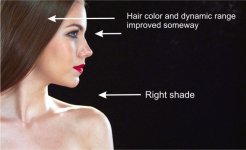
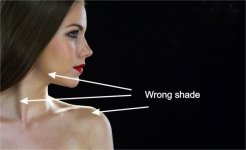
Take a look at the different shades of skin tones in the first image below.

If you haven't noticed, the light shades of the skin tones are correct (to the average people's eyes), but the dark shades, instead of going smoothly to a dark-pink kinda shade , it becomes more like a gray-charcoal kind of color , that looks unnatural, and it happens in every footage I see from the red camera, and this is before or after the color correction, and it gets worse when you try to apply contrast and saturation.. Go ahead and watch again the trailers from the movies I just mentioned and you'll see what I'm talking about.
Now, Jim Jannard states that this is a "myth", and he says that you have to color balance prior to any color correction, and also he says, that Red color science has improved lately, But for my surprise, the latest movie shot on Red "Hitchcock", shows the same problem. Don't they know how to color balance?, I don't think, that's the case, instead, I know is a problem caused by the debayering algorithm and it happens at the sensor level, so don't get me wrong, we are trying to fix things here, I am not a Red hater or something like that. I have to say also that I am surprised of the work they did with the movie "Bachelorette", still, the problem is not totally corrected. The method I am working on corrects this problem as you see in the second image. I'll post more examples later, I can even "Grade after the Grade with this method".
Post your .R3d still and I'll prove it to you.
 

Attachments

  • right.jpg
    right.jpg
    41.3 KB · Views: 0
  • wrong.jpg
    wrong.jpg
    29.6 KB · Views: 0
Funny how one day the RED cams are denigrated for giving people 4K when all the industry really needs is 1080. Then the next day they get slammed because the way they create that 4K image isn't the most ideal way possible. WTF?

I have seen plenty of nice clean high resolution images come from Epics, F65s and 65mm negative. Each approach has strengths and weaknesses, know them and you can optimize. Full stop.

BTW, the whole skin tone issue ties back to the basic conundrum inherent in a RAW pipeline - the power to do far more good, or evil, than a typical RGB based imaging system.

Cheers - #19

I'm considering printing this out and putting it on my wall. I don't know how else or how better to explain where we're at. RED started it all. And now they are panned (supposedly) for not doing 4K "well enough"? Whatever.

What's the expression...

If you can't beat them...join them

And your note about skin tones is so on. When you are working in RAW, you have to know what you are doing EVEN MORE. There's nothing baked in. You can make skins look like ANYTHING. Both good and bad. With great power comes great responsibility (to not fuck up).
 
I know this topic causes adverse reactions but I can prove what I said. Also, just for the record, this is a constructive criticism, as a said, I discovered something, and I am working on that to correct the problem. ( I cannot talk much about in details right now thou)

Take for instance movies shot on Red like "A Dolphin Tale", or , "Unconditional".
People behind those movies are supposed to be the best (colorist) in the world, still, I know that, they have had a hard time grading the raw files from a Red camera (I know one of them personally). I'll post one example image showing you exactly what I am talking about..

Take a look at the different shades of skin tones in the first image below.

If you haven't noticed, the light shades of the skin tones are correct (to the average people's eyes), but the dark shades, instead of going smoothly to a dark-pink kinda shade , it becomes more like a gray-charcoal kind of color , that looks unnatural, and it happens in every footage I see from the red camera, and this is before or after the color correction, and it gets worse when you try to apply contrast and saturation.. Go ahead and watch again the trailers from the movies I just mentioned and you'll see what I'm talking about.
Now, Jim Jannard states that this is a "myth", and he says that you have to color balance prior to any color correction, and also he says, that Red color science has improved lately, But for my surprise, the latest movie shot on Red "Hitchcock", shows the same problem. Don't they know how to color balance?, I don't think, that's the case, instead, I know is a problem caused by the debayering algorithm and it happens at the sensor level, so don't get me wrong, we are trying to fix things here, I am not a Red hater or something like that. I have to say also that I am surprised of the work they did with the movie "Bachelorette", still, the problem is not totally corrected. The method I am working on corrects this problem as you see in the second image. I'll post more examples later, I can even "Grade after the Grade with this method".
Post your .R3d still and I'll prove it to you.


"prove..." ?? Excactly how is this proof?

So you are pointing out a problem that few (if any) others think exists so that you can ride to the rescue with a solution? Affordable, too, I don't doubt. LOL
 
Last edited:
"prove..." ?? Excactly how is this proof?

So you are pointing out a problem that few (if any) others think exists so that you can ride to the rescue with a solution? Affordable, too, I don't count. LOL

is OK no worries, is 12:52 am, and I am discovering more fascinating things about this everytime.. I guess Canon and Sony should be very interested in this.. Everything is there, at the sensor level!
 
Last edited:
is OK no worries, is 12:52 am, and I am discovering more fascinating things about this everytime.. I guess Canon and Sony should be very interested in this..

Ugg. Here we go again. Another RED basher with an agenda to prove. Who cares...We shot this video in 2010 with a RED ONE and B-Speeds and the skin tones look GREAT. Countless movies and projects say you are wrong...Prometheus, Flight, Social Network, etc, etc, etc.

The camera is what you make it.
 
Ugg. Here we go again. Another RED basher with an agenda to prove. Who cares...We shot this video in 2010 with a RED ONE and B-Speeds and the skin tones look GREAT. Countless movies and projects say you are wrong...Prometheus, Flight, Social Network, etc, etc, etc.

The camera is what you make it.

Some parts of the video look OK due to lighting, some others don't, like always, but I am really busy cooking something for you guys..
 
Below: ARRI ALEXA SHOT minimum grade..


alexa_zps8b54d4f4.jpg


Below: RED EPIC SHOT minimum grade..


red_zps12c5a3c2.jpg


Below: the second image above (Epic) converted to ALEXA colors, Just compare the skin tones with the one on top, they match.


red2alexa_zps8649ee6d.jpg
 
Last edited:
What lens did you use on each? I'm curious, because I see obvious purple fringing and soft edges on the EPIC shot. Very typical of Tokina optics these days, AFAIK. Mind you, the colour chart is further left on the EPIC shot. I don't own either camera but I'm curious as to what others will say.
 
Back
Top