Sabovic Adis
Well-known member
Hrvoje, is it possible to make one with Your rectification, but without 709 Transform on top of it?
Thanks!
Thanks!

Follow along with the video below to see how to install our site as a web app on your home screen.

Note: this_feature_currently_requires_accessing_site_using_safari


Camera Optimization seems to be the default code words.
I like it and I get philosophically where you're heading with this.
I've found most talented and experienced colorists prefer to maintain a consistent gamma curve / contrast level throughout a project. Radically or even subtlety changing the curve scene-to-scene can be detrimental to a cohesive look. With film (ala printer lights) that made sense as the stock, exposure, and development created the curve and kept it consistent. With digital cameras that's not necessarily the case anymore. Some cameras behave quite differently at lower light levels, with extreme scene contrast and with even flat contrast. I've noticed over the years that custom transforms were able to squeeze more life out of a shot than the standard. We react to what we initially see. Even if there is more information, more color, more dynamic range, what we are first presented with usually informs the final image. If there was a way in which to have a transform that could evenly and consistently showcase a camera's potential vis-a-vis each practical scene shot, that would be ideal. Distributing captured DR in a consistent yet variable curve that accounts for max white / max black / and all the micro contrast in between. And separating colors into levels of saturation instead of intensity. It's a bit of a fool's errand to attempt magic but every once in awhile something can astonish.
These pix remind me of working with Sigma's Foveon cameras. The workflow is tedious but I find it fascinating. The raw files need to be optimized in Sigma's own photo editor and then exported before they can be colored in photoshop. A bit of moving around the X3F raw file parameters can produce fairly incredible results. Taking the time to optimize each in relation to how the camera operates and how the scene was photographed has produced absolutely breathtaking images. Finding a path that gets one towards camera optimization as a starting point feels like the path I'd like to be on.

Hrvoje he is doing a tremendous job.
We are trying its lut for several days on a number of films with various DRagon OLPF.
I'm pretty impressed, even my colorist, Dragon now has colors so real!
His approach with the signal is something different from the usual, the pictures have another feeling.
Wow, still good Hrvoje.
What is ETA for release for dragon weapon


Hey, these are some interesting developments so far. From looking at this example, the tattoo seems a little too green compared to the pink skin (in my opinion). Possibly the yellow/green adjustments could be dialed in some more:
Šabović Adis;1706063 said:Hrvoje, is it possible to make one with Your rectification, but without 709 Transform on top of it?
Thanks!

Let me second what Luigi says, Hrvoje is doing something special, i feel my DSMC 1 dragon has a new sensor, truly, its a great optimized image to start grading. Thanks for letting me be part of the beta tester team.
Hrvoje, will your tech also be applicable/usable for lower end cameras like the upcoming Panasonic GH5?
The clip of the fighter stands out the most to me and your results look great!


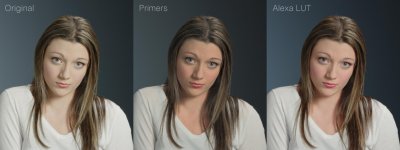
The skintones look great - it’s quite similar to what I ended up with as well.
I’m not sure if it’s too late for one more suggestion, but looking at her hair color - what are your thoughts on adding a touch more saturation back into the shadows?
unfortunately, in (almost all) images posted so far, the 1D is visibly lifted... so, it needs to be determined where the colors end up once u compensate for that. Some of the images have slightly fake-ish color (because of that) - although clearly more detail.

There is nothing unfortunate here nor there is a "fakish" color.
There is a reason for the latter images being EXACTLY as they are and your impression is your mind playing tricks with left image used as a reference. Which is wrong.
In the beginning of the thread there are three points, put there precisely because of what you are doing now.
Explanation coming soon.
