Welcome to our community

Be a part of something great, join today!

  • Hey all, just changed over the backend after 15 years I figured time to give it a bit of an update, its probably gonna be a bit weird for most of you and i am sure there is a few bugs to work out but it should kinda work the same as before... hopefully :)

Improving the Camera: The Image

Hrvoje, is it possible to make one with Your rectification, but without 709 Transform on top of it?
Thanks!
 
Camera Optimization seems to be the default code words.

I like it and I get philosophically where you're heading with this.

I've found most talented and experienced colorists prefer to maintain a consistent gamma curve / contrast level throughout a project. Radically or even subtlety changing the curve scene-to-scene can be detrimental to a cohesive look. With film (ala printer lights) that made sense as the stock, exposure, and development created the curve and kept it consistent. With digital cameras that's not necessarily the case anymore. Some cameras behave quite differently at lower light levels, with extreme scene contrast and with even flat contrast. I've noticed over the years that custom transforms were able to squeeze more life out of a shot than the standard. We react to what we initially see. Even if there is more information, more color, more dynamic range, what we are first presented with usually informs the final image. If there was a way in which to have a transform that could evenly and consistently showcase a camera's potential vis-a-vis each practical scene shot, that would be ideal. Distributing captured DR in a consistent yet variable curve that accounts for max white / max black / and all the micro contrast in between. And separating colors into levels of saturation instead of intensity. It's a bit of a fool's errand to attempt magic but every once in awhile something can astonish.

These pix remind me of working with Sigma's Foveon cameras. The workflow is tedious but I find it fascinating. The raw files need to be optimized in Sigma's own photo editor and then exported before they can be colored in photoshop. A bit of moving around the X3F raw file parameters can produce fairly incredible results. Taking the time to optimize each in relation to how the camera operates and how the scene was photographed has produced absolutely breathtaking images. Finding a path that gets one towards camera optimization as a starting point feels like the path I'd like to be on.
 
Hrvoje he is doing a tremendous job.
We are trying its lut for several days on a number of films with various DRagon OLPF.
I'm pretty impressed, even my colorist, Dragon now has colors so real!
His approach with the signal is something different from the usual, the pictures have another feeling.
Wow, still good Hrvoje.
 
What is ETA for release for dragon weapon
 
Camera Optimization seems to be the default code words.

I like it and I get philosophically where you're heading with this.

I've found most talented and experienced colorists prefer to maintain a consistent gamma curve / contrast level throughout a project. Radically or even subtlety changing the curve scene-to-scene can be detrimental to a cohesive look. With film (ala printer lights) that made sense as the stock, exposure, and development created the curve and kept it consistent. With digital cameras that's not necessarily the case anymore. Some cameras behave quite differently at lower light levels, with extreme scene contrast and with even flat contrast. I've noticed over the years that custom transforms were able to squeeze more life out of a shot than the standard. We react to what we initially see. Even if there is more information, more color, more dynamic range, what we are first presented with usually informs the final image. If there was a way in which to have a transform that could evenly and consistently showcase a camera's potential vis-a-vis each practical scene shot, that would be ideal. Distributing captured DR in a consistent yet variable curve that accounts for max white / max black / and all the micro contrast in between. And separating colors into levels of saturation instead of intensity. It's a bit of a fool's errand to attempt magic but every once in awhile something can astonish.

These pix remind me of working with Sigma's Foveon cameras. The workflow is tedious but I find it fascinating. The raw files need to be optimized in Sigma's own photo editor and then exported before they can be colored in photoshop. A bit of moving around the X3F raw file parameters can produce fairly incredible results. Taking the time to optimize each in relation to how the camera operates and how the scene was photographed has produced absolutely breathtaking images. Finding a path that gets one towards camera optimization as a starting point feels like the path I'd like to be on.

:)

:cheers2:

Hrvoje he is doing a tremendous job.
We are trying its lut for several days on a number of films with various DRagon OLPF.
I'm pretty impressed, even my colorist, Dragon now has colors so real!
His approach with the signal is something different from the usual, the pictures have another feeling.
Wow, still good Hrvoje.

Thanks Luigi, hats off for the material.

What is ETA for release for dragon weapon

As soon as optimal. :)

More info coming soon.
 
Hrvoje, will your tech also be applicable/usable for lower end cameras like the upcoming Panasonic GH5? I think there will be a market there.
 
Hey, these are some interesting developments so far. From looking at this example, the tattoo seems a little too green compared to the pink skin (in my opinion). Possibly the yellow/green adjustments could be dialed in some more:

Thanks for the feedback, John. This solution takes care of what the camera does, not what the particular light does and it has to work and keep neutrality throughout the scenarios. What the particular light does is easier to compensate once the signal is optimized. I updated the pics with latest Beta, this one is more accurate.

Šabović Adis;1706063 said:
Hrvoje, is it possible to make one with Your rectification, but without 709 Transform on top of it?
Thanks!

Hey Adis, PM sent.
 
Let me second what Luigi says, Hrvoje is doing something special, i feel my DSMC 1 dragon has a new sensor, truly, its a great optimized image to start grading. Thanks for letting me be part of the beta tester team.

Thank you Jacobo, for imagery as well, very nice work.


Hrvoje, will your tech also be applicable/usable for lower end cameras like the upcoming Panasonic GH5?

Yup.


The clip of the fighter stands out the most to me and your results look great!

Thanks, Stacey.
Now go back and check them with the latest Beta applied. :)
 
Dragon.


Sammy Suh


2mq4y28.jpg


20fov8w.jpg
 
Dragon.


Luigi Valtulini, Cine5K


qq777q.jpg


2qkihs5.jpg
 
It is done.


11sdvfs.jpg


295u90x.jpg


2dbv0c8.jpg


9izgxf.jpg


2hzppg3.jpg


2e5jdjn.jpg
 
The skintones look great - it’s quite similar to what I ended up with as well.

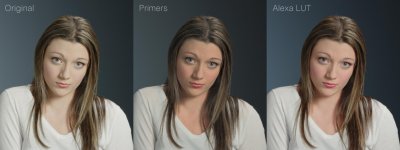
I’m not sure if it’s too late for one more suggestion, but looking at her hair color - what are your thoughts on adding a touch more saturation back into the shadows? I’m using the Alexa LUT again as a point of reference:

11sdvfs_2.jpg
 
unfortunately, in (almost all) images posted so far, the 1D is visibly lifted... so, it needs to be determined where the colors end up once u compensate for that. Some of the images have slightly fake-ish color (because of that) - although clearly more detail.

U can (conservatively) lift/shape targeted keys (in order to address detail/texture), but u can't just lift the entire range. does not work like that in real life, the 1D cuts like a knife. And that my friends, rhymes.

@ John Schick: yup, excactly. Look at how nice the 1D is in the Alexa LUT, although not perfect.


does any of the beta testers have an image where u adjusted the 1D after Hrvoje's solution ?
 
The skintones look great - it’s quite similar to what I ended up with as well.

I’m not sure if it’s too late for one more suggestion, but looking at her hair color - what are your thoughts on adding a touch more saturation back into the shadows?

That is what her hair looks like.
My thoughts on her hair colour past this point are irrelevant because this is not creative grading.

You get to decide that in post. In this process I don't. :)


unfortunately, in (almost all) images posted so far, the 1D is visibly lifted... so, it needs to be determined where the colors end up once u compensate for that. Some of the images have slightly fake-ish color (because of that) - although clearly more detail.

There is nothing unfortunate here nor there is a "fakish" color. ;)

There is a reason for the images being EXACTLY as they are.

In the beginning of the thread there are three points, put there precisely because of what you are doing now.
Knowing some would and knowing also why.

Food for the analytical part coming soon.
 
There is nothing unfortunate here nor there is a "fakish" color. ;)

There is a reason for the latter images being EXACTLY as they are and your impression is your mind playing tricks with left image used as a reference. Which is wrong.

In the beginning of the thread there are three points, put there precisely because of what you are doing now.

Explanation coming soon.

oh boy. with that blind answer, I fear the worst. For the record, I tried to help you. ;-) And others have mentioned it.

Maybe take off ur sunglasses ?! ;-)))

or: kindly post a tiff (of any of the above shots) so we can dial in further tweaks so we can actually assess how color holds up when finishing any of the above shots...


btw: RED gammas are off, too. always have been. but ur's is massively obvious lifted - throughout the range. cardinal sin.
 
Happy day of the Sun.


I am grateful.


2dj5p2f.jpg


Name:

Primers


Function:

Per camera designed image response optimization tools


Form:

Cube 3D Look-up table


"Optimization":

1) Optimized for shooting

Giving accurate colorimetry and reliable exposure visual feedback, using full available sensor DR.

2) Optimized for post

Giving adequate basis for grading based on monitoring standard and giving a few scenario & methodology-oriented options which predetermine the final outcome.


With these, both creative sides of the camera get an image performance increasing tool.
Shooters and colorists.


Achieved:

Image optimizations are done across the signal range in many particular image parameters, jointly achieving:

- Image accuracy and consistency
- Maximum DR utilization
- More natural image impression


Work on Dragon started last spring.
After new color science was announced it started again last fall.

These are made by matching the final signal to scene values. Through custom methodology developed from scratch. Some would term this approach as "scene referred". In practice this means that if you apply these while shooting in gamma and gamut they are designed for (Log3G10/RWG) on rec 709 calibrated OLED monitoring, with proper WB and exposure you should see what you see in real life, spanned to monitor brightness range. Additionally depending on light properties, lens properties, camera base performance and monitor performance.

These are designed to get the most out of the camera by adjusting the fixed signal offsets which cameras + signal mappings typically make.
These make variable, light-related signal offsets easier to control and compensate.
These make you see what your camera is capable of.


Included:

Primers EQX for Dragon includes a set of 8 Primers.

4 are different, in two sets of precisions. 33^3 for monitoring and 64^3 for post.

01_NTR Primer

Gives the most natural image coming out of your camera.

It is nothing you have seen or used before.
It allows additional way of monitoring and another approach in post manipulation due to its specific luminance distribution.
In some scenes it may feel "lifted", in some "darker". That is normal. The impression changes with time as the preconditioning with previously slammed digital imagery fades away. When that happens, the feel of another creative choice emerges.

Best used:

- When you want more creative range for shoulder and toe and specific contrast distribution, while having improved colorimetry and available DR mapped to viewing
- In high contrast scenes
- When this image response intuitively feels right and fits the shot
- When you want the most natural image coming out of your camera

02_Standard

This Primer is the most healthiest for the sensor's signal while having a more defined luminance distribution and resulting contrast.
The best one used for judging exposure on a healthy signal. It will seem "darker" than previous out of the box gammas. That is normal.

03_Vivid

Stronger shoulder and toe for more punchier image while keeping saturation levels.

04_Push

Additional push in upper mids on top of Vivid response while preserving the DR and highlight data, thickness in blacks and saturation levels.

All Primers keep the full sensor DR, regardless of contrast.
All Primers improve the results across the shooting scenarios, regardless of the light source.


Additional benefits:

Easier matching with that other camera whose image performance you intuitively appreciate.
While providing some image performance aspects which that other camera cannot provide.

Other benefits are best experienced directly and some things are better left unspoiled by babble.


Why it has not been said from the start "LUTs for Dragon" ?

Because judging the function based on previous experiences with the form would lead to incorrect conclusions.
You don't judge images by rationalizing "bitmaps".


Warnings:

- Primers are designed per sensor, base gamma and gamut. Throwing them around at whim leads to messed up imagery.
- Each is designed to work alone. Stacking them and using as creative filters leads to messed up imagery.
- Primers work on base color response correcting the offsets. Using "auto" matching and dumb algorithms attempting to fix the image leads to Primers working on ...something. And messed up imagery.
- You are not free to distribute these around. Also, any attempt of misuse of these and claiming as own work would meet zero tolerance and lead to adequate attitude adjustment. Appreciation, respect and responsibility leads to growth.


Cost has been made fair and these tools accessible to many.
Input from the community helps in further development of tools for the community.
The circle.


Hats off to the whole Red team for making this fantastic imaging device, from sensor to color science.


Dragon has been optimized.
These Primers work on all Dragon sensor based Red cameras.

No more excuses.
Time for creative stuff.


Coming soon on Primers web page.
 
BOOOOOMM ;)

MAgic Hrvoje.

... It was time I was expecting this ....


It would be a nice 17x17, for the "boys" of Scarlet-w eheh ;)
 
Back
Top