Welcome to our community

Be a part of something great, join today!

  • Hey all, just changed over the backend after 15 years I figured time to give it a bit of an update, its probably gonna be a bit weird for most of you and i am sure there is a few bugs to work out but it should kinda work the same as before... hopefully :)

IBC - Dragon Epic and Scarlet Firmware V5.1.14 BETA

ill tell you this give me 48fps ws in 4k on my scarlet and I will personally fly to LA and kiss you jarred lol were heading the right direction!
And you think this would motivate him? ;)
 
Amazing new GUI. Can't imaging any other company out there daring to change so much. Hats off to you all.

+) Edit 0 : GUI

Probably been noted already - and probably inconsequential:
Menu>>Power menu : Letter 'C' in 'Current' missing the left columns of pixels on Oled Bomb EVF.

+) Edit 1 : HELP

Really liked the new Help (took me a while on the EVF to realise that the window is scrollable when it has a blue outline)
When you first select help of a page - Suggest defaulting to the scrollable help page rather than 'close help'. (First action is likely to be want to be scroll down).

+) Edit 2 : FAN

Quiet preview : In standby : Crept slowly up to 68 deg and just stayed there - very nice.

Adaptive : In standby : Initially disconcerting as there is a lag before the temp increases from standby with no fan.
Overshoots the target temp slightly (so control system is not critically damped) before nailing it.
(maybe aim for a value 6 degrees lower, ramping to target temp 1 deg every 10 sec for fist minute?)
Love the idea that black calibration & Adaptive could be used to maximise Dragon.

+) Edit 3 : PROJECT menu

When I first saw 'Project -> Format' - I thought of Formatting media.

+) Edit 4 : Setup >> Keys

Not sure if there is space in the firmware - but if there was a choice for 'Verbose' - this would be for those less familiar with every single meaning.
Suggestion. When field to the right of 'SH User A Press:' is highlighted -> Describe what this field means in the bottom (empty) part of the screen when in verbose mode (or even just always do this). Great for those not 100% sure what the camera buttons of the camera they have currently picked up are set to.

When user does click on the key to change it, the current pop-up uses entire with of screen with 5 x lines of keys.
Suggest that this popup is moved up 1/3 of the screen (just below Key Mapping / Options / Soft keys menu)
Suggest that description box for currently selected key is explained. Great way to learn / remind what all the options mean.

"Press a user key to remap" -> "Press a user key to display mapping"

+) Edit 5 : Calibrate Sensor

Wow .. much faster!
Suggestion : Change Calibration map 'factory' to 'factor (46degC)'.
Suggestion2 : When Dragon upgrades are performed - four factory sets are added (55,60,65,70) with the default Adaptive mode to use the Map that is closest temp (this should also work in High frame rate as Adaptive fires up both fans to maintain temp).

Hunting for my Cap used when doing the Black Calibration - Couldn't find it / not sure what its called on Red.com to order another one. Any chance of an absolute metric of light just before you do a black Calibration? (Just so you know if the conditions are good / that there is no obvious light leak or the lenscap that you are using does block 100% of the light.)

+) Edit 6 : Camera Shutdown

In the last Camera Shutdown screen, It defaults to Cancel.
In the EVF you have to press Arrow down on the Side Handle.
Any chance you could also allow rotate to move it down - much less fiddly!

AJ

Thanks for all the feedback!
 
I'm super excited for my new Scarlet......what an awesome update!! Well done RED :)

Whilst I'm not able to boot up my camera just now, can someone please tell me the resolution of 4K WS? 4K Full is 4096x2160....so I'm assuming 4K WS is wider, but by how much? Maybe Phil needs to update the Data Sheet hehe ;)
 
I'm super excited for my new Scarlet......what an awesome update!! Well done RED :)

Whilst I'm not able to boot up my camera just now, can someone please tell me the resolution of 4K WS? 4K Full is 4096x2160....so I'm assuming 4K WS is wider, but by how much? Maybe Phil needs to update the Data Sheet hehe ;)

The format resolutions are now available in the advanced tab when you bring down the format spinner.
 
The format resolutions are now available in the advanced tab when you bring down the format spinner.

Thanks Matt, but you missed the part where I don't have my camera with me....so I can't touch the screen if you know what I mean. Do you know the resolution off hand?
 
I love how quick the boot time is. I've been shooting all week with no problems in adaptive mode on Scarlet. I'm a huge fan of the WS modes and bumped up frame rates and lower compression as well. Thanks RED team, feels like a whole new camera.

Could someone expand upon what the camera does in "Quiet Preview & Record Mode" ?

A004_C054_0330K50000140_zps9f849621.jpg

4k WS @ 36fps

Stunning!
 
Thanks Matt, but you missed the part where I don't have my camera with me....so I can't touch the screen if you know what I mean. Do you know the resolution off hand?

4096 x 1708 (2.40:1)
 
Im super nice and a super good director from Brazil and i have a Scarlet-X and a bunch of lomo anamorphics that I want to use in my second feature film that will start the production next november. So, can you guys at RED be nice and bring me a 4k ANA MODE update so i can use my camera? (sorry for buying it without knowing that it didnt have the 4K ANA) . I KNOW IM NOT ASKING FOR SOMETHING IMPOSSIBLE. Thanks everybody ! :thumbsup:
 
I did my first feature-film with a Red One MX in 4k ANA. It played in Locarno Film Festival last year and even won a prize: http://www.youtube.com/watch?v=spi6pgHW_qI... I was excited for the Scarlet, wanted to use it in my second feature. When I unpacked the camera, i found out that it dont have the 4k ANA. Now that you have a new Build with lots of new mode's, I really was hoping to have this option so i can use the camera in the new Project.
 
I did my first feature-film with a Red One MX in 4k ANA. It played in Locarno Film Festival last year and even won a prize: http://www.youtube.com/watch?v=spi6pgHW_qI... I was excited for the Scarlet, wanted to use it in my second feature. When I unpacked the camera, i found out that it dont have the 4k ANA. Now that you have a new Build with lots of new mode's, I really was hoping to have this option so i can use the camera in the new Project.


Really no problem shooting 4k ana on scarlet...

But I guess you look for desqueeze.
 
Red One 4k ANA was 2816 x 2304 iirc.

I don't have a camera at hand to verify, but from memory; with latest beta FW, you can select 3K and 5:4 aspect, with ANA desqueeze. This should be 2880x2304 - so almost exactly what R1 called 4K ANA.

Apologies if I'm wrong, but do check it out :)
 
Got the chance to play with build 5 and having some issues:

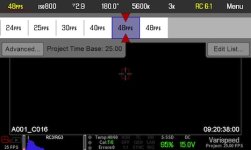
1) Cannot do more than 48fps at 3K (I think the new version can do up to 50 fps, right?). I have attached a screenshot of my UI

2) When I loaded my build 4 presets, I encountered the following issue:
- lens (Canon 11-16) would not focus using "single focus" mode
I then restored factory settings and the focus issue got fixed

3) My Canon 11-16 lens won't open to 2.8 (it reads 2.9). I manually changed lens config to 2.8 and for a while it seemed to stick there, but then it changed back to 2.9. See attached UI screenshot.

On the other hand, I'm confused with the new shutter modes. I always had my camera set to relative mode, so when working in a 25 fps time base at 1/50, when I changed my frame rate to 50fps (at 2K), my shutter speed would automatically be set to 1/100. Now, if I do this same exact operation in build 5 set at relative mode, my shutter reading will stay at 180º. If I check shutter speed in advanced setting, it has in fact changed to 1/100 while staying at 180º. I just preferred the old simple way, where I could immediately recognize in the top menu that my shutter speed had changed in accordance to my frame rates.

I have saved a log file, so I will send it to support. Just wanted to share this in case somebody else was having the same issues.

Cheers.
P.S.: Forgot to mention this is happening with my Scarlet
 

Attachments

  • UI shot_Brain LCD.jpg
    UI shot_Brain LCD.jpg
    30.7 KB · Views: 0
Last edited:
Yes its awesome! I feel like its a new camera If they can just enable 48fps at 4k haha Matthew Your lighting on your site is awesome! Hats off to you chap.
 
Got the chance to play with build 5 and having some issues:

1) Cannot do more than 48fps at 3K (I think the new version can do up to 50 fps, right?). I have attached a screenshot of my UI

2) When I loaded my build 4 presets, I encountered the following issue:
- lens (Canon 11-16) would not focus using "single focus" mode
I then restored factory settings and the focus issue got fixed

3) My Canon 11-16 lens won't open to 2.8 (it reads 2.9). I manually changed lens config to 2.8 and for a while it seemed to stick there, but then it changed back to 2.9. See attached UI screenshot.

On the other hand, I'm confused with the new shutter modes. I always had my camera set to relative mode, so when working in a 25 fps time base at 1/50, when I changed my frame rate to 50fps (at 2K), my shutter speed would automatically be set to 1/100. Now, if I do this same exact operation in build 5 set at relative mode, my shutter reading will stay at 180º. If I check shutter speed in advanced setting, it has in fact changed to 1/100 while staying at 180º. I just preferred the old simple way, where I could immediately recognize in the top menu that my shutter speed had changed in accordance to my frame rates.

I have saved a log file, so I will send it to support. Just wanted to share this in case somebody else was having the same issues.

Cheers.
P.S.: Forgot to mention this is happening with my Scarlet


After playing with the new build more extensively, I have figured out that most of these issues were due to user ignorance.

1. Just figured out we can only do 50 fps at 3KWS, not 3K.

2. Loading my Build 4 presets somehow created some conflicts, especially regarding single focus operation. I have reset camera to Factory settings and created from scratch my presets for Build 5. Everything seems to be fine now, except that my Canon 11-16mm lens still opens to 2.9 instead of 2.8. No big deal.

3. Still a little confused with the new shutter relative mode modus operandi...

So basically all fine here and really liking the new build's UI, rack focus speed options, extra framerates, etc. Sorry for the confusion.

Cheers
 
3. Still a little confused with the new shutter relative mode modus operandi...

We used to have separate display and control modes for the shutter.
Display:
A. Time
B. Angle
Control:
1. Absolute - Shutter time stayed the same as you changed frame rate
2. Relative - Shutter time would change to the same percentage of total frame time when you changed frame rate

This allowed for 4 different combinations:
A1: Absolute Time
A2: Relative Time
B1: Absolute Angle
B2: Relative Angle

We coupled the two settings together and now just offer:
A1: Absolute Time
B2: Relative Angle

It sounds like you were use to A2 (Relative Time).

There were a number of factors why we chose to do this, but one was to simplify the user experience. Time by its nature is absolute and angles by their nature are relative so this is a straight forward mapping. 180 degrees, by definition, means your exposure time will be 1/2 your total frame time.
 
We used to have separate display and control modes for the shutter.
Display:
A. Time
B. Angle
Control:
1. Absolute - Shutter time stayed the same as you changed frame rate
2. Relative - Shutter time would change to the same percentage of total frame time when you changed frame rate

This allowed for 4 different combinations:
A1: Absolute Time
A2: Relative Time
B1: Absolute Angle
B2: Relative Angle

We coupled the two settings together and now just offer:
A1: Absolute Time
B2: Relative Angle

It sounds like you were use to A2 (Relative Time).

There were a number of factors why we chose to do this, but one was to simplify the user experience. Time by its nature is absolute and angles by their nature are relative so this is a straight forward mapping. 180 degrees, by definition, means your exposure time will be 1/2 your total frame time.
Got it, makes total sense.
Many thanks for the response
 
Does it stay at 24 fps after the black shading is complete or just temporarily change to it during the black shading?
Hey Trent. Just another quick question:

Just did a blackshade. Chose Black Shading at "current FPS/Exposure", which is 25 fps at 1/50. My project timebase is 25fps.

While calibrating, the fps in the menu changed to 12 fps (in yellow). When calibration was finished, the fps change back to 25 fps. I then checked my system status and in the calibration tag it reads: "38C, 1/24.00". Is this the way it should be? Shouldn't it read: "38C, 1/50.00"?

Thanks again!
 
Hey Trent. Just another quick question:

Just did a blackshade. Chose Black Shading at "current FPS/Exposure", which is 25 fps at 1/50. My project timebase is 25fps.

While calibrating, the fps in the menu changed to 12 fps (in yellow). When calibration was finished, the fps change back to 25 fps. I then checked my system status and in the calibration tag it reads: "38C, 1/24.00". Is this the way it should be? Shouldn't it read: "38C, 1/50.00"?


Thanks again!

Black shading is done at 5k so 12 fps is the max, I always set shutter to 1/100 for BS that gives 1/24th to 1/425 with a green status , seems the best compromise especially for Epic, I do the same with scarlet . BTW 38 seems a little cold for doing the BS however I think thats the factory preset.
 
Back
Top