Welcome to our community

Be a part of something great, join today!

  • Hey all, just changed over the backend after 15 years I figured time to give it a bit of an update, its probably gonna be a bit weird for most of you and i am sure there is a few bugs to work out but it should kinda work the same as before... hopefully :)

How to make the RODE VIDEO MIC PRO working with Scarlet/Epic

Is this a moot modification now that the Scarlet firmware supports balanced audio? Or am I not understanding balanced audio and the issue with this mic and the Scarlet?

ie... Can I reconnect the white wire in the mic?
 
Got me a VideoMic Pro and couldnt figure out why, then found this thread. I'm on the latest release build 3.3.14 and no combination of changing the channel input from Unbalanced to Balanced/48v or Balanced enables audio. I'm guessing I need that Radio Shack part. Once I do, what Channel Input type should I use?

Thanks!
 
Keep it unbalanced...

Having said that, with the latest firmware (that enables phantom power) I would recommend going for the wire mod. You are not loosing anything. The unmodified mic sends the same signal to both channels, modified sends it only to one. Same exact info. This will prevent any accidental enabling of phantom power and (as a result) possibly shorting your camera...

Peter
 
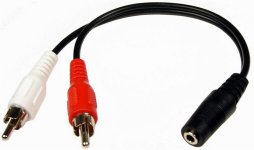
Hello all. I have the new Rode VideoMic Pro connected to my epic. I bought a stereo -> 2 mono cables and I managed to power it in. All great.
Except I hear a LOUD humming noise all the time and ever 1-2 second there is a scratching sound. The sound levels are also so low so I have to increase the sound input to +60dB.

I dont expect perfect sound in any way but would be nice to have a backup sound that could be used for anything.

Best wishes,
Andreas
 
Hello all. I have the new Rode VideoMic Pro connected to my epic. I bought a stereo -> 2 mono cables and I managed to power it in. All great.
Except I hear a LOUD humming noise all the time and ever 1-2 second there is a scratching sound. The sound levels are also so low so I have to increase the sound input to +60dB.

I dont expect perfect sound in any way but would be nice to have a backup sound that could be used for anything.

Best wishes,
Andreas

Make sure you boost the gain on the mic (the -10 / 0 / +20 switch) - you probably have it on -10 atm
Also - do not engage the peak protection - the switch above the gain - keep it in the middle position (next one right from the OFF position)
Then adjust your input levels accordingly on the camera

Peter
 
Has anyone used the the Rode Stereo Videomic Pro on an Epic yet? If so, how have you managed the connections? What kind of cable are you using? I'm thinking of getting this mic as an on-camera mic for event shoots...
 
I bought the B&H equivalent of the stereo-mono jack. The Rode VMP works great. I have mine set to the +20 switch on the mic and +40 in the audio control in-cam. No complaints for sound. I wish the cord was longer and more beefy.

rode.jpg
 
Jason, can you please show some details of your mounting solution ? And what about the sound quality ? Just for scratch or enough for broadcasting ? No camera noise ?

Thanks,

Kristin
 
Jason, can you please show some details of your mounting solution ? And what about the sound quality ? Just for scratch or enough for broadcasting ? No camera noise ?

Just a simple, straight cold shoe screw-on adapter:
rode1.jpg
rode2.jpg


Mainly for scratch audio, also a backup for run-n-gun situations. You definitely hear camera noise (fan) with it.
 
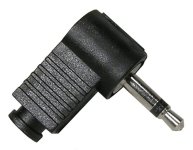
Has anyone found a stereo female to 2 male mono cable? I was thinking of building my own using a stereo female to 2 male rca jacks but replacing the arc with 2 mono mini male connectors (see attachments). I just want to double check how I should wire the cables...any suggestions?
 

Attachments

  • AUD-3045_C101-2.jpg
    AUD-3045_C101-2.jpg
    26.9 KB · Views: 0
  • 24-310-0_M256-2.jpg
    24-310-0_M256-2.jpg
    80.9 KB · Views: 0
Thank you so much for this forum. I went for the seven dollar, non-invasive, radio shack solution. Stereo Female 1/8" to dual Mono Male 1/8" and it works like a charm. It's so nice to finally have a solution for something so basic that doesn't cost hundreds or even thousands of dollars.
 
It does not help with the VMP but perhaps we could use existing mics(xlr) that we have... I have the me64 from a while back. I apologize for interrupting the thread.

While it seems to be a great product - how exactly is this helping to make a RODE VIDEO MIC PRO work with Scarlet / Epic?

:sifone: Peter
 
After comming upon this thread yesterday, between being sick that I sold my VMP and being thirsty to see how it worked wit my Scarlet I borrowed my uncle's VMP and bought that http://www.radioshack.com/product/index.jsp?productId=2103860 from radio shack, I did a quick test, as Joachim Guanzon said

Here's what I used... $6 from radioshack (1/8" female stereo to 2m mono splitter or 'airplane adapter'):

http://www.radioshack.com/product/index.jsp?productId=2103860


Works ok with the rode vidmic pro but I have to boost the levels up.

On the left is a sound professionals binaural mic:
http://www.soundprofessionals.com/cgi-bin/gold/item/MS-TFB-2

Works great for onboard 3D sound.

I set my VMP to +20 and the gain to +32 (on both channels as I plugged both channels in) and it sounded great. I turned on the limiter on both channels in the camera's audio menu, and did some loud snapping close to the mic to send things into the red, when I listened back it sounded pretty good. Thanks again Peter for this solution, this along with the new firmware and the DSMC 2.0 Fan upgrade should make for some new plausible uses for these RED cameras :emote_happyhappy:
 
Back
Top