Welcome to our community

Be a part of something great, join today!

  • Hey all, just changed over the backend after 15 years I figured time to give it a bit of an update, its probably gonna be a bit weird for most of you and i am sure there is a few bugs to work out but it should kinda work the same as before... hopefully :)

How to make the RODE VIDEO MIC PRO working with Scarlet/Epic

I tried a Radioshack adapter (part No 274-882), 1/8 Mono Male to 1/8 Stereo Female to connect the Rode VideoMic to Scarlet (Scarlet audio set to unbalanced). Sounds fine on headphones for scratch audio. Then for fun I plugged in an old $5 laptop mike for Skype, it too works but sounds IMG_2087.jpglike I'd expect for a $5 mike. This may however be a small and cheap option in some circumstances.
 

Attachments

  • IMG_2088.jpg
    IMG_2088.jpg
    87.1 KB · Views: 0
Yeah Peter, thanks for the tip. Like an idiot I bought this mic (as a scratch track, record my son type mic) just assuming it would work and was quite disappointed when I wasn't getting any levels. Did a quick search, found this thread and 10 minutes later the mic was working fine.

That being said people with beefy hands might want to have somebody with smaller hands to do this for them. The wires inside are very small and the toughest part of the operation for me was getting the incredibly small piece of electrical tape to wrap around the incredibly small wire (and I have pretty small hands.) I finally managed to do it and am happy to report I now have scratch track audio on my Scarlet.
 
Yeah Peter, thanks for the tip. Like an idiot I bought this mic (as a scratch track, record my son type mic) just assuming it would work and was quite disappointed when I wasn't getting any levels. Did a quick search, found this thread and 10 minutes later the mic was working fine.

That being said people with beefy hands might want to have somebody with smaller hands to do this for them. The wires inside are very small and the toughest part of the operation for me was getting the incredibly small piece of electrical tape to wrap around the incredibly small wire (and I have pretty small hands.) I finally managed to do it and am happy to report I now have scratch track audio on my Scarlet.

I'm glad it helped you. The RODE VIDEOMIC PRO is an excellent mic in its own right. Set your fan speed to 25% ~ 35% and the sound is more then just a scratch. It never hurts to have a higher quality scratch, just in case...

Peter
 
So, has anyone hacked their regular Rode Video Mic with a similar mod? What is the wire you are cutting actually responsible for? That might help me figure out a similar mod for the regular Rode.

EDIT: Bought the radio shack adapter. Works great. Do I need to worry about phantom power shorting with this setup?
 
Last edited:
thanks peter, just saved my ass on a shoot. I'm curious what other options you've been looking at for scratch sound & scarlet/epic. I like my rode, but I'm not blown away by the sound quality...I use a sennheiser 416 with a zoom for my main track and compared to that the rode feels useless, except for scratch...for the size isn't there something smaller to be using for scratch? Just curious what your take on it is...thanks again
 
Hi there,

I needed to find a quick solution for sound for a shooting tomorrow.
Only mic I had was my Rode video Mic pro but I didn't feel secure with cutting anything . Also I was not sure if it would still work with my DSLR
So I looked into some old boxes full of adapters.

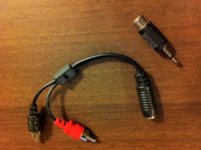
I just put together my Rode to a - Y female mini jack to male RCA - and a -female RCA to mono mini jack- (see pictures) to my Scarlet and it works great!
Put tape around the connections. The sound is nice clear !

I'm sure its possible to get a small mono mini jack extension cord or a stereo and cut it in some ways.
also a Y mono mini jack like on the picture might work.
 

Attachments

  • photo-2.jpg
    photo-2.jpg
    39 KB · Views: 0
  • photo-3.jpg
    photo-3.jpg
    38.2 KB · Views: 0
  • Unknown.jpg
    Unknown.jpg
    4.2 KB · Views: 0
VERY IMPORTANT: Don't remove the back plate (to cut the wire) with the battery installed. Perhaps this was obvious, but I didn't even think about it. When the battery is installed, it puts pressure on the front plate and the two plastic notches on the top of the front plate got sheared off when I lossened the screw Peter talked about. Now the front plate is only held in place by the front screw. I have to use a twist tie to hold it in place. This makes my new Rode Video Mic look a little... ghetto.

I'm contacting Rode to see if I can get a new front plate with the two plastic notches on the top intact.

Just wanted to warn others about making the same mistake I did.
 
After cutting the wire as instructed, I do get audio coming from the mic to the Scarlet. Unfortunately, most of the time, that audio is terribly distorted. Not peaking... just... bad. What am I doing wrong? Do I have a faulty mic? Scarlet firmware badness? I have Scarlet firmware 3.2.16 installed. Link to bad audio: https://dl.dropbox.com/u/651378/Problems_with_audio.wav Limiter on Scarlet is turned off. Rode mic is set to non-filter mode.
 
Last edited:
Upgrading to 3.3 didn't make any difference. I have the level input gain set to 17db... is this a problem?

BTW What does cutting the white wire do?
 
Hey all, I'm new to RED and I just bought the Scarlett for a job coming up soon that required the purchase. In any event, I also need audio so I bought the RODE stereo Mic Pro because I need to record sounds from all around the room. I haven't got the mic yet but it should be coming today and I was going to start the testing as soon as I got it. Are you all telling me that this mic wont work because of some odd wiring? Please tell me I am misinterpreting something because I am now in panic mode. Can someone please verify this or at lest help me understand why this may not work!
 
Upgrading to 3.3 didn't make any difference. I have the level input gain set to 17db... is this a problem?

BTW What does cutting the white wire do?

Cutting the white wire essentially turns the RODE from "double mono" mic into "mono" mic. The RODE is wired in a "normal" way - which means even thou it is a mono mic - it sends the same mono signal on both paths of the stereo connector (note that this does not make it a stereo mic). The RED input is wired as +/- for balanced XLR path, which is however uncommon on the mini-jack plug. So if You send the standard RODE signal to RED - it basically deducts from the "left" (mono) the "balanced" signal on the "right" (which is the same mono signal) - and this results in complete cancelation of the actual audio being recorded. As You cut the white wire - you are removing the duplicated mono signal - so now it is not deducted from the identical main mono signal - which is in return free to record now...

Coincidentally - this does not in any way reduce the performance of the mic when used in a non-RED mini-jack plugs. The only difference is that you would record a stereo signal with the mono being in one channel and the other channel is empty (as suppose to having the same mono channel in both paths of the stereo signal). Any audio software will turn mono into "fake" stereo by duplicating the mono signal into both paths of the stereo channel - which is what the RODE is wired to do by HW...

Hey all, I'm new to RED and I just bought the Scarlett for a job coming up soon that required the purchase. In any event, I also need audio so I bought the RODE stereo Mic Pro because I need to record sounds from all around the room. I haven't got the mic yet but it should be coming today and I was going to start the testing as soon as I got it. Are you all telling me that this mic wont work because of some odd wiring? Please tell me I am misinterpreting something because I am now in panic mode. Can someone please verify this or at lest help me understand why this may not work!

This also answers Your questions Kory - so no need to panic. If You are uneasy about such minor "non-invasive surgery" - just use one of those stereo-to-mono plug converters such as this:

Dayga-T2-Stereo_To_Mono_3_5mm_Adapter.jpg

http://www.radioshack.com/product/index.jsp?productId=2062469

It does essentially the same thing - but You need to be careful not to have a phantom power enabled - as this would short your camera!!!
It also adds bulk to your setup and extends the audio connection to potentially intrude into Your lens setup. Which is why I recommend cutting the wire instead...
Hope this helps...

Peter
 
This is pretty late, but THANK YOU. Just used this tutorial and it was a huge help.
 
I just got a RODE VIDEOMIC PRO today for scratch audio. Out of the box, it didn't work with 3.3. Used a stereo-to-mono plug converter shown above and it works. I'm now recording audio in a mono track just fine...just FYI for those trying the same.
 
Back
Top