Welcome to our community

Be a part of something great, join today!

  • Hey all, just changed over the backend after 15 years I figured time to give it a bit of an update, its probably gonna be a bit weird for most of you and i am sure there is a few bugs to work out but it should kinda work the same as before... hopefully :)

Help Creating a Look

Jesse Rambis

Well-known member
Joined
Aug 13, 2013
Messages
93
Reaction score
0
Points
0
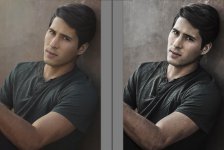
Hi Everyone, I was wondering if anyone could help me create a look I thought was interesting (see before and after of images). In Lightroom it is fairly easy to create a similar look "clarity" and "vibrance," but these don't really carry over to Resolve and aren't as polished. The closest tools that would correlate would in resolve would be sharpening and saturation, but the looks end up being a bit different (the sharpening can have bad effects, and it doesn't have the grungy feel that lightroom is able to create with the clarity slider). Does anyone have any pointers to help achieve this look in video? A much better example would be the Fury movie poster, I think the look is so cool they created (see image below). Thanks in advance!

 

Attachments

  • fury_ver2_xlg.jpg
    fury_ver2_xlg.jpg
    99.9 KB · Views: 0
  • look2.jpg
    look2.jpg
    79.4 KB · Views: 0
Thanks for the input Andy, that does have a cool look to it. Is there anything similar in Davinci Resolve or a way replicate it in Resolve?
 
I bet a great, experienced colorist could recreate the look in Resolve. Bear in mind that a great deal depends on the actual cinematography of the original material. The trailer on Fury has looks that are all over the place...


What I see in the trailer is what I'd call desat blue/cyan with a lot of windows to put a little more color into the faces. But other sections are warm and have decent greens. It clearly changes the look depending on where it is in the story. They also chose the costumes, art direction, and specific shots with that look in mind.
 
The micro-contrast function in resolve is called midtone detail. It's in the color match tab along with shadow and highlight recovery sliders. It's in the same family as Clarity in Lightroom, Alchemy in Redcine, and Pop in Colorista. There's obviously more to it than just that function, but that'll get you started in that direction.
 
Paris, thank you very much! This is exactly what I was looking for.
 
I would also look at the hue vs. luminance curves, which I think will get you in the ballpark for that kind of gritty desat look.
 
Back
Top