Welcome to our community

Be a part of something great, join today!

  • Hey all, just changed over the backend after 15 years I figured time to give it a bit of an update, its probably gonna be a bit weird for most of you and i am sure there is a few bugs to work out but it should kinda work the same as before... hopefully :)

Helium weird bokeh / clipped highlights (RED tech please look at this)

We shot a high end corporate with two Epic-W last week, in controlled lighting and uncontrolled environment outdoor with very high contrast. Both using Std OLPF, ISO1600, Dragoncolor and Redgamma3, 8K WS 8:1, 25fps and 38fps

My DP (who owns Epic Dragon) and I agree that image from Helium is very similar to Dragon. They look beautiful. We don't understand all this hype or frustrations people expierience with Helium. Important is that you expose correctly, so your hightlights won't clip. But we must admit, that Helium is much cleaner in the shadows.

Unfortunately, it is too early so I cannot share any footage.

I am very happy with Epic-W and will keep shooting.
 
Last edited:
Yes but even if you record it properly, and nothing clips, if you don't have the right color science...you won't know for sure.

Right now Dragon Color seems to be making some Helium colors and highlights "bleed" or "distort" in a way that, probably, won't be the case once Helium color is released.

Of course, Nick, but the big question is:
Right color science - for what?
It has to be display related, meaning "right" for sRGB, "right" for 709, P3 etc.
Me, I have troubles understanding what the, say, "Dragoncolor" is related to...other than the sensor itself. :biggrin:
 
We shot a high end corporate with two Epic-W last week, in controlled lighting and uncontrolled environment outdoor with very high contrast. Both using Std OLPF, ISO1600, Dragoncolor and Redgamma3, 8K WS 8:1, 25fps and 38fps

My DP (who owns Epic Dragon) and I agree that image from Helium is very similar to Dragon. They look beautiful. We don't understand all this hype or frustrations people expierience with Helium. Important is that you expose correctly, so your hightlights won't clip. But we must admit, that Helium is much cleaner in the shadows.

Unfortunately, it is too early so I cannot share any footage.

I am very happy with Epic-W and will keep shooting.

Yes, the discussion here is not what happens in the middle of the DR but at the outer rims. So if you dial in your exposure so that nothing is even close to clip and nothing goes far down in the darks and there is no saturated colors in frame, then most likely when the image is developed into something like dragoncolor or such, then things will look just fine, or even splendid, as the image land nicely on the middle of the plate of the smaller color space you push it into....

So this is more about what happens in the hars light, the stoplights of a car, pure R, B or G light that goes into clip and such. Those will with the current transcode settings start act up on you in a way that most people would describe as ugly, not right etc. And it´s easy then to point at the camera, toss out some negative comments about small pixels, raw compression etc and say it´s all shit. But I´m sure when the new color transforms things will look different.

As with helium it seams (this is me speculating) the raw image is on a bigger plate so when trying to push it all into a more narrow color space it´s more difficult to get the far out colors to land right on a smaller plate. Thats whats seen in this thread. The blue clipping in the computer screen etc. It´s simply not "right" it´s not how alexa would do it and its not how MX or dragon would do it, etc.

Its not at the capture stage the issues are created, but when the captured image is translated / developed into a view-able image. Then those low and high ends need to be brought in very accurately and that´s what I think Graeme is working very hard on at the moment.

To speculate some more. I think even weapon has a larger plate than epic dragon as I think I seen some of this stuff on weapon that I did not see on dragon. But that could also be me shifting OLPF´s etc. If so it´s a good thing it means we can capture a larger range of colors and when the transforms are done right we can also view it all without the clipping etc.
 
Graeme I would disagree with you about the sensor being able to handle high contrast scenes.

I have performed tests at 1600iso and find that even if you expose to protect your highlights anything even remotely close to clipping oversaturates and looses detail. To protect those highlights you have to underexpose the rest of the scene which results in a loss of colour fidelity in the rest of the image. I'm also finding it hard to even believe the histogram and traffic lights as i'm getting clipping in some shots which I can see in the RAW and when I check these tools it's not even triggering the traffic lights.

For me this is not a desirable characteristic at all.

I have a few examples I'm more then happy (actually wanting) to send you to get your feedback on because if I was missing something I would love to know as I want to love this camera but i'm finding it extremely hard to do so.

Cheers

True. Did you get an answer on this yet, Tristan?
 
Graeme I would disagree with you about the sensor being able to handle high contrast scenes.

I have performed tests at 1600iso and find that even if you expose to protect your highlights anything even remotely close to clipping oversaturates and looses detail. To protect those highlights you have to underexpose the rest of the scene which results in a loss of colour fidelity in the rest of the image. I'm also finding it hard to even believe the histogram and traffic lights as i'm getting clipping in some shots which I can see in the RAW and when I check these tools it's not even triggering the traffic lights.

For me this is not a desirable characteristic at all.

I have a few examples I'm more then happy (actually wanting) to send you to get your feedback on because if I was missing something I would love to know as I want to love this camera but i'm finding it extremely hard to do so.

Cheers
True. Did you get an answer on this yet, Tristan?

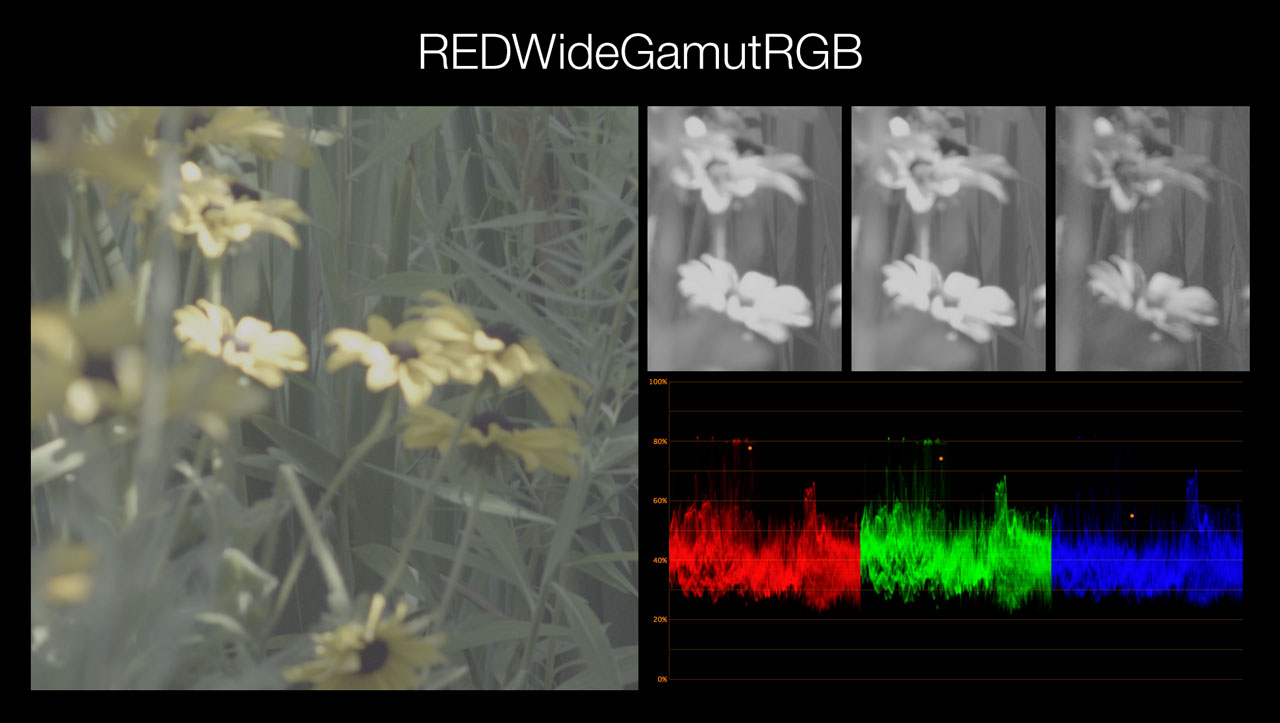
I can comment on this - it's not an exposure problem, it's a colorspace issue. The colors being captured are too saturated to currently be displayed with a Rec709 colorspace (like REDcolor4), and some color channels can clip to black. This often shows up with highly saturated light sources, but can also occur in nature.

Switching to a wider colorspace like REDWideGamutRGB brings the color information back. You can also just pull the raw saturation slider down (quite a bit sometimes), and that can work too. The image will appear more desaturated obviously, and needs additional transforms - you could try the saturation rolloff LUT (I posted above), or grade the saturation back manually.

The traffic lights in-camera are for the actual luminance data being clipped for each channel (overexposed red, green, & blue photosites). If the raw data isn't clipping, you have lots of options to dial back the saturation in post.

Here's an example with some REDlogFilm footage and the saturation rolloff LUT (click for larger images):


More information: http://truecolor.us/news/free-saturation-rolloff-lut/
 
I can comment on this - it's not an exposure problem, it's a colorspace issue. The colors being captured are too saturated to currently be displayed with a Rec709 colorspace (like REDcolor4), and some color channels can clip to black. This often shows up with highly saturated light sources, but can also occur in nature.

Switching to a wider colorspace like REDWideGamutRGB brings the color information back. You can also just pull the raw saturation slider down (quite a bit sometimes), and that can work too. The image will appear more desaturated obviously, and needs additional transforms - you could try the saturation rolloff LUT (I posted above), or grade the saturation back manually.

The traffic lights in-camera are for the actual luminance data being clipped for each channel (overexposed red, green, & blue photosites). If the raw data isn't clipping, you have lots of options to dial back the saturation in post.

Here's an example with some REDlogFilm footage and the saturation rolloff LUT (click for larger images):


More information: http://truecolor.us/news/free-saturation-rolloff-lut/

Thanks John looks like a good solution "if the RAW data is not clipping". The question here was that how can you use low light at higher ISOs with a fast lens when it will clip the highlights, this bad.

I would be testing your solution on the footage that was shot to see how it helps.
 
Thank you for the LUT, John!. Still tweaking my workflow and grading process with the new helium sensor and your LUT was very welcomed. I'm finding going from SOURCE > your Sat LUT > Alexa Log C to REC709 LUT (as a quick "thickening" or "normalizing" step) seems to be a great starting point. The explanation on your page was helpful, in addition to all the great info being shared from Gramme, Phil, and everyone else. Much appreciated!
 
Last edited:
Asif I didnt get any response from Graeme and it was his weekend so I wasnt expecting much but I have sent an example of the hue shift in skin tones to RED.

As for the less then desirable exposure needed to maintain highlights I am taking samples to a colourist to see what he thinks tomorrow. Should be interesting, will keep you posted.

Thanks for the info John as well as the LUT.
 
Asif I didnt get any response from Graeme and it was his weekend so I wasnt expecting much but I have sent an example of the hue shift in skin tones to RED.

As for the less then desirable exposure needed to maintain highlights I am taking samples to a colourist to see what he thinks tomorrow. Should be interesting, will keep you posted.

Thanks for the info John as well as the LUT.

I messaged you last night! Drop me an email please. (Edit: Sorry I didn't message, I clicked on the "send email" link on the forum)

Graeme
 
Thanks Tristan!

Graeme
 
Graeme I would disagree with you about the sensor being able to handle high contrast scenes.

I have performed tests at 1600iso and find that even if you expose to protect your highlights anything even remotely close to clipping oversaturates and looses detail. To protect those highlights you have to underexpose the rest of the scene which results in a loss of colour fidelity in the rest of the image. I'm also finding it hard to even believe the histogram and traffic lights as i'm getting clipping in some shots which I can see in the RAW and when I check these tools it's not even triggering the traffic lights.

For me this is not a desirable characteristic at all.

I have a few examples I'm more then happy (actually wanting) to send you to get your feedback on because if I was missing something I would love to know as I want to love this camera but i'm finding it extremely hard to do so.

Cheers

Tristan, I took another look at the Helium files, and as you can see from the attached screenshot, the clipped highlights with Helium are at 50%, while clipped highlights from Dragon sensor are at 67%
So as the Epic-W camera is using old image processing, maybe the traffic lights expect a "hotter" signal, and don't work correctly with Helium sensor?
clipped_sensors.jpg
 
Tristan, I took another look at the Helium files, and as you can see from the attached screenshot, the clipped highlights with Helium are at 50%, while clipped highlights from Dragon sensor are at 67%
So as the Epic-W camera is using old image processing, maybe the traffic lights expect a "hotter" signal, and don't work correctly with Helium sensor?

On a limb here but those show hard clipping in linear, but the iso is 800 for both of them. I believe ISO does affect the linear signal. If the Helium was set to a higher ISO in camera and exposed for that, to hit clipping would't the results match better?

Is there a setting in redcine that strips away all metadata and just shows the raw linear values in the file?

maybe...

cheers
Paul
 
On a limb here but those show hard clipping in linear, but the iso is 800 for both of them. I believe ISO does affect the linear signal. If the Helium was set to a higher ISO in camera and exposed for that, to hit clipping would't the results match better?

Is there a setting in redcine that strips away all metadata and just shows the raw linear values in the file?

maybe...

cheers
Paul

Changing the ISO doesn't have any effect if gamma is linear. So these settings - Camera RGB and Linear gamma - are the closest to the RAW data.
 
Tristan, I took another look at the Helium files, and as you can see from the attached screenshot, the clipped highlights with Helium are at 50%, while clipped highlights from Dragon sensor are at 67%
So as the Epic-W camera is using old image processing, maybe the traffic lights expect a "hotter" signal, and don't work correctly with Helium sensor?
clipped_sensors.jpg

What is going on here.
 
If you want proper linear output to do these kinds of comparisons, export an EXR. The integer linear output is very conservative in how it tries to avoid producing clipped data.

Graeme
 
Back
Top