Welcome to our community

Be a part of something great, join today!

  • Hey all, just changed over the backend after 15 years I figured time to give it a bit of an update, its probably gonna be a bit weird for most of you and i am sure there is a few bugs to work out but it should kinda work the same as before... hopefully :)

GTX480 WOW! - Resolve test -

ok I try to help Andy,
from what I see is not right, you have to follow exactly what I say.
1. Tell me exactly how to have put the video cards, black magic 3d, PCIe, post a photo.
2. download the software from here gfxutil http://rapidshare.com/files/83220759/gfxutil.zip.html
3. gfxutil put on the desktop.
4. well now turn off the system. leave on only a video card and boot.
5. open the terminal
6. cd /desktop (then hit return)
./gfxutil-f display (then hit return)
7.ok, now tell me what is left, you should have something like this:
PciRoot (0x1) / Pci (0xE, 0x0) / Pci (0x0, 0x0)
ok now write it somewhere on a sheet.
8. ok, turn off your PC.
9. ok, remove the video card and insert it into the second PCIe slot
10. start the pc, and repeat from step 6.
you should have a different number
11. here just hours after your two lines that you got.
12. now I know what you have in the /extra folder , list the files from com.apple.boot.plist, other questions have acceleration QE / CI card?
you have installed nvidia drivers and cuda?

13. This link is the only new rc5 chameleon boot, install it, then I put the nvidia special drivers to install , remember to uncheck the AppleHDA.
http://rapidshare.com/files/443324291/andy.zip
14. Where did you get dsdt.aml?


ok once you do what you've listed here the post and your pci gfx string, you
I do a com.apple.Boot.plist for your UD9.

excuse me for my bad english..
 
Last edited:
partly solved - but still no dual gtx480

partly solved - but still no dual gtx480

ciao luigi!

thank you for trying to help, i really appreciate this!

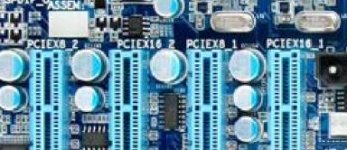
what you suggested, i have already tried before. the strange thing is that i cant boot my system with just one gtx installed in the pci-express x16 #2. not even the bios shows up. therefore i tried it with pci-ex16 #1 and #3. here are my device pathes:
1st nvidia - pci-express x 16 #1
DevicePath = PciRoot(0x1)/Pci(0x3,0x0)/Pci(0x0,0x0)/Pci(0x0,0x0)/Pci(0x0,0x0)

2nd nvidia - pci-express x16 #3
DevicePath = PciRoot(0x1)/Pci(0x7,0x0)/Pci(0x0,0x0)/Pci(0x0,0x0)/Pci(0x0,0x0)

but still only one card seems to be recognized.

what i solved: the one gtx 480 works now correctly! the hint was editing the AppleGraphicsPowerManagement.kext. i've read this here:
http://forums.macrumors.com/showthread.php?t=1010704

but why no second card!

in my extra/extensions folder there is nothing but:
fakesmc.kext (for making osx believe that i have an original mac)
ioahciblockstorageinjector.kext (for fixing the orange icons)
openhaltrestart.kext (for the ability to restart and shutdown without any problems!)

the rest (i7-core stepping) and other minor fixes are corrected via my DSDT.AML.

hmmm... what can i do now?

thx in advance
andy
 
ciao andy,
try this,
i think your problem is dsdt.aml...
mmm is not simple :(
please boot in verbose mode post your here .
 

Attachments

more infos

more infos

hi!

any idea?
in rc5 with -v it says:
gtx480 1536 NVc0 10de:06c0...
gtx480 -4095MB NV1ff 10de:06c0...

booting ends up with loading a black screen :(

hmm.... why is my second card being recognized with a negative RAM?

thanks again,
andy
 
ciao Andy,
it certainly is not injected with the second driver, the cause can 'be your com.apple.Boot.plist in extra folder.please Andy send me your configuration file otherwise we go on to write post indefinitely.

luigi.valtulini (at) gmail (dot) com
i read your file


luigi
 
andy try to delete dsdt.aml ... your configuration boot without ?
 
I just want to say that I use a hackintosh with efi-x for at least a year and I have noticed that Nvidia Quadro and Geforce are EXACTLY the same... the difference is how they are recognized by driver... so the hackintosh bypass all that and all game cards performing as they should... that is Quadro...

I have more than real time HD from Color running with a 9800GT even with OS-X 10.5.8... and a single quad i7 2,26G for over 18 months now...
 
efix has many limitations ... you can not do RAID 0 or 1 for the boot, you can only have one video card, etc. ...
on the other hand have no problems when leaving the apple update. is impossible to have everything:)
ChameleonRC5 or efi v8 allows many opportunities but you need to know exactly where to set the settings.
I'm glad to see that you have a hack to 18 months and it works great:) nice.
 
hi!

any idea?
in rc5 with -v it says:
gtx480 1536 NVc0 10de:06c0...
gtx480 -4095MB NV1ff 10de:06c0...

booting ends up with loading a black screen :(

hmm.... why is my second card being recognized with a negative RAM?

thanks again,
andy

With 2 or more cards, always you must set bios to start from the last card, in your case, second pcix16

Jose.
 
more on monday

more on monday

i am not able to try or send something till monday.... i will send you my files then. meanwhile, thx :)
 
me again :)

me again :)

hello luigi and jose!

well, my old problem doesnt exist anymore, the problem for not recognizing my second card at all was my new but somehow broken motherboard!!!

now, i got a new one, and my osx detects two cards every time. that is a big relief... but:

if i try to get both cards detected as gtx480 via dual efi-string (aquamac method) it results in kernel panic! and i really dont know why!!!

the device pathes seems to be all right, because it doesnt kernel panic with either the first or the second card removed from my system and it detects the remaining card rightly as gtx480!

but together, kernel panic. hmmm... why this!?

and jose, thank you for your tip. i tried that, but it doesnt change anything. i set my bios to boot from pcie3 port first but if both cards are installed it kinda ignores my setting and i get only a monitor signal from the first pci-express slot. is that normal? i guess yes, as it is my second new board and the guys from gigabyte did test it i guess.

any suggestions?

and by the way: gigabyte was really cooperative in exchanging my broken board.

hmm...
 
Ciao Andy,
I'm glad that the problem was the motherboard. ;)
make me a screenshot of the kernel panic. you boot in verbose mode (-v)
and screenshot of system profile (graphic).
Deleting DSDT.aml in /extra folder , and reboot . (try only if you have another bakup system).
The ud9 have 2 chipset nf200 same p6t7 , Do not worry, there must be a solution.
I wait you reponse.
ciao
luigi
 
I'm 99% sure that the panic problem come from the bios settings.

At least in my case, when i set bios to start from the second pcie x16, the start monitor come from the second card only.

Are you sure that your second card is in the third bios slot?. PCIEX16_2?


hello luigi and jose!

well, my old problem doesnt exist anymore, the problem for not recognizing my second card at all was my new but somehow broken motherboard!!!

now, i got a new one, and my osx detects two cards every time. that is a big relief... but:

if i try to get both cards detected as gtx480 via dual efi-string (aquamac method) it results in kernel panic! and i really dont know why!!!

the device pathes seems to be all right, because it doesnt kernel panic with either the first or the second card removed from my system and it detects the remaining card rightly as gtx480!

but together, kernel panic. hmmm... why this!?

and jose, thank you for your tip. i tried that, but it doesnt change anything. i set my bios to boot from pcie3 port first but if both cards are installed it kinda ignores my setting and i get only a monitor signal from the first pci-express slot. is that normal? i guess yes, as it is my second new board and the guys from gigabyte did test it i guess.

any suggestions?

and by the way: gigabyte was really cooperative in exchanging my broken board.

hmm...
 

Attachments

  • GA-X58A-UD9.jpg
    GA-X58A-UD9.jpg
    21.1 KB · Views: 0
dear all!

SOLVED! well, thanks for all your suggestions.

the solution was:
pci-express #1 - 2nd gtx480, no monitors connected
pci-express #2 - 1st gtx480, monitors plugged in

bios settings: init PEG2 first.

that is the ONLY combination my board seems to allow!!!

NO LUCK with:
1st and 3rd slot, even if i boot in bios from 1st or 3rd!

so, if anyone of you tries it with a x58a-ud9:
just use the first and the second slot for dual-gtx and a nonbroken board ;)

thank you all!!!!

and: i wondered how the inital poster can read out his fps?
(for example: GTX480 alone - 51 fps)

the fps on my resolve just climp up to realtime once i hit play and there they stay.

and: well, dual gtx480 seems to be very powerful. playing with some alexa 4444 material, couple of nodes and trackers - so far no loss of realtime at all :)
 
He increased the project playback framerate setting in the Config panel.
 
well :)
wait for your test with ud9.:tongue_smilie:

(for test others slot put in extra/extension folder nullcpupower kext)

NO LUCK with:
1st and 3rd slot, even if i boot in bios from 1st or 3rd!

is possible for you dump for me ioreg+lspci ?

ciao
Luigi
 
hi luigi!

well :)
wait for your test with ud9.:tongue_smilie:

well, i dont have any red material right now, but i tried the playback with various nodes on apple pro res 4444 alexa material -> get about 31 to 38 fps. hmm... now that seems okay, but to be honest i expected more.

if i go to the about menu, davinci tells me version 7.1 - 1 GPU.
is this normal? i mean can i check how many cuda cores davinci is using? it seems like my second gtx480, where my monitors are connected to, is pureley for the interface and doesn't computing, or am i wrong? should i get a cheap third graphic card to gain the full double gtx power???

(for test others slot put in extra/extension folder nullcpupower kext)

NO LUCK with:
1st and 3rd slot, even if i boot in bios from 1st or 3rd!

is possible for you dump for me ioreg+lspci ?

well, of course it is. is it urgent? because right now i don't want to open up my comp again, after all this testing and weird problems :(
but if you insist, i can do it :)

and: the first time i start my hacky i get random kernel panics. after the second boot or so it all stays normal. so i think i am going DSDT, but i dont know exactly how to convert my pci-adresses:
pci-express x 16 #1
DevicePath = PciRoot(0x1)/Pci(0x3,0x0)/Pci(0x0,0x0)/Pci(0x0,0x0)/Pci(0x0,0x0)
pci-express x 16 #2
DevicePath = PciRoot(0x1)/Pci(0x3,0x0)/Pci(0x0,0x0)/Pci(0x2,0x0)/Pci(0x0,0x0)

the first one is an easy one: (_ADR, 0x00030000)
but the second? where to put that 2?

hmm... after reading you installing guide for the asus, i thought damn, if i did read this a month before i would have invested in the asus board and could participate from all your work easier :(
but then again, we are pioneers and thats somehow a good feeling, isn't it?

thanks in advance,
andy
 
if i go to the about menu, davinci tells me version 7.1 - 1 GPU.
is this normal? i mean can i check how many cuda cores davinci is using? it seems like my second gtx480, where my monitors are connected to, is pureley for the interface and doesn't computing, or am i wrong? should i get a cheap third graphic card to gain the full double gtx power???

Yes, Resolve will not use any GPU which is used to drive the main display (one with the Apple Menu bar). On the Mac Pro, we recommend using a ATI5770/GT120 to drive the GUI and leave the Q4000/Q4800FX/GTX285 for CUDA compute exclusively.

If you want to over-ride this behaviour, and force the second GPU to be used, you can enter this in Preferences/Debug:

LsManager.3.NumGPUs = 2
LsManager.3.GPUMapping = 0 1
LsManager.3.GPUMappingEnable = 1

Of course, all this is officially unsupported, but I thought you might want to try nevertheless :-)
 
Back
Top