Welcome to our community

Be a part of something great, join today!

  • Hey all, just changed over the backend after 15 years I figured time to give it a bit of an update, its probably gonna be a bit weird for most of you and i am sure there is a few bugs to work out but it should kinda work the same as before... hopefully :)

Group Buy - Formatt-Hitech Firecrest ND Filters

If anyone regrets their decision I would love to buy your set of ND's. I had a set of their original ND filters which were recently stolen and I'm a bit bummed I just now saw this group buy.
I've got some Firecrest 100x100mm I'm looking to sell. Brand new, still wrapped in the tissue paper.

Set of three 0.3, 0.6, 0.9
Set of three 1.2, 1.5, 1.8
 
I finally got them yey! :thumbup:

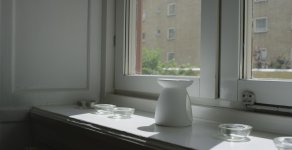
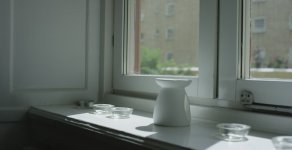
I have a range between 0.3 to 1.8. I seem to see a difference across these. I only did a fast test of them, but they seem to differ much more than Phils images? I'm not sure if it's the ISO playing a trick on me since I changed the ISO between each filter.
 

Attachments

  • 03.jpg
    03.jpg
    40.6 KB · Views: 0
  • 06.jpg
    06.jpg
    38.6 KB · Views: 0
  • 09.jpg
    09.jpg
    39.4 KB · Views: 0
  • 12.jpg
    12.jpg
    38.7 KB · Views: 0
  • 18.jpg
    18.jpg
    42.2 KB · Views: 0
I finally got them yey! :thumbup:

I have a range between 0.3 to 1.8. I seem to see a difference across these. I only did a fast test of them, but they seem to differ much more than Phils images? I'm not sure if it's the ISO playing a trick on me since I changed the ISO between each filter.

Image 5 does indeed showcase a shift.

If you can do the test over again with exposure increments in shutter speed.
 
Image 5 does indeed showcase a shift.

If you can do the test over again with exposure increments in shutter speed.

Alright I only did three now to look at the difference between those and the 1.2. ISO1280, changed shutter. Slightly brighter on the 0.3 due to aperture a bit off the mark though. What does this mean? That I have a faulty 1.2? Or are yours having the same differences? I'm using the Standard OLPF by the way.

NDs are 0.3 - 0.9 - 1.8
 

Attachments

  • 03_2.jpg
    03_2.jpg
    34.8 KB · Views: 0
  • 09_2.jpg
    09_2.jpg
    33.1 KB · Views: 0
  • 18_2.jpg
    18_2.jpg
    32.9 KB · Views: 0
Alright I only did three now to look at the difference between those and the 1.2. ISO1280, changed shutter. Slightly brighter on the 0.3 due to aperture a bit off the mark though. What does this mean? That I have a faulty 1.2? Or are yours having the same differences? I'm using the Standard OLPF by the way.

NDs are 0.3 - 0.9 - 1.8

Interesting. Do you have a color chart? Just taking your jpgs here and exploring just white balancing gets me closer, but to really know what's going on I need to see more.

If you can create .R3D snapshots of this or this with some sort of gray card in particular with a bit more front facing light that would help. I can look at them later today.
 
Interesting. Do you have a color chart? Just taking your jpgs here and exploring just white balancing gets me closer, but to really know what's going on I need to see more.

If you can create .R3D snapshots of this or this with some sort of gray card in particular with a bit more front facing light that would help. I can look at them later today.

Sorry, don't have any gray cards, but here's R3D snaps of the previous shots.

ND 0.9
ND 0.3
ND 1.2
 
I would def re-check and if possible not with a variable light source (and please use shutter not asa or lens stop)

... We have found the Firecrests to be realy accurate. Also if there is a issue I am confidant they will just sort it out.

good luck and yes you should expect them to match in colour (especiually between close densities)
 
I would def re-check and if possible not with a variable light source (and please use shutter not asa or lens stop)

... We have found the Firecrests to be realy accurate. Also if there is a issue I am confidant they will just sort it out.

good luck and yes you should expect them to match in colour (especiually between close densities)

That's what I did in the second test, the light never changed, only changed shutter.
 
Hi.. Sorry I see now you changed your method. The tricky thing for me looking at them is that I don't know what is outside that window (a green truck may slowly drive past;-) . I am sure you have thought about that and where checking for changes .. but for sombody not actually there it is harder to judge... A stable artificial source in a very controled environment is the way I do it.. I also make nobody move position between takes and we all dress ninja!

Ps the reason I am confidant is we just did this test and all our new firecrests where great...
 
Hi.. Sorry I see now you changed your method. The tricky thing for me looking at them is that I don't know what is outside that window (a green truck may slowly drive past;-) . I am sure you have thought about that and where checking for changes .. but for sombody not actually there it is harder to judge... A stable artificial source in a very controled environment is the way I do it.. I also make nobody move position between takes and we all dress ninja!

Ps the reason I am confidant is we just did this test and all our new firecrests where great...

There's no change, there's a smooth cloudy sky outside, there's not even a street, no changes whatsoever in the changes other than changing filter and shutter.

Yes the shift is clearly there,

This test needs to be done with a completely stand still Subject or better Object, as any movement or rearrangement of the subject even if minor can also be a cause of the lighting hitting the tae in a different way.

I've done the test two times with the same result, there are no changes other than shutter and filter changes, if these are differences because of a slight change in position that means it doesn't matter if there are physical errors with the filter because a slight change would make the image... green?

Bottom line is that the 1.2 filter turns the image green, I've seen it over and over now. I'm really not sure what this means though, is this normal on the standard OLPF? if not then how could this have made it through quality control?
I'd like to know about the other filters though, I feel there's a slight shift in them as well, although not as dramatic. If it's just the 1.2 I could contact Formatt and ask them about it.

But trust me, there are no changing conditions between the filters other than changing filters and ISO in the first test and changing filters and shutter in the second one, so these are real world changes that would happen on location while shooting.
 
These are the things I think that are important when testing ND Filters, and for me I am really not testing the filter I am testing if I am using the filter correctly:
1- use metal Hallide lights ( I do a lot of vr, people think the light is not changing but it's obvious in stitching that outside light is constantly changing)
2- fanatical on matte box (any leaks on the matte box totally destroy the test)
3- camera is running and stable temp during all tests
4- don't change the t stop , only thing I change is shutter ( this depends on lense and mount, but in extremely bright conditions I've had light shift based on t stop and things bouncing around in the mount/lense... I've noticed this way more on still glass then cinema glass . This shutter approach does create a problem though since the black shade is shutter dependent, so I often redo the test with t stop and compare results).

if if its not a controlled environment it's not a test. I do think it's real good to test new ND filters to understand their characteristics.
 
These are the things I think that are important when testing ND Filters, and for me I am really not testing the filter I am testing if I am using the filter correctly:
1- use metal Hallide lights ( I do a lot of vr, people think the light is not changing but it's obvious in stitching that outside light is constantly changing)
2- fanatical on matte box (any leaks on the matte box totally destroy the test)
3- camera is running and stable temp during all tests
4- don't change the t stop , only thing I change is shutter ( this depends on lense and mount, but in extremely bright conditions I've had light shift based on t stop and things bouncing around in the mount/lense... I've noticed this way more on still glass then cinema glass . This shutter approach does create a problem though since the black shade is shutter dependent, so I often redo the test with t stop and compare results).

if if its not a controlled environment it's not a test. I do think it's real good to test new ND filters to understand their characteristics.

This wasn't a scientific test of these NDs, it was a fast real world test. The lighting outside didn't change since it was pure white with no variants in the clouds. The most notable thing is that every time I put the ND 1.8 in it gets greener than the rest. I don't need perfect conditions to see that difference, it's like night and day and always the same tint.

I'm not that interested in tests with charts etc. since they do not represent shooting conditions really. If I do not see a difference during normal shooting it's good, but I can clearly see a greener tint on the ND 1.8 and that is what I'm wondering about here. It would take a day for me to get together a proper test for my NDs and I would still end up with the same result for the 1.8.

If I did a blind test I would still be able to see which is the 1.8 of my NDs. Here's two more shots in direct sunlight (no clouds) It's easy to see the difference and the difference show up every time. I'm not sure what a scientific test would do if these are real world conditions?

"Hey, put in the 1.8" - "but it looks green?" - "no, it's not scientifically proven that it is, let's go" :tongue_smilie:
 

Attachments

  • 09_3.jpg
    09_3.jpg
    54.3 KB · Views: 0
  • 18_3.jpg
    18_3.jpg
    49.5 KB · Views: 0
Just advice when testing filters and color consistency.

The only way to do a correct sampling is to adjust the shutter speed. Lenses, nearly all of them, exhibit color variation of some degree when stopped down. Particularly within the range of the first 3 stops. Hard to detect on the pricey glass, easier to detect on the less expensive stuff generally speaking. ISO is also not the answer as you changing what is "seen".

If there is a color issue with a filter though, do contact Firecrest and I'm sure they'll get your sorted.
 
Just advice when testing filters and color consistency.

The only way to do a correct sampling is to adjust the shutter speed. Lenses, nearly all of them, exhibit color variation of some degree when stopped down. Particularly within the range of the first 3 stops. Hard to detect on the pricey glass, easier to detect on the less expensive stuff generally speaking. ISO is also not the answer as you changing what is "seen".

If there is a color issue with a filter though, do contact Firecrest and I'm sure they'll get your sorted.

Yes, I've contacted them, the R3Ds I provided were shot using different shutters, without changes to the aperture. Same with the latest images. There's clearly a green tint and all the surfaces in the images are grey and white so they are as close to a real world grey chart as I can get ;)
 
Yes, I've contacted them, the R3Ds I provided were shot using different shutters, without changes to the aperture. Same with the latest images. There's clearly a green tint and all the surfaces in the images are grey and white so they are as close to a real world grey chart as I can get ;)


Yep My 1.8 has a green shift too. not too happy about that. Let me know what they say for you.

Just contacted Hotrod.
 
Last edited:
Yep My 1.8 has a green shift too. not too happy about that. Let me know what they say for you.

Just contacted Hotrod.

Interesting. I've had a set of these for a while now and never noticed a green color shift with my 1.8 filter. I hope they get you guys sorted out.
 
This wasn't a scientific test of these NDs, it was a fast real world test. The lighting outside didn't change since it was pure white with no variants in the clouds. The most notable thing is that every time I put the ND 1.8 in it gets greener than the rest. I don't need perfect conditions to see that difference, it's like night and day and always the same tint.

I'm not that interested in tests with charts etc. since they do not represent shooting conditions really. If I do not see a difference during normal shooting it's good, but I can clearly see a greener tint on the ND 1.8 and that is what I'm wondering about here. It would take a day for me to get together a proper test for my NDs and I would still end up with the same result for the 1.8.

If I did a blind test I would still be able to see which is the 1.8 of my NDs. Here's two more shots in direct sunlight (no clouds) It's easy to see the difference and the difference show up every time. I'm not sure what a scientific test would do if these are real world conditions?

"Hey, put in the 1.8" - "but it looks green?" - "no, it's not scientifically proven that it is, let's go" :tongue_smilie:
When I look at your shot it doesn't look your fps with a ND1.8 is any where near 24 fps, if I can re-quote myself "This shutter approach does create a problem though since the black shade is shutter dependent, so I often redo the test with t stop and compare results)."

This means your have to blackshade at a very high fps, so when you get to 1.8 ND at 24 fps (or around there) you are in a normal range. With testing, you need to isolate what your testing per component, though I guess you disagree with the concept of testing so not sure what to say on that. So by testing at 1 fps at 1.8 ND your not testing the ND filter but blackshade at low fps (i.e. the camera at 1fps in full sun is fairly unusual, of which I use frame averaging in that case anyway).
 
When I look at your shot it doesn't look your fps with a ND1.8 is any where near 24 fps, if I can re-quote myself "This shutter approach does create a problem though since the black shade is shutter dependent, so I often redo the test with t stop and compare results)."

This means your have to blackshade at a very high fps, so when you get to 1.8 ND at 24 fps (or around there) you are in a normal range. With testing, you need to isolate what your testing per component, though I guess you disagree with the concept of testing so not sure what to say on that. So by testing at 1 fps at 1.8 ND your not testing the ND filter but blackshade at low fps (i.e. the camera at 1fps in full sun is fairly unusual, of which I use frame averaging in that case anyway).

Fps is not the same as changing shutter really, even though it changes if increasing the fps over shutter length. Still, how can you tell fps on a still frame? haha
But it doesn't matter really since I use the Weapons auto-cal. I also get consistent results between chaning only ISO, changing only aperture and changing only shutter, so despite one or two of those not being recommended, the end result is the same meaning, by scientific reasoning, there's a green tint in the 1.8 filter.
 
Back
Top