Welcome to our community

Be a part of something great, join today!

  • Hey all, just changed over the backend after 15 years I figured time to give it a bit of an update, its probably gonna be a bit weird for most of you and i am sure there is a few bugs to work out but it should kinda work the same as before... hopefully :)

Greenscreen has green cast

Matt Gerard

Well-known member
Joined
Dec 30, 2011
Messages
133
Reaction score
0
Points
0
Location
Minneapolis, MN
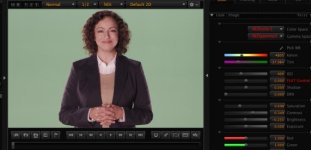
OK, I'm trying to figure something out here. We do a lot of greenscreen shoots with the EPIC rotated 90º. We recently rented out our camera to a very reputable camera/DIT/tech a couple weeks ago. Ever since it came back (or around that time) we have been fighting a greenish cast on our subjects when shooting green screen. OK, before you go on, here is the link for the r3d still.


http://www.creativeftp.com/_Odbe4Hb-2THF2R

We have our wall/floor painted digicomp green, she is about 15' away from the wall. The floor is coverd with packing blankets, as it is not head to toe. All lights are 3200k. The wall is lit by florecents, also at 32k. other lights are a combo of kinoflos and arri hot lights.

We have also shot with a blue drop that we hang in front of the green and light with the same cyc lights as the green, but don't have the color cast problem we do with the green.

I have done a full reset of the camera and is set for RC3 and RG3. When looking at our 17" panasonic SDI monitor, the green looks washed out. Its not very saturated as you see with your eye. This is monitoring with RC3 and RG3 turned on. RAW looks as to be expected, a little darker (shooting at ISO800) and flatter. Alhtough it seems that the green "pops" more when looking at RAW. Odd.

My question is, are we overlighting the green? The panny monitor we have for some reason won't play well with the EPIC and won't display the waveform. But that's another problem:)

I do have a dimmer pack and board available, and the flo's are dimmable, so I'm going to try to throttle back the green for the same amount of key, fill and greaser lights that the DP uses. I'm not the DP, I'm the tech, so I need to figure this out. What am i missing? I think we are just overlighting the green, but the the bossman disagrees and is trying to do the 80b filter and shoot at 56k in the camera trick. I know we should be using 56k lights when shooting green, but we rent our studio out alot and that wouldn't fly with 99% of the renters.
 
did the in camera tint get messed with at all?
 
i'm not really seeing anything out of the ordinary here, looks to be just some ambient spill. it never hurts to black out and block as much unnecessary screen reflection as is practical, but otherwise i'd just do a subjective white balance for the talent and an objective one for the cleanest key. an 80filter isn't a terrible idea and it's not impossible you're seeing certain makeups reacting to your tungsten sources.
 
Yep. This is ambient spill to me as well. Some flags for cutting/controlling and maybe, from the looks of how it's lit and where some of it is coming from, some duvetyne on the ground would have helped perhaps.
 
I'm guessing, That you shoot with tungsten light, in other words your blue channel is starved and you got no filter on the camera to compensate. And Also your green screen is, my guess again, rather big so the warm light from you lamps are bounced on the green, then around and onto the talent and adding to the tungsten problem, floding green to the allready warm picture. A filter would keep picture clean a smaller greenscreen would improve the result and 560K balanced light would change everything. But you can get her to normal but then there is not much green in the green screen, see screen dump. So in this case I would work native and have a keyin that was graded for the greenscren and grade the fill to fit whatever background in the comp from raw.
 

Attachments

  • PastedGraphic-5.jpg
    PastedGraphic-5.jpg
    19.5 KB · Views: 0
I'm with Bjorn on this. Tungsten on green screen isn't ideal. Especially with darker skin where the blue channel really will suffer. That said, I was able to correct the colour balance in Redcine by adjusting the tint and some other adjustments. Also, by changing the colour space settings. Redcolor2 and RedGamma2 were much more flattering to her. In any case, the shoot is totally workable! Open the image in it's own window for larger view to see the settings.

Screen%20Shot%202013-08-16%20at%207.59.18%20PM.jpg

greenComp.jpg
 
Hey Matt,
You can get away with using tungsten lights on talent and try green Kinos for the cyc/greenscreen. Our DP(with Epic) used this for a shoot I produced and gave us excellent results even with a green floor, no duvetyne. What it did was allow us to use less light overall on the background and what was there was wavelength specific--so less spill. We did not have to do lens filtering. (Sorry I don't have a R3D to share, but perhaps others here know what I am talking about and can post theirs.) One thing about dimmers on tungsten lights.. lowering their output is also lowering Kelvin...obviously bad for both talent and tungsten-lit greenscreen.

There is an art to keying on tungsten-lit greenscreens with a talent in foreground. Tutorials online (sorry I don't have time to Google those for you). Basically correct the image for overall casts first(like red/yellow), garbage matte, then key. Nuke is best, Keylight in AE is great too. Only very last do you put on spill suppression. One trick I have done also is boost up whole image with higher Kelvin overall to pull the key, then properly corrected the foreground after that.

HTH
 
It's funny, I've been reading more and more about using blue instead of green screen b/c skin tones have less blue in them than green.
 
Hey Matt,
You can get away with using tungsten lights on talent and try green Kinos for the cyc/greenscreen. Our DP(with Epic) used this for a shoot I produced and gave us excellent results even with a green floor, no duvetyne. What it did was allow us to use less light overall on the background and what was there was wavelength specific--so less spill. We did not have to do lens filtering. (Sorry I don't have a R3D to share, but perhaps others here know what I am talking about and can post theirs.) One thing about dimmers on tungsten lights.. lowering their output is also lowering Kelvin...obviously bad for both talent and tungsten-lit greenscreen.

There is an art to keying on tungsten-lit greenscreens with a talent in foreground. Tutorials online (sorry I don't have time to Google those for you). Basically correct the image for overall casts first(like red/yellow), garbage matte, then key. Nuke is best, Keylight in AE is great too. Only very last do you put on spill suppression. One trick I have done also is boost up whole image with higher Kelvin overall to pull the key, then properly corrected the foreground after that.

HTH

Totally agree on the idea of using green filters on the light that hits the green screen, then the levels there get a good push. But if you use tungsten you are low in the blue channel which makes it noisy in especially in the low lights but if you then use a 80c filter on the camera and make sure to get proper exposure your blue channel gets ballanced out and the noise will be far less... blue is still always the most noisy channel on Cmos. But the 80c filter will get you to a good 5600k.

If you do not use the c80 filter then even if your greenscreen is properly lit you got only red and a noisy blue to key on, that will not hold up to good as a full RGB images as as the G is gone and the B is not properly exposed. So it's like building the image from a green contaminated R and a B that is only half filled. Usually that, at least in more complex key situations, quickly leads to a discussion about skintones.... As it's tricky to dial in the facial colors from that half picture you got left.

So my advice green gel filters on the lights hitting the greenscreen, 80c in the mattebox, which both each a bit of light so make sure you go enough in lamps in the van. :)
 
I've shot dozens of projects on green and blue screen with Epic under tungsten light. With the original sensor I used to worry about using blue filters etc. But now there is no reason you can't achieve great results under tungsten light on green or blue. The green screen projects that I've shot have ranged in size from a 20x20 green screen to over 120x40 green. There is always bound to be some ambient green on the skin, however subtle it may be. In your case it is extreme. It does look like ambient green spill as Phil mentioned. Maybe you should do the same setup and turn off all the lights lighting the green and see how much the skin tones change. Basically , shoot your subject under 3200 light properly exposed with a black background (maybe fly in a solid for this) and then the same foreground lighting WITH the green screen lights on. You'll be able to see how much the green cast is caused by sensor bias vs green spill.

Also, rate the camera as low an ASA as possible, while keeping highlights from blowing out. This will give you a fatter neg and it will be less noisy. 400 or 500 is much better than 800 for green/blue and typically on green screen there aren't a lot of tones above 3 stops over key so highlights usually aren't an issue.

examples on my online reel - Awkward promo, Big Bang Theory promos, DOve Magic Johnson and Virgin America (virtual sets).
 
So my advice green gel filters on the lights hitting the greenscreen, 80c in the mattebox, which both each a bit of light so make sure you go enough in lamps in the van. :)

Thinking harder on it (it has been over a year and a half since that shoot) we may have used blue on the lens(matte box). --I don't recall any red/minor yellow bias to remove on slap comps. I wish I could confirm, I only had Quicktime ProRes files to work with and they may have been corrected before they got to me. If anything we had a blue bias but that could have been boosted in RED Cine-X. As for the green tubes... being in Los Angeles we just rented them at a reasonable cost.

re: blue vs. green screen

blue may be good for keying a face, but that may be bad for clothing or other set pieces IMHO
(rather let the DP's and CC pros here speak on that)
 
On the blue vs green question...

I was wondering if there's any benefit to green over blue given the greater number of green sites on the sensor?

This used to be the case with digital video recording 4:2:0 and 4:1:1, there was twice the resolution in the green channel which I think explains the move to green as the norm for digital production over the last fifteen years or so.

Wondering if the same still applies. It would seem logical to me.
 
On the blue vs green question...

I was wondering if there's any benefit to green over blue given the greater number of green sites on the sensor?

This used to be the case with digital video recording 4:2:0 and 4:1:1, there was twice the resolution in the green channel which I think explains the move to green as the norm for digital production over the last fifteen years or so.

Wondering if the same still applies. It would seem logical to me.

I used to get told this by inexperienced compositors all the time however every time I tested & shot against Blue & Green, blue always was better, I am talking difficult compositing ie smoke / glass / hair, even someone wearing blue jeans!

Edit even with digital betacam we could keep the wires in a heated rear window of a car, they could not be retained against a green.
 
I used to get told this by inexperienced compositors all the time however every time I tested & shot against Blue & Green, blue always was better, I am talking difficult compositing ie smoke / glass / hair, even someone wearing blue jeans!

Edit even with digital betacam we could keep the wires in a heated rear window of a car, they could not be retained against a green.

Well could be. Though I've worked vfx on studio feature and television(as a coordinator, not a compositor) and never a single blue, always green. No garage compositors, "just" multiple vfx houses in U.S., U.K., China, Canada. Panavision 35mm and Sony F23.
 
Well could be. Though I've worked vfx on studio feature and television(as a coordinator, not a compositor) and never a single blue, always green. No garage compositors, "just" multiple vfx houses in U.S., U.K., China, Canada. Panavision 35mm and Sony F23.

Green got trendy, lots of second hand screens floating around is often the reason.

Looking at the OP's file, increasing the red & reducing the green, everything looks way better. TBO 8:1 compression is too much for green screen especially tungsten lit, 5:1 would make a huge difference in dark shadow areas.
 
I'm guessing, That you shoot with tungsten light, in other words your blue channel is starved and you got no filter on the camera to compensate. And Also your green screen is, my guess again, rather big so the warm light from you lamps are bounced on the green, then around and onto the talent and adding to the tungsten problem, floding green to the allready warm picture. A filter would keep picture clean a smaller greenscreen would improve the result and 560K balanced light would change everything. But you can get her to normal but then there is not much green in the green screen, see screen dump. So in this case I would work native and have a keyin that was graded for the greenscren and grade the fill to fit whatever background in the comp from raw.


Just a BTW: from a DP's perspective this is so asinine.

I agree with everything Bjorn has basically said but setting up guidelines like having to use CC filters or 5600K lighting for shooting any greenscreen work is also a direct way of interfering with the DP's creative process. Even if it makes better images in the EPIC.
 
Just a BTW: from a DP's perspective this is so asinine.

I agree with everything Bjorn has basically said but setting up guidelines like having to use CC filters or 5600K lighting for shooting any greenscreen work is also a direct way of interfering with the DP's creative process. Even if it makes better images in the EPIC.

I always interfere with the DP's that's basically my job, and usually I get paid 10 times or more than the DP's so normally I'm allowed to have it my way :)

But offcourse there are benefits of having blue screen some times and also non balanced light. But as the epic is built for daylight shooting tungsten uncorrected is not really a good approach. See it as shooting daylight film stock in tungsten light, usually thats not such a great idea. The sensor is just not dialed in for it.

If you got a chroma screen to replace the sky behind some bushes it's ofcourse better with a blue one, then still I would recommend a filter in camera if it's tungsten light. And blue tubes of blue filtered lights hitting the screen will help as well.


Anyone can see that the blue channel is not equal in quality to the red and green. It's about half as good. And that is the case for all Cmos sensors. However the epic is pretty darn good so not so much to worry about, but if you want good clean images all the way down in the lowlights when shooting tungsten you need to filter the camera, that goes for all cameras that are balanced for daylight... most are.

Red screen is not used much but if you do not have people in the scene and got both green and blue, then it works just as good. Not many use it though.
 
How does adding a 1/2 CTB filter hamper the creative process? losing a 1/2 stop, losing a filter tray?? Talking with team members regarding techniques to achieve the best results is something we do at every pre pro meeting.
 
Maybe the DP doesn't want to light for daylight and trust that in post the shot will be properly rebalanced to tungsten?
 
How does adding a 1/2 CTB filter hamper the creative process? losing a 1/2 stop, losing a filter tray?? Talking with team members regarding techniques to achieve the best results is something we do at every pre pro meeting.

Yes off course, those are also a concerns. And most of times you can leave the filters in the van. But if you care for having a wider DR and more possibilities in the grading and post process (which should interest at least some DPs...) then making sure that all three channels end up balanced within what the sensor can capture is a good thing. Loosing 1/2 a stop might be crucial at certain situations but mostly I see tungsten shots with overexpo in red and under expo in blue far to often. And if you light your scene and you got enough light than 1/2 stop will not stop you will it?

Lost filter trays... yes not much to say about that, if you stick a filter in you got one less to play with. If you got three you have room for two more.

Another trick with green screen is to also adjust to a tighter shutter. Especially when shooting without the soon to come motion mount. As croma shots have a tendect to really show the ugliness of having constant on/off motion blur. I find it better if there is no big risk for strobing to shoot on 90 deg shutter for chroma or even less than that. it's easy to apply more motion blur in post to chroma layers but it's impossible to remove when it's to much read, the drummers drumsticks in a greenscreen music video or such can motion blur to nothing against blue screen but would be visable against the comp background...
 
Back
Top