Welcome to our community

Be a part of something great, join today!

  • Hey all, just changed over the backend after 15 years I figured time to give it a bit of an update, its probably gonna be a bit weird for most of you and i am sure there is a few bugs to work out but it should kinda work the same as before... hopefully :)

Forged Weapon killing mags on power up

EPIC-W in the loop

EPIC-W in the loop

Hi Brent, since i had a similar issue on .78 on our new EPIC-W and 240 GB Mag - Log and Description went to you via mail and Callum and Rob.

subscribed to this thread now :)
 
Hi Brent, since i had a similar issue on .78 on our new EPIC-W and 240 GB Mag - Log and Description went to you via mail and Callum and Rob.

subscribed to this thread now :)

Alex what happened exactly? Sorry just want to understand a bit more. Thx!
Best
 
1. Camera with MG PL Mount and ET V Mount Module and Teradek Bolt 300 and CMOTION CVOLUTION all connected and powered. FW was .75 - 240 GB Magazin inserted
2. Booted
3. rebooted with ne FW .78 on and installed.
4. after install without reboot new Black shading.
5. Shutdown and Swap Battery, 1 minute later with fresh battery boot up with same SSD where FW and Black Shading were done.
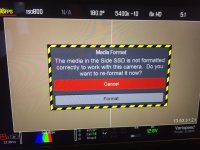
6. After Boot Message on Screen: the Magazine is not readable - do you want to Format mag? ( we did not format then)

7. Checking Mag on Macbook, that is how it looks like (really weird date on the Mag Creation time too ) - also on next magazines the Date seems to have been reset to year 2000 - maybe we have the Y2K or Y8K Bug??? ;)
 
1. Camera with MG PL Mount and ET V Mount Module and Teradek Bolt 300 and CMOTION CVOLUTION all connected and powered. FW was .75 - 240 GB Magazin inserted
2. Booted
3. rebooted with ne FW .78 on and installed.
4. after install without reboot new Black shading.
5. Shutdown and Swap Battery, 1 minute later with fresh battery boot up with same SSD where FW and Black Shading were done.
6. After Boot Message on Screen: the Magazine is not readable - do you want to Format mag? ( we did not format then)

7. Checking Mag on Macbook, that is how it looks like (really weird date on the Mag Creation time too ) - also on next magazines the Date seems to have been reset to year 2000 - maybe we have the Y2K or Y8K Bug??? ;)

Thanks for sharing Alex.

Let us know what you hear.
 
PS, Nick, this was a general sentiment. Not directed at you...

Brent, no worries. I appreciate you guys monitoring this thread. I hope I don't come across as over zealous.

I'm just a huge fan of RED (use the platform weekly, and promote it to all my clients), and having seen this issue come up once (to my surprise), I find myself monitoring this thread as well (I'm a relentless optimist, and always looking for answers/solutions).

Have a great weekend.
 
My Epic-M Dragon camera is still in the shop.

But in other news I was shooting with two literally out of the box Weapon 8k Helium cameras, redvolt expanders, and 480 mini mags. I lost power while recording onto the 4th new mag of the day and received this error:

attachment.php


I tried reinserting the mag several times and it refused to mount. Then I tried it on my computer and it wouldn't mount.

I believe we opened a support ticket and are sending the mag in for potential data recovery.
 
Today, I got the "dreaded warning", once more.........My new protocol is to never boot the Epic-W up with exposed media, and did not lose any data. I don't know if this new procedure saved me or not, but this is the only way I believe you are totally safe. My two cents.
 

Attachments

  • IMG_7101.JPG
    IMG_7101.JPG
    96.8 KB · Views: 0
Last edited:
Today, I got the "dreaded warning", once more.........My new protocol is to NEVER boot the Epic-W up with exposed media, and did not lose any data. I don't know if this new procedure saved me or not, but this is the only way I believe you are totally safe. Only my two cents.
Did you format or press cancel and reboot?
 
Did you format or press cancel and reboot?

Because it was mag which was back from our DIT as "ready to format" I tried to trouble shoot this issue......I canceled, ejected, re-booted, and inserted the mag.....and got the same warning. I don't know what this means but I feel the added step of not booting up with exposed media is worth the peace of mind. Kinda sucks to have to do this but the alternative is much worse.
 
I tried to trouble shoot this issue......I canceled, ejected, re-booted, and inserted the mag.....and got the same warning. I don't know what this means but I feel the added step of not booting up with exposed media is worth the peace of mind. Kinda sucks to have to do this but the alternative is much worse.
I personally have gotten into the habit of ejecting before shutdown and powering on w/o a mag in camera. Not sure if it actually matters, but seems like good practice. I don't usually power up Windows with a USB stick plugged in. Sometimes it tries to boot from it. :)

Which FW are you on?

Did you save a log file and send to Red? Maybe it will have some info in it. I would like to see them add a feature to beta builds. An additional button on any error dialog that says write log file now. In your case, write log file after format. :)

Maybe if you have a log file written, a dialog pops up on insert letting you know you have a log file on your drive, in case you forget to send to Red.
 
Because it was mag which was back from our DIT as "ready to format" I tried to trouble shoot this issue......I canceled, ejected, re-booted, and inserted the mag.....and got the same warning. I don't know what this means but I feel the added step of not booting up with exposed media is worth the peace of mind. Kinda sucks to have to do this but the alternative is much worse.

Ummm if it came back from your DIT as ready to format, was it possible that he had already formatted it as Fat32 on his computer? I do that after dumping cards because when you put it in the camera, that message automatically comes up and I know the card has been dumped and checked. So I would guess it's not an error, it's actually doing what it's supposed to do because of what your DIT did.
 
Ummm if it came back from your DIT as ready to format, was it possible that he had already formatted it as Fat32 on his computer? I do that after dumping cards because when you put it in the camera, that message automatically comes up and I know the card has been dumped and checked. So I would guess it's not an error, it's actually doing what it's supposed to do because of what your DIT did.

That's a great thought. I'll check with him this morning. I'd love to believe it's pilot error on my part.
 
Yep that's what happened. The DIT is erasing the clips so that's why we got the warning so the camera is doing what it should. Sorry for the false alarm.
 
Is erasing clips from the computer such a good idea? I suppose if you are using it to throw that message on purpose, you know that if you insert a mag and don't get the message that something is wrong. Meaning the DIT has not done something specific on the mag, like back it up. :)
 
Is erasing clips from the computer such a good idea? I suppose if you are using it to throw that message on purpose, you know that if you insert a mag and don't get the message that something is wrong. Meaning the DIT has not done something specific on the mag, like back it up. :)

That's exactly why I do it. There is no question that the DIT downloaded it because he had to take the time to open up disk utility and format the mag.
 
Just peaking at this thread, even though I've seen it in passing before. On a film shoot today, and this error ended up popping up. Put the card aside from now, as we're run-and-gun for pickups without a DIT on-set. Newest firmware, happened between a proper shutdown and battery swap. Weapon MG. This was the first time I haven't secure formatted my mag all week, thinking that it was overkill. Oddly enough...

Though, the difference in my error so far seems to be that I can still see the media remaining on-cam. It makes me believe that my formatting is actually still in tact - but the bin file may have become corrupt. More when I return home, and hoping for the best here.

EDIT: Just want to mention that I'm not raising my pitchfork here. Just adding in my notes for anyone else that comes across the text in the future. I fully support RED and absolutely understand that there's always the 0.0001% of bad luck that can strike despite an otherwise perfect synergy of hardware and ecosystem.
 
Last edited:
Just peaking at this thread, even though I've seen it in passing before. On a film shoot today, and this error ended up popping up. Put the card aside from now, as we're run-and-gun for pickups without a DIT on-set. Newest firmware, happened between a proper shutdown and battery swap. Weapon MG. This was the first time I haven't secure formatted my mag all week, thinking that it was overkill. Oddly enough...

Though, the difference in my error so far seems to be that I can still see the media remaining on-cam. It makes me believe that my formatting is actually still in tact - but the bin file may have become corrupt. More when I return home, and hoping for the best here.

EDIT: Just want to mention that I'm not raising my pitchfork here. Just adding in my notes for anyone else that comes across the text in the future. I fully support RED and absolutely understand that there's always the 0.0001% of bad luck that can strike despite an otherwise perfect synergy of hardware and ecosystem.

Reporting back, now home at my computer. I can confirm that all that's left on the card is a log file, blank otherwise with all the "used space" still accounted for. Kind of bummed, as we just shot an entire day in a prison that took a good month to book and lock down. Going to print out a log file, call in tomorrow, and hopefully join the few who have send their MiniMags into HQ. Really hoping that data is recoverable (considering that it must still exist on the blocks of the used space). Crossing my fingers, and about to reach out to the director.
 
Back
Top