Welcome to our community

Be a part of something great, join today!

  • Hey all, just changed over the backend after 15 years I figured time to give it a bit of an update, its probably gonna be a bit weird for most of you and i am sure there is a few bugs to work out but it should kinda work the same as before... hopefully :)

FOOLCONTROL for Iphone @ IBC

When do you expect LGG wheels on the iPad version?

2.01 update released today

Lift Gamma gain on iPad and iPhone versions, complete with multiple precision modes, undo / redo system, smart variable precision sliders etc
New Audio VU meters on main page (advanced full audio setup UI coming next, right now it is available thru the 'M' camera menu)
New options for preset page allows to save Fan settings, Framing Guides, Monitor setup, Audio settings etc
etc

13458493_933430283435025_5843740887678898236_o.jpg


13443114_933430216768365_7365853583148555025_o.jpg


13482864_933430290101691_7455037011099749986_o.jpg


get your daily dose of foolnews on facebook
 
Just installed the new version and I can't seem to get my Weapon to connect. I have double checked all setting and it should be okay (was working fine with previous version). Any troubleshooting steps besides those in the app?
 
Mikael, I notice that lift,gamma, gain control is only available through the oSX version...any chance that it will migrate to ios ever.

yesterday's 2.01 update has a bug affecting camera discovery (only in Ad Hoc mode)
2.02 should appear very soon on the App Store but in the mean time use this workaround :

tap on MANUAL IP and enter : 192.168.100.76

it will find the camera and remember it until 2.02 is out :-)

Sorry for this nasty bug
 
yesterday's 2.01 update has a bug affecting camera discovery (only in Ad Hoc mode)
2.02 should appear very soon on the App Store but in the mean time use this workaround :

tap on MANUAL IP and enter : 192.168.100.76

it will find the camera and remember it until 2.02 is out :-)

Sorry for this nasty bug

That worked thank you! However the LGG precision seems to be off. Adjustments are coarse (and staggered) at all precision settings.

Thanks!
 
That worked thank you! However the LGG precision seems to be off. Adjustments are coarse (and staggered) at all precision settings.

Thanks!

The camera processing has to keep up with the value change and update your changes so it can feel delayed, you have to adjust them rather slowly.

The various precisions modes will allow small or large color shifts by adjusting the 'scale' of your wheels. Maybe should add more options on the fine end...

feel free to email me with any question if needed, I will compare with how OS X app works with tangent see if I can improve responsiveness but it felt similar.
 
Just installed the new version and I can't seem to get my Weapon to connect. I have double checked all setting and it should be okay (was working fine with previous version). Any troubleshooting steps besides those in the app?

Ad hoc discovery issue.now fixed in 2.02 release.
 
Yesterday I rented a Canon Ef lens to test focus pull with foolcontrol. To my surprise focus pull is very precise and worked fine most of the time. Well, it does not replace a high grade focus pull knob of course.
In some occasions I noticed quite a lag which I am not sure was caused by busy network, Af motor of the lens, or something else. Wifi was set on infrastructure using TPlink 300n portable router.

Then I tested the same setup on my copter to see how far I can fly and still able to remotely change settings, pull focus via foolcontrol.
I put the TPlink router on the top of my car for better connectivity. Scarlet-W with DIY external antenna (5db) solution.
Within a radius of approx. 125m (410 ft) LOS it works great. From 125-150m (490 ft) connectivity gets unreliable but still working. From 185m (600 ft) lost connection. You must get the copter back within range to reconnect which works most of the time. Although it takes about 20-30secs until foolcontrol finds the camera.

However, one or two times foolcontrol won't reconnect, it failed to find the SW completely although camera was connected to the router. After a while I only see foolcontrol logo on screen. I had to shut down camera, close foolcontrol and restart everything.
Mikael, any idea what's the issue here?

All in all, this is huge for drone work. Can't wait to get my hands on Latitude.
 

Attachments

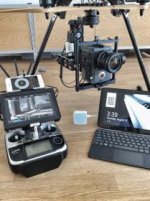
  • image.jpg
    image.jpg
    12.2 KB · Views: 0
  • image.jpg
    image.jpg
    15.9 KB · Views: 0
Last edited:
I am still having issues running this app consistently. I have this small router :
https://www.amazon.com/gp/product/B007PTCFFW/ref=oh_aui_search_detailpage?ie=UTF8&psc=1

The camera's wifi stays green but in order to get the app to work after breaks throughout the day I have to go into wifi on the iPhone, turn it off, join the wifi again then quit the app and reconnect to the Weapon. Weapon FW and app are up to date. It would be great it this app would stay connected without this work around. After using the app for an hour or two sometimes I can't even reconnect to the camera (doesn't show in the scan screen). The router and phone are inches away from the Weapon and there isn't a cage or anything on top of the camera to block the int antennas.

Any one else have this issue?
 
I am still having issues running this app consistently. I have this small router :
https://www.amazon.com/gp/product/B007PTCFFW/ref=oh_aui_search_detailpage?ie=UTF8&psc=1

The camera's wifi stays green but in order to get the app to work after breaks throughout the day I have to go into wifi on the iPhone, turn it off, join the wifi again then quit the app and reconnect to the Weapon. Weapon FW and app are up to date. It would be great it this app would stay connected without this work around. After using the app for an hour or two sometimes I can't even reconnect to the camera (doesn't show in the scan screen). The router and phone are inches away from the Weapon and there isn't a cage or anything on top of the camera to block the int antennas.

Any one else have this issue?

Hello Kenny
I never used that router but a similar one called the 300N.
Sometimes the iPhone will switch to cellular network since wifi has no internet access so it is recommended to enable airplane mode and then only turn wifi on if you have a sim card in your iPad / iPhone.

It could also be an issue with the wifi network channel if you get disconnected if in a busy wifi area. In that case try to change channel on the router itself
(can use an app called wifi scanner on mac to see surrounding networks with their channel and strength).

feel free to email me for further help.
 
yesterday's 2.01 update has a bug affecting camera discovery (only in Ad Hoc mode)
2.02 should appear very soon on the App Store but in the mean time use this workaround :

tap on MANUAL IP and enter : 192.168.100.76

it will find the camera and remember it until 2.02 is out :-)

Sorry for this nasty bug

I downloaded the update for my iPad but it still doesn't connect with the camera in ad hoc mode. I'm elbows deep in trying to update an old computer... that and trying to get a riding lawn mower running... so haven't yet tried the dedicated ip address.

Any tips to why the ad hoc recognition isn't working?
 
I downloaded the update for my iPad but it still doesn't connect with the camera in ad hoc mode. I'm elbows deep in trying to update an old computer... that and trying to get a riding lawn mower running... so haven't yet tried the dedicated ip address.

Any tips to why the ad hoc recognition isn't working?

if you are on iOS and foolcontrol 2.03 Ad hoc mode should work fine. it is maybe some wifi channel interference, did you try choosing another channel than default channel 1 ?

Do email me when you are done with the lawn mover to get this working ;-)
 
if you are on iOS and foolcontrol 2.03 Ad hoc mode should work fine. it is maybe some wifi channel interference, did you try choosing another channel than default channel 1 ?

Do email me when you are done with the lawn mover to get this working ;-)
Mikael, I've got a few minutes while waiting for my mechanically minded neighbor to come over, so I re-tried and failed on both Fool Control and Fool Control R. And yes, I'm on 2.03 and I've tried channel 6 and others as instructed in the help section... still no joy.

i'll email you once my neighbor leaves. Sorry, mechanically minded neighbors who do favors take priority. '-)
 
DPing an Indie feature. I'm using Helix Jr with my Epic with a 24-70 Canon EF and my focus puller has no complains about using Foolcontrol for the job
 
Was just testing the connection with a new Scarlet-W. It's having real trouble staying connected in ad hoc (the app, not the wifi of the iPhone). Bummer, have tried a few different channels, all prone to disconnecting. Will keep experimenting!
 
Was just testing the connection with a new Scarlet-W. It's having real trouble staying connected in ad hoc (the app, not the wifi of the iPhone). Bummer, have tried a few different channels, all prone to disconnecting. Will keep experimenting!

Are you disconecting cellular ?
Best would be to try in infrastructure mode if you are in a busy wifi area. This router is cheap and requires zero setup :
https://www.amazon.com/TP-LINK-TL-WR802N-Wireless-Repeater-300Mbps/dp/B00TQEX8BO
 
Are you disconecting cellular ?
Best would be to try in infrastructure mode if you are in a busy wifi area. This router is cheap and requires zero setup :
https://www.amazon.com/TP-LINK-TL-WR802N-Wireless-Repeater-300Mbps/dp/B00TQEX8BO
Thanks Mikael! Just placed an order for that router and will play around in Airplane mode. Much appreciated. Aside from sorting out the connection, I really love the app. It makes it a lot easier to really tap into the camera's potential.
 
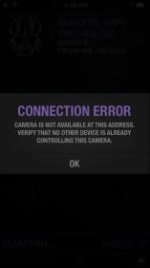
hmm.. not much more luck in infrastructure mode with a router. The Scarlet-W occasionally drops out (every few minutes) and the app gives the dialog: "Connection Error; Camera is not available at this address. Verify that no other device is already controlling this camera." (screen grab attached). Makes me think the camera still thinks it's attached, though control has stopped. Also, the Scarlet-W won't shut down after this error, locks up with the "Shutting Down..." dialog on screen, which is worrisome :/

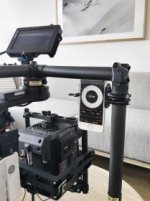
Edit: tested the Raven on the same network and iPhone, bulletproof connection. Something about this Scarlet-W is different. It's rigged up with an outrigger handle and EVF on an arm. Think that much metal above the camera would interfere?
 

Attachments

  • IMG_3363.jpg
    IMG_3363.jpg
    3.9 KB · Views: 0
Last edited:
Hello Matt

The wifi internal antenna is located between the two top fans toward the lens...

Feel free to contact me to test further but you should open a ticket on red.com and send them camera log file for inspection. There is maybe something wrong regarding wifi on that camera.
 
Back
Top