Welcome to our community

Be a part of something great, join today!

  • Hey all, just changed over the backend after 15 years I figured time to give it a bit of an update, its probably gonna be a bit weird for most of you and i am sure there is a few bugs to work out but it should kinda work the same as before... hopefully :)

Focus problems with my Dragon after upgrade

Christoffer Glans

Well-known member
Joined
Jun 11, 2007
Messages
4,993
Reaction score
36
Points
48
Age
42
Location
Stockholm, Sweden
I started a thread in the lens section about my Sigma 35mm not being able to focus properly. Now it seems that's not the case. Since then I've tried the Canon CN-E, and they showed the same thing; a focus that is never really in focus with a horisontal smeared "bokeh" that changes to a vertical "bokeh" when going past the focus point. I took my Dragon to an experienced camera and lens technician at the local rental house and we adjusted the backfocus with his gear. Still the problem continued. We tried both the Canon CN-E primes, the Sigma lens, changed the mount to a PL and tried out the Ultra Primes and it's the same all the time.

Here's the Canon 24-70 and the Sigma 35mm. (In the end is the Sigma and that shows the problem best).
Sigma download

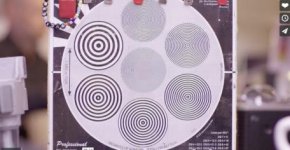
Here's a video from when we did tests at the rental house. First one is a Canon CN-E and second is an Ultra Prime. Last one is Canon CN-E 85mm outside, the red highlight in the window shows the strange smearing of the focus when pulling focus.
CN-E and Ultra Prime test download
(Download takes a few sec to start)

EDIT:
Uploaded the one I shot with the technician to Vimeo.
https://vimeo.com/141118180
Password: sharp

Has anyone encountered this? I've sent word to my rep at Red London, so I'm hoping I get som info there, but this is serious if this went through QC when I upgraded to Dragon. It's visible on full images as making the bokeh close to the sharp plane look smeared and ugly.
 
I started a thread in the lens section about my Sigma 35mm not being able to focus properly. Now it seems that's not the case. Since then I've tried the Canon CN-E, and they showed the same thing; a focus that is never really in focus with a horisontal smeared "bokeh" that changes to a vertical "bokeh" when going past the focus point.

If you've played with Canon T-S lenses, you know that the horitzontal->vertical bokeh is a characteristic of a tilt. My guess is that either your sensor or your lens mount, or both, are adding tilt where you don't want it.
 
If you've played with Canon T-S lenses, you know that the horitzontal->vertical bokeh is a characteristic of a tilt. My guess is that either your sensor or your lens mount, or both, are adding tilt where you don't want it.

Exactly my theory also. Because we changed mounts and got the same result, it must be the sensor. Or could it be something with the OLPF? I haven't touched it or changed it. It has been the STH since I got the camera back from the upgrade.
 
Exactly my theory also. Because we changed mounts and got the same result, it must be the sensor. Or could it be something with the OLPF? I haven't touched it or changed it. It has been the STH since I got the camera back from the upgrade.

You could take the OLPF out completely and eliminate that factor from the equation. It would obviously throw off color and you'd need to readjust back focus, but if the tilt remains, it's not the OLPF.
 
As the OLFP is a flat glass with no power it will have NO effect on any optical aberration- tilted or not
 
Then, this is a sensor issue then, if it's not the mount, not the lenses and not the OLPF, then the only thing left is that Red mounted the Dragon sensor wrong or off. Can't think of anything other than this.
 
Can you upload this video to Vimeo with a download link or Dropbox? Both zips came in as corrupt for me. There's a few things it can be.
 
Just do a magnified export of the effected area.

I did.
Uploaded the one I shot with the technician to Vimeo.
https://vimeo.com/141118180
Password: sharp


It's not "an effected area", it's the entire image. The focus plane never gets into focus and has a smeared bokeh close to it, different directions based on if it's bokeh past the point of focus or before it. On larger images it looks like details are smeared. A "circular detail" in the image will scew and smear either horizontally or vertically instead of just "blooming" out of focus.
 
I did.
Uploaded the one I shot with the technician to Vimeo.
https://vimeo.com/141118180
Password: sharp


It's not "an effected area", it's the entire image. The focus plane never gets into focus and has a smeared bokeh close to it, different directions based on if it's bokeh past the point of focus or before it. On larger images it looks like details are smeared. A "circular detail" in the image will scew and smear either horizontally or vertically instead of just "blooming" out of focus.

Did that technician mention words like "coma, astigmatism, or spherical aberrations"? Center frame it appears to be doing what I would expect for the given lenses. I'm assuming this was wide open for all of these? Did you test T4 or T5?
 
Did that technician mention words like "coma, astigmatism, or spherical aberrations"? Center frame it appears to be doing what I would expect for the given lenses. I'm assuming this was wide open for all of these? Did you test T4 or T5?

Tested on both T4.0 and on wide open for Sigma, Canon stills, Canon CN-Es, Ultra Primes. All look the same on this issue. The technician has over 40 years experience with film, digital and lenses and he was surprised that we couldn't get things into focus. At T4.0 the Ultra Primes should be dead sharp, but nope. And yes, the backfocus was calibrated with a collimator so that wasn't the issue.
The video shows center frame, the text on the chart is as much in center as the rest of chart since it's a 1920x1080 crop of the center. Same goes for the last image which is a 1920x1080 crop of the center.

Thing is that all lenses behave the same, it's not the lens characteristics since I can't see the same thing on another camera using the same lens.
 
Any news Christoffer?

My rep has quit Red so I'm getting a new rep right now. Technicians are looking into the issue as I write this so I'm waiting on word based on all the info and files I provided here.
There's no question that there's something wrong though. Cropped in you see the problem, but on full images the thing you notice is that the bokeh and focus looks smeared and weird all over. Nothing is uniform, every detail has an angle to it.
If Red don't see a problem here I'm gonna be very surprised.
 
So I received my camera back from Red London and nothing has been resolved. I didn't even get an explanation on why focusing behaves like this. I'm gonna compare to another Dragon and see if I can replicate the issue, if so I will be very pissed off by the waste of time sending in my camera without getting any explanation at all. I only got info that they had calibrated everything, but backfocus and such things I can do myself, don't need to send my camera away for a week... not sure what they've done really.

If anyone could try out the same thing, wide open good lens at around F1.4 - F1.9 and enhance the image to see if the focus behaves the same with the same vertical and horizontal smearing of details when going in and out of focus. All lenses I've tried behaves the same. Stills to Ultras, doesn't matter.
 
What was the issue? whats not sharp?

From looking at the video I think it looks quite ordinary when sliding the playhead back and forth trough the focus pull. Or what am I missing?

https://vimeo.com/142486235


Are you referring to the "none perfect linearity" of the DOF blur? Well I think that comes with a lens, it´s round and it´s not uniform across a picture like a digital defocus or such. So yes it smears things around... like a lens does, no?


Then to me your chart goes in focus when it´s in focus, hard to see on the vimeo feed but looks sharp to me, minus the normal olpf fog.

What was the camera you compared to and how was that done. HD center crop of dragon is a very different thing than a HD crop from... any other video camera. Smaller part of the projection circle is in use as the pixel array is more dense and so on. Comparing to another dragon would be the first thing to do. If you think what you see is that your camera is a bad seed.
 

Attachments

  • PastedGraphic-6.jpg
    PastedGraphic-6.jpg
    21.2 KB · Views: 0
This is not about a lens character that makes it "non-linear across an image". This has been brought up before and it's not the issue. The issue, which is the same on all lenses tested, be it Ultra Primes, Canon CN-E or still lenses is that the focus is never really in focus, especially at infinity, even with a properly adjusted back focus. The focus, across the entire image, experience the same kind of phenomenon; the details all smears in either a horizontal skewing or a vertical skewing when focusing past and before a certain focus point (detail/subject).

What this means is that the focus close to the sharp focus plane looks skewed and smeared. It looks like a faulty lens on all lenses and the image is unpleasant to look at in my opinion.
It's like it never really focuses correctly and details feel stretched. I'm not sure why no one notice this on the videos. Look at the last part of the video on vimeo. Look at the details in the image, everything smears and skews awfully. Can this really go through Reds technical team without anyone noticing?

Here's a video I just shot with an 85mm. It's a center crop, 1920x1080 of a 6K FF footage. First is F2.0, second is F4.0 and last is F1.8. I know that lenses are soft wide open, but I have not seen this on any other camera before. I will do a detailed comparison with another Dragon to look into this. If that Dragon doesn't show the same characteristics, I will need to take this a serious step further.
When testing lenses at T4.0 most should look good without these kinds of smearing/skewing, especially Ultra Primes. So I think it's unacceptable that this is the quality I get out of my camera.

http://www.constantproduction.se/Clients/test_2.mov

Horizontal skew
image2.png


Vertical skew
image1.png
 
So I think it's unacceptable that this is the quality I get out of my camera.

Optics. Spherical based aberrations at that.

High Resolution = High Magnification or potential artifacts. Astigmatism, the slightest astigmatism in these cases, will create what you are seeing. The color effect to the fringing you see outside of the letters is due to chromatic aberrations.

http://toothwalker.org/optics/astigmatism.html

I am very familiar with the lenses tested and in the case of the Ultra Primes have tested those on film even. I believe what you are seeing is normal. You likely haven't noticed it prior to this moment for one reason or another. You will notice the effect on MX and all other cameras in my experience, though some aren't so high resolution to "magnify" the effect.

What you are blaming on the camera is an optical phenomena and known type artifact, it's rather expected behavior. After seeing your sample clip, it's exactly what it's showing.
 
Do you see it in this image, small iris / closed lens:

http://we.tl/sBJ30e2xqt


or this open lens:

http://we.tl/CMSgrfAYJb

Nope, but it's hard to see on stills, especially when their closed down much.

Optics. Spherical based aberrations at that.

High Resolution = High Magnification or potential artifacts. Astigmatism, the slightest astigmatism in these cases, will create what you are seeing. The color effect to the fringing you see outside of the letters is due to chromatic aberrations.

http://toothwalker.org/optics/astigmatism.html

I am very familiar with the lenses tested and in the case of the Ultra Primes have tested those on film even. I believe what you are seeing is normal. You likely haven't noticed it prior to this moment for one reason or another. You will notice the effect on MX and all other cameras in my experience, though some aren't so high resolution to "magnify" the effect.

What you are blaming on the camera is an optical phenomena and known type artifact, it's rather expected behavior. After seeing your sample clip, it's exactly what it's showing.

I'm gonna check together with another Dragon when I have the ability to do it, but I do not see this on the footage from the time my camera was an Epic. Thing is that I don't have to crop 100% on details to see it. I see it in these images clearly as the slightly out of focused area looks smeared instead of just unfocused. I see it on short DOF just as the bokeh goes into sharpness. It distorts the bokeh in ways I
haven't seen before on other cameras.


(open images in new window and zoom in)
Dark haired girls face doesn't have uniform bokeh
unsharp1.png

Boys face is slightly out of focus and has the same non-uniform characteristics
unsharp2.png
 
I noticed that unpleasant feeling on my scarlet D since day one. Like some directional blur/out of focus. I never noticed it on MX. My thought was what Phil said, that suddenly 5k was magnifying the lenses characteristics. But sometimes it's really strong and more than once I wondered if something was wrong with my camera.
I read your thread and decided to look more closely at my camera behavior. My bokeh is also "turning" sometimes, like an oval directed bottom left to top right before the focus point and bottom right to top left when passing the focus point. But when I tried on the BMPCC with the same lenses it was almost the same. But not as strong. I went to some old MX footages too and noticed a few moments with unpleasant bokeh that I never noticed before. But again not as strong. I focus too much on it maybe. The zeiss contax are fuzzier than canon. I'm almost sure it's lenses but there is still that super small feeling that something is wrong. For my part it's probably because o went from 4k to 5k. I guess it's more weird for you Christoffer, as you already had experience with 5k.
 
Back
Top