Welcome to our community

Be a part of something great, join today!

  • Hey all, just changed over the backend after 15 years I figured time to give it a bit of an update, its probably gonna be a bit weird for most of you and i am sure there is a few bugs to work out but it should kinda work the same as before... hopefully :)

FCPX The Good, The Bad, The Ugly

I don't care about a few years ago, tell me about NOW, no bullshit, no fluff. Just facts.

Still waiting for those facts too. I can't understand people wasting so much energy hating something they obviously don't understand.
 
Media preparation is not editing. Motion graphics are not editing. Grading is not editing.

Editing is rhythm, context, flow, relations, motion, order, constant comparison, consideration, reviewing, checking details, references and outcomes...none of which can be done as intuitively, practically and efficiently with this stripped/then compensated approach as it can be done with a normal approach. There are tons of things one can do on a normal timeline, used by all serious video and audio editing tools.

Muting, solo, movable. Open, comprehensive, unconditioned, customizable timeline.
This empowers the editor through most usable temporal canvas and most comprehensive insight and media manipulation abilities possible on a digital 2D plane.

Sorry Hrvoje, although I enjoy reading your posts, I get why a lot of people ask for a 'no bullshit' response of why FCPX wouldn't work.
You use a lot of difficult words, but you are not saying a lot of concrete stuff (with all due respect)

'media manipulation abilities possible on a digital 2D plane' ??
What is not 2D about FCPX? Did I miss something about a 3D mode in FCPX where I put stuff in depth or something?
And if we are talking about media manipulation being more possible on a non-magnetic tracked timeline instead of a trackless magnetic timeline: what do you mean with media manipulation? Extending a clip? Shortening it? In FCP 7 I need to check first if there is nothing in the way. Check how many tracks my clip has, and how many the next clip and/or the previous one has and on which tracks I put them. Check if nothing gets out of sync later on the line. In FCPX? I just extend or shorten.
(the only exception would be music that you put on the beginning of your timeline and runs trough the rest of the edit. Although this is the same in FCP7, of course)

FCPX has a second viewer. The Event Browser viewer. It's not the same as the old viewer in other NLE's. I can imagine for some editing operations it being somewhat more difficult. Although, you get used to the skimmer and how quickly it changes between your shot in the Browser and your Timeline very quickly. So much that once Apple put in back the second viewer (the Event viewer?) I tried it, and discovered I didn't need it and it got in my way. Your mileage may vary of course.

Organising not part of the editing process? I would respectfully disagree. Editing is also choosing which take to use and which one not to use. FCPX organisation skills (with favorites, keyword ranges, etc. ) make that easier. In a world where people shoot digital and shoot MORE footage than ever before, FINDING the right take back, is also very important for your EDITING decision.

The 'normal' way of editing... That's just point of view. Simply: I grew up and used track-based NLE's (Premiere, FCP 7) for 5-10 years before I used FCPX. So, yes, in the beginning I had some difficulties adjusting to this trackless method. Now? I get behind my program and edit. When I have to use FCP7 again, I kind of wonder why it doesn't work as fast and as intuivitive as FCP7. That's my new normal. It's like starting from a blackberry with buttons and going to a touch screen for your phone. Your thumbs needed to adjust, but here we are.

An open customisable timeline? What is open about a clip colission? What is customisable about NEEDING to chose how many tracks to put available because you have 4 empty audio tracks on a clip with 8 tracks in total? And you need to put all 8 of them on a timeline, or if you choose the 'right' tracks, and you miss, adjusting it can be a pain in the but of Match Frame, moving up back tracks, etc. ... ? In FCPX, I 'just' extend the tracks audio. I just choose, afterwards or before or during, which audio channels I want to hear and use, without it getting in the way of putting clips on the timeline in the first place or extending a track.

And you know about the Roles feature, right? You know... The with one click seeing where Music and Dialogue clips are (if you organised them well) ? With a couple of clicks in the Timeline Index seeing only Video and no Titles or no sound effects?
I think Roles could get better with color coding and with some extra features of automatic vertical organisation, sure. But it's a genius concept. Why do you need tracks in a timeline? For visual organisation. If you can do it with tags instead of tracks, of which the latter can get in your way during the basic act of PUTTING clips in a timeline... why would you choose tracks? I get that they are handy in a mixing environment, and I hope Apple brings us a Role-based mixer. But according to you, mixing shouldn't be talked about anyway because it has nothing to do with editing.
Everyone grew up with tracks, because that was the only visual analogy we had. It's like still using the symbol for a floppy disk for a 'save as' feature.

Your rally against FCPX seems purely theoretical.
 
Sorry Hrvoje, although I enjoy reading your posts, I get why a lot of people ask for a 'no bullshit' response of why FCPX wouldn't work.
You use a lot of difficult words, but you are not saying a lot of concrete stuff (with all due respect)

'media manipulation abilities possible on a digital 2D plane' ??
What is not 2D about FCPX? Did I miss something about a 3D mode in FCPX where I put stuff in depth or something?
And if we are talking about media manipulation being more possible on a non-magnetic tracked timeline instead of a trackless magnetic timeline: what do you mean with media manipulation? Extending a clip? Shortening it? In FCP 7 I need to check first if there is nothing in the way. Check how many tracks my clip has, and how many the next clip and/or the previous one has and on which tracks I put them. Check if nothing gets out of sync later on the line. In FCPX? I just extend or shorten.
(the only exception would be music that you put on the beginning of your timeline and runs trough the rest of the edit. Although this is the same in FCP7, of course)

FCPX has a second viewer. The Event Browser viewer. It's not the same as the old viewer in other NLE's. I can imagine for some editing operations it being somewhat more difficult. Although, you get used to the skimmer and how quickly it changes between your shot in the Browser and your Timeline very quickly. So much that once Apple put in back the second viewer (the Event viewer?) I tried it, and discovered I didn't need it and it got in my way. Your mileage may vary of course.

Organising not part of the editing process? I would respectfully disagree. Editing is also choosing which take to use and which one not to use. FCPX organisation skills (with favorites, keyword ranges, etc. ) make that easier. In a world where people shoot digital and shoot MORE footage than ever before, FINDING the right take back, is also very important for your EDITING decision.

The 'normal' way of editing... That's just point of view. Simply: I grew up and used track-based NLE's (Premiere, FCP 7) for 5-10 years before I used FCPX. So, yes, in the beginning I had some difficulties adjusting to this trackless method. Now? I get behind my program and edit. When I have to use FCP7 again, I kind of wonder why it doesn't work as fast and as intuivitive as FCP7. That's my new normal. It's like starting from a blackberry with buttons and going to a touch screen for your phone. Your thumbs needed to adjust, but here we are.

An open customisable timeline? What is open about a clip colission? What is customisable about NEEDING to chose how many tracks to put available because you have 4 empty audio tracks on a clip with 8 tracks in total? And you need to put all 8 of them on a timeline, or if you choose the 'right' tracks, and you miss, adjusting it can be a pain in the but of Match Frame, moving up back tracks, etc. ... ? In FCPX, I 'just' extend the tracks audio. I just choose, afterwards or before or during, which audio channels I want to hear and use, without it getting in the way of putting clips on the timeline in the first place or extending a track.

And you know about the Roles feature, right? You know... The with one click seeing where Music and Dialogue clips are (if you organised them well) ? With a couple of clicks in the Timeline Index seeing only Video and no Titles or no sound effects?
I think Roles could get better with color coding and with some extra features of automatic vertical organisation, sure. But it's a genius concept. Why do you need tracks in a timeline? For visual organisation. If you can do it with tags instead of tracks, of which the latter can get in your way during the basic act of PUTTING clips in a timeline... why would you choose tracks? I get that they are handy in a mixing environment, and I hope Apple brings us a Role-based mixer. But according to you, mixing shouldn't be talked about anyway because it has nothing to do with editing.
Everyone grew up with tracks, because that was the only visual analogy we had. It's like still using the symbol for a floppy disk for a 'save as' feature.

Your rally against FCPX seems purely theoretical.

+1 .... well said mate!! you hit in right on the nail. Purely theoretical, bias and antiquated (for lack of better words).

I can invite any experience premiere / fcp7 editor to challenge me in fcpx editing the same project , and i guarantee i'll finish in half the time... guaranteed! (i've done these test before with colleagues... right before they all converted to fcpx ;) )
 
+1 .... well said mate!! you hit in right on the nail. Purely theoretical, bias and antiquated (for lack of better words).

I can invite any experience premiere / fcp7 editor to challenge me in fcpx editing the same project , and i guarantee i'll finish in half the time... guaranteed! (i've done these test before with colleagues... right before they all converted to fcpx ;) )

To be fair, speed isn't the only or even the best metric for evaluating an editing platform. Faster isn't typically better... Unless we are talking about missed deadlines. ;-)
 
Sorry Hrvoje, although I enjoy reading your posts, I get why a lot of people ask for a 'no bullshit' response of why FCPX wouldn't work.


Your rally against FCPX seems purely theoretical.

Understandable.

Interesting how it doesn't seem theoretical to most of my colleagues making sour faces when FCPx is mentioned and the guy sitting next to me on Nuendo finishing a feature sound mix.
Who knows, perhaps we're all insane over here or too intellectually challenged and/or have a fixation on 14 hr working days, or we are actually masochists and prefer doing it all the harder way, and Apple got an epiphany between iPhone versions, with same premise Super Ultra Director 15 years ago had. We are currently on 354 audio tracks so I'm waiting for an Apple sales rep to attempt re-wiring our brains and show us how it's really done.

I'll try to find the time for more specifics but considering the Kool Aid effect it currently seems as an exercise in futility.
 
Sorry Hrvoje, although I enjoy reading your posts, I get why a lot of people ask for a 'no bullshit' response of why FCPX wouldn't work.
You use a lot of difficult words, but you are not saying a lot of concrete stuff (with all due respect)

'media manipulation abilities possible on a digital 2D plane' ??
What is not 2D about FCPX? Did I miss something about a 3D mode in FCPX where I put stuff in depth or something?
And if we are talking about media manipulation being more possible on a non-magnetic tracked timeline instead of a trackless magnetic timeline: what do you mean with media manipulation? Extending a clip? Shortening it? In FCP 7 I need to check first if there is nothing in the way. Check how many tracks my clip has, and how many the next clip and/or the previous one has and on which tracks I put them. Check if nothing gets out of sync later on the line. In FCPX? I just extend or shorten.
(the only exception would be music that you put on the beginning of your timeline and runs trough the rest of the edit. Although this is the same in FCP7, of course)

FCPX has a second viewer. The Event Browser viewer. It's not the same as the old viewer in other NLE's. I can imagine for some editing operations it being somewhat more difficult. Although, you get used to the skimmer and how quickly it changes between your shot in the Browser and your Timeline very quickly. So much that once Apple put in back the second viewer (the Event viewer?) I tried it, and discovered I didn't need it and it got in my way. Your mileage may vary of course.

Organising not part of the editing process? I would respectfully disagree. Editing is also choosing which take to use and which one not to use. FCPX organisation skills (with favorites, keyword ranges, etc. ) make that easier. In a world where people shoot digital and shoot MORE footage than ever before, FINDING the right take back, is also very important for your EDITING decision.

The 'normal' way of editing... That's just point of view. Simply: I grew up and used track-based NLE's (Premiere, FCP 7) for 5-10 years before I used FCPX. So, yes, in the beginning I had some difficulties adjusting to this trackless method. Now? I get behind my program and edit. When I have to use FCP7 again, I kind of wonder why it doesn't work as fast and as intuivitive as FCP7. That's my new normal. It's like starting from a blackberry with buttons and going to a touch screen for your phone. Your thumbs needed to adjust, but here we are.

An open customisable timeline? What is open about a clip colission? What is customisable about NEEDING to chose how many tracks to put available because you have 4 empty audio tracks on a clip with 8 tracks in total? And you need to put all 8 of them on a timeline, or if you choose the 'right' tracks, and you miss, adjusting it can be a pain in the but of Match Frame, moving up back tracks, etc. ... ? In FCPX, I 'just' extend the tracks audio. I just choose, afterwards or before or during, which audio channels I want to hear and use, without it getting in the way of putting clips on the timeline in the first place or extending a track.

And you know about the Roles feature, right? You know... The with one click seeing where Music and Dialogue clips are (if you organised them well) ? With a couple of clicks in the Timeline Index seeing only Video and no Titles or no sound effects?
I think Roles could get better with color coding and with some extra features of automatic vertical organisation, sure. But it's a genius concept. Why do you need tracks in a timeline? For visual organisation. If you can do it with tags instead of tracks, of which the latter can get in your way during the basic act of PUTTING clips in a timeline... why would you choose tracks? I get that they are handy in a mixing environment, and I hope Apple brings us a Role-based mixer. But according to you, mixing shouldn't be talked about anyway because it has nothing to do with editing.
Everyone grew up with tracks, because that was the only visual analogy we had. It's like still using the symbol for a floppy disk for a 'save as' feature.

Your rally against FCPX seems purely theoretical.

This seems about as well said as it can be.
 
Sorry Hrvoje, although I enjoy reading your posts, I get why a lot of people ask for a 'no bullshit' response of why FCPX wouldn't work.

Thank you for the courtesy lacking with some and the effort invested in writing this.

There is no bullshit but the one some project themselves.

You use a lot of difficult words, but you are not saying a lot of concrete stuff (with all due respect)

That is because concrete stuff takes time.

'media manipulation abilities possible on a digital 2D plane' ??
What is not 2D about FCPX? Did I miss something about a 3D mode in FCPX where I put stuff in depth or something?

No, you missed the fact that on a normal timeline you can organize and manipulate content in any way you want, meaning the edit itself and separate clips or groups somewhere on the side for comparing/rearranging/to use later on that place if needed/ for a reference/whatever...so every part of the timeline surface is immediately usable for something, and in FCPx all around a base track is directly unusable empty space dependent on a main track.

And if we are talking about media manipulation being more possible on a non-magnetic tracked timeline instead of a trackless magnetic timeline: what do you mean with media manipulation?

Treating clips as independent items on independent tracks with unlimited temporal canvas which can also be used as a visual map and temporary storage place near the related group or as a mini timeline within a timeline for independent sequences to be used where ever one wants.

Extending a clip? Shortening it? In FCP 7 I need to check first if there is nothing in the way.

Check how many tracks my clip has, and how many the next clip and/or the previous one has and on which tracks I put them. Check if nothing gets out of sync later on the line. In FCPX? I just extend or shorten.

You have a tool which moves all the clips on the timeline or just one track. Or you can use an empty track under or above the main edit and test clip there while everything else stays put and you don't have to worry about the sync at all. It all depends on how you use the timeline. You can use it in tons of ways.

This way you can use it as someone else chose it for you so you have to use other tools to compensate for limitation of the main thing.

Organising not part of the editing process? I would respectfully disagree. Editing is also choosing which take to use and which one not to use. FCPX organisation skills (with favorites, keyword ranges, etc. ) make that easier. In a world where people shoot digital and shoot MORE footage than ever before, FINDING the right take back, is also very important for your EDITING decision.

Organizing is a preparation part. Not the editing part.

If you organize clips in bins wisely in FCP7, tagging is unnecessary unless you are doing something with a huge data base. Your brain remembers images more efficiently and recollects them faster than you can type.

Of course in FCPx someone got another epiphany and decided that typical project media bins are bad for you, so tag away.

I'll be sure to consider that route the next time I put chosen trimmed clips from the timeline to a new bin to put where ever I choose to later.

The 'normal' way of editing... That's just point of view. Simply: I grew up and used track-based NLE's (Premiere, FCP 7) for 5-10 years before I used FCPX. So, yes, in the beginning I had some difficulties adjusting to this trackless method. Now? I get behind my program and edit. When I have to use FCP7 again, I kind of wonder why it doesn't work as fast and as intuivitive as FCP7. That's my new normal. It's like starting from a blackberry with buttons and going to a touch screen for your phone. Your thumbs needed to adjust, but here we are.

That sounds good.

I saw some ten thousand points of view resembling the one I mentioned signing the petition.

Small bunch compared to iPhone sales though.

An open customisable timeline? What is open about a clip colission?

The ability to avoid clip collission by clearing out the timeline.

What is customisable about NEEDING to chose how many tracks to put available because you have 4 empty audio tracks on a clip with 8 tracks in total?

You open more tracks on the timeline.

And you need to put all 8 of them on a timeline, or if you choose the 'right' tracks, and you miss, adjusting it can be a pain

Then you learn and you don't miss later.

While keeping the freedom to edit in any way you want, or the project requires.

And you know about the Roles feature, right? You know... The with one click seeing where Music and Dialogue clips are (if you organised them well) ? With a couple of clicks in the Timeline Index seeing only Video and no Titles or no sound effects?
I think Roles could get better with color coding and with some extra features of automatic vertical organisation, sure. But it's a genius concept.

Roles are cool.
They would be even cooler on a normal timeline.

Why do you need tracks in a timeline?

Because that way you can:

a) organize the timeline based on any factor you choose - take/version/location/actor/singer/efx/graphics etc

b) perceive the exact element of the edit as fast and intuitive as possible

c) manipulate just the selected tracks as you wish

d) go back and forth with post, export just that track, replace just that track with least mental effort possible and least re-checking required

e) use empty tracks as visual dividers

f) use muting tracks to compare and check edit versions in multiple ways & to show to the client multiple versions while able to immediately re-edit each one with least amount of mental effort

g) use another track to relocate these clips there to that place there and arrange them this or that way prior to that, while all others stay intact

h) play a short sequence test in the middle of a main sequence

i) preview simple compositing by combining tracks

j) play a solo track to check just one element edited

k) play few tracks together to see how few elements breathe edited together while you are waiting for other elements worked on in post

l) perceive detailed content relations based on the chosen logic of populating tracks

...all in the same timeline window, without needing to hop anywhere and waste time, reduce focus from the main content and stuff your memory with another visual map.

For visual organisation. If you can do it with tags instead of tracks, of which the latter can get in your way during the basic act of PUTTING clips in a timeline... why would you choose tracks?

Because:

a) Tracks are a reference which your mind can use in multiple ways

b) With tracks you use visual navigation and immediate and constant reference and with tags you use descriptive, textual and momentary one. If I tell you "left-right- third left-left-second right-then straight ahead until you see a white building then left - than right-then left" your brain has to process that into visual information, if I give you a picture from above you immediately see the whole picture and where what is.

c) You are editing visual content so textual/descriptive reference in between is additional mental step in accessing data.

d) You need to type instead of think, visualize and edit

e) Words are inferior to imagery. One comprehensive picture makes a thousand tags redundant.

+

f) Visual memory and perceptive abilities are a prerequisite for proper editing. Those who are lacking them fiddle.
They evolve with editing mileage. Very important faculties for crafting visual content.

g) By relying on algorithms to handle visual content and compensate for lack of developed visualisation and perceptive abilities, nothing gets developed in the mind but typing skill and the patience for tagging.
Those are not prerequisite skills for a proper editor.
 
Steve, I am sorry this has become such a waste of time. FCPX is a rethink. If you don't want to rethink, that's cool for now. But history is full of those who resisted change and we know how they look now. There used to be a blacksmith shop on every corner....but not now....for obvious reasons.
 
The only thing discouraging me personally from spending precious time learning FCPx is Apple's overall migration away from the pro community over the past decade and the resulting sorry state of their pro hardware. It means nothing to their bottom line, could one blame them for just deciding it is no longer worth the effort?
 
The only thing discouraging me personally from spending precious time learning FCPx is Apple's overall migration away from the pro community over the past decade and the resulting sorry state of their pro hardware. It means nothing to their bottom line, could one blame them for just deciding it is no longer worth the effort?

You think the New Mac Pro is a migration away from Pro Market? If you put some time in to FCPX, you won't be disappointed. Funny we are arguing this here on REDUSER. The rest of the world has already gotten over it. There is no question. They screwed up. FOUR YEARS AGO. Fixed now. Really. Believe me, it is the wave of the future, no matter what some people in Croatia think. Just saying.
 
Change and evolution s inevitable ... That's a universal rule of life.

To all the fcpx doubters and haters ... I'll simply say This...

"Everyone that hat has ever taken the time to learn fcpx (meaning complete an entire projects from start to finish , learning as you go .... ) .... They all unanimously Never looks back"

Let that sink in for a bit .....

That statement alone says it all. The software , once learned , is superior.
So In theory , I have every reason to believe that the more people that actually "give fcpx a proper try" ..... The more converts and advocates that will emerge .

It's that simple ....
Change is inevitable
 
Never tried fcx on other than small projects, and on those it so much faster imho.
If you have 354 audio tracks it might not. We are doing an 8 episode broadcast documentary series now and this will be the first big project we will use fcx.
 
I can't understand people wasting so much energy hating something they obviously don't understand.


Steve, I am sorry this has become such a waste of time. FCPX is a rethink. If you don't want to rethink, that's cool for now. But history is full of those who resisted change and we know how they look now. There used to be a blacksmith shop on every corner....but not now....for obvious reasons.


You think the New Mac Pro is a migration away from Pro Market? If you put some time in to FCPX, you won't be disappointed. Funny we are arguing this here on REDUSER. The rest of the world has already gotten over it. There is no question. They screwed up. FOUR YEARS AGO. Fixed now. Really. Believe me, it is the wave of the future, no matter what some people in Croatia think. Just saying.


Interesting.


Let's see...

1) Recites seller PR rethoric
2) Uses projection and strawman fallacies
3) Ignores what was said
4) Stoops to nationality based prejudice
5) Is obviously clueless about the matters being addressed
6) Fails to see the purpose of addressing the "ugly" on a topic with "good, bad & ugly" in the headline


Bye bye, Scot.

Have a nice day.
 
guys, keep this thread productive. Try to not make it personal. It's okay to agree to disagree.

In the case of sound, that's where I'm still trying to figure things out. Having worked a particular way with sound editing in track based editors, including Pro Tools I'm looking for the best ways to approach sound editing and design in FCPX. Once again, I have to keep an open mind about it because years of working the same way are hard to put aside.
 
Having worked a particular way with sound editing in track based editors, including Pro Tools I'm looking for the best ways to approach sound editing and design in FCPX.

Sound design has no place in any video editor. Not even close.

As far as sound editing goes, if you are doing the edit, after you do the rough edit I suggest exporting the sound files for a proper Protools/Nuendo work.
They have to be checked more thoroughly and if necessary alligned more precisely. Also, they have to be separated for a proper mix.
 
I guess people should just try and see if it suits them. I hated FCPX when it was released. Then I came back to it years after and I loved it. This summer I gave Resolve a try to edit and I love it even more. It's fast and easy. Going back and forth to the color tools is great. And it's evolving fast.
I don't trust Apple anymore. Their spirit is gone, everything can change depending on what will bring them money. And iphones are bringing more money than pros. Probably there will be a new FCPX called whatever in the future, I will be charged the same price for my upgrade as the full price, and they will tell us that magnetic timeline is something from the past and introduce some new tricks. Or maybe they will just abandon FCP because they can make more money selling toilet paper.
Anyway I love their computers.
 
I guess people should just try and see if it suits them. I hated FCPX when it was released. Then I came back to it years after and I loved it. This summer I gave Resolve a try to edit and I love it even more. It's fast and easy. Going back and forth to the color tools is great. And it's evolving fast.
I don't trust Apple anymore. Their spirit is gone, everything can change depending on what will bring them money. And iphones are bringing more money than pros. Probably there will be a new FCPX called whatever in the future, I will be charged the same price for my upgrade as the full price, and they will tell us that magnetic timeline is something from the past and introduce some new tricks. Or maybe they will just abandon FCP because they can make more money selling toilet paper.
Anyway I love their computers
.

Whenever I read stuff like this I just don't know what to think, it's like people are nostalgic for an Apple that never existed, iPhones are popular but so what? Before that it was iPods and before that it was something else that doesn't mean that they have abandoned the professional and blah blah for money etc.
Apple could have just made a minor revamp of Final Cut Pro slapped it on the App store and left it at that but they didn't, they rewrote the app from the ground up to make it faster and do something that no one else had the balls to do which is rethink editing, that's not marketing BS it was the goal of whats his face who ran the Final Cut devision before he retired recently then they launched it for a low price and have been updating it free of charge ever since.

People rolled their eyes at the new Mac Pro too but people love the thing, I haven't got one myself but I just don't have the money for it.

You don't trust Apple? To What!? They're probably actually better then they used to be and spirit? What spirit? They still have the same "spirit" I've always seen in them in that they want to make great stuff.
 
POST 1/3

Because that way you can:

a) organize the timeline based on any factor you choose - take/version/location/actor/singer/efx/graphics etc

b) perceive the exact element of the edit as fast and intuitive as possible

c) manipulate just the selected tracks as you wish

d) go back and forth with post, export just that track, replace just that track with least mental effort possible and least re-checking required

e) use empty tracks as visual dividers

f) use muting tracks to compare and check edit versions in multiple ways & to show to the client multiple versions while able to immediately re-edit each one with least amount of mental effort

g) use another track to relocate these clips there to that place there and arrange them this or that way prior to that, while all others stay intact

h) play a short sequence test in the middle of a main sequence

i) preview simple compositing by combining tracks

j) play a solo track to check just one element edited

k) play few tracks together to see how few elements breathe edited together while you are waiting for other elements worked on in post

l) perceive detailed content relations based on the chosen logic of populating tracks

A lot of work you are talking about: putting it on a timeline for later use, is what you do in the browser now. A lot of people used to make random timelines with stuff they wanted to use later. I notice that with FCPX, with all the organisation tools, you do a lot more work up front with favorites, and keywords, that are all searchable btw (on a normal timeline, it isn't!) and you find that 'piece' you were looking for. Instead of making a timeline with the bits you want to use, you do all that stuff in the browser because you finally have the tools for it.
And if you want to try out stuff already, you could make compound clips or put stuff later in the timeline connected to a custom generator.
It's just a way of working, and I don't see FCPX any less capable here then another NLE.

Again, compound clips are a great way of working with a group of clips. I do this a lot. Test something in a compound, adjust it, re-use it, put it wherever I want in a timeline, break it apart if I think it's better, etc. ...
Because of the primary/connected clip way of working, stuff is also already grouped in a way. If you don't want that, just work with connected clips attached to an empty clips or a generator.

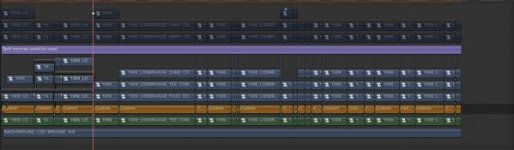
Using an empty track to visually sort stuff is not a bad idea, in fact, I did the same thing this week in FCPX ;-) I just put 1 second gap in the beginning of the timeline, and I can connect all kinds of stuff there. I connected an empty non-active title on it, and used it to seperate clips that I didn't need (but that the customer could ask to be activated later, and they had to be in sync) with the ones that I was working on. I put a screenshot of it, in attachment.

The thing is: when you talk about a tracked NLE, you say you can use the timeline in a ton of ways. But you have to be aware of the limitations.
FCPX is not different. You can have a lot of different ways of using the timeline, but you have to be aware of how it works.
In my experience, the timeline gets a LOT less in your way during the creative editing process of testing where clips need to go, test the order of shots, see if it works better when you make a clip longer, etc....

In FCP 7 tagging is unnecessary? You had just a couple of labels to put on clips. That was it. I had to put them in one folder.
If you want to work with folders in FCPX it's ALMOST the same. You make a hierarchy of folders, and put in keyword collections in it. Bam. In those keyword collections you have your clips like you would have in a folder. You can even have FCPX make it automatically when you drag in folders (it has some differences though, a keyword collection cannot be IN another keyword collection, so you have to resort to folders).
If we are talking about the brain remembering an image more then typing, you should love FCPX. With all the thumbnails, the updating of thumbnails, the skimming you all have. It's much more visual then FCP 7.

A good friend/collegua of mine is editing his long feature documentary on X. A good example of why keyword work so much better. He's making a documentary about a village, troughout the seasons, with all it's inhabitants. Let's say he makes a timelapse. With bins, he would have to CHOOSE to put that timelapse in a folder Timelapses... Or the shooting day (and remember that if he searches for a timelapse, he should remember on which day he shot it). Or he should put it in a folder WINTER... With FCPX it can live in all of those things at the same time.
You don't HAVE to use this, but you can, and once you do, it's so liberating. He follows a lot of farmers. Let's say he makes a winter timelapse of a landscape of the guys garden. (and he also makes them in the summer etc.). Now he can connect that clip with a keyword collection of THAT person... of a keyword collection WINTER, and with a keyword collection TIMELAPSES. He can much easily go and find the shot based on CONTENT. What does it CONTAIN, and not only: where did I put the file on the drive?
And if he wants THAT shot... he makes a smart collection that needs to filter on all the parameters of timelapse, winter and that person. No digging, missing, trying another folder.

You can also adjust all the keyword from a clip in the keyword editor. If you think: no it's not viable anymore to put it into that collection.

I don't get your argument that a customisable timeline is one where you can avoid clip collission by clearing out the timeline. Customisable means you have a choice. You NEED to clear out the timeline if you want to avoid a clip collission. That's not customisable, that's one way that you need to do something, and the program FORCES you to do it, otherwise you cannot extend your clip.

Open more tracks on the timeline... You get a lot of wasted tracks, a lot of wasted space on other tracks. If you have one clip with 8 tracks, and 20 clips with only 2 tracks, suddenly you needed to make an 8 track timeline just to be able to put that one clip with all it's tracks in there. (not speaking about extra sound effects etc). That's not 'freedom to edit'. You NEED to do that. In FCPX, I can put the clip and not worry about the amount of tracks. Even if you don't LIKE editing in FCPX, you have to agree that your example doesn't sound like more freedom?
Your argumentation: then you learn and don't miss later, doesn't go completely. In FCPX: if you make that mistake, it takes you one click to get stuff back. In FCP7 you need to do match frame, patch your tracks, replace again. Another reason why the argument doesn't hold true always: you say: you learn it once and don't make the misstake anymore. But in one clip you can have relevant dialogue on channel 1, in another you can have 4 channels of audio, in another 2. Of course you can make the same misstake. The only way not to make that misstake, is to
1. OR Patch tracks carefully PER CLIP you put in a timeline. This slows you down immediately, because you have to work within the limitations of tracks FIRST, before you can follow your creative decision to JUST PUT THE CLIP THERE and see how it works in your story. In FCPX you can do this with very low risk and very quick.
2. OR use all tracks of every clip. Resulting in a lot of wasted space, vertically, a lot of track tetris, a lot of possible misstakes in dissorganisation.
 

Attachments

  • Screen Shot 2015-09-08 at 16.32.50.jpg
    Screen Shot 2015-09-08 at 16.32.50.jpg
    18.7 KB · Views: 0
POST 2/3

Because that way you can:

a) organize the timeline based on any factor you choose - take/version/location/actor/singer/efx/graphics etc

b) perceive the exact element of the edit as fast and intuitive as possible

c) manipulate just the selected tracks as you wish

d) go back and forth with post, export just that track, replace just that track with least mental effort possible and least re-checking required

e) use empty tracks as visual dividers

f) use muting tracks to compare and check edit versions in multiple ways & to show to the client multiple versions while able to immediately re-edit each one with least amount of mental effort

g) use another track to relocate these clips there to that place there and arrange them this or that way prior to that, while all others stay intact

h) play a short sequence test in the middle of a main sequence

i) preview simple compositing by combining tracks

j) play a solo track to check just one element edited

k) play few tracks together to see how few elements breathe edited together while you are waiting for other elements worked on in post

l) perceive detailed content relations based on the chosen logic of populating tracks

a) fair point. That being said, you can make all the roles you want. You can have auditions. You can search trough your timeline on the notes inside clips, or how you called them.

b) I don't understand what you mean with this one.

c) In FCPX, I can manipulate just the clips that I want, with a bit more freedom when they are connected instead of one the primary storyline. If we are talking about muting a complete track, you could do that with Roles, or with the Timeline Index. Selecting all clips, press V.
If we are talking about audio: you can mute roles, solo clips, solo connected storylines. I think you have a fair point, but the logic behind it goes trough the window once you start editing in X and working with audio components on a more content-based approach.
I would wonder, if you do an edit, to explain WHY you do it, WHY you want to achieve what you want to achieve (the logic) and then see how fast you can do the same thing in X. That's why a lot of people talk about LEARNING to edit differently. What it means is: instead of thinking: I used to do this in 7 this or that way, think about WHAT you want to achieve and way. And then you often (not always) find a way of doing the same thing in X, differently. Often it's faster too.

d) You had to put a lot of mental effort when placing clips on the timeline, by patching tracks. This you fail to mention. If you work with a connected clip in X, I can just use the range tool, select that clip, and connect the new version the clip. It's pretty much the same amount of steps.


e) see what I typed above about using empty tracks. Same thing is pretty much possible in X. Also see my screenshot.

f) You can mute Roles, you can mute clips with just a checkbox without muting what's further down the track, you can solo clips, you can do CLIP SKIMMING in a timeline where you just see THAT clip, irrelevant of what's above, etc. If we are talking about checking versions, Auditions just needs one click once you made it, to have your 'new' version.

g) this is just something that you HAVE to do, to work within the limitations of a track system. It's not something you can do in X, because you don't have any REASON to try it. And with the SHIFT key hold, I can just move a clip vertically, and all the rest stays intact too.

h) I can do the same thing with the Range tool. And/or with Clip skimming. I can just loop a selection. This is no different in X.

i) Compound Clips. Clip Skimming.

j) Clip Skimming. It works in a timeline also, if you didn't knew.

k) This is not any different in X.

l) In X, because stuff is CONNECTED to the Primary Storyline, they also have a very 'perceived content relations'. It's not based on tracks. It's based on content.
 
POST 3/3

Because:

a) Tracks are a reference which your mind can use in multiple ways

b) With tracks you use visual navigation and immediate and constant reference and with tags you use descriptive, textual and momentary one. If I tell you "left-right- third left-left-second right-then straight ahead until you see a white building then left - than right-then left" your brain has to process that into visual information, if I give you a picture from above you immediately see the whole picture and where what is.

c) You are editing visual content so textual/descriptive reference in between is additional mental step in accessing data.

d) You need to type instead of think, visualize and edit

e) Words are inferior to imagery. One comprehensive picture makes a thousand tags redundant.

+

f) Visual memory and perceptive abilities are a prerequisite for proper editing. Those who are lacking them fiddle.
They evolve with editing mileage. Very important faculties for crafting visual content.

g) By relying on algorithms to handle visual content and compensate for lack of developed visualisation and perceptive abilities, nothing gets developed in the mind but typing skill and the patience for tagging.
Those are not prerequisite skills for a proper editor.

a) I answered that in my first a question, you are making the same argument there.

b) You say that left right is less clear to the mind that just a picture. Funny, because a tracked NLE works much more lineair left to right, then X, with its relationships between clips.

c) The same argument you are making for c and d. I answered it below.


d) I don't agree. You can have a timeline open, full of gorgeous thumbnails and you can SEE immediately where stuff is stacked. Do you have a massive timeline and you are searching for stuff? Use the timeline index. You had do search for stuff in 7 too, you just didn't have a timeline index to do it. I agree vertical organisation could sometimes be better, and color coding of roles would help.

e) if you highlight a role, you can see it running (highlighted literally!) trough your complete timeline. This is very visual. I think you are undervaluing how visual X is, and overvaluing how visual a tracked NLE is. To give an example: You say you immediately see on a timeline what's where. To a certain degree this is true... Because you made it. If you give that timeline to someone else, he doesn't know that the clip on track 3 is a graphic. He'll have to check and guess and go and look. With Roles, he clicks TITLES and a subrole GFX for instance, and immediately he SEES where it all is. Vertical organisation is also plain LESS important in X because the whole trackless paradigmn is less rigid. In a tracked NLE, you HAVE to PUT stuff on the right track, or you won't be able to extend a clip later without a clip collission. That's why you NEED to put stuff in tracks. In X, because the program does vertical organisation for you automatically (and sometimes you need to do little adjustments, quick, with the shift key) you don't NEED all that 'I need that to be on track 2'. I'm sure getting a tracked timeline with 30 video tracks and 40 audio tracks is a visual MESS for someone who just gets it in his hands and doesn't know the logic behind it. Because the concept behind roles is one of CONTENT, stuff like that can be easier to see immediately.
I get your point. I just don't agree that X is worse at it.

f) Perceptive abilities... You say people who lack it, fiddle. But in a tracked timeline, you have just audio 1, audio 2, audio 3, video 1, video 2, etc. as a 'reference' point. If you made the timeline yourself, perfect. If someone else gets it, he has to fiddle and check what is where. Unless you give him a legend with where is what. That's okay, but with Roles you would have it accessible for everyone. Although, again, color coding and maybe optional automatic vertical organisation would help.

g) This is just a personal judgement of you, not a fact. You act like X is this algorythm doing all the work for the editor. It takes a lot of track management of the editor so he can just focus on which shot and which timing works the best. You talk like someone who edits in X just tags and edits less conciously then someone in a tracked timeline. I could make the opposite point (and it would be as less true as your statement is): because in X I can just focus on the quality of the shot without doing track management first, I am visually and percetivally much more busy with THE EDIT. If you interview an editor, and ask him what his job is, ask him if it's 'doing track management' or 'making the edit'. It's making the edit. But in a tracked timeline, you have to spend a lot of your time and thinking doing the track management. With X, you can focus on making the edit, while you are in the zone of cutting and pasting and changing order and stuff.

There was a time that for making an edit, you needed to have all the skills that comes with tape management, when we were doing lineair editing. I did it, a couple of times, when I was 14, in high school doing film classes, and editing on the computer for consumers was only starting to become a reality. I wouldn't expect someone that edits now to say: "knowing how that tape recorder works is a prerequisite skill for a proper editor". And he doesn't know that skill, because he grew up with NLE's, I wouldn't claim he isn't a proper editor. He learned how to do the edit with the modern tools that let him to what he needed to do the quickest and easiest. Why would someone new to editing and he does it on X, learn that stuff needs to be on another TRACK? If clip collissions are impossible in X, and you have Roles to have quick visual organising? (of course I can think of reasons, if the student needs to work with tracked NLE's because X isn't as popular as it should be ;-) but you get my point)

I DO agree that ORGANISATION is very important for an editor. Even on a base level, if you don't want media going off-line. But in X, a lot of that doesn't happen in the timeline as much as it happens in the browser and ripples to the timeline. And Roles, of course, for the organisational management in the timeline.
 
Back
Top