Welcome to our community

Be a part of something great, join today!

  • Hey all, just changed over the backend after 15 years I figured time to give it a bit of an update, its probably gonna be a bit weird for most of you and i am sure there is a few bugs to work out but it should kinda work the same as before... hopefully :)

Ethernet Cables for REDLINK Development

pinned for reference
 
Don't think that Netgear is gigabit ethernet. From the Amazon page: "Gigabit Ethernet Port-No"
It does kindof look that way but I think there's a comma missing (after the word 'gigabit'), because I may be crazy but it seems to me that it wouldn't be very useful to have 300mbps wireless if you only had 100mbps wired.

Edit... I was wrong... they did indeed make a device with 300mbit wireless and 100mbit wired... which imho is not the brightest maneuver. I did find ONE gigabit to wireless N bridge: http://www.newegg.com/Product/Product.aspx?Item=N82E16833168097, I guess I'm surprised that there aren't more (lots of usb-wirelessn... and quite a few 100mb to wireless).
 
Last edited:
Dont we need a router though? Anyone know?

I guess the way I'd plumb the system (not having done it before and possibly being completely wrong) would be Epic to wireless-n module powered off the camera... then on the PC side a small router either wired to the PC or just hanging out providing a standard wireless setup.

I suppose if you're planning to control from a phone or pad another option would be to put a small router on the camera... which would use more power than a simple module but would keep the setup simple. Though for that sort of configuration I'd first try to do it ad-hoc (router less) and only fall back on a router setup if for some reason (most likely problem would be that one of the wireless devices doesn't support ad-hoc configurations) an ad-hoc setup didn't work.
 
To be honest, the only thing I'm looking for is wireless to be used for FoolControl iOS... That's why those portable/travel routers (basically a USB powered wifi hotspot with WAN port that cost $20) would have been perfect (they're smaller than the HotLink, too)... Alas, they're only 10/100, which makes them useless. It's kind of frustrating being so close to such a simple/inexpensive solution.
 
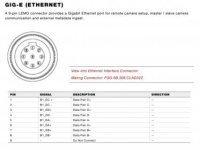
OK, this might need its own thread but I'm working on getting a short cable made up for on-rig patching and I need to confirm the pinout. Attached to this post is the one from the DSMC manual. The diagram states that the pin arrangement diagram is "view into Ethernet Interface Connector" and then specifies "Mating Connector:"

Is the pin arrangement looking into the socket on the camera or looking into the plug to connect to it. Initially I wired it as looking in to the camera but that has proved not to work. Before I cut and recrimp the RJ45 8P8C connector, I'd like to confirm that this pin arrangement is looking towards the plug and not towards the camera.

attachment.php
 

Attachments

  • DSMC-pinout.jpg
    DSMC-pinout.jpg
    16.4 KB · Views: 0
OK, this might need its own thread but I'm working on getting a short cable made up for on-rig patching and I need to confirm the pinout. Attached to this post is the one from the DSMC manual. The diagram states that the pin arrangement diagram is "view into Ethernet Interface Connector" and then specifies "Mating Connector:"

Is the pin arrangement looking into the socket on the camera or looking into the plug to connect to it. Initially I wired it as looking in to the camera but that has proved not to work. Before I cut and recrimp the RJ45 8P8C connector, I'd like to confirm that this pin arrangement is looking towards the plug and not towards the camera.


it is looking into the connector on the cable.
 
it is looking into the connector on the cable.

Thanks for the confirmation, George. Don't you find it a little ambiguous? I would refer to a plug or a socket as a connector and the second line reads to me to introduce a new, second connector which mates to the first one mentioned. Oh well, I'll report back when I get it all working. It's a 400 mm cable for going to a travel router mounted on the rig (possibly through a Gigabit switch, if required) and still keeping the battery plate on the back.
 
Would be nice if RED or some good cable maker made a small pigtail lemo to female RJ45 cable for underwater and long distance use.

Just bought a few extra lemo-RJ45 RED cables myself and was thinking of cutting one just to do this without having to solder into those small and difficult to source lemo connectors and make a standard ethernet cable with the other end... One could even cut a cheaper master/slave cable and make 2 pigtails out of it...

Are you making yours from scratch Andrew ?
 
OK, here's my report so far. I had two custom cables made up by a cable-making supplier but, as stated above, got the connection diagram a bit wrong. So, I had to recrimp the RJ45 ends because the LEMO would have been too difficult for me to easily do myself. The only problem with this is that now the pairing is out of order. Because the data signals are balanced, the pairing is used to remove noise and ensure the signal can travel the required distance with reduced shielding requirements. This cable is unshielded Cat5e, the supplier informed me that the Cat6 they had available wouldn't fit into the LEMO connector. The longer cable I had made, which was 3 m, doesn't achieve a connection after recrimping because of this issue. The LAN indicator on the camera lights up only momentarily and the light on the switch never comes on. The short cable, for stabiliser and handheld use, is 40 cm and, because it's so short, the noise isn't such an issue and it does work now that it's been recrimped. I am a little concerned that this cable won't hold up in environments with more electrical noise than where I tested it but I'll do some testing and see how it goes.

The first thing I did once I'd made the connection was fire up foolcontrol for the first time. Nice work, Mikael, it's awesome! The focus works extremely well on my Nikon 14-24mm f/2.8G. The 24-70mm f/2.8 didn't work so well, kept seeking from close to infinity right at the bottom of the wheel, but I think a lens re-init will fix that, I didn't get much time to test it.

I also confirmed that the camera does indeed require a gigabit connection to work. I configured a travel router (TP Link MR3020 running OpenWRT, which has a single 100BASE-TX port) to be the on-stabiliser WiFi access point and the camera could only be discovered on the network when it first went through a gigabit switch.

My next step is figuring out how to power the network hardware and keep it together and tidy on the sled of the stabiliser. I'm going to try a mobile phone recharging battery, although I'm not sure how long that will run for and the ultimate solution will be a 5V converter from sled power.
I'm also considering cutting the longer cable shorter so that I can still use it with the incorrect pairing.
 
Hi Andrew
Thanks for the infos.
I have a friend with 14-24, 24-70 and 70-200 nikon G. He said all were working fine. Will try to borrow them and make further tests as I want to create preset discs for those 3 lenses.
 
I have a friend with 14-24, 24-70 and 70-200 nikon G. He said all were working fine. Will try to borrow them and make further tests as I want to create preset discs for those 3 lenses.

Mikael, this is awesome! I'd love to have presets for those three lenses, I have the 70-200mm also. Can't wait! I'm sure the 24-70mm will be fine after an iniitialisation, I'll try it again soon, and the 70-200.
 
Mikael, this is awesome! I'd love to have presets for those three lenses, I have the 70-200mm also. Can't wait! I'm sure the 24-70mm will be fine after an iniitialisation, I'll try it again soon, and the 70-200.

Shot as small project saturday with those 3 lenses. Love the image but unfortunately as they are photo zoom they are not parfocal...
So whenever you change focal length you loose focus. They work well as 'variable primes' but it will difficult to make preset marking discs for them in foolcontrol, as it will always be slightly off except to the extreme focal length values where you have a hard stop.
However I will try to do all the Nikon prime G lenses if I can get access to a good set.
 
George is correct. Sorry for the confusion. The intent was to document pins as looking into the camera connector. This one was wrong.
 
George is correct. Sorry for the confusion. The intent was to document pins as looking into the camera connector. This one was wrong.

Hi Dave, yes, when I read it at first it seemed confusing but having looked at the other pin diagrams, I concluded that the Ethernet diagram should match so I went ahead with that. I suppose I should have sought clarification from RED. I'm happy to have been part of bringing this to your attention and that the revised document will be clearer.

Shot as small project saturday with those 3 lenses. Love the image but unfortunately as they are photo zoom they are not parfocal...
So whenever you change focal length you loose focus. They work well as 'variable primes' but it will difficult to make preset marking discs for them in foolcontrol, as it will always be slightly off except to the extreme focal length values where you have a hard stop.

Yes, that's true, they do have to be used as variable primes as opposed to true zoom lenses. Would it be possible to change the focus disc depending on the focal length reported from the camera? So, it would be a look-up table rather than a linear relationship? I appreciate that could add a lot of complexity and that it could be confusing for the user and that two different copies of the same lens could respond differently.
 
Hi andrew.
We could link focal distances to focus marks but I think the precision would be lost as reported focal distance would never be accurate enough to keep precise focus marks across the range.

Will have a look into it but probably won't be worth doing it...
 
Ho andrew. It could but I think the precision would be lost as reported focal distance would never be accurate enough to keep precise focus marks across the range..

Yes, the reported focus distance can't be relied upon, but how about the focal length? All good, just a thought!

I had my first shoot with foolcontrol for iOS yesterday, using stabiliser while an assistant ran the focus. Worked like a charm! Before we started rolling, we focussed the camera at different lengths and made corresponding marks on the disk, and the ACs used those marks instead of the reported distance to run the focus. We shot a fairly forgiving f/7 at 24mm, 5K FF and it came out sharp. Having the remote run button on the focus page and remote playback control was so helpful for stabiliser as well.

I didn't get much time to play around with foolcontrol but my one question at this stage is, can you change clip by tapping on it in the playback list or is the list just an indication and you have to use the next/previous clip buttons to change what's loaded into playback?
 
Thanks for the feedback Andrew :-)

Will run test but my feeling is that reported focal length change on lens won't be accurate enough to offer reproductible precise focus marks on non parfocal zoom lens.

Yes tapping on a clip in the list will load that clip while in Playback mode.
 
Back
Top