Welcome to our community

Be a part of something great, join today!

  • Hey all, just changed over the backend after 15 years I figured time to give it a bit of an update, its probably gonna be a bit weird for most of you and i am sure there is a few bugs to work out but it should kinda work the same as before... hopefully :)

Epic-W Wifi Dropping out

Paul Watt

Well-known member
Joined
Dec 31, 2006
Messages
160
Reaction score
0
Points
16
Location
Vancouver, BC
I've tried multiple Epic-Ws, but it seems every one drops it's connection with my iPhone (and other iPhones) while using Foolcontrol (2.05). They run connected for about 5 or so minutes, then drop the connection, and refuse to re-connect until the camera has be re-started. Any other incidents like this?
 
Hello Paul

I am running a test just now here in ad Hoc mode on an EPIC-W using channel 6 and I have been connected without any drop outs for over 2 hours now (camera and iPhone are in the same room).


While running this test I just compiled some infos and tips on best practices with DSMC wifi using the different camera wifi modes and 3rd party accessories...

feel free to get in touch by email for any specific help / troubleshooting.


link to the pdf file :

http://foolcolor.net/foolcontrol_wifi_tips.pdf
 
What channel are you running on? You may have some interference if you're on channel 1.
 
I've tried channel 1, 6, and 8. All drop after a few minutes. There's not a lot of wireless interference here, and we had the same problem when the cam was car-mounted relatively far from any possible wireless interferences.
It's happened on 3 different cameras with 3 different iphones now.
 
I've tried channel 1, 6, and 8. All drop after a few minutes. There's not a lot of wireless interference here, and we had the same problem when the cam was car-mounted relatively far from any possible wireless interferences.
It's happened on 3 different cameras with 3 different iphones now.

Using any top plate on the cameras that could obstruct the wifi antenna ?
As mentioned by Antony it might be useful too open a support ticket and send log files from the cameras to RED support using dedicated the web page.
 
I'm also having problems with dropping WIFI on my Epic-W.
Especially when I press 1:1 (magnify) the signal freezes and drops after about 2 seconds.
Tried AD-HOC and infrastructure mode, unfortunately both options have the same connectivity problem.

If i can reminder correctly, we didn't have problems with the previous firmware.

I've sent a log-file over to RED's technical department a few days ago, no news yet.
 
Last edited:
I noticed this as well. I was trying out fool control and after a few minutes it would reset and go back to the 'choose camera' screen. It would connect again. This may be slightly different to what others are experiencing. I have no obstructions to the wifi plate and was sitting next to it on my iPhone. I was playing with the electronic focusing (very cool) but also noticed some stuttering at times when playing with the focus wheel, that may have been a communication issue over wifi (can't really tell). I was channel 6.

Are there some specific steps to test for that would be helpful?

thanks
Paul
 
Antony, sounds like we are having more or less the same problem.

Before our Epic-W arrived, we rented a RAVEN. FoolControl and Wifi always worked perfectly.
Do you think this problem is firmware related or is it a hardware problem?

Anyway, i'll need to send my Epic back for repair. We are having a few dead pixels and problems with the 4,7 inch LCD screen in direct sunlight.
 
I think this issue could be more prevalent, but that there are not many people reporting it / providing RED with logs.

Hi Antony,

Where would i find some logs? Quite happy to contact Red with them. The more the merrier i would guess.

It's a shame Red didn't go down the bluetooth route, it's much more robust although i guess distance was the main reason...

thanks
Paul
 
Paul,

Go to Menu > Settings > Maintenance. Select Save Log.
This creates an emailable Log file on the SSD that can be emails to RED.

Bluetooth does not have a high data rate / and is aimed at very low power devices.

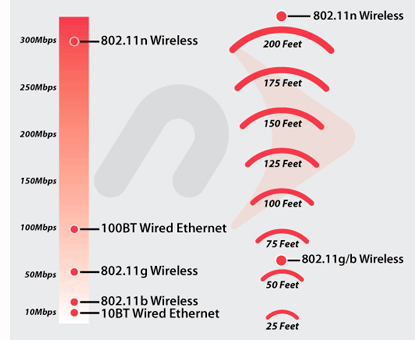
Range of Wifi in RED is limited by the choice of a wireless technology from the previous decade (802.11g : Used by RED : Created circa 2003).

If RED move to a standard from this decade (like 802.11n) - Range / Data rate would increase > 4 times.

speed_range_chart.gif


AJ

Are the DSMC2 bodies really g? I looked in the Operation Guide and couldn't find the flavor of Wi-Fi used, but I would've assumed it was at least n, and hopefully ac, in a product of this sophistication/price bracket. Hell, my Amazon Fire Stick has ac. If Red is still stuck on g, that's kind of confusing and upsetting.
 
I have been having the same issue, and I recently went into the settings of Fool Control. and turned off Battery Save. I've only done this recently, and it will still disconnect sometimes, but it reconnects immediately.
I'm going to continue testing this out to see if it continues to work.
You can get to Battery Save by tapping "fool control (version #)" text in the bottom left corner of the screen where the camera shows up.
 
Thank you Zac for the info.

We turned off the 'Battery Save' option.
Unfortunately the WIFI keeps dropping away. We are not able to use FoolControl for more than 10 seconds straight.
Very annoying.
 
Thank you Zac for the info.

We turned off the 'Battery Save' option.
Unfortunately the WIFI keeps dropping away. We are not able to use FoolControl for more than 10 seconds straight.
Very annoying.

Feel free to email me mika at foolcolor dot net to troubleshoot the issue with your wifi...
 
Feel free to email me mika at foolcolor dot net to troubleshoot the issue with your wifi...

Thanks Mikael! I think I might have a faulty WIFI antenna, we tried FoolControl with both a iPhone 7 and iPad 2.
Exactly the same problem with the two devices. Connection immediately drops after zooming to 1:1.

The data often won't load like ISO and Shutterspeed lists. I don't think it's a bug in the application but a hardware related problem.
 
Thanks Mikael! I think I might have a faulty WIFI antenna, we tried FoolControl with both a iPhone 7 and iPad 2.
Exactly the same problem with the two devices. Connection immediately drops after zooming to 1:1.

The data often won't load like ISO and Shutterspeed lists. I don't think it's a bug in the application but a hardware related problem.

yes if you have no top plate blocking wifi and tried some of the tips from my pdf (ad hoc network channel, infrastructure etc) and as you mentioned before it worked fine with a rented RAVEN... it could be a problem with your internal antenna... :(
 
"I don't think it's a bug in the application but a hardware related problem."

Please share your Camera logs with your BS reps - especially if you have a way of reproducing this (Firmware) issue.

AJ
 
"I don't think it's a bug in the application but a hardware related problem."

Please share your Camera logs with your BS reps - especially if you have a way of reproducing this (Firmware) issue.

AJ

Already did that Anthony, about a month ago. They didn't find anything suspicious.
My BS rep asked to send the camera in, we'll do that as soon as it's possible for us.
 
Thilbaut,

There is a chance that there is an issue with the way the Firmware works in conjunction with the camera hardware.

+) In my own case (on a 6K Weapon Dragon) - I would notice that the Ad Hoc Wifi (that the camera was creating) would briefly change from:
wifi -> wifi -> initialise WIFI -> wifi

+) This RESETing of the adhoc network by the camera is not what I would expect.
(95% of the time it would come back / 5% of the time, a Camera Reboot was required).

If you getting the wifi symbol briefly, and are able to reproduce this, this would give RED (armed with your Camera logs) the ability to Reproduce the issue (and/or hopefully make the Firmware more resilient).

AJ
 
Last edited:
Anthony,

I made a quick video of the problem
As you can see the connection is not stable at all and very slow at certain moments. (AD-Hoc and Infrastructure)

https://www.youtube.com/watch?v=bg6c2GRazlM

When pressing 1:1 the connection drops away nearly immediatly.

Yesterday I saw the WIFI indicator changing for a split second from green to yellow and back to green, like you mentioned.
Today I wasn't able to reproduce that unfortunately.
 
Back
Top