Jamal Solomon
Member
- Joined
- Feb 26, 2015
- Messages
- 17
- Reaction score
- 0
- Points
- 0
Have any of you all ever had issues running two RED touch monitors simultaneously? Or even had issues running a EVF/LCD combo?
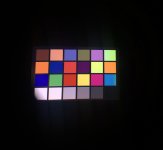
I have a Wooden Camera Easy Top Plate (with the battery replacement done), and 2 separate right angle POGO cables for monitoring. More often than not, I can't view anything on my EVF when both it and the touch monitor are plugged in. It stays on the chip start [see photo attached].
With some troubleshooting, I've been able to tell that:
• the EVF works when connected to the "front"/Top port [only downside to that is that I can't control the camera from the EVF]
• the monitor turns on but does NOT display any image or UI when plugged into the "side"/Left port - similar to the EVF staying on the color chart.
• no combination allows either device to work correctly when they are both plugged in.
An old REDUSER thread [http://www.reduser.net/forum/showthread.php?103131-Bomb-EVF-hanging-on-color-bars] suggests that the brain may not have enough power to distribute the signal [see the 7th post in the thread].
My reason for bringing this up is because I recently built another RED setup where there was no issue or problem. So is there something I should do with my own camera that I haven't done already?
I have a Wooden Camera Easy Top Plate (with the battery replacement done), and 2 separate right angle POGO cables for monitoring. More often than not, I can't view anything on my EVF when both it and the touch monitor are plugged in. It stays on the chip start [see photo attached].
With some troubleshooting, I've been able to tell that:
• the EVF works when connected to the "front"/Top port [only downside to that is that I can't control the camera from the EVF]
• the monitor turns on but does NOT display any image or UI when plugged into the "side"/Left port - similar to the EVF staying on the color chart.
• no combination allows either device to work correctly when they are both plugged in.
An old REDUSER thread [http://www.reduser.net/forum/showthread.php?103131-Bomb-EVF-hanging-on-color-bars] suggests that the brain may not have enough power to distribute the signal [see the 7th post in the thread].
My reason for bringing this up is because I recently built another RED setup where there was no issue or problem. So is there something I should do with my own camera that I haven't done already?