Welcome to our community

Be a part of something great, join today!

  • Hey all, just changed over the backend after 15 years I figured time to give it a bit of an update, its probably gonna be a bit weird for most of you and i am sure there is a few bugs to work out but it should kinda work the same as before... hopefully :)

DSMC2 Beta Build v6.4.17 / IPP2 / April Shipment Update

Hi everyone,

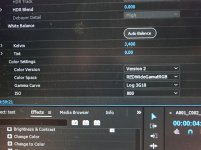
i'm having trouble integrating the ipp2 into my system. I figured to check the "show advance settings" in red cine-x pro (build 42) to be able to select the color space (red widegamut) and the gamma curve (log 3g10), but i can't seem to see these settings in premiere pro (CC 2017 02).
In the master settings of the clip, i neither see 3log10 nor redwidegamut.

Any suggestions/advice?


Thanks in advance!

It won't happen until Adobe adds the new SDK.

I realize that IPP2 is not implemented yet, but I can select 3log10 and redwidegamut in Premiere.
 

Attachments

  • IMG_2985.jpg
    IMG_2985.jpg
    99.3 KB · Views: 0
How does the varispeed audio work? I updated, but when I'm in varispeed mode, I still don't see any audio monitoring, nor is there any audio in my R3D when I import it.

I just wanted to follow up and say that the varispeed audio works just fine once I realized that you have to enable "Record varispeed audio in separate WAV file" under MENU->SETTINGS->RECORDING->MODE

Thanks again Jarred and crew!
 
I just wanted to follow up and say that the varispeed audio works just fine once I realized that you have to enable "Record varispeed audio in separate WAV file" under MENU->SETTINGS->RECORDING->MODE

Thanks again Jarred and crew!

RIGHTEOUS! this is what i've been most excited about. thanks for sharing your insight on it.

gracias to you, graeme and the rest of y'all involved. seriously love RED Digital Cinema.
 
Have a ticket open with Red support on the Wooden Camera Cable-less battery adapter and not seeing battery information with the new firmware.

Red asked if I had reached out to Wooden Camera to see if they had any information. I did and got only this disappointing CYA message:
"The 6.4 firmware available on the RED website is a beta version, as you acknowledge. Given this status, even minor bugs may still be lingering, and exercising caution is therefore recommended. With the current release build you should not run into any issues when using the Cable-less mount."

Maybe you didn't get the entire email, or you relayed it incorrectly, but this is what Wooden Camera replied to me. Read the end part, it sounds very promising.

"The 6.4 firmware available on the RED website is a beta version. Given this status, even minor bugs may still be lingering, and exercising caution is recommended. The battery data is not presented on this BETA, but on the current release build you should not run into any issues when using the Cable-less mount. This is a firmware compatibility issue which will be resolved in RED's official release build."
 
What caught my eye about the new Colour Space was when I read about the improved handling of troublesome LED lights. Have recently filmed concerts at venues with unavoidable cheap and nasty par cans (couldn't touch their rig) and it is a real challenge - some of the footage was close to unusable due to the blocks of solid light they create especially on skin. With the new RedCine 50 beta I loaded some of the troublesome footage (shot on Dragon) and the difference is huge. Can't fix the lighting - it is what it is - but now at least what was almost unusable footage is usable again. Pics attached.

If anyone has any insights on how I can lessen the impact of these lights on the skin further, I'd be very grateful. In the meantime, this is great news.
 

Attachments

  • Image 1 - RedCine 42.jpg
    Image 1 - RedCine 42.jpg
    32.1 KB · Views: 0
  • Image 2 - RedCine 50.jpg
    Image 2 - RedCine 50.jpg
    31.9 KB · Views: 0
What caught my eye about the new Colour Space was when I read about the improved handling of troublesome LED lights. Have recently filmed concerts at venues with unavoidable cheap and nasty par cans (couldn't touch their rig) and it is a real challenge - some of the footage was close to unusable due to the blocks of solid light they create especially on skin. With the new RedCine 50 beta I loaded some of the troublesome footage (shot on Dragon) and the difference is huge. Can't fix the lighting - it is what it is - but now at least what was almost unusable footage is usable again. Pics attached.

If anyone has any insights on how I can lessen the impact of these lights on the skin further, I'd be very grateful. In the meantime, this is great news.

Wow - quite a difference - much more graduation and colour/tonal range in the blue. Particularly interesting to see the lighter/hotter areas on the light and highlights on the talent's face... the fact that these are Dragon shots and you can get this result by using IPP2 is quite exciting (I'm Dragon too - so no IPP2 in-camera, but at least we know the footage will process well in the post pipeline).
 
I had to roll back to the last official release. My record light stopped working. Playback only worked when I recorded ProRes only. Looks like a great upgrade and look forward to trying again at next bug fix.
 
After some initial tests with Epic-W and Kowa Anamorphics, it appears to me that the image is about 1/2 - 1 stop sharper. Anyone else noticing sharper / more crisp image with new IPP2?
Is this because of the improved demosaicing algorithm? For anamorphic shooting this is huge.

Otherwise, still adapting to the new IPP2 workflow but so far so good - besides the minor bugs which already have been reported here and I am sure Red is looking into it.

Well done RED Team!
 
Wow this is really interesting.

So, one thing I liked in IPP2 preview was the ability to manipulate all my red raw R3D settings I was used to, and then the output affecting the signal chain down the line with the other ipp2 transforms happening after..

Examples : Flut, Luminance curve adjustment, saturation.

I would often manipulate just the toe for black level for instance.

Im predicting that maybe with FoolColor or something like Pomfort livegrade we might be able to drive Live LUT creation in the camera over wifi so we have those granular Curve adjustments on set readily and easily available but in a different way that would standardize across camera asystems that don't have the same raw development controls as Red.

Either way, super interesting and cool.
 
Wow this is really interesting.

So, one thing I liked in IPP2 preview was the ability to manipulate all my red raw R3D settings I was used to, and then the output affecting the signal chain down the line with the other ipp2 transforms happening after..

Examples : Flut, Luminance curve adjustment, saturation.

I would often manipulate just the toe for black level for instance.

Im predicting that maybe with FoolColor or something like Pomfort livegrade we might be able to drive Live LUT creation in the camera over wifi so we have those granular Curve adjustments on set readily and easily available but in a different way that would standardize across camera asystems that don't have the same raw development controls as Red.

Either way, super interesting and cool.

While I can absolutely see the want and need for having all sorts of adjustments, I still believe the final simplification of IPP2 with the ASC CDL controls is probably the best step forward in terms of conforming to standards. I'm sure the future will pave way for additions to the current standard - but better to start now. LUTs and CDLs are becoming such a big part of the industry, and this will definitely allow for future interoperability. So, a little bit a bummer about the lack of excess tweaking - but the simplification really offers a healthy workflow.
 
While I can absolutely see the want and need for having all sorts of adjustments, I still believe the final simplification of IPP2 with the ASC CDL controls is probably the best step forward in terms of conforming to standards. I'm sure the future will pave way for additions to the current standard - but better to start now. LUTs and CDLs are becoming such a big part of the industry, and this will definitely allow for future interoperability. So, a little bit a bummer about the lack of excess tweaking - but the simplification really offers a healthy workflow.

I'm looking at ways to properly integrate curves into the workflow so that they work correctly and will integrate better with other workflows. IPP2 pipeline is certainly beneficial, but I does make you think again on how things should work to fit in best with the philosophy and pipeline.

Graeme
 
Wow this is really interesting.

So, one thing I liked in IPP2 preview was the ability to manipulate all my red raw R3D settings I was used to, and then the output affecting the signal chain down the line with the other ipp2 transforms happening after..

Examples : Flut, Luminance curve adjustment, saturation.

I would often manipulate just the toe for black level for instance.

Im predicting that maybe with FoolColor or something like Pomfort livegrade we might be able to drive Live LUT creation in the camera over wifi so we have those granular Curve adjustments on set readily and easily available but in a different way that would standardize across camera asystems that don't have the same raw development controls as Red.

Either way, super interesting and cool.

FLUT is renamed to Exposure, but effect is the same (non clipping gain).

Luma curve - working on proper integration into the IPP2 workflow and pipeline.

Saturation - check under CDL - it's now there as part of the CDL grading tools.

Graeme
 
Graeme, I am finding shooting with a grey card is more important for IPP2. Perhaps a better way of saying it is if a pick a WB for kelvin/tint in redcinex a lot of color "magic" occurs and it's perfect right off the bat, where in the old days (i.e. last week) I really needed to play with the color to "get there". Could you comment on what happens in IPP2 if i just do a simple white balance off of a grey card(both post and production), also if you would agree that shooting with a grey card could be more important for IPP2(so I have one 20% grey card shot per scene/lense)?
 
Graeme, I am finding shooting with a grey card is more important for IPP2. Perhaps a better way of saying it is if a pick a WB for kelvin/tint in redcinex a lot of color "magic" occurs and it's perfect right off the bat, where in the old days (i.e. last week) I really needed to play with the color to "get there". Could you comment on what happens in IPP2 if i just do a simple white balance off of a grey card(both post and production), also if you would agree that shooting with a grey card could be more important for IPP2(so I have one 20% grey card shot per scene/lense)?

Good white balance is the foundation of the image. I'd always recommend shooting charts for colour continuity and debugging.

For both Legacy and IPP2, the white balance and colorimetry are identical. What you're seeing is the benefit of how IPP2 can render the same colour data.

Graeme
 
I know someone else that is having trouble with the Sigma Art primes. (Canon mount) He sent a log to red UK. Is there a better place for him to send the log file?

Now I'm a bit baffled. Right after installing the update on my Epic-W, my Sigma Art 18-35 lens (Canon mount) had no options in the iris menu. I had to select advanced and type the appropriate value in to set the iris. Today however it was working fine, allowing me to select iris values from the list as normal.

I'm glad that it's working, but I don't know what fixed it. :-/
 
3D LUTS don't seem to work under Legacy. Trying to enable John Schick's RED to Alexa LUT under Legacy as enabling it under IPP2 causes a double rendering of the transform to REC709. However, while 3DLUTs work in IPP2, it doesn't work in Legacy Image Pipeline.
 
Hi David,

John's LUT worked for me in legacy mode. You just have to be sure you set the gamma to LOG3G10 and color space to RWG then add the LUT.
 
I know someone else that is having trouble with the Sigma Art primes. (Canon mount) He sent a log to red UK. Is there a better place for him to send the log file?

Yes, if you have Sigma Art issues log file to me please, along with the precise lens name.

Graeme
 
Back
Top