Welcome to our community

Be a part of something great, join today!

  • Hey all, just changed over the backend after 15 years I figured time to give it a bit of an update, its probably gonna be a bit weird for most of you and i am sure there is a few bugs to work out but it should kinda work the same as before... hopefully :)

DSMC Camera Firmware release 5.1.55 and 5.2.21 beta

I have been doing a very similar fix by using a Luma vs Saturation node in Resolve and taking all the chroma out of the deep blacks. This removes all the colour out of the noise and makes for nice crisp blacks.

That's a good idea for sure. I'm looking forward to testing the new version of RCX- I see noise in mid tones as well as shadows so I am hoping RED's fix goes farther than your technique might be able to. I was also hoping for a firmware fix but it sounds like in due time it will happen.
 
Graeme's fix rolls off seamlessly as exposure increases- it has a notable effect across more than just the deepest shadows, and is not simply either a chroma blur or a luma/chroma desaturation. I'm sure it won't be long before everyone can play with this :)
 
Because right now it is specfic to Dragon footage with the new OLPF. Remember this was originally going to happen in the camera calibration... We shifted the code from being in camera to being in the debayer which gives the opportunity for Graeme to adapt this in a smaller form to more hardware combinations... perhaps even to MX footage ( no promises ) . Since its more open there is the SDK support and Rocket support and everything else that goes with it so there needs to be an on off switch until it works with everything... and until there has been hundreds of more hours of testing to make sure there is no negative side effect that pops up where you would want to turn it off.


Got ya :)
 
Toia your tweaks freaked me out, but thankfully when I looked carefully at the footage that splotchiness appears to just be from the JPEG compression.

I'll be interested though to see this on a "hard situation" like a green chroma wall. Do we lose edge chroma detail? If it's better for chroma keying then I see no reason to ever turn it off. If it's like chroma blur then I definitely need an on/off switch.

hahahaa... Yes, JPG compression made it worse... however I was amazed in the difference between the two settings even from a crap 8 bit JPG. :)

Even though I consider Phil a hard core RED man. (some say I am as well) . I really think Phil's testing is solid and highly useful. Great for RED to have someone so committed from the outside looking in. :)

Love these cameras.

I_love_my_EPIC.jpg
 
Last edited:
hahahaa... Yes, JPG compression made it worse... however I was amazed in the difference between the two settings even from a crap 8 bit JPG. :)

Even though I consider Phil a hard core RED man. (some say I am as well) , I think Phil's testing is solid and highly useful. Great for RED to have someone from the outside looking in.

Well I like your test and respect what you're after there. Here's some additional things to look at inspired by what you're looking for:


First up is what I feel is significant, especially for those working in black and white or dealing with things like VFX keying. Channel Noise Improvements:


So the interesting thing to note there is that the RGB image is "better". However, looking closer we can see the enhancements across all three Color Channels. Specifically Red and Blue getting a mega performance boost in my mind. This orb is out of focus on purpose, but the shape characteristics are more accurate in both R and B. Remember everything I'm showing here is at ISO 2000, which is technically the top end of recommended ISO Rating. This is in stress test land really and it's doing pretty good things up here. The lower and higher ISO ratings are improved as well.


Which leads me to this example. What D.E.B. is eliminating:


This is literally showing the amount of noise being cut out by D.E.B. at ISO 2000. You can see the results are across various tones as these are the exact patches I posted earlier.


Pretty interesting stuff in reality that improves past and future footage. This is a rather clever and interesting technique. I'm seeing improvements under many lighting conditions at all ISO ratings. Haven't been able to throw anything at it yet that freaks me out. The "fix" is actually far better than what I thought was going to be implemented. Hats off to Graeme on this one. The good color is still there. Red specks are gone and we have a nicer overall texture to the image.
 
Release please - f*** some bugs in it, i love Beta, ... release please ;-)
 
After watching carefully what I'm seeing here (thanks Phil), I still believe D.E.B is a specialized version of chroma noise reduction.
As most cameras exhibit red pixels in dark shadows, Graeme found a good algorithm to desaturate the reds in dark areas, while leaving midtones and highlights untouched.
I'm only guessing here, but I believe the desaturation of those red pixels is stronger as the ISO gets higher.

The result is nice looking blacks, especially evident at high ISO.

Good job, Graeme.
 
Setting aside DEB for a moment, what is Dragon 6.5 ratio as introduced in the 5.2.21 Beta firmware?
 
Man this dragon keeps impressing me more and now there’s new tools to get more out of the stuff we shoot. I went to a bit of an extreme to test the DEB capabilites of the NEW RCX build (thanks to Graeme and RED team for letting em have an early peek.


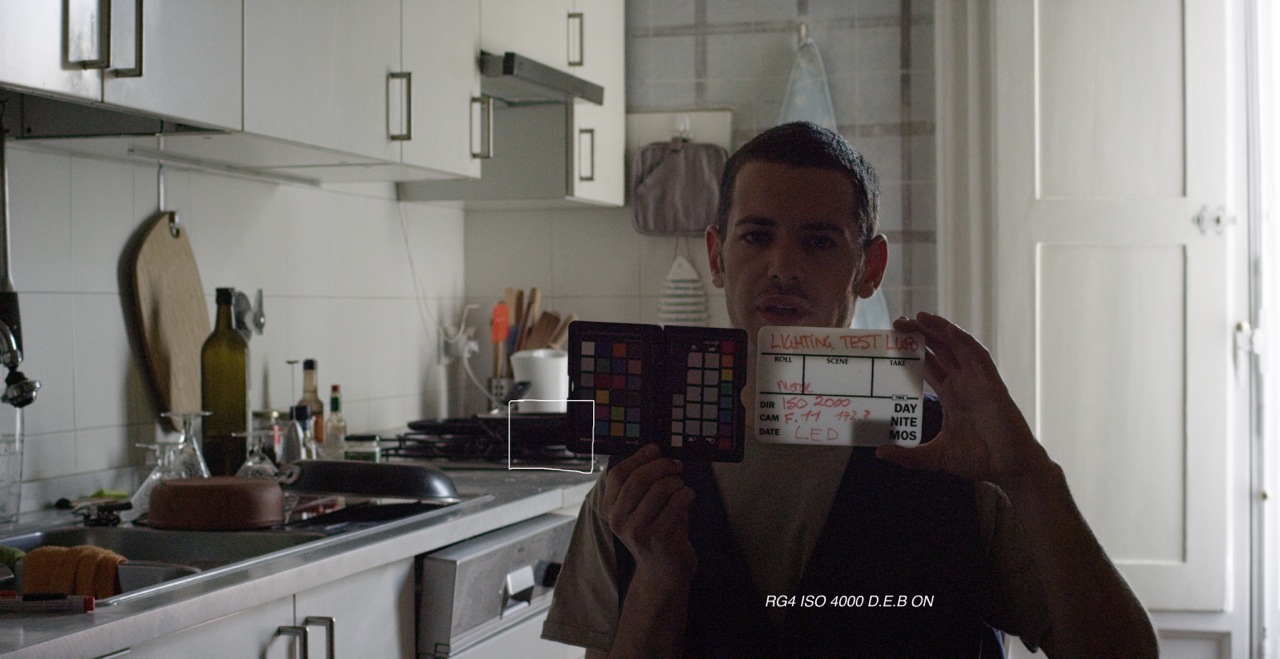
So The first image is what you might get right out of the camera at 500ISO (and as you can see it is severely underexposed at that). We had Just shot a 2000ISO test@ F11 with the KEY LIGHT ON. Then I switched the KEY LIGHT OFF. I need to stress something really important here. When I metered this scene with the key light off, there was no measurable light at 2000ISO. So clearly I am trying to get a shot with ZERO lighting (except what is peeking in through the window)


BASE_500_ISO.png


So what happens when I push the already underexposed image? I cut out a small section of the chart and pushed it to 4000ISO. I just expected to see nothing because I with this level of underexposure I should be getting nothing at all right?


This is the cutout area after I pushed a completely underexposed shot to 4000ISO.

4000ISOdebON.jpeg


Here it is on old RCX build at 400 percent pushed to 4000ISO. I stress, here I was happy to be seeing colour with NO LIGHT.

4000ISO400percentOLD.png


But look at the detail in the new build. No colour noise. you can read the word Checker. No noise in the highlight area. Huge difference. and the space between the swatches is BLACK.

4000ISO400percentNEW.png


Now, you might want to look at this and say, meh?, but when you take a shot that has ZERO light to start with, underexpose it, push process it past where it is supposed to go and get some recoverable image that is an amazing feat.


If you exposed properly and want to push or have even just a little bit of light to activate the photo sites even more, then you are looking at a whole new ballgame creatively. The only thing to remember is to get some light on that sensor and you will have a lot of room to push process and get some noise free images, Like some of the high ISO stuff others have been posting lately.


Cheers RED. Nice work. It's just getting better.


Battistella


Now we can push in even further than before with little or no perceived penalty at all.

Thanks for "exposing" this new ability using Dragon footage, David.
 
hi david, thanks for the test - it´s cool they sent you the new RCX -

as i did a lot of tests too here on reduser, but have no entry to this new redcine at the moment, is it possible to send you 2-3 R3D stills to your email that you can do a test with my footage of the tests last days ?

i would like to compare it also to the MX but you and Phil i think are the only user to have the new option right now, so if possible i would like to send you some frames ...
 
I own and use a Zaxcom MAXX recorder. I am able to sync (green TC) a 23.98 project in camera with 29.97 set in my Zaxcom device and auto sync later successfully. It's good to inform your editor to work in "full seconds" just in case. Until there's an official fix from both parties there's this fix/hack/achievement unlocked.
While I am aware of this work around, it is completely unacceptable to the post production department of the scripted drama network shows on which I have been working.
These networks are, in case you wondered, USA, Viacom(MTV and VH1), and Fox.
These projects shoot at 23.98, and expect their timecode to be the same.

They aren't wild about Zaxcom file folder naming structure either, which means I am not allowed to use my Zaxcom Fusion on these projects either, only Sound Devices ones.

Are you leaving your Maxx connected to the camera while you shoot?
Because I am expected to use ambient or Denecke boxes on the camera. Neither of which succeeds in teaching 3 of the 4 Dragon Cameras we have seen this summer the timecode.
Oddly, one of the cameras did not display the correct timecode from the box, but it did autosync in Resolve 11. The lack of confirmation of TC sync on the menus was also considered unnaceptable to the production company (yeah I know that Arri's TC display has a lag)

The lack of certainty lost the job of splinter unit camera for Dragons on these networks.

Cross Jamming from an audio recorder is not what the industry wants.
 
Lock-it boxes and the rest of these kludges need to die. I'm no expert on GeoSync or any particular topology for using broadcast time signals but it's 2014. Every device on set that is "capturing" real time data of any kind should be using a common sync source to allow TOD correlation in post. In 2011 Stuart English told me that the available sync signals were not accurate enough. If that is still the case, perhaps a more precise "clock" could be broadcast for any number of use cases where it would be an asset - starting with our industry!

Cheers - #19
 
While I am aware of this work around, it is completely unacceptable to the post production department of the scripted drama network shows on which I have been working.
These networks are, in case you wondered, USA, Viacom(MTV and VH1), and Fox.
These projects shoot at 23.98, and expect their timecode to be the same.

They aren't wild about Zaxcom file folder naming structure either, which means I am not allowed to use my Zaxcom Fusion on these projects either, only Sound Devices ones.

Are you leaving your Maxx connected to the camera while you shoot?
Because I am expected to use ambient or Denecke boxes on the camera. Neither of which succeeds in teaching 3 of the 4 Dragon Cameras we have seen this summer the timecode.
Oddly, one of the cameras did not display the correct timecode from the box, but it did autosync in Resolve 11. The lack of confirmation of TC sync on the menus was also considered unnaceptable to the production company (yeah I know that Arri's TC display has a lag)

The lack of certainty lost the job of splinter unit camera for Dragons on these networks.

Cross Jamming from an audio recorder is not what the industry wants.


While yes I think a better solution is the solution I don't know why this would scare anybody away from using a camera or audio device. I haven't tested every piece of audio gear out there though and tested every workflow.

Syncing at 29.97 via Zaxcom and still having your 23.98 timecode in camera is a workable solution and it syncs in post. I have jammed while connected, untethered during roll, and wirelessly now. Used a few external clocks. Mark's recommendations are spot on. Don't know about not getting the TC sync and it working. That's a new one for me though.

I am only interested in provided a workable solution until a better one comes. This method allows for shooters and editors to continue working with no issues I've encountered. Can't speak for everybody though.

I mainly use Zaxcom and particularly the MAXX due to the quality of the sound I get off the device. I dig NeverClip. Not fond of the folder structure as well.

If I was Red I would design an audio recorder and mixer that worked via metadata in camera with current take/filename information along with TC sync and call it a day. I can only imagine the possibilities really. With REDLINK and potentially future devices who knows. Maybe the solution is just merely developing a wireless timecode device like what was sort of happening with Meizler. Though Timecode Buddy is pretty damn interesting and I am seeing it used more and more.
 
Back
Top