Welcome to our community

Be a part of something great, join today!

  • Hey all, just changed over the backend after 15 years I figured time to give it a bit of an update, its probably gonna be a bit weird for most of you and i am sure there is a few bugs to work out but it should kinda work the same as before... hopefully :)

Dragon Non-Linear Color Response?

RCX one light. Processed at 250ISO, RC3/RLF, 2300k. Not as bad as I would have thought for the extremely low color temp. Still, the issue of the greenish skin tone is there around her eyes (right click and open in a new tab for UHD). It's not super obvious but it's there. Lots of noise but that's expected in underexposed 2300k footage. I have had the patchy skin before and usually it's make up related but it normally rears it's head most under tungsten. Don't notice it as much on daylight balanced sources. (not saying it doesn't happen, but it's more prevelant and obvious with tungsten.)

ZebSkin2300K.jpg
 
I spoke to a makeup artist with whom I have been collaborating the past 3 years specifically on this issue. She confirmed that she has seen this issue time and again with the RED camera and that she has to cut most yellow based products with pinker tones, even though it is very often totally counterintuitive to do so with some actors' skin tones. We have worked together on dozens of shoots over the years and she has been instrumental in helping find the workaround to the problem. It's taken many times of having an actor look green faced and experimenting with how to cut the yellow/orange base with pinker tones before getting the hang of it. She also confirmed that she has not seen this issue with the Alexa, for what it's worth. I think it's important to note this, because although purely anecdotal evidence, hopefully the comparison can lead to a discovery of why one sensor might exhibit this particular issue and the other might not. Or maybe they both will- a side by side test will tell.

In the meantime, I have found my notes regarding makeup brands and added some based on my discussion with this makeup artist who is familiar with the issue.

HAVE EXHIBITED THE PROBLEM: - -These are brands that typically lean towards yellow or golden.
Visiora (PL 006)
"HD makeup"
Bobby Brown
Makeup forever hd foundation


TESTED AND DO NOT EXHIBIT PROBLEM
Gerda Spillman (CH-8134)
La Mer Tan
Armani
Loreal Tru Match Cool

I'm hoping to be able to pick up some of the problem and non problem makeup and do some comparative tests in the coming weeks. I'll be sure to bracket exposure.

This is great info, thanks for that and the effort you are making.

The list of problem products... these are all foundations, yes? Can you also find out and report what other products (if any) were also used in combination (edit: when the problem is present)?

When you do your tests, would it be possible to document the makeup application with complete videos? The goal is to know comprehensively, what products are going on (or coming off) and in what concentrations, that we might better understand what is happening. As the test proceeds, any additional changes to the makeup should likewise be documented. That would include simple blotting even if no products are applied.

If you shot the entire application process on the set, side by side, we might see the problem develop like a Polaroid. I would not allow the makeup artist to view a live monitor.

Thank you again.
 
Last edited:
Oh Great... I recently watched a couple of these shows and didn't notice a thing. Since reading your post I look for bad makeup on everything I watch.

Thanks a LOT! mumble grrrr dagnabit

That's one of the pitfalls of being "in the business." You almost have to retrain yourself to look at and listen to programs like a regular person and not like a cinematographer, sound mixer, editor, etc.

Lately, the makeup has just been jumping out at me for some reason. All the examples I used are from the last two weeks. Granted, I watch a lot of television.

For the most part, it's not present the majority of the time on the majority of shows, just like the problem with MX isn't present most of the time. It may just be in one scene or a few shots.

From what I've recently seen on TV, it's been more noticeable on males, probably because we don't think twice about seeing women made up, even if their makeup is on the garish side. Men, in most instances, have to be made up to look like they're not made up. When that's not working so well, I think it's more noticeable.

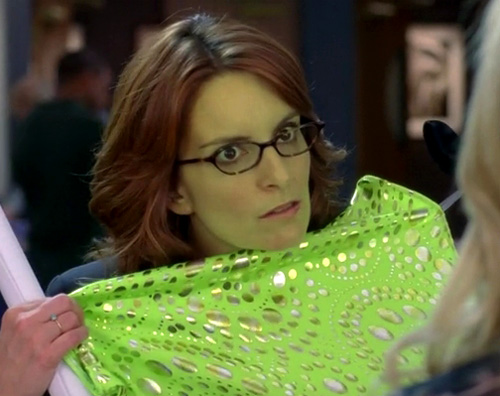
Or, maybe everyone affected just has "witchy undertones" like Liz Lemon.

Liz_Lemon_witchy.jpg
 
That's one of the pitfalls of being "in the business." You almost have to retrain yourself to look at and listen to programs like a regular person and not like a cinematographer, sound mixer, editor, etc.

Lately, the makeup has just been jumping out at me for some reason. All the examples I used are from the last two weeks. Granted, I watch a lot of television.

For the most part, it's not present the majority of the time on the majority of shows, just like the problem with MX isn't present most of the time. It may just be in one scene or a few shots.

From what I've recently seen on TV, it's been more noticeable on males, probably because we don't think twice about seeing women made up, even if their makeup is on the garish side. Men, in most instances, have to be made up to look like they're not made up. When that's not working so well, I think it's more noticeable.

Or, maybe everyone affected just has "witchy undertones" like Liz Lemon.


Liz_Lemon_witchy.jpg

But at least she has beautiful hands. '-)
 
Flame Lit Skin Tone

Flame Lit Skin Tone

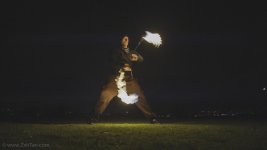
Along the same lines . . . here's a test I shot last night in preparation for a larger event. I see the flames as 2 stops overexposed which will put the performer further underexposed when I make that adjustment on the production shoot.

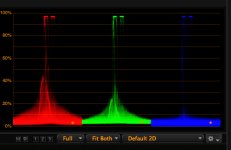
The face tones are exhibiting yellow blotches and the color parade shows very little data in the Blue Channel. Looking at the flames you can see that there is indeed blue light being produced. The performer has no make-up on . . . this I know for a fact. If I add an 80C filter to this to feed the Blue channel it will further underexpose the entire scene by about stop causing more noise.

What to do?

https://dl.dropboxusercontent.com/u/117794729/Spin 1st Test/A028_C004_0326WH.0000622_S000F.R3D

Has someone done a test showing a linear response of all RGB channels from very low light to clip? For my peace of mind I would like to see the RGB lines plotted over each other from crush to clip. I'm not the sharpest tool in the box but it seems maybe that the Blue Channel loses sensitivity when the luminance is reduced exacerbating the inherent light component imbalance from non-blue light sources - like incandescent bulbs and fire. But then we really need to have yummy skin tones with low level warm light sources since that is not a rare application.
 

Attachments

  • ZEB_Nite_Spin.jpg
    ZEB_Nite_Spin.jpg
    51.6 KB · Views: 0
  • RGB.jpg
    RGB.jpg
    97.4 KB · Views: 0
Last edited:
Augment your exposure with a large, possibly soft daylight balanced source and/or shoot earlier in the day.

What if the performance, venue or environment doesn't allow for bringing in additional light sources? Am I screwed with Dragon?
 
Last night's Modern Family had some really really bad yellow makeup and it's Alexa. I certainly see more bad yellow makeup on RED productions. But it's not unique to RED. There is a really terrible Christmas movie that's like a feature list for RED defects on Netflix that I can't remember the name of. My girlfriend was watching it when I got home a few months ago and in about 2 seconds I was like "This was definitely shot on RED." Yellow skin, splotchy blue noise, over-compression. My suspicion is that it's definitely blue-starvation related tied together with wavelet compression.

Arrested Development had it in almost every episode (The Netflix season). It would be nice if someone could reproduce it in a controlled situation. In the mean time a few % of FilmConvert seems to overcome all of RED's out of the box color deficiencies for me. I'm more excited about FilmConvert than Dragon.
 
What if the performance, venue or environment doesn't allow for bringing in additional light sources? Am I screwed with Dragon?

If I was unable to manipulate the situation to best suit the photography, then I would re-align my expectations a bit. You are looking at a challenging scenario for any camera, but I would certainly want to give Dragon a crack at it once the color science is released. Has HDRx been enabled for Dragon?

You have to resist the urge to lift it too much and let the darkness go black. You should be in a much better place with Dragon than I would be shooting this with MX.
 
Last edited:
Are you certain the problem you have is not with Netflix compression and not the original
photography? I have seen great variation on Netflix streaming. My iPad renders it better than Apple TV on my big LCD TV. This is understanding of course that the iPad is almost certainly better color managed than my TV, but Netflix still stands out among all other sources most egregiously. The TV often shows Netflix streams as horribly green. I noticed it particularly while watching House of Cards.

Last night's Modern Family had some really really bad yellow makeup and it's Alexa. I certainly see more bad yellow makeup on RED productions. But it's not unique to RED. There is a really terrible Christmas movie that's like a feature list for RED defects on Netflix that I can't remember the name of. My girlfriend was watching it when I got home a few months ago and in about 2 seconds I was like "This was definitely shot on RED." Yellow skin, splotchy blue noise, over-compression. My suspicion is that it's definitely blue-starvation related tied together with wavelet compression.

Arrested Development had it in almost every episode (The Netflix season). It would be nice if someone could reproduce it in a controlled situation. In the mean time a few % of FilmConvert seems to overcome all of RED's out of the box color deficiencies for me. I'm more excited about FilmConvert than Dragon.
 
Last edited:
I'm thinking that Dragon sensitivity drops off quickly in the Blue channel when ETTL. When you ETTR you get a balanced parade. I'm going to test this theory unless someone much smarter than me has already done so and can post the results so I can visualize/memorize the drop off curve. If low level warm light = wonky skin tones then no big deal - just want to understand the limitations of the tool before being in a shot critical situation.
 
Josh, I can't speak for Dragon but since the mysterium sensor and then MX a good rule of thumb has been ETTR. It is not quite so simple though, skin tones also go "wonky" to my eyes when they are pushed too far to the right. This may be where the idea of rating the camera at 800 iso comes from. if you rate at 800 iso and ETTR then , generally, your skin tones should fall in the sweet spot. No guarantees but you get the idea I am sure.

My rules of thumb with M and MX have been.:-

1. When possible use daylight balanced light

2. ETTR within reason, when not possible shoot the lowest Redcode compression available.

3. rate at 800iso (320 on M) with the knowledge that you are in fact essentially underexposing the sensor a bit
 
What if the performance, venue or environment doesn't allow for bringing in additional light sources? Am I screwed with Dragon?

Get a C300... RED cameras aren't known for being good in seeing in the dark... If that is your main purpose, then get another camera like the c300 or C500. You can't make a camera be what you want it to be. Dragon is not a low light/available light camera especially when you want to shoot at 48fps.
 
Get a C300... RED cameras aren't known for being good in seeing in the dark... If that is your main purpose, then get another camera like the c300 or C500. You can't make a camera be what you want it to be. Dragon is not a low light/available light camera especially when you want to shoot at 48fps.

Good advice, be aware however that the C300 is 720p at 48fps but from what I have seen is pretty good at 2000iso and even higher. Plus skin is a priority for canon. They make it look a certain way, most like it some hate it.

It's fair to assume Dragon should be better. It was plugged as having the same noise at 6k 2000 ISO as MX 5k at 800ISO.
 
Good advice, be aware however that the C300 is 720p at 48fps but from what I have seen is pretty good at 2000iso and even higher. Plus skin is a priority for canon. They make it look a certain way, most like it some hate it.

It's fair to assume Dragon should be better. It was plugged as having the same noise at 6k 2000 ISO as MX 5k at 800ISO.

Very true, but I've also never heard of anyone shoot HFR in available light only at night. Kind of shooting yourself in the foot with whatever camera you choose.

The Dragon ISO 2000 claim really threw me off too. Doesn't even seem to compare to 800 ISO on MX if they are exposed identically. I actually found the old calibration/olpf to do better in low light than the new calibration/olpf which shifted towards the highlights taking away from the low end. Wish there was a way for a temporal process similar to ADD to work in camera to reduce the noise and without further post processing. Maybe some on chip noise reduction.
 
To add to my previous comment..

I have a theory and not sure if it can be proven, but I'm wondering if the increase in DR gives the appearance of more noise because were seeing further into the dark than previously on MX. Where we would have had crushed areas on MX we now have milky blacks which shows the extra DR but could also be why we see more noise. Anyway, just a thought.
 
Are you certain the problem you have is not with Netflix compression and not the original photography?

Yes. I'm used to compression wonkiness I know what it looks like.
 
Back
Top