Welcome to our community

Be a part of something great, join today!

  • Hey all, just changed over the backend after 15 years I figured time to give it a bit of an update, its probably gonna be a bit weird for most of you and i am sure there is a few bugs to work out but it should kinda work the same as before... hopefully :)

DPX or RAW

A note: in Still imagery, no image manipulation apart from metadatas values is done in Raw. Just like what's been said here.
We can barely reveal the RAW values and affect WB, isos, color temp...
But the core work of the look is always done from a Tiff, PSD or an EXR etc... in a non-detructive format.


So it's just a question of precision and what the format in question allows. no?
 
In other words, in the moment we choose a "non-destructive"
format, we're not anymore in R3D in the sense that we can not
anymore affects metadatas, but nothing in the image itself
is lost in the pipeline. Or yes?


So that leads to a question: if it's all the same in the end,
why transcode for grading? (assuming no comp is required)
Why not simply grading from the R3D?


Isn't that the same if I grade directly from a R3D switched to RLF from
the source settings than if I grade a transcoded RLF version?
So why should I loose time in transcoding a R3D?

It is easy to lose a lot of data (or weigh the "wrong data") when going from linear light to "some" gamma.

For an everyday example, if you choose to go to a REC709 gamma (like RedGamma4) you

1. easily (and normally) ditch a lot of data in the top and bottom of the exposure, and if not so:
2. you lose a lot of precision in the lower end.

It doesn't matter if you go to an 8 or 16 bit format. That will usually happen.

Now: The biggie is:
Is that always bad?

And a lot of times: It really isn't...

If you're happy with what you shot how you shot it and just want minor adjustments, that can actually be pretty good.
You always ditch a lot of data in the final pass. And if it's ready for that, well then it is.
The picture can be splendid, as it is prioritized like you want it.

"Technical" quality of an image container does not equal you really want to "use it all".

But in short: Nope, it's not totally irrelevant how the image is treated when you go RGB. That is true both if you do it with a live debayer (or as it is referred to here: RAW grading), or if you do it through an RGB file.

BUT
If the settings are "right" and you are not to tweak them any more before the grade, there are good arguments both for locking that in a transcode and for staying "live debayer".

And the result if you go "live" or you go with a 16 bit DPX/EXR file with those same settings should be 100% equal.
 
Last edited:
A note: in Still imagery, no image manipulation apart from metadatas values is done in Raw. Just like what's been said here.
We can barely reveal the RAW values and affect WB, isos, color temp...
But the core work of the look is always done from a Tiff, PSD or an EXR etc... in a non-detructive format.


So it's just a question of precision and what the format in question allows. no?

Yes, this is a good startingpoint to approach it.
 
Yeah yeah... we all have base light, Resolve lustre at our finger tips and all see the associated issues with baked grading.
Anyways, You keep convincing yourself grading a colour baked file is the way to go... I'll stick with my shitty RAW & EXR work flow. ...ooooh thats right. Its not RAW. Sheesh. I forgot ..
As usual, you missed my point entirely. Why this should be any different from the usual dismissive attitude you have toward post professionals? I give up. Keep grading your own stuff and keep denigrating colorists. Nice going Mark...
 
Hey guys,

Lots of great info in this thread. No great need to start slinging. People are learning stuff.

As I read through I understand it this way.

A RAW file is always being presented through an RGB space, so even when viewing raw you are seeing RGB.

The parameters of that file can be easily changed when working from R3D originals, wb, curves, color space etc.

this flexibility is lessened to a degree when you move away from the original to create a new master in the form of a prores file, exr, dpx or any file type that becomes a "new master".

Once you have moved to a new master the colors on that file are mapped to how the original was set or "baked in" and we lose the ability to quickly alter the live-on-the-fly debayering that working from raw (or to be more correct viewing rgb directly from a raw file) offers.

Lets not not argue too much over this stuff. I believe the overall point is that it's important for certain parameters to be correct prior to creating new masters.

Jake and Mark. You guys are both professionals and bring a wealth of information.

Peace.
 
Peace is good advice.

What Jake additionally rightly points out, is that if you go to a container that can contain all the data from the RAW file, you actually lose nothing. Not in data and not in image flexibility.
It will pretty often be a more demanding starting point for most people wanting to grade quickly and well, than a partly developed one (with ISO/WB and some sort of log or REC gamma baked). But technically, that image is pretty baked, even though you haven't made a file-transcode.

My point is that if you're computationally strained, you can divide that strain into several passes.
One for debayering and a technical grade, which goes into the final grade and thus releases a lot of computation power from debayering and to color correction.

If the choice is to say go from 1/4 debayer "RAW grade" to make the computer not choke, or doing a full debayered and pre-scaled RGB-file-based grade, the latter will often be an easier route to a better end result.

Not to split hairs, but I think Jake has an important point in demystifying what we do when we "grade RAW".

There is also the totally subjective, but highly relevant experience that "for whatever reason this workflow/signalchain suits my images the best".

And if you have found that, all the power to you!
 
Last edited:
It is easy to lose a lot of data (or weigh the "wrong data") when going from linear light to "some" gamma.

What I meant with "some gamma" wasn't rec709 or something that pull the histogram to it's limits. I mean that you do the gamma yourself and manage so that no data goes beyond black or white. If you still keep within range and enhance that gamma slightly on the RAW files (I mean the metadata settings) and render out to DPX you will essentially get a DPX with much more information in it. I think the misunderstanding here is that it's either log or a full gamma curve, I'm speaking of something in the middle, to give even more information to the DPX files and more information available when you start manipulating the DPXs as RGB in the grade. If you go with Open EXR that is from my understanding a "larger" format with more information in it, so I wouldn't compare it to a DPX workflow.
 
H
And I for one would love to know about Bradford formulas and chromatic adaption matrices.
Not really getting my head chopped off for being curious, but just from being curious.
(though curiosity infamously kills cats, and thus I could be an endangered species).
I would also love to know how that knowledge is practically applicable in say Resolve.
But this is really nothing to get worked up about.
You know which forum you're on. It's not Color Science Specialists United, or the Academy Tech Committee.
We're mostly just a bunch of shooters trying to make the most of our tools and trying to enhance our skills to do that well.

Unfortunately, Bradford matrices can't be easily utilized in Resolve. Yes, I know, not everyone has Baselight or Nucoda, but then, as you correctly pointed out, "We're mostly just a bunch of shooters". So, at some point, if one of those shooters looking to step up their game, it may be time to hand their material to someone, who is making it their business to know their way around color grading. Yes, Resolve opened the door to many aspiring colorists, like Mark Toya. Unfortunately, at the same time, Resolve helped to breed unhealthy disdain for colorist profession. I would never think about advising people how to light or shoot, even though I have plenty of experience in the past as a working photographer. I stick to what i know best and I make it my business to know the subject of post production. Proper terminology matters, facts matter, bloviating is not. If some people want to keep repeating the old mantra- always grade RAW, if you don't, then you lose quality, precision, it will clip, your color temperature will be wrong, it's more difficult, it takes more time etc. then fine. Unfortunately, all that will show, that a little knowledge is a dangerous thing.
Back to Bradford matrices. In order to correct the color temperature of the transcoded material, first you must linearize your image, which today is quite trivial. Then you must apply one of the proper Bradford adaptation matrices. You can find them here:
http://www.brucelindbloom.com/index.html?Eqn_ChromAdapt.html
So, let say, you shot under a fluorescent lighting. You can choose the proper type of fluorescent lighting here:
https://en.wikipedia.org/wiki/Standard_illuminant#Illuminant_series_F
You then need to apply one of the pre-made Bradford formulas into a Matrix tool in Nucoda or Baselight.
It sounds quite complicated, but you can have all those models of standard illuminants prebuilt as a preset in your color grading software and, once it's done, all it takes is a single click. So, at the end, it is trivial. And please note, it is much more, than just simple color temperature adjustment. Those transforms work with very nasty types of illuminants, like F11- a very narrow band type of fluorescent light.
No need to apologize for asking. All I'm trying to do is to bring clarity and factual information. Unfortunately, all I see in return are snide and uninformed comments by someone, like Mark Toya.
Piece!
 
Christoffer, I hear you. There is a difference between a technical term like "keeping all data", and what often will give you the best practical result.
So I am not saying what you do give you a bad result, just that all depression of signal after a transform will technically give you lower precision in those regions.
And as I have said a few times: That isn't always bad. "All" can be a real messy dataset at times and roughly filtering it and setting it up through ISO/WB/Curves, can be really smart.

As to DPX vs EXR, if you go to 16-bit DPX, that container is wide enough to contain "everything" if you so wish.

Anyhow.
I am glad you have a signal chain that makes you happy!
 
Last edited:
Unfortunately, Bradford matrices can't be easily utilized in Resolve. Yes, I know, not everyone has Baselight or Nucoda, but then, as you correctly pointed out, "We're mostly just a bunch of shooters". So, at some point, if one of those shooters looking to step up their game, it may be time to hand their material to someone, who is making it their business to know their way around color grading. Yes, Resolve opened the door to many aspiring colorists, like Mark Toya. Unfortunately, at the same time, Resolve helped to breed unhealthy disdain for colorist profession. I would never think about advising people how to light or shoot, even though I have plenty of experience in the past as a working photographer. I stick to what i know best and I make it my business to know the subject of post production. Proper terminology matters, facts matter, bloviating is not. If some people want to keep repeating the old mantra- always grade RAW, if you don't, then you lose quality, precision, it will clip, your color temperature will be wrong, it's more difficult, it takes more time etc. then fine. Unfortunately, all that will show, that a little knowledge is a dangerous thing.
Back to Bradford matrices. In order to correct the color temperature of the transcoded material, first you must linearize your image, which today is quite trivial. Then you must apply one of the proper Bradford adaptation matrices. You can find them here:
http://www.brucelindbloom.com/index.html?Eqn_ChromAdapt.html
So, let say, you shot under a fluorescent lighting. You can choose the proper type of fluorescent lighting here:
https://en.wikipedia.org/wiki/Standard_illuminant#Illuminant_series_F
You then need to apply one of the pre-made Bradford formulas into a Matrix tool in Nucoda or Baselight.
It sounds quite complicated, but you can have all those models of standard illuminants prebuilt as a preset in your color grading software and, once it's done, all it takes is a single click. So, at the end, it is trivial. And please note, it is much more, than just simple color temperature adjustment. Those transforms work with very nasty types of illuminants, like F11- a very narrow band type of fluorescent light.
No need to apologize for asking. (...snip...)
Piece!

Thanks.
That makes sense!
I have wondered if there is systems like this.
 
Christofefer, I hear you. There is a difference between technical terms "keeping all data", and what often will give you the best result.
So I am not saying what you do give you a bad result, just that all depression of signal after a transform wil technically give you lower precission.

As to DPX vs EXR, if you go to 16-bit DPX, that container is wide enought to contain "everything" if you so wish.

Anyhow.
I am glad you have a signal chain that makes you happy!

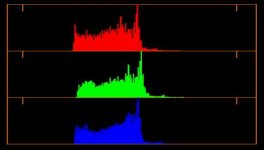
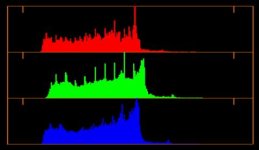
I'm not really sure how it's depressing the signal as it expands the range between whites and blacks. In essence it pulls more "steps" between light and dark from the RAW data and code it into the DPX. If you just use Redlog Film for the DPX the image is more compressed. Yes, there is a minimal difference, but it's better than compressing the range as much as LOG does.

This is what I mean, the first is log and the second is "my own" gamma before grade. (it's not the correct histogram, but gives an idea of what I mean). The second isn't even close to crushing blacks or clip whites, it just expands the data range from the RAW. If you have a 10bit DPX, the second one will have encoded more information into the DPX than going log and expanding it from that.
 

Attachments

  • Screen Shot 2015-08-19 at 11.23.39.jpg
    Screen Shot 2015-08-19 at 11.23.39.jpg
    11.7 KB · Views: 0
  • Screen Shot 2015-08-19 at 11.23.58.jpg
    Screen Shot 2015-08-19 at 11.23.58.jpg
    13.2 KB · Views: 0
I run into trouble all the time when I try to work directly in raw. Off course simple editing like whats done in Premier, FCPx stuff works fine no problem if the timelines are not to intense. But using r3d´s for compositing in nuke, AfterEffect, flame and so on really demand that you knew what you are doing as it´s really easy to fill up the memory buffers and just hit a wall of lag.

Personally I pretty much use Flame for everything and I got about 18 years daily experience from doing so still I find my self (more often than whats comfortable) stuck in a corner where I simply built a setup that is really hitting the wall just because I wanted to work from the original sources. Off course there is always ways around this and most of times its just sloppyness from my side that kind of builds a pile of stuff that the computer really can not chew.

But my approach for compositing r3d´s is this and I think it works on almost all platforms that can buffer sub renders.

1. I bring in the r3d native at 1/4 resolution then I put a scale node that size them to my wanted output resolution, most times thats HD.
2. On the HD node I put a buffer.

The above gives me something I can really scrub around in and work with very well. If there is massive amounts of inputs I just toggle the 3rd´s to an even lower resolution.
And during my work I can at any time reach the RAW settings and change them and reset the buffer. And the comps have the same resolution the whole time so keys scalings etc stays the same. And ofourse if I need a 2k, 3k,4k or 6k canvas of the clip I can just change the resize node for that single input.

3. Then when I do my final render I just toggle the r3d´s to full resolution and render. This ofocurse takes some time but then it´s just the fames needed for the comp and this I don't mind so much it´s the lag while animating and making the setup that is usually causing issues.

In flame the above is a quite easy procedure and works really well. The only thing I can wish for is that they make a per setting or global toggle to jump between full res r3d encoding and lower resolutions. But thats for autodesk and the other software manufactures to solve, I think RED did their part when they made the r3d format. Now the others just need to learn how to use it.....

So in short buffering your r3d inputs will keep you out off memory buffering overflows that will for sure hit you if you try to read to many r3d´s at onces..
 
In flame the above is a quite easy procedure and works really well.

Last time I checked Flame uses the CPU for debayering to keep the GPU free for compositing tasks. Don't think that 2016 changed that.

For quick and rough editing, testing colour/comps etc... I use 1/4 debayer as you described. But when the editing is done, client happy with the offline edit the selected footage gets hard imported with meaningful setups in the Red SDK.


Hans
 
Back
Top