Welcome to our community

Be a part of something great, join today!

  • Hey all, just changed over the backend after 15 years I figured time to give it a bit of an update, its probably gonna be a bit weird for most of you and i am sure there is a few bugs to work out but it should kinda work the same as before... hopefully :)

Desaturated shadows?

Downloaded the files.

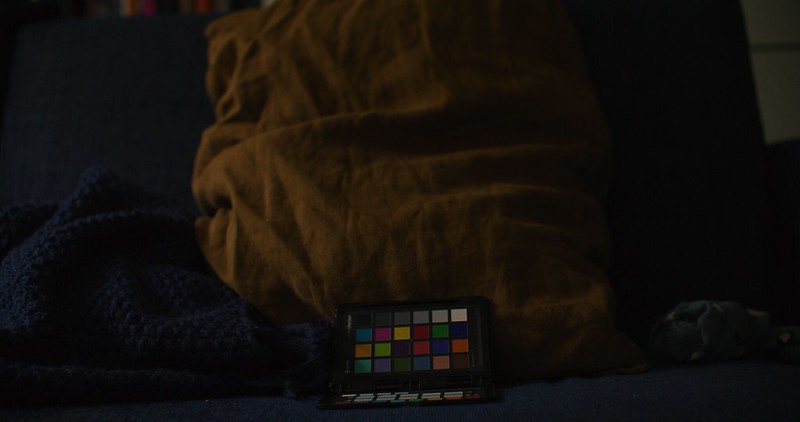
Not sure what you are looking for but your image is exposed for about 24000ISO these cameras do best below something like 6000 ISO. Here is the image developed at 12800 ISO and still the histogram does not reach even half to clip. When at such low exposure levels then sure komodo and many cameras like it will not capture colors so accurately.

And I think the chroma noise cancellation feature Was enabled, that is processing the data in a way that could look appealing but its also destructive in a way, could cause blockyness and other things.

PastedGraphic-3 by Björn Benckert, on Flickr


Below is the image developed at 2000ISO 5500K and resolve color picker balanced on the gray card. Not sure I see what you are talking about. A lot if not most cinema cameras does not do this well in 2000 ISO, a few earlier iterations of red cameras fall in that category.

2000ISO 5500K resovle colorblance on gray. by Björn Benckert, on Flickr

Also on this other picture, Not sure what to look for? The exposure is almost a flat line, when Brough up to 12800 iso there is as I see it plenty of color, no?


PastedGraphic-4 by Björn Benckert, on Flickr

When looking at it in 800ISO you see that you used just of a fraction of the cameras DR capacity, only 1/8 of the DR is in use when capture this image. In other words the image is 8 times as noisy as it would need to be if the strive was to get a perfect capture.

PastedGraphic-6 by Björn Benckert, on Flickr
 
Downloaded the files.

Not sure what you are looking for but your image is exposed for about 24000ISO these cameras do best below something like 6000 ISO. Here is the image developed at 12800 ISO and still the histogram does not reach even half to clip. When at such low exposure levels then sure komodo and many cameras like it will not capture colors so accurately.

And I think the chroma noise cancellation feature Was enabled, that is processing the data in a way that could look appealing but its also destructive in a way, could cause blockyness and other things.

No, these R3Ds are shot at ISO400 to reduce noise. It's just a trim of the last part when at ISO400 they start to break down in the shadows.

Here's the full video


This is about how the camera or conversion behaves at the lowest DR range, so keep the R3D sources at ISO400 where they're shot and check when the aperture gets the image to the low end.
 
What iso you shoot at is irrelevant. What I'm saying is your actual exposure level on these uploaded images is extremely low. Here is your brightest image in the sequence developed at 400 ISO... Now when at such low light levels you don't have much color accuracy, but who cares, if you exposed it for 400ISO then that means you wanted your image as pretty much back, the closer to black you get the less colors. That's natural, at 100% black you obviously got zero color. Your exposure on these uploaded images are very close to the zero point. Your histogram is basically a flatt line at 400ISO. when trying to turn that into a nice rich histogram then you need to multiply the numbers and then you naturally also scale up the inaccuracies that are luring close to the noise floor of the sensor, as for any sensor.


PastedGraphic-7 by Björn Benckert, on Flickr
 
What iso you shoot at is irrelevant. What I'm saying is your actual exposure level on these uploaded images is extremely low. Here is your brightest image in the sequence developed at 400 ISO... Now when at such low light levels you don't have much color accuracy, but who cares, if you exposed it for 400ISO then that means you wanted your image as pretty much back, the close to black you get the less colors you got, that's natural as at 100% black you obviously got zero color, your exposure here is very close to that point.

But I think you're missing the point I'm making here. You got a R3D trim of the last part of a normal to underexposed clip (check the youtube video, it's longer, starting at T1.8 to T22). The normal exposure at ISO400 is not part of the R3D you have because that's a trim of the original R3D and the normal exposure is not what this is about, it's about shadows. It's about how Komodo and the IPP2 conversion behaves at the low range of the DR. Imagine that this underexposed image is the shadow areas of a normally exposed low-key scene where you have highlights in range. The problem that occurs is that the shadow areas of the image start to behave overly desaturated and become a grey splotchy "mush". While low-key shots of someone's face makes the shadow areas of that person's face look grey and without any shadow rolloff. Hair details look grey and their dark areas look crushed, not rolling off into each other.

So you miss the point of this entire thing. I'm aiming at the low range of the DR, how it behaves down there and the example R3D is about how it behaves there. See the entire thing as a representation of shadow areas in a low-key shot. How shadows in such shot behaves.

I mean, if you increase the ISO you get those colors back, because it is not about exposure levels, it's about the behavior of the shadow rolloff.
 
But I think you're missing the point I'm making here. You got a R3D trim of the last part of a normal to underexposed clip (check the youtube video, it's longer, starting at T1.8 to T22). The normal exposure at ISO400 is not part of the R3D you have because that's a trim of the original R3D and the normal exposure is not what this is about, it's about shadows. It's about how Komodo and the IPP2 conversion behaves at the low range of the DR. Imagine that this underexposed image is the shadow areas of a normally exposed low-key scene where you have highlights in range. The problem that occurs is that the shadow areas of the image start to behave overly desaturated and become a grey splotchy "mush". While low-key shots of someone's face makes the shadow areas of that person's face look grey and without any shadow rolloff. Hair details look grey and their dark areas look crushed, not rolling off into each other.

So you miss the point of this entire thing. I'm aiming at the low range of the DR, how it behaves down there and the example R3D is about how it behaves there. See the entire thing as a representation of shadow areas in a low-key shot. How shadows in such shot behaves.

I mean, if you increase the ISO you get those colors back, because it is not about exposure levels, it's about the behavior of the shadow rolloff.


In my screen dump above I see a black image, if its blotchy or not does not matter so much does it? Any image capture device to date is less accurate at low exposures. Simply the less photons hitting the photo site the less accuracy you get.

what Im saying is that what is suposed to be black in an image does not really need to be blotch free or have high color accuracy... as its black and black does not have color, just as highlights / white does not have color.

The more pixels in the image that have less exposure, the harder it also gets for the image compression processing. As the difference between exposure values between individual pixels goes up. Complete noise is super hard to compress a flat image of a single color is the easies. So naturally the compression bites harder the more noise you introduce. due to that low light levels will introduce even more noise / blotchiness as the compression gets to work harder.

Also when altering the iris to control the light levels you also alter the depth of focus. When wide open your image is a blur, that means a lot of pixels next to each other have the same pixels color value, it's an easier image to compress than an image where the iris is all closed down and more of the scnerey is sharp, such scenario has more differences in between pixels and naturally gets harder to compress. So yes a ultra sharp image where you see the structure of the wall paper in the background and the skin texture of the foreground is more compression taxing than an image where everything is racked out of focus. So more closed iris adds to injury as well.

But as you can see on the other screen dump and developed images I uploaded even this close to nothing exposure you uploaded still can render a better image than most cameras, Dragon falls short in comparison and so does many other cameras that's why I don't understand your complaint. You had a dragon before, it was way worse in mixed light darkness no?


To me this image developed at 2000ISO looks more than fine. Sure if there was instead 2 or 3 stops more of light and it was developed at 400ISO it would look about the same in terms of brightness but it would have less noise and more accurate colors.


2000ISO 5500K resovle colorblance on gray. by Björn Benckert, on Flickr
 
Looked at your clip on another monitor. Think I see what you mean now, that the image goes a bit BW before fading to black.

How are you developing the image, what IPP2 curve is applied?

Can you mimic the same light loss with exposure time instead of if iris to see what is introduced by the iris change.

Basically make an image that has the same exposure as your lowest Fstop by altering the exposure time to see if it also goes BW.
 
Looked at your clip on another monitor. Think I see what you mean now, that the image goes a bit BW before fading to black.

How are you developing the image, what IPP2 curve is applied?

Can you mimic the same light loss with exposure time instead of if iris to see what is introduced by the iris change.

Basically make an image that has the same exposure as your lowest Fstop by altering the exposure time to see if it also goes BW.

Yes, this what I'm referring to. I don't see it on other cameras and it's very noticeable on a good TV, especially in THX light recommendation levels. It's like the shadow areas become grey and it doesn't balance at all against the highlights and brighter areas. In a low-key situation, I've never seen any camera do this.

Gonna try and do one and also compare it to my Canon R (will do a comparison with my Dragon as well when I have the time)
 
Yes, this what I'm referring to. I don't see it on other cameras and it's very noticeable on a good TV, especially in THX light recommendation levels. It's like the shadow areas become grey and it doesn't balance at all against the highlights and brighter areas. In a low-key situation, I've never seen any camera do this.

Gonna try and do one and also compare it to my Canon R (will do a comparison with my Dragon as well when I have the time)

perhaps also test for higher lower iso. see if pushing or pulling emphasizes the issue or reduces it. at least in the meantime finding a best case scnenario.
 
Saw the same thing as Christopher with R3D's someone posted online from a pre-release Komodo.

I could be wrong, but it looks to me like the results of some colour-science level decisions made when trying to balance image-quality considerations with the new sensor.

While trusting the validity of those decisions, I'd also guess it's a work in progress, and that perhaps more options might be available if the sensor was in a fully-fledged DSMC body.

If that is the case, then as far as I can tell it's just a matter of exposing for the sensor as it is, while waiting to see what develops.

Would be good to have an official experts opinion on it though.
 
So my first question is:

Are you looking more for this sort of thing:

phfx_forCG_lowKeySaturation.jpg

http://www.phfx.com/temp/reduser/phfx_forCG_lowKeySaturation.jpg
 
So my first question is:

Are you looking more for this sort of thing:

phfx_forCG_lowKeySaturation.jpg


http://www.phfx.com/temp/reduser/phfx_forCG_lowKeySaturation.jpg

From what I understand, what Christoffer noted is something that can't be seen on a still frame.

When this video fades to black when iris is pulled there is a short moment where the image appear more black and white before it goes black...

So when exposure is lowered the lumination of the image happens along one curve and saturation along another.

Play this clip, looking at stills does not show it.

 
Not sure what I'm looking at here (Phil's Image)? The image is at an exposure level where there are no shadows really? Or they're not in the lowest range for the rolloff to be noticed. Check this video again and see when I pull the aperture down during the sofa shot and you can see how the colors behave without any rolloff


It can be argued that it's youtube compression and such, but it's visible from shooting through post and the upload was a ProRes 444, so the youtube transcode is at the highest level for it.

Did a new video both changing shutter and aperture and included stills with my Canon R. As of writing, it's not in 4K on YouTube yet, but I've included a R3D as well as an export of this.


Aperture R3D
https://we.tl/t-1PFwmUooqA

Shutter R3D
https://we.tl/t-19ELOifKKh

Youtube file
https://we.tl/t-gKQm5xo1Ob


As far as I can see, I'm not sure if it makes things much better, but doing a, from scratch, RWG/LOG3G10 grade improves on the phenomena in the shadows. There's nothing scientific in any of these tests, but it might be concluded that the IPP2 transforms do not work well with Komodo. That grading the material directly from the LOG3G10 is in fact improving on the "grey splotchyness" in shadows.

But this needs to be tested more. The general feeling here is that the IPP2 transforms elevate shadow areas too much so there isn't any roll-off capacity left to be made out of the lower DR range. Comparing to the Canon shots, they roll off better into shadows and end up in black, while the Komodo material, first has a very green tint to the lower range and second looks way off in its levels. Decreasing exposure doesn't really do much, it just packs things together and more stuff ends up in the "grey splotchyness". So the transforms seem to just "try" to roll-off into shadows but end up packing everything into a dull grey mess where everything is the same but nothing really dies off into black.

Since I've not yet tested it in comparison to my DSMC2 Dragon, I'm not sure if this is just how IPP2 works, but maybe we've not seen it on Dragon material that much because of the higher noise. However, it might be that the standard IPP2 isn't really matching well with the internal color science of Komodo and might need a rework or tweak. Either through firmware or improving color science into IPP3.

I'm gonna test ACES as well to see how it behaves there because that is a crucial area since so much gets graded through ACES now.
 
But this needs to be tested more.

From my perspective, observations, and even probing Graeme I would say IPP2's Output is working as intended. There's some characteristic stuff in terms how shadows and highlights are treated to avoid bad things that can happen high and low with high or near out of gamut material.

In the specific shots presented you're trading some aspects off, but you can indeed put more saturation down there as it is in there. I've made unique transforms that hold more saturation well into the noise floor even and go against standard S-Curve or Contrast logic, but that I would say classifies more as a unique look.

I'll download your additional test shots and look into them today or tomorrow. But I have yet to see anything that's truly unexpected or more accurately not intended.

Graeme could likely pop in and chat about it. Fairly deep subject from a color science perspective and natural looking image perspective.
 
From my perspective, observations, and even probing Graeme I would say IPP2's Output is working as intended. There's some characteristic stuff in terms how shadows and highlights are treated to avoid bad things that can happen high and low with high or near out of gamut material.

In the specific shots presented you're trading some aspects off, but you can indeed put more saturation down there as it is in there. I've made unique transforms that hold more saturation well into the noise floor even and go against standard S-Curve or Contrast logic, but that I would say classifies more as a unique look.

I'll download your additional test shots and look into them today or tomorrow. But I have yet to see anything that's truly unexpected or more accurately not intended.

Graeme could likely pop in and chat about it. Fairly deep subject from a color science perspective and natural looking image perspective.

I would gladly hear from Graeme on this since I really trust his judgment and knowledge. IPP2 isn't really a problem in itself. I think that if we think about how Komodo has monochromatic handling of DR at the highlight range, it might be so at the low range as well. So if IPP2 is treated just like any other Red camera, but the regular DSMC2 cameras don't have monochromatic stops, that could mean that the transformation of Komodo material isn't really doing it in the same way as with the other DSMC2s. So while they keep color and luminance working in tandem with each other throughout the transform from low to high, on Komodo we get some weird artifacts. This however seems odd as the physical DR range should expand beyond what the transform does, but I think that due to how Komodo handles itself, we might need some special treatment of the color science in order for IPP2 transforms to work as intended.

So far, what really sticks out is the green tint of the low range, as well as the monochromatic nature of it while it cram everything at the lowest range into something just above pure black. My color instinct here is that I generally get better results when going from LOG3G10 as the starting point without any of the IPP2 transforms either internally or as output nodes. It might not even be about things getting monochromatic, but that the transforms make it impossible to roll off into pure black, instead it compresses everything into a grey "mush". So it doesn't matter if you push down the grade, as long as the transform is there it keeps everything compressed in the low range, and therefore it becomes a grey splotchfest.

Something is clearly a bit off here that I think needs some eyes on it and maybe we need some tweaks to how Komodo gets handled through the IPP2 pipeline as Komodo seems to work a bit different than the regular DSMC2 linup.
 
just to expand this conversation a bit, from a viewing standpoint, i see the grey in Gemini footage when i pull below the “native” iso. So, iso800LL is pretty obvious, and exports in Davinci look weird, until i adjust the curve. i’ve not tried ACE’s yet.

it does appear to be mostly a conversion issue, as playing with curves alters things. but i see it in other Ipp2 footage as well, just to a lesser degree. and i agree, i’ve not seen it in other camera footage before. would be interested in hearing more post workflows to more easily avoid this.

So, if you talk to Graemme would be great to get some insight on IPP2 in general, because i’m not sure it is just the Komodo.
 
If it doesn't happen in the r3d/when bypassing IPP2, then it's a somewhat non-issue (IMO). It should also be recoverable after transform by using REDs IPP2 conversion LUTs (instead of native IPP2) as you could add a node pre-tonemap/rolloff and boost the shadows/shadow saturation to taste.

This also strengthens Panavision's/Light Iron's/DXL's decision of bypassing IPP2 altogether and having their own LUT applied on an all encompassing RWG/L3G10 image.
 
If it doesn't happen in the r3d/when bypassing IPP2, then it's a somewhat non-issue (IMO). It should also be recoverable after transform by using REDs IPP2 conversion LUTs (instead of native IPP2) as you could add a node pre-tonemap/rolloff and boost the shadows/shadow saturation to taste.

This also strengthens Panavision's/Light Iron's/DXL's decision of bypassing IPP2 altogether and having their own LUT applied on an all encompassing RWG/L3G10 image.

Im not sure that's how Panavision does it. As I understand they only use a primer lut under IPP2.
 
Back
Top