Welcome to our community

Be a part of something great, join today!

  • Hey all, just changed over the backend after 15 years I figured time to give it a bit of an update, its probably gonna be a bit weird for most of you and i am sure there is a few bugs to work out but it should kinda work the same as before... hopefully :)

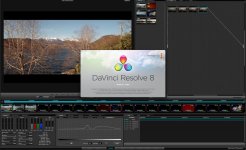
DAVINCI RESOLVE and ***HACKINTOSH***

2 gtx 580 working progress...........

P6t7 supercomputer + 2 gtx 580 + areca+ blackmagic 3d+ redrocket..
For DAvinci REsolve 8

Wait...I thought the GTX 580 was working as of your last update? I'm so close to pulling the trigger on buying all my hardware and I don't want to buy 3 GTX 580s just to run into a whole bunch of problems. I don't mind having to modify some things and tweak to make them work, I just need to know that they can work reliably. I would much rather buy current 5 series gtx cards than old 4 series.
 
There isn't big difference in performance between 4xx and 5xx series but there is big difference in price
GTX470 448 cuda cores
GTX580 512 cuda cores
So 64 cores more for double price.
Only Gtx 590 is worth the money because of two gpu on one board (1024 cuda)
 
I can confirm that 2 GTX580's work. I still don't have them working perfectly, but I am getting full performance and good reliability. I have to have my monitors plugged into the second card on boot up so no bios or machete screen. Black until OSX. There are times that I have to remove one monitor to get OpgenGL and Cuda to boot up correctly and then plug in the second monitor. There are definitely quarks but I am glad that I bought the 580's because I will have them for when Resolve goes to PC and I bet with more time they will get better on Mac.

Thanks to Luigi for all the help! Without him this setup would not work at all. He did a LOT of work to get these to work for me.
 
If you want a Hack then go with the GTX470's 480's or Quadros. They are working perfectly for this. I bought the 580's for the future and can deal with these problems for now. Resolve on PC is going to be awesome. The 590's would be sweet to have for PC but on mac it will not utilize both GPU's.
 
I can confirm that 2 GTX580's work. I still don't have them working perfectly, but I am getting full performance and good reliability. I have to have my monitors plugged into the second card on boot up so no bios or machete screen. Black until OSX. There are times that I have to remove one monitor to get OpgenGL and Cuda to boot up correctly and then plug in the second monitor. There are definitely quarks but I am glad that I bought the 580's because I will have them for when Resolve goes to PC and I bet with more time they will get better on Mac.

Thanks to Luigi for all the help! Without him this setup would not work at all. He did a LOT of work to get these to work for me.

Thanks for the info. Sounds like a bit of a pain. But the reason I would like to go with the 580s are the same as yours. Hmmm
 
There isn't big difference in performance between 4xx and 5xx series but there is big difference in price
GTX470 448 cuda cores
GTX580 512 cuda cores
So 64 cores more for double price.
Only Gtx 590 is worth the money because of two gpu on one board (1024 cuda)

That might have been in the past but the pricing currently is pretty close. The "Buy it Now' options on ebay for a GTX480 are $465. You might luck out bidding on a used one. There is one GTX 480 for $370 open box on ebay. And the best real price on google (there are several in the $300s but when you click on them they are in the $500s) is $499.

You can buy a brand new EVGA GTX 580 for $469 after rebate on NewEgg. Not a huge price difference. I would rather be current and future ready for Windows DaVinci than dated before I begin.
 
I wrote about gtx470 wich you can buy for half the price of gtx 580
There is no future proof solution in these times;) Ok maybe except EPIC
When windows version of davinci comes I'll go with three gtx590 = 6 gtx580 but in three PCIe slots
 
I just made some research and found the following information regarding CUDA performace of different cards on WIKI:

GeForce GTX 460 - 907.2 GFLOPS
GeForce GTX 470 - 1088.64 GFLOPS
GeForce GTX 480 - 1344.96 GFLOPS

GeForce GTX 560 - 1075 GFLOPS
GeForce GTX 570 - 1405.4 GFLOPS
GeForce GTX 580 - 1581.1 GFLOPS
GeForce GTX 590 - 2488.3 GFLOPS

for the reference some other cards:

GeForce GTX 285 - 1062.72 GFLOPS
Quadro 2000 - 480 GFLOPS
Quadro 4000 - 486.4 GFLOPS
Quadro FX 4800 - 693.5 GFLOPS

I think this does make sense and helps to find the best price/performace card...

source:
http://en.wikipedia.org/wiki/Comparison_of_Nvidia_graphics_processing_units
 
I just made some research and found the following information regarding CUDA performace of different cards on WIKI:

GeForce GTX 460 - 907.2 GFLOPS
GeForce GTX 470 - 1088.64 GFLOPS
GeForce GTX 480 - 1344.96 GFLOPS

GeForce GTX 560 - 1075 GFLOPS
GeForce GTX 570 - 1405.4 GFLOPS
GeForce GTX 580 - 1581.1 GFLOPS
GeForce GTX 590 - 2488.3 GFLOPS

for the reference some other cards:

GeForce GTX 285 - 1062.72 GFLOPS
Quadro 2000 - 480 GFLOPS
Quadro 4000 - 486.4 GFLOPS
Quadro FX 4800 - 693.5 GFLOPS

I think this does make sense and helps to find the best price/performace card...

source:
http://en.wikipedia.org/wiki/Comparison_of_Nvidia_graphics_processing_units

THanks bpain, nice;)


OK guysss UPDATE TO 8.1 .:thumbsup:

thanks
Luigi
 

Attachments

  • da.jpg
    da.jpg
    96.9 KB · Views: 0
Hi,

I installed OSX Lion (thanks again Luigi). Since OSX requested an update for CUDA, I downloaded and installed the newest CUDA drivers 4.0.50 (GPU drivers 270.05.05f01 -> unchanged). When I start DaVinci, I get an error message:

Critial Execption : BtExeption: ERROR: index "SyRecordInfo_UserWithLock_idx" contains unexpected zero paige at block 0
HINT: Please REINDEX it.
QPSQL: Unable ti create query

When I ignore the warming and try to set up an project, DaVinci tells me that there's a database error:

The current database has a problem. To continue, you should contact your system administrator to restore the operation of the current database or connect to a different working database...

Any tips what I should do?

Thanks
David
 
So I found a fix at the Creative Cow forum

A fix for this requires a few command for you to type on the terminal. This will uninstall the database, so the next install of Resolve will install it properly.

http://forums.creativecow.net/thread/277/8240

1) Stop the server
sudo /sbin/SystemStarter stop postgresql-8.4
2) Remove menu shortcuts:
sudo rm -rf /Applications/PostgreSQL 8.4
3) Remove the ini file
sudo rm -rf /etc/postgres-reg.ini
4) Removing Startup Items
sudo rm -rf /Library/StartupItems/postgresql-8.4
5) Remove the data and installed files
sudo rm -rf /Library/PostgreSQL/8.4
6) Delete the user postgres
sudo dscl . delete /users/postgres

Now, re-install Resolve, reboot, and then start Resolve.

DaVinci doesn't produce any database error any more, but complains about missing CUDA drivers (4.0.50 is installed).
When I ignore the warmin and try to set up a project, DaVinci quits without any error message.

UPDATE: No more errors, everything is working fine!
 
I can confirm that 2 GTX580's work. I still don't have them working perfectly, but I am getting full performance and good reliability. I have to have my monitors plugged into the second card on boot up so no bios or machete screen. Black until OSX. There are times that I have to remove one monitor to get OpgenGL and Cuda to boot up correctly and then plug in the second monitor. There are definitely quarks but I am glad that I bought the 580's because I will have them for when Resolve goes to PC and I bet with more time they will get better on Mac.

Thanks to Luigi for all the help! Without him this setup would not work at all. He did a LOT of work to get these to work for me.

How are the 580s treating ya? Any fixes for your issues? I would love to use 3 580s and not have to unplug and re-plug monitor cables.
 
Hi,

What is the right configuration for 4 gpu, that if i use a Netstor?
Netstor (External PCI Express Box with Storage Backplane)
http://www.netstor.com.tw/_03/03_02.php?ODQ

I almost finished my new Machette Mac-hackintosh 8.1 system, (this is
a development plan).

DAVINCI RESOLVE 8.1 + Netstor.

slot:
1. Red-Rocket
2. Netstor PCI Express - Adaptor
3. Gtx-470
4: empty
5: GTX-470
6: empty
7: GTX-470

on the Netstor (External PCI Express Box)

1. Gtx-470
2. Decklink 3D+
3. Arreca

What settings need to be done?

Best regards

Peter

http://redstormhungary.com/
 
Jeremiah, Nothing new. The 580's are working great. I don't have to unplug and replug the monitors in every time. I only have to do it when I need to get into the bios or if I want to see everything booting up. Usually I just boot black screen and it works great. There have been a few times where OpenGL doesn't load correctly and I need to fiddle with stuff and then it eventually works. Overall I am very happy and I will post specs and pics soon. Again... All thanks to Luigi!!!
 
Jeremiah, Nothing new. The 580's are working great. I don't have to unplug and replug the monitors in every time. I only have to do it when I need to get into the bios or if I want to see everything booting up. Usually I just boot black screen and it works great. There have been a few times where OpenGL doesn't load correctly and I need to fiddle with stuff and then it eventually works. Overall I am very happy and I will post specs and pics soon. Again... All thanks to Luigi!!!

Sweet! Good to hear. Please do post pics and specs. Thx.
 
For all those who are writing me and asking for info on my Hack, place the information once again so that we can help you buy the version that works well.

The debug mode in Davinci is configured like this:
LsManager.3.NumGPUs = 3
LsManager.3.GPUMapping = 1 2 3
LsManager.3.GPUMappingEnable = 1

this is because the first and only GPU is only used for the interface, while the 2 / 3 / 4 is used for Cuda.
I repeat and repeat it several times, if you want to have realtime RED R3D files you must have a minimum of 6core cpu or a Redrocket dual is better, the GPU are for Nr, Blur etc. ect. but not to decode the R3D files.
I repeat once again that the drivers for the GTX 580 are beta and not stable, so if you want a smooth and without spending much always recommend the gtx 470 in my case.
Machete is a good uitlity and helps you to install a fairly good hackintosh with good performance, obviously you do not have any type of media.

My next step will be to add another Red Rocket, I have a pci-e slot free for EPIC files hdrx.
I thank all the people who have trusted me and I apologize if I can not answer at all, I do my free time.


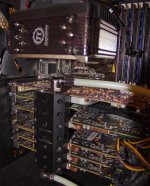
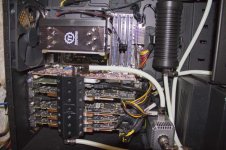
HACK LUIGI:

CPU : I7 950 (NOT OVERCLOCKED)
MAINBORAD: ASUS P6T7 SUPERCOMPUTER
RAM: CORSAIR DDR3 18GB
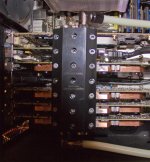
GPU: 4 GTX 470 EVGA WATERCOOOLED.
POWER: CORSAIR 1000W
OS: 10.7.1 SSD CORSAIR 120 GB SATA1
RAID: INTERNAL SOFT 5 DISK SATA 2/3/4/5/6

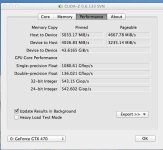
IN STANDART CANDLE TEST V8.0 THIS IS RESULT:
V1 2 nodes : 24 fps
V2 4 nodes : 24 fps
V3 6 nodes : 24 fps
V4 12 nodes :24 fps
V4-x2 24 nodes: 17 fps
V5 NR 4 : 24 fps
V6 NR 4 : 24 fps
V7 NR 4 : 24 fps
V8 NR 4 : 12 fps

LINK IS THIS :
http://forums.creativecow.net/thread/277/7454

MACHETE SUPPORT:

ALL CPU OF INTEL XEON AND DESKTOP DUAL CORE TO 6 CORE
ALL TYPE OF RAM
LION OSX 10.7.0 AND 10.7.1
ALL TYPE OF SSD HARD DRIVE AND NORMAL
GTX 460/470/480 AND BETA VERSION FOR 580 (NOT STABLE)

AND MACHETE IS FREE FOR DOWNLOAD ;)
https://rapidshare.com/files/3092412...e_version3.zip
I HOPE THAT HELP PEOPLE TO UNDERSTAND BETTER:)


THANKS
LUIGI
 

Attachments

  • int1.jpg
    int1.jpg
    93.3 KB · Views: 0
  • int2.jpg
    int2.jpg
    97.5 KB · Views: 0
  • int3.jpg
    int3.jpg
    92.5 KB · Views: 0
  • int4.jpg
    int4.jpg
    35.3 KB · Views: 0
Last edited:
REsolved problem whit p6t7 cuda driver in 10.7.2 ..
next week i post some fix and possible to update to 10.7.2 .

thanks
Luigi
 
Hello Luigi.
Very impressive thread, I read it all.
The system on your post #416 looks very clean. Could you post the details of the hardware you're using (Case, Watercooling solution, watercooling block that cools all the GPUs...) ?
many thanks
 
Sorry but this is incorrect, I use a multitude of SSD's with the two p6T7's I have. From Kingston, OCZ, Corsair, Patriot, etc... There is in fact a problem with the sata IRQ being used so drives other than 0 & 1 have exceptionally slow speeds. Whether they are SSD or not. 2-5 channels suffer major speeds drops, under the ICH10R.

So, how many SATA devices are you able to use with this MB ? Only two ?
 
So, how many SATA devices are you able to use with this MB ? Only two ?

ciao Michael,
look at post # 416 I just wrote, I use 1 for os and ssd drives in raid 5, then all 6 SATA ports, eSATA does not work.
Case is Corsair this: http://www.corsair.com/pc-cases/obsidian-series-pc-case/obsidian-series-800d.html
for Watercooling i use this : http://shop.aquacomputer.de/product_info.php?language=en&products_id=2491 and for radiator and pumps is only your choice and this is bridge http://shop.aquacomputer.de/product_info.php?products_id=2527.

i hope help you ;)


thanks
Luigi
 
Back
Top