Welcome to our community

Be a part of something great, join today!

  • Hey all, just changed over the backend after 15 years I figured time to give it a bit of an update, its probably gonna be a bit weird for most of you and i am sure there is a few bugs to work out but it should kinda work the same as before... hopefully :)

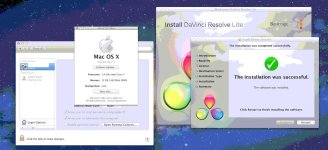
DAVINCI RESOLVE and ***HACKINTOSH***

Hi Luigi
Your installer is GREAT thank you!

My beta setup

I7 970
24GB DDR
1250W power supply


1-redrocket
2-Black Magic
3-GTX470
4-Free
5-GTX470
6-free
7-quadro 4000

it is temporary setup because I ordered wrong tower:embarassed: and there is no place for third gtx in slot 7
Davinci performance is superb I can do anything I want in 1080 and there is still power reserve!!!!

Of course there are trouble as usual

system doesn't see Red rocket. Ones i saw in redcine-x that there is rocket but there was no picture and RX crashed
sometimes I have warning ATY_int.kext was installed improperly...
I had some problems with instability. First time it was after I created software raid so I deleted it and now is better. Maybe it was coincidence.
MCcolor doesn't work :cryin:

thanks

EDIT:
I couldn't resist and tried to little overclocking:coolgleamA:

4.2Ghz without any problems. It gives me half res good 25fps

Edit2:
Redrocket is working now!!! I connected to mac via usb and reinstalled 3&4 + redrocket+blackmagic 3d from machette installer again and now everything is OK
 
Hi Luigi
Your installer is GREAT thank you!

My beta setup

I7 970
24GB DDR
1250W power supply


1-redrocket
2-Black Magic
3-GTX470
4-Free
5-GTX470
6-free
7-quadro 4000

it is temporary setup because I ordered wrong tower:embarassed: and there is no place for third gtx in slot 7
Davinci performance is superb I can do anything I want in 1080 and there is still power reserve!!!!

Of course there are trouble as usual

system doesn't see Red rocket. Ones i saw in redcine-x that there is rocket but there was no picture and RX crashed
sometimes I have warning ATY_int.kext was installed improperly...
I had some problems with instability. First time it was after I created software raid so I deleted it and now is better. Maybe it was coincidence.
MCcolor doesn't work :cryin:

thanks

EDIT:
I couldn't resist and tried to little overclocking:coolgleamA:

4.2Ghz without any problems. It gives me half res good 25fps

Edit2:
Redrocket is working now!!! I connected to mac via usb and reinstalled 3&4 + redrocket+blackmagic 3d from machette installer again and now everything is OK


Ciao Artur,
1: work all 3 gpu in REsolve ?
2: you have deleted AppleGrapichpowermagement from /system/library/Extensions ?
3: put modified realtek KExt in /System/Linbrary/Etensions and open kextwizar app and select repair permission and cache /system/library/extension... reboot and try connect you MC color (reinstall software)
AND IMPORTANT NOT OVERCLOCK SYSTEM , BLACKMAGIC not work right with overclock......

i wait your reponse or screenshot

thanks
Luigi


https://rapidshare.com/files/2600397906/mc.zip
 
Hi!

Ciao Artur,
1: work all 3 gpu in REsolve ?

When I do the tip in debuger with three gpu performance is lower than when I set two gpu

2: you have deleted AppleGrapichpowermagement from /system/library/Extensions ?

Yes

3: put modified realtek KExt in /System/Linbrary/Etensions and open kextwizar app and select repair permission and cache
/system/library/extension... reboot and try connect you MC color (reinstall software)

THANK YOU I hope it will work!!!

AND IMPORTANT NOT OVERCLOCK SYSTEM , BLACKMAGIC not work right with overclock......

Hmm I have no(new) problems after overclocking.

i wait your reponse or screenshot

Tomorrow I'll receive a new tower and post pictures, screenshots, full spec and candle performance test

I had problem with redrocket after comp slipping. Now I turned off power saving. Is there better solution?
It is funny but after being very impressed with peroformance now I want more more more ;)))


Cheers!
 
I had problem with redrocket after comp slipping. Now I turned off power saving. Is there better solution?
It is funny but after being very impressed with peroformance now I want more more more ;)))


Cheers!

Check firmware and driver i use 1.4.16.. , whatis the problem of redrocket? not work in davinci? or another software?


thanks
Luigi
 
oc

oc

hey artur,

could you share ur cmos settings for overclocking the 930? thanks!

p-
 
I have latest driver I think it is 1.4.16
Problem is when computer goes in to sleep mode and when wake up rocket is usles in resolve and other aps. I must turn off for min. 1-2 minute and rocket working again

Paul I have 970 so setup should be different with your 930.
I just gain base frequency to 175Mhz with short steps and memory to 1774 i think. 970 have 24 multiplier so it gives 4.2Ghz. Now I reduced to 166Mhz 4ghz because I don't need so much power and I feel safer. I couldn't find any CPU temperature monitor for hackintosh. When I install windows I'll test how much I can get from this supercomputer;)
 
I have latest driver I think it is 1.4.16
Problem is when computer goes in to sleep mode and when wake up rocket is usles in resolve and other aps. I must turn off for min. 1-2 minute and rocket working again

Artur good, this is a bug?! or if someone should try to have a MacPro with redrocket and see if you do the same flaw ...
I never noticed because I disable 'all the energy saving and power down after every correction, I never went to sleep mode.

thanks anyway;)
 
Rocket in mac pro just don't allow mac go to sleep mode. I always wondering why and now I know;-)
 
Luigi you are THE BEST!!!
MC Color is working now!!!!!!! :hurray:
I'll post everything about my setup with pics in the evening.
Thank you!
 
AND IMPORTANT NOT OVERCLOCK SYSTEM , BLACKMAGIC not work right with overclock......

So your saying we can't overclock this system if using a Black Magic card? That's sad because I had hoped to overclock it to 4.0ghz. :(
 
So your saying we can't overclock this system if using a Black Magic card? That's sad because I had hoped to overclock it to 4.0ghz. :(

Jeremiah,
try ;) if your sistem is stable enjoy.


thnaks
Luigi
 
Jeremiah,
try ;) if your sistem is stable enjoy.


thnaks
Luigi

HAHA! Nice. Will do. My purchase date is slowly approaching. Hope to snag all the parts and start my build before the year is out. I will keep you posted on my progress. Should be fun!
 
Rohit or Dwaine i think this is same bug whit lion 10.7.0 and resolved.
I download from apple store lion, is surprise is 10.7.1 , install it in macpro and when install Resolve same problem of Database not possible to create .
And no create a user PostgresSQL.
Whit 10.7.0 work.

I hope we can be of help.
 

Attachments

  • 2.jpg
    2.jpg
    67.5 KB · Views: 0
Rohit or Dwaine i think this is same bug whit lion 10.7.0 and resolved.
I download from apple store lion, is surprise is 10.7.1 , install it in macpro and when install Resolve same problem of Database not possible to create .
And no create a user PostgresSQL.
Whit 10.7.0 work.

I hope we can be of help.

Hi Luigi,

I just installed 10.7.1 fresh from the App Store, and then installed Resolve, and it installed just fine.

Regards,
Rohit
 
Hi Luigi,

I just installed 10.7.1 fresh from the App Store, and then installed Resolve, and it installed just fine.

Regards,
Rohit


ok i try donwload another 10.7.1 from app store and try, thanks Rohit ;)


Luigi
 
Hello, I hope this query is welcome, Luigi.

Has anyone experienced these two errors in Resolve:

Failed to enable output mode=32347073

followed by:

Failed to set the video mode on the Decklink card

Any help would be appreciated.

Thanks

Mansur

P.S.

Luigi, I used Rohit's posted fix for this (I just forget where he posted the terminal fix but not on this forum) to address the database problem I had with 10.7.0 and Resolve 8.0.1 I assume this would work with your problem but it does erase the older database (which you could also backup anyways).
 
Last edited:
Hello, I hope this query is welcome, Luigi.

Has anyone experienced these two errors in Resolve:

Failed to enable output mode=32347073

followed by:

Failed to set the video mode on the Decklink card

.

Ciao Mansur,
when this error occurs?
have tried to see the logs in / Library / Application Support / Blackmagic Design / DaVinci Resolve / folder.

thanks
LUIGI
 
Appreciated, email from Ramalho,
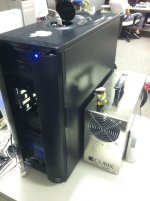
P6t7 Supercomputer DAVINCI RESOLVE 8 --> "Machete" and CUBIX.
Thank you for feedback Ramalho.:rolleyes::rolleyes:

1-Areca
2-Cubix
3-GTX470 - (GUI)
4-blocked
5-GTX470
6-blocked
7-GTX470

In the Cubix:

1- DeckLink
2- FiberChannel


thanks
Luigi
 

Attachments

  • IMG_0558.jpg
    IMG_0558.jpg
    51.5 KB · Views: 0
Will do, Luigi.

But when I got to the studio and booted the system, everything worked fine without problems. I guess the hack doesn't like me not being around. lol

And no log entries of the error. My colorist is mystified at the moment.
 
Last edited:
Will do, Luigi.

But when I got to the studio and booted the system, everything worked fine without problems. I guess the hack doesn't like me not being around. lol

And no log entries of the error. My colorist is mystified at the moment.

Ciao Mansur,
but let me understand, the system works even with errors?
or resolve not to be more?
Resolve or works, but there 'no signal SDI output?

Have you tried to swap PCIe slots with Deklink 3d?

aspect of your news, I'm curious.
But it happens only with hack, or even with a MacPro?


thanks
Luigi
 
Back
Top