Welcome to our community

Be a part of something great, join today!

  • Hey all, just changed over the backend after 15 years I figured time to give it a bit of an update, its probably gonna be a bit weird for most of you and i am sure there is a few bugs to work out but it should kinda work the same as before... hopefully :)

DAVINCI RESOLVE and ***HACKINTOSH***

I am sorry: I have three 470s, not 460s. I can't change the case because I am only allowed to use the machine as is because it will also serve double duty to run Windows for CUDA programming using a mobile rack for the system drive (one drive for Windows, another drive for me to use Mac OS).

If you have some time in the coming weeks for a custom configuration, I would greatly appreciate it.
 
Hi Luigi,

I wanted to update to Lion using your Machete installer, but saw in the description that I have to have my Areca in slot 4 and the Blackmagic 3D+ ind slot 2. Unfortunatly, my Areca is in slot 6 and the Blackmagic 3D+ in slot 4. Since I connected my GPUs (in slot 3 5 7) with a watercooling bridge, I can't change the slots of the other cards without removing the GPUs. Do I have to modify your installer in any way to use it with my setup?

Thanks
David
 
Hi Luigi,

I wanted to update to Lion using your Machete installer, but saw in the description that I have to have my Areca in slot 4 and the Blackmagic 3D+ ind slot 2. Unfortunatly, my Areca is in slot 6 and the Blackmagic 3D+ in slot 4. Since I connected my GPUs (in slot 3 5 7) with a watercooling bridge, I can't change the slots of the other cards without removing the GPUs. Do I have to modify your installer in any way to use it with my setup?

Thanks
David

ciao David.
certainly made ​​to feel that we organize a remote desktop ;) or try new installer see down post ;)
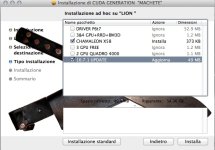

thanks
Luigi
 
Last edited:
ciao,

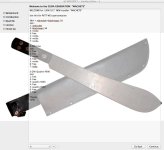
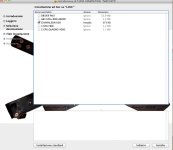
little update at MACHETE installer,
:thumbup1:
added at the new installer can select 3 nvidia GPU, with the other free slots, and 2 NVIDIA Quadro GPUs"this is in beta test".

3 gpu is:

slot:
1. free
2. free
3. nvidia
4: free
5: nvidia
6: free
7: nvidia

for 2 quadro 4000:

slot:
1: free
2: free
3: quadro 4000
4: free
5: quadro 4000
6: free
7: free

choose the amount of GPU you want in Lion , step after installed on the boot partition.


https://rapidshare.com/files/52784098/machete2.zip

thanks
Luigi
 

Attachments

  • 1.jpg
    1.jpg
    68.5 KB · Views: 0
  • 2.jpg
    2.jpg
    48 KB · Views: 0
  • boot.jpg
    boot.jpg
    7 KB · Views: 0
Last edited:
Could you perhaps try this little benchmark?
http://forums.creativecow.net/readpost/277/8355
The yousendit link doesn't work, but email the guy to get the file.

Also any status on the GTX 570?

I've had a go at trying to get the 570 working on a system here. However OpenCL works, CUDA works, but the "video player" inside davinci doesn't work. Adobe Premiere CS 5.5 has the same issue in fact.
 
Could you perhaps try this little benchmark?
http://forums.creativecow.net/readpost/277/8355
.

Ciao Jimmy
this is my result:

V1 2 nodes : 24 fps
V2 4 nodes : 24 fps
V3 6 nodes : 24 fps
V4 12 nodes :24 fps
V4-x2 24 nodes: 17 fps
V5 NR 4 : 24 fps
V6 NR 4 : 24 fps
V7 NR 4 : 24 fps
V8 NR 4 : 12 fps


You have a ASUS p6T7 Supercomputer?
strange because it works for me,
maybe you have another motherboard?

thanks
Luigi
 
Wow, impressive numbers :)

I have ordered one.
However my theory is that it's mainly because I use the GTX 570 as main display card aswell.
 
ciao GUYSSSSS..

Update 10.7.1::thumbup1:

Added patch at machete for 10.7.1.
- OPENCL
- APPLE AUDIO OUT HDA
- CHAMELEON 1348

simple procedure, update to 10.7.1, reboot, open Machete and select 10.7.1 + chamaleon , repair permission and reboot ;)

https://rapidshare.com/files/464801124/Machete2.zip

thanks
Luigi
 

Attachments

  • Schermata 08-2455792 alle 01.48.20.jpg
    Schermata 08-2455792 alle 01.48.20.jpg
    81 KB · Views: 0
Last edited:
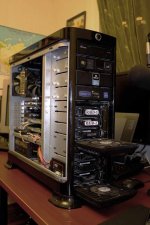
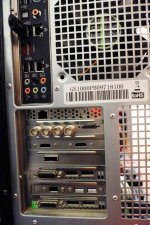
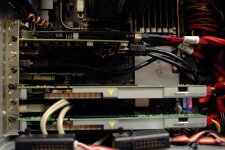
Public photos of a hack for Davinci RESOLVE in Russia. I managed to run two NVIDIA 4000, with some initial difficulty APM power management, not easy in remote desktop to patch dsdt ,but then everything went wonderfully well;)
ALEXANDER Thanks you for your patience.
Really great performance.:thumbup1:

ASUS P6T7 supercomputer mainboard
2. Nvidia 4000
1. areca 1222
1. highpoint
1. blackmagic 3d


thanks
Luigi
 

Attachments

  • 22.jpg
    22.jpg
    90.8 KB · Views: 0
  • 23.jpg
    23.jpg
    99.8 KB · Views: 0
  • 21.jpg
    21.jpg
    90.4 KB · Views: 0
both...im going to build hackintosh in soon cant decide what type of display i should get...
your rig is damn powerful do you think it this will be enough for davinci lite ?
i7 960 12Gb DDR3 Ram and single GTX 480..(raid array)
 
both...im going to build hackintosh in soon cant decide what type of display i should get...
your rig is damn powerful do you think it this will be enough for davinci lite ?
i7 960 12Gb DDR3 Ram and single GTX 480..(raid array)

ALEX have:
2 samsumg 1 for gui 1 for vetorscope and 1 SOny sdi 24"

For HAck Sert is better 2 or 3 gtx the single is not good choice, for ram is good 12 gb and i7 960 is a great choice ;)


thanks
Luigi
 
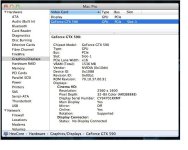
OHI OHI OHI !!!! ;)

The solution is near ------- i hope ;)
 

Attachments

  • 590.JPG
    590.JPG
    56.9 KB · Views: 0
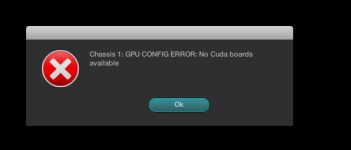
gpu config error

gpu config error

has anyone gotten this error? resolve crashes when i try to load a file.

pref still says 3 GPU and i havent changed the mapping.

chasis 1: GPU CONFIG ERROR: NO CUDA BOARDS AVAILABLE
attachment.php
 

Attachments

  • Screen shot 2011-08-21 at 9.40.22 AM.png
    Screen shot 2011-08-21 at 9.40.22 AM.png
    15.1 KB · Views: 0
Back
Top