Welcome to our community

Be a part of something great, join today!

  • Hey all, just changed over the backend after 15 years I figured time to give it a bit of an update, its probably gonna be a bit weird for most of you and i am sure there is a few bugs to work out but it should kinda work the same as before... hopefully :)

DAVINCI RESOLVE and ***HACKINTOSH***

My configuration:

1 - empty
2 - empty (HMDI output)
3 - GTX480
4 - Blackmagic Decklink 3D+
5 - GTX480
6 - Areca 1880i
7 - GTX480

Quick question, does the P6T7 allow for double spaced PCIe cards not to overlap the other PCIe slots or are you using some other means to keep the cards using only one PCIe slot. Does watercooling allow you to lose the large fans and hence allow you to fit your Areca and BM decklink in between? Looking at the board I always imagined those types of graphics cards would always create this issue.
Paul
 
Quick question, does the P6T7 allow for double spaced PCIe cards not to overlap the other PCIe slots or are you using some other means to keep the cards using only one PCIe slot. Does watercooling allow you to lose the large fans and hence allow you to fit your Areca and BM decklink in between? Looking at the board I always imagined those types of graphics cards would always create this issue.
Paul

Hi Paul,

the fans would normally overlap a second PCIe slot. I'm using Aquacomputer coolers to fit the cards into a single slot. The coolers are awesome and not to expansiv, but their connector (Twinconnect) is terrible. I flooded my PC three times before it worked (fortunaltey I started a test run without plugging the PC in, powering the pump from an old power supply). Water was leaking out between the bridge and the cooler. It's possible to fix it with silicon sealant.

The Areca and the Blackmagic cards fit in between (I had to remove for both cards a srew on the watercoolers which were blocking their fans).

If I would set up a new system, I would rather take a different company then Aquacomputer, where it's possible to screw the plugs directly into the cooler. Just be sure that the connectors are high enough so they don't block other cards (the Areca is low profile anyway).

Maybe these:

http://www.aquatuning.de/product_in...ire-VID-connection-nipple-G1-4----1-Slot.html

A good shop wich I would recommend:

http://www.aquatuning.de/index.php/language/en

If you have any questions, write me a pm.
David

PS: I'm not working for Aquatuning, I just had good experience with them:smile5:
 
connector (Twinconnect) is terrible. I flooded my PC three times before it worked (fortunaltey I started a test run without plugging the PC in, powering the pump from an old power supply). Water was leaking out between the bridge and the cooler. It's possible to fix it with silicon sealant.


yess i Quote David , is terrible ...........
 
CIAO GUYS,
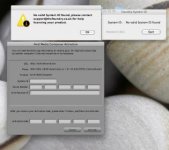
I worked hard for this problem, the system had problems installing Avid 5.0.3 and some soft of Foundry. SystemID did not recognize the machine (see screenshot).
Fixed bug with digital audio + USB+ increases system stability and performance + integrate 2 lan in table , now the ACPI tables are APPLE'S LIKE :thumbsup:

Find the link to download in first post and find the new installer CUDA GENERATION .(this link have a utility for check systemID)
I recommend you backup your system!! so it does not work you can restart.

and download bios Pics (link first page for max stability settings)

I look forward to hearing from you

LUIGI
 

Attachments

  • Schermata 2011-02-08 a 22.32.32.jpg
    Schermata 2011-02-08 a 22.32.32.jpg
    14.7 KB · Views: 0
Last edited:
Thanks to
ROHIT GUPTA and JOSE.


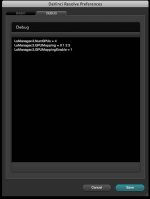
For best performance setting in DAVINCI DEBUG MENU
LsManager.3.NumGPUs = 2 ***GPU you HAVE in HACK**
LsManager.3.GPUMapping = 0 1 *** 0 1 2 .. GPU ***
LsManager.3.GPUMappingEnable = 1 *** 1 Default ***

SEe pics in my case 4 gtx
 

Attachments

  • gigi2.jpg
    gigi2.jpg
    79.5 KB · Views: 0
  • gigi88.jpg
    gigi88.jpg
    67.1 KB · Views: 0
Hi luigivaltulini..thanks for your tutorials .
i have a Intel Core2 Duo Cpu E8400,Intel media series motherboard,4gb ddr3 ram
with quadro fx 1800..system..can i convert as a hackintosh and run Davinci for my learning purpose? please help me
 
Hi luigivaltulini..thanks for your tutorials .
i have a Intel Core2 Duo Cpu E8400,Intel media series motherboard,4gb ddr3 ram
with quadro fx 1800..system..can i convert as a hackintosh and run Davinci for my learning purpose? please help me


you can try. But it is difficult even for the ACPI table. you have
Snow leopard original and a Mac running?


1. which motherboard? gigabyte, asus, intel? model?
 
sorry ..i dont have Mac system ,
here is my system details:-
motherboard:Intel media series DP35
Processor x86 Family 6 Model 23 Stepping 6 GenuineIntel ~2999 Mhz[Intel Core2 Duo Cpu E8400]
Quadro fx 1800
 
some more details here..
Intel[R] Core [TM]2 Duo CPU E8400 @ 3.00 GHz
motherboard: Intel Media series DP35DP
 
Tested new Davinci 7.1.1 update, everything works correctly in this configuration.

thanks

luigi
 
Is it Quadro fx 1800 comfortable with P6T7 ws& i7 for Davinci ???


The fx 1800 is a Quadro entry level,
is only 64 core cuda is low !!!!!!!!!!

probably works, I've never tried and I can not know if all video cards work with hacks.
I'm sorry but I can not help in this case.
sorry AJAYKUMAR


thanks
Luigi
 
Is it Quadro fx 1800 comfortable with P6T7 ws& i7 for Davinci ???

Have you asked google yet? You'd find your answer in mere seconds, the only way this works is with research and experimenting. Not asking other people for the answer
 
Hi Luigi,

could you please reupload the Cuda update and the fix for the system id? Rapidshare removed it...

For the DaVinci GPU mapping. I have three GTX480s in slot 3/5/7. Should it look like this?

LsManager.3.NumGPUs = 3
LsManager.3.GPUMapping = 0 1 2
LsManager.3.GPUMappingEnable = 1

Thanks:smile5:
 
ooopss. correct link :) try download.
yes for Davinci GPU in debug menu.

David, I recommend you save your configuration and write if everything is gone well with CUDA GENERATION . Is a Beta !!!!
I wait YOu post

thanks a lot
LUIGI


Hi Luigi,

could you please reupload the Cuda update and the fix for the system id? Rapidshare removed it...

For the DaVinci GPU mapping. I have three GTX480s in slot 3/5/7. Should it look like this?

LsManager.3.NumGPUs = 3
LsManager.3.GPUMapping = 0 1 2
LsManager.3.GPUMappingEnable = 1

Thanks:smile5:
 
This question may have already been asked, but will a quadro fx 5500 (pc card, not "flashed" for mac) work in this system?
If not, are the GTX480 cards that you are using "flashed" for mac or are they regular pc cards?
Thanks for the guide!
 
Back
Top