Welcome to our community

Be a part of something great, join today!

  • Hey all, just changed over the backend after 15 years I figured time to give it a bit of an update, its probably gonna be a bit weird for most of you and i am sure there is a few bugs to work out but it should kinda work the same as before... hopefully :)

Davinci Resolve 16.1 Final Release Version

Edit Videos on iPad and PC - LumaFusion to Davinci Resolve


By
Lu TechSource


Control Saturation in Color Grading


By
Tim Yemmax


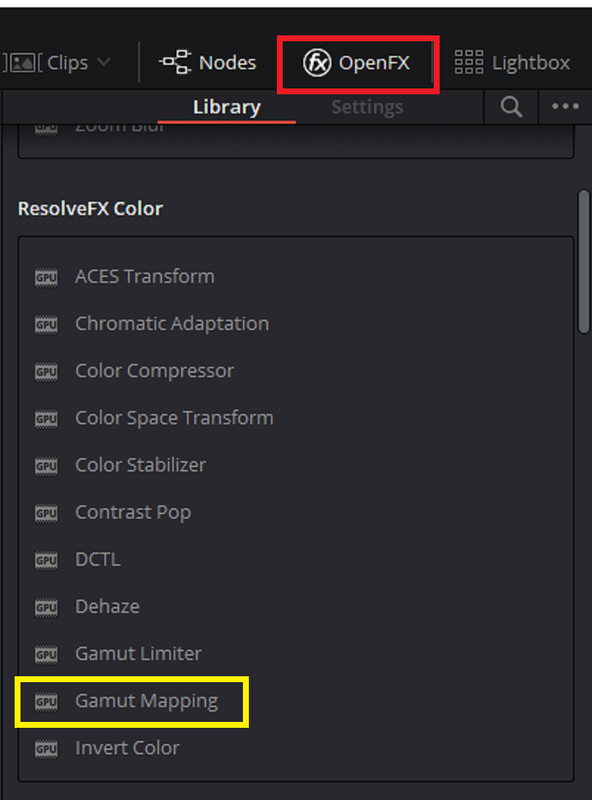
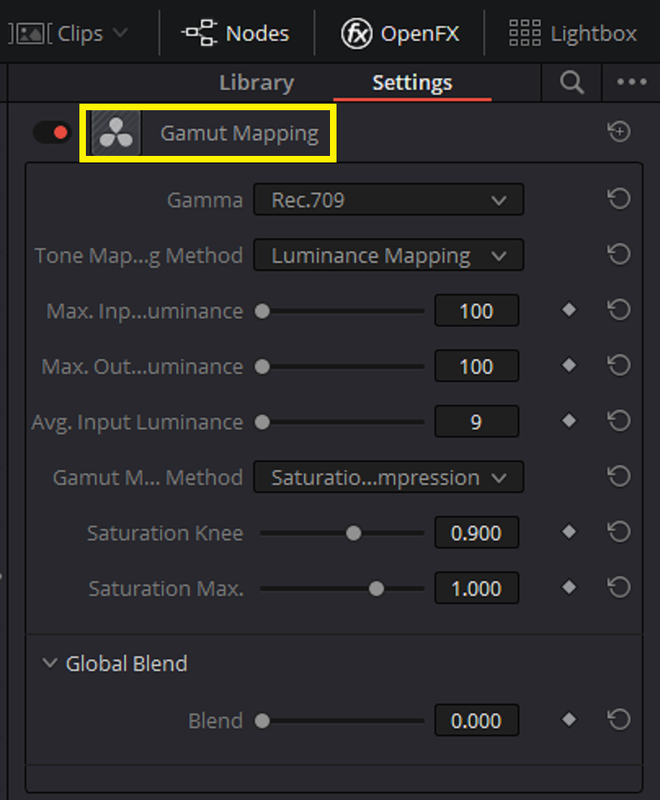
The "Gamut Mapping" tool he used can be found on the "Color Page" under the "OpenFX" heading in the top right-hand corner.

Screenshot-797.png


Screenshot-798.png


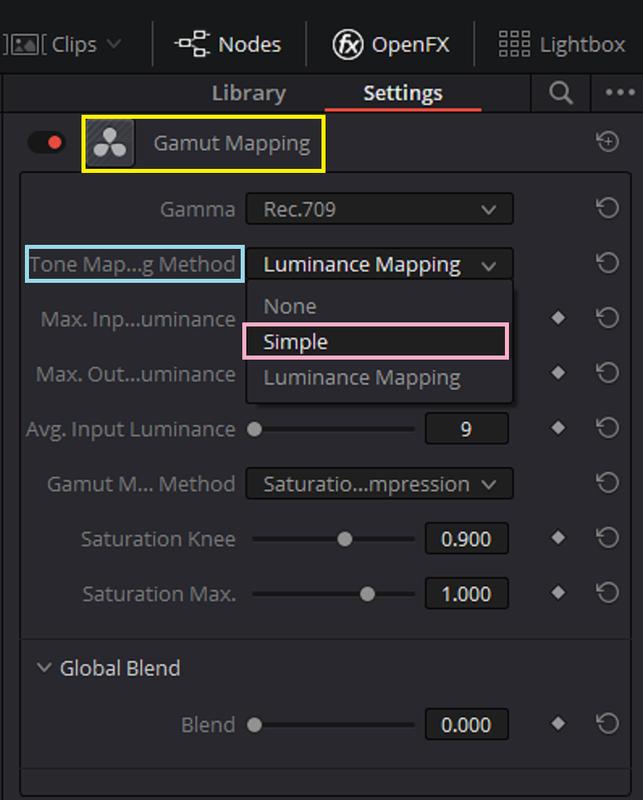
You can use the "Tone Mapping Method" to better control the Highlight Roll-off of footage. I especially like using it with Red .R3D files in ACES where you can't use IPP2 Luts for better highlight roll-offs. Choosing the "Simple" methods works most of the Time.

Screenshot-799.png
 
Last edited:
5 TRICKS to DOUBLE your Editing Speed In Davinci resolve


By Billy Rybka


Color grade FASTER w/ MASTER TIMELINE | Davinci Resolve Tutorial


By Billy Rybka


Davinci Resolve 16: How To Use The Cut Page (Complete Cut Page Tutorial)


By Geekoutdoors


Best Render Settings for YOUTUBE in DaVinci Resolve


By
Tim Yemmax


Chroma Keying Greenscreen Tutorial | DaVinci Resolve


By Moviola


iPad Color Grading in Premiere, DaVinci or FCPX With This One Weird Trick?


By Color Grading Central

You can try Cinema Grade for free for 7 days and get 20% off with code ‘youtube20’ at checkout.

https://cinemagrade.com


Is anyone else having their 16.1.2 hang up all the time? On a new project I started today. I have had Resolve hang up about 12 times. Have never had any issues like this at all since the upgrade....
 
DC Chavez.


by "Hang up" do you mean "Freeze up" or the program not wanting to open?
 
DC Chavez.


by "Hang up" do you mean "Freeze up" or the program not wanting to open?

Today I have had 15+ "Program is not responding" on my 16.1.2 Windows 10 Pro system. I can call out any specs you need, but it worked FLAWLESSLY on previous version /project. Not sure if its the program. my 2080 TI (x2) drivers, or something else... At least it crashes nicely, saving 98% of what i was previously working on. Thankfully, its only my reel, so I can go back a shot or two and be fine... No idea whats up.
 
Connecting the dots a bit further, I realize a lot of the issues I am having is when I click the play in reverse button on my Mini Panel. Somehow it chokes up the system and locks up the program. My decklink Mini 4K card monitor shows one clip, and the program freezes on the one before that. Then I have to restart it....
 
DC Chavez


Ckeck these first.

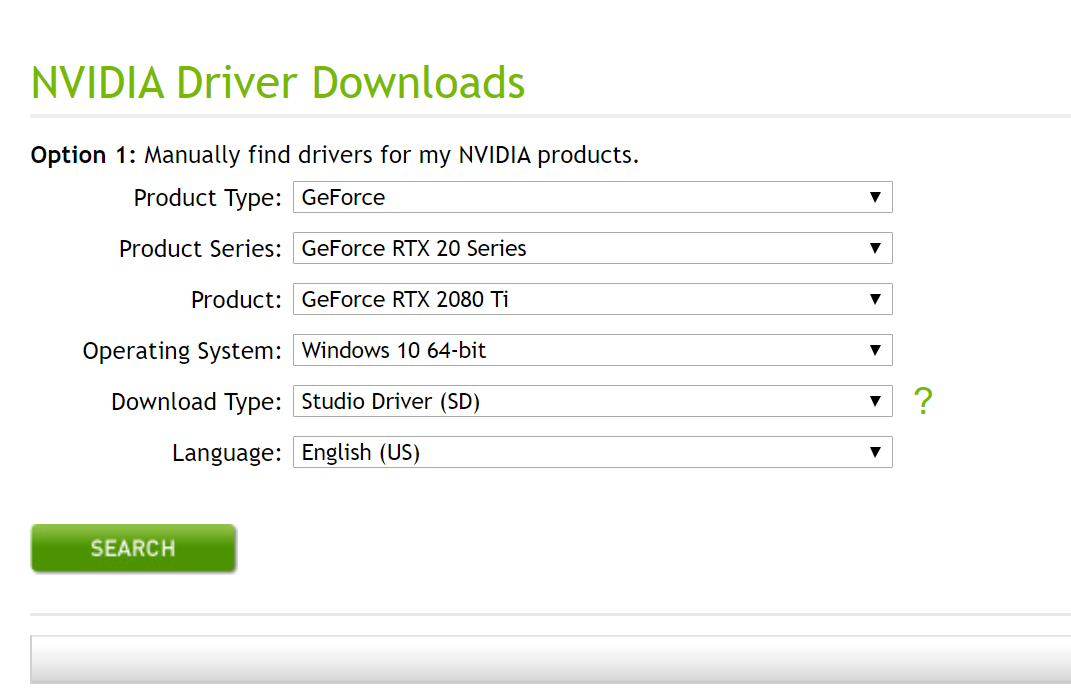
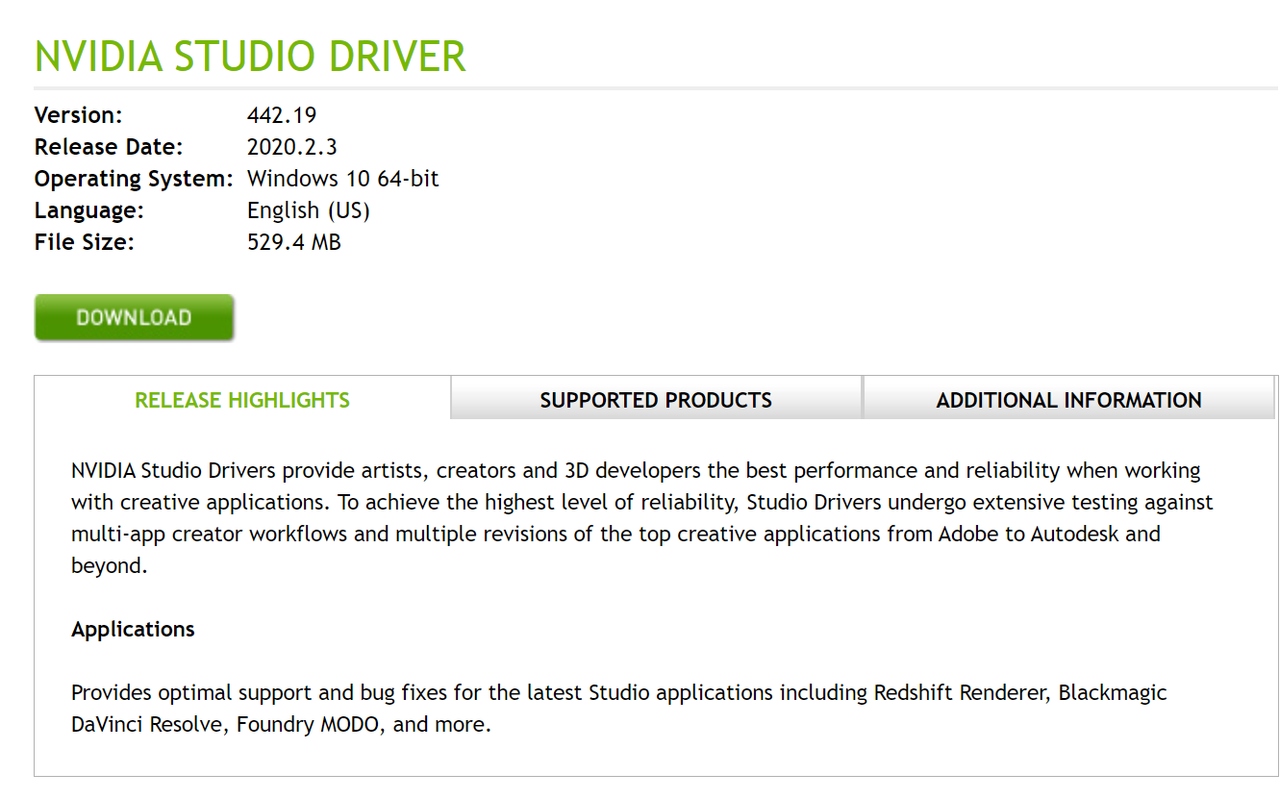
For the 2080 TI , are you using the latest "Studio Driver".

https://www.nvidia.com/Download/driverResults.aspx/156784/en-us

Screenshot-801.png


Screenshot-800.png


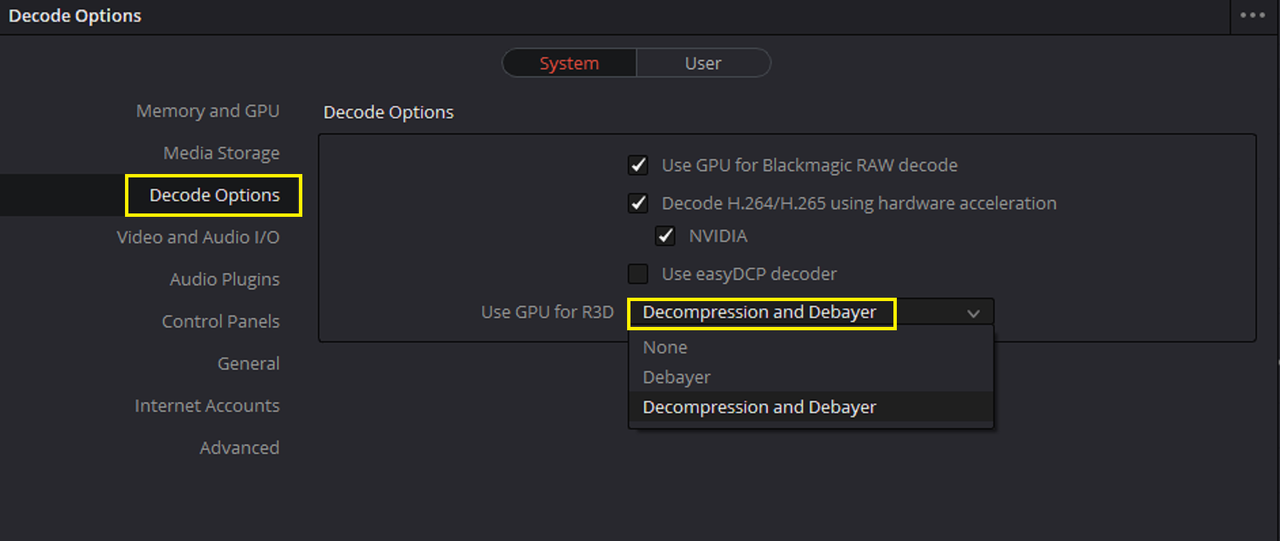
Under "Preferences" under the "File" Menu, For "Decode Options">"Use GPU for R3D" do you have "Decompression and Debayer" selected?

Screenshot-802.png


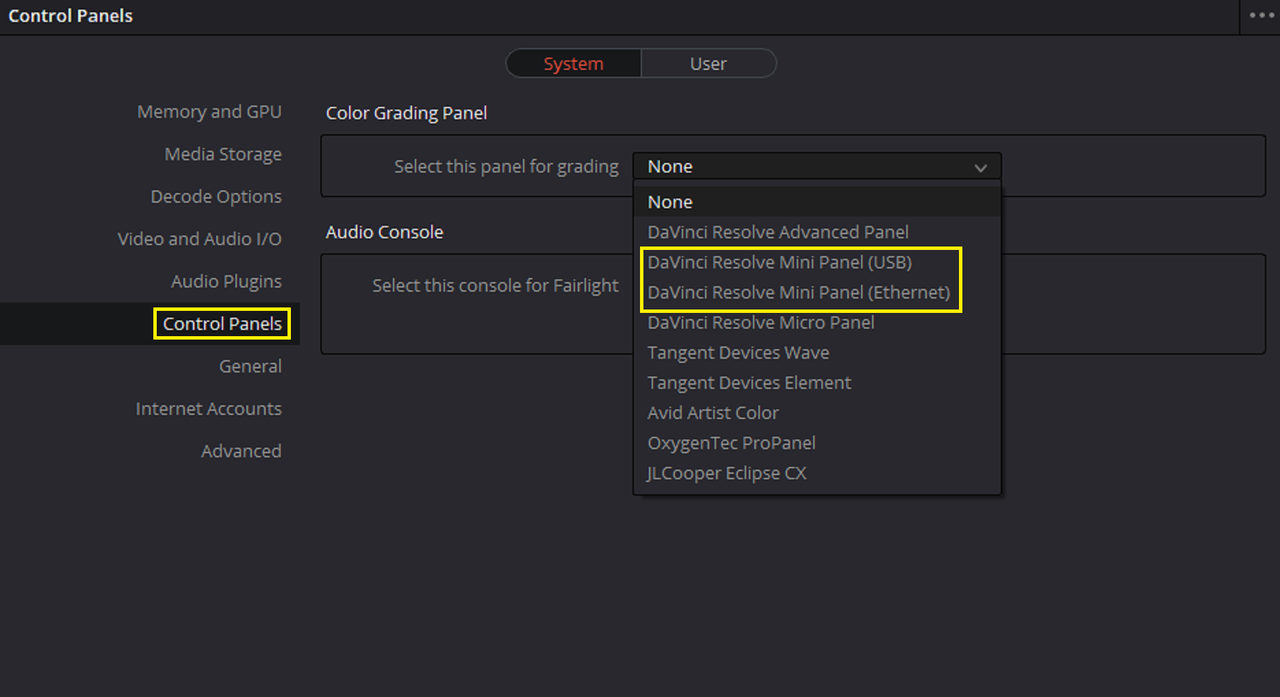
Make sure which ever Mini Panel you are using is still selected in the "Control Panel" settings

Screenshot-806.png
 
Last edited:
Rand- Thank you kindly for such a great and informative post- as always. I installed that exact driver yesterday, updated my panel and Decklink today with most current driver, and am running the latest version of resolve. I also have decompression and debayer setup as well... No dice. Since my first post I have had at least 6 lockups since then....
 
DC Chavez,


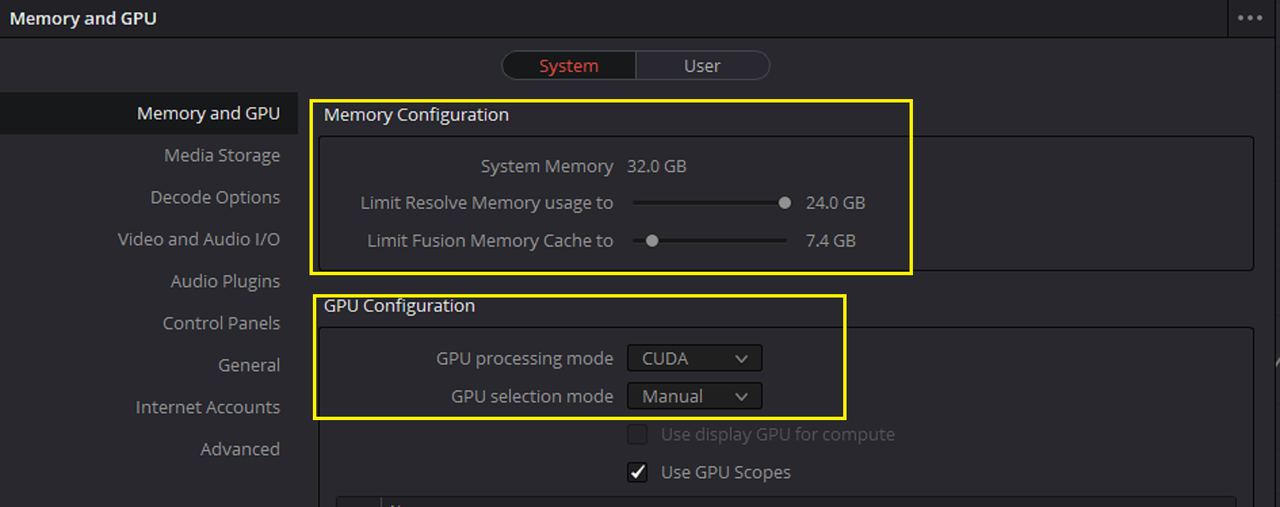
Damn, Sorry man I thought at least one of those would have helped. Have you "played around" with "Memory Configuration" settings and double-checked the "GPU Configuration" settings.


Screenshot-808.png


I know Rohit Gupta is the Blackmagic Design Representative here on the Forum and could probably give you the exact answer to this problem. You can PM him here if he doesn't see your post here first.


http://www.reduser.net/forum/member.php?33802-Rohit-Gupta


Edit;

It could also have something to do with the lastest '"Desktop Video 11.5" update, if you can, maybe try going back to 11.4 if you updated and see if that helps.
 
Last edited:
Happened before I did the desktop video update... I updated because I thought it might have been the issue.

Now- getting random "The GPU failed to perform image processing because of an error" Error code 77.

The fun never ends...
 
DC Chavez,

Here's a thread on the "The GPU failed to perform image processing because of an error" Error code 77" on the blackmagic forum from early 2018 to Jan 2020 if this helps. Maybe try not using the "Decompression and Debayer" setting.

https://forum.blackmagicdesign.com/viewtopic.php?f=32&t=72680


And at the bottom of Page 2 of the thread Brain Gordan states that Puget systems suggests disabling the "Decompression and Debayer" setting.


https://www.pugetsystems.com/labs/a...io-16-1-2-Update---RED-SDK-improvements-1645/

"Some new info I came across is in the article from Puget systems that seems to suggest the "Decompression and Debayer" setting can actually cause worse performance on multi-core machines. Their tests were on an 24 core AMD TR 3960X.

I have dropped my setting back to "Debayer" and so far the issue is resolved and the system is stable."
 
Last edited:
Back
Top