Welcome to our community

Be a part of something great, join today!

  • Hey all, just changed over the backend after 15 years I figured time to give it a bit of an update, its probably gonna be a bit weird for most of you and i am sure there is a few bugs to work out but it should kinda work the same as before... hopefully :)

DATA CALCULATOR for Red Epic/Scarlet

Caleb Vetter

Well-known member
Joined
Jun 13, 2007
Messages
71
Reaction score
0
Points
0
Age
39
Location
Kansas City, MO
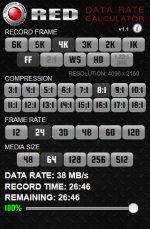
Hey everyone! I couldn't find a data calculator that I liked that was super fast and easy and could show the time remaining on the card... so a made one :) It's a web app for the iPhone. You save it to your home screen and (after opening it once) it will work offline.

The slider at the bottom sets the media percentage remaining, or you can tap the percentage number to quickly enter an exact percentage.

Here's where you can get the app...
http://www.vetterbrothers.com/rdc
Enjoy!
 

Attachments

  • red-data-calc.jpg
    red-data-calc.jpg
    55 KB · Views: 0
That looks very handy. Thanks for sharing. But I have 2 questions on your math.
5120x2700 = 13824000 pixels
times 16 bpp = 221184000 b = 27648000 B = 27.648 MB/frame
times 24 = 663.552 MB/s
at 6:1 compression = 110.592 MB/s

your app says 79.1 MB/s. To get that number you must be using 12bpp and binary units instead of decimal.
I'd have to double check some R3D files, but don't the DSMC cameras use a 16 bit wrapper?
Again I'd have to double check a RedMag, but aren't they closer to 128000000000 Bytes?
 
Looks great! Thank you for doing this!
Just a quick question, is it possible to add 25 and 50 fps for us Europeans? :)

thanks again!
 
That looks very handy. Thanks for sharing. But I have 2 questions on your math.
5120x2700 = 13824000 pixels
times 16 bpp = 221184000 b = 27648000 B = 27.648 MB/frame
times 24 = 663.552 MB/s
at 6:1 compression = 110.592 MB/s

your app says 79.1 MB/s. To get that number you must be using 12bpp and binary units instead of decimal.
I'd have to double check some R3D files, but don't the DSMC cameras use a 16 bit wrapper?
Again I'd have to double check a RedMag, but aren't they closer to 128000000000 Bytes?

I was under the impression that the formula used for calculating would be:
5120 x 2700 (frame) x 24 (fps) x 12 (bpp) / 8 (bits to bytes) / 1024 (B to KB) / 1024 (KB to MB) / 6 (6:1 compression) = 79.1 MB/s
Using 16bpp would give us 105.5 MB/s, but then why does Red's calculator give us 73 MB/s? That doesn't seem right.
I'm going to record to an entire 64GB card and double check my calculations. And yes, you are correct, a 128GB card is actually 128000000000 Bytes, which is 119.2GB
 

I've seen this, but it's not as quick to use as I'd like on an iPhone, you have to be online, and the "usable space" can be confusing since the cards don't actually have as much space as they say (ie. 64GB is actually 64000000000 Bytes which /1024/1024/1024 = 59.6GB)


I personally like and use KataData.

I've seen this too. I wanted something simpler with a media percentage so you can quickly tell how much time you have left... and mine's free :)
 
Just did the test recording to a 64GB redmag, 4K FF 6:1. Filled the entire card and checked the record time. Came up to 20:11. My app calculated 20:06. :smiley:

The calculator on Red's site says 22 min, and that's putting in the true usable space of 59.6GB. Go figure.
 
Thanks Caleb, altho I use katadata, your simple web-app is a nice alternative...
Please add 25 fps for PAL land, and you could consider adding HDRx and maybe more framerates for overcrancked speeds (or a box to manually change it like the percentage).

Also I would strongly suggest NOT using RED's official logo nor RED's font on a 3rd party product...
 
Just did the test recording to a 64GB redmag, 4K FF 6:1. Filled the entire card and checked the record time. Came up to 20:11. My app calculated 20:06.
That's good to hear. You were right, 12bpp is the number to use, rather than 16. I asked RED yesterday to explain their formula for that online tool, and they are now checking "to see if this information is publicly available." WTF.
 
Nice tool.

Another vote for European frame rates and or user frame rates.

Also, is it possible to make the hot spot for the percentage slider slightly larger than the visible slider control? It can be quite hard to "grab" on my iPhone.
 
Thanks Caleb, altho I use katadata, your simple web-app is a nice alternative...
Please add 25 fps for PAL land, and you could consider adding HDRx and maybe more framerates for overcrancked speeds (or a box to manually change it like the percentage).

Also I would strongly suggest NOT using RED's official logo nor RED's font on a 3rd party product...

I'll be out of town for a couple weeks, but I'll work on the European frame rates soon. Good idea on a custom frame rate button. And you're right, I should probably take the Red logos off... Darn, it looked so cool, haha ;)
 
Also, is it possible to make the hot spot for the percentage slider slightly larger than the visible slider control? It can be quite hard to "grab" on my iPhone.

I looked briefly at this while I was creating the app. The slider I used was generic so I don't have much control over that unless I implement a custom one. I'll look into it again.
 
This looks great! I so wish it was also available on Android!

It's a web app? Why wouldn't it work?

As I said in the other thread - Lovely, but yeah, 25 FPS and 50 FPS be great, alternatively a custom one, would be handy for when I have to use 37.5 for x1.5 slow-mo syncing on music videos haha :P
 
Back
Top