Welcome to our community

Be a part of something great, join today!

  • Hey all, just changed over the backend after 15 years I figured time to give it a bit of an update, its probably gonna be a bit weird for most of you and i am sure there is a few bugs to work out but it should kinda work the same as before... hopefully :)

CS 5.5 - Premier Pro - Bug Reports bug Reports from a RED user

We specifically turned down the room a/c to see if this was the problem---i see this referred to on several google searches---but just does not seem to be the culprit since it's really not so hot with ambient air---now inside the machine is another thing....We are monitoring cpu usage and all via disk utilities. But a fan goes directly on it next time at the edit station---however, i think this is not the issue.

Please try 2 things so I can help figure this out.. Use Encode in Premiere instead of Queue and try and export directly from Premiere. If that doesn't work then turn off GPU and try an export.

Thanks

Dave
 
Please try 2 things so I can help figure this out.. Use Encode in Premiere instead of Queue and try and export directly from Premiere. If that doesn't work then turn off GPU and try an export.

Thanks

Dave
Dave....sorry about not replying, been away for past week on a shoot...back at it as of yesterday. Let me report what has been happening now:

DAVE: this is regarding the flickering yes? I did try that and what i found was i had to delete the preview files for THOSE clips that flickered THEN do as you say...go to Software not GPU acceleration and we believe that solved the problem. i say "believe" because it worked...but i need to go back and retry this based on all my various setting changes to be sure.....
 
REPORT 3 from page 1:

Encoding in CS 5.5 & CS 6
Where to start: ok, this is a tricky one since i'm not an advanced user, but i'd like to think i'm pretty much the average target person Adobe is going for....That said here are my stats for encoding:

Machine: (see post 1 for my machine specs)
Video size/time: 52minute video with up to 6 tracks of video with mixed codecs from R3d to AVCHD
Software: working inside of PrPro only (no after effects)
Effects applied: Almost all of the several hundred clips inside the timeline have multiple PrPro effects applied (more below)
Additional effects: 3rd party effects from Colorista as well as neat video and Mercali for both noise reduction and image stabilization
i realize Neat Video and Mercalli can eat up time on encoding and i will also point out that we have not used those two effects much...only on a certain few clips.

Encoding from CS 5.5:
Encode: encoding to Tiff files (for master)
settings: 1920x1080p @ 29.97 (there are a few clips in timeline shot at 24fps)
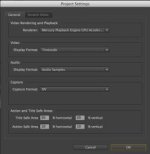
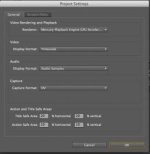
Project setings: Render using Mercury GPU
Memory settings: Ram for premier: 28GB & 4gb for other apps
Optimize for Performance

Exporting to Tiff via AME: send over to AME and process begins...starts out at slow pace, then gets even slower...after 4 hours of encoding i was up to render time showing me 51 hours remaining. About a 1.1 hour per minute of footage at these settings.

I CANCELLED this Encode then went to CS 6
(ps...All drivers are up to date by the way and all 3rd party components.)

Encoding from CS 6
Encode: encoding to Tiff files (for master)
settings: 1920x1080p @ 29.97 (there are a few clips in timeline shot at 24fps)
Project setings: Render using Mercury GPU
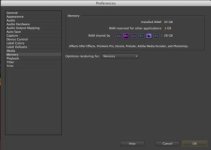
Memory settings: Ram for premier: 28GB & 4gb for other apps
Optimize for Memory

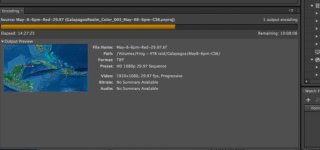
Exporting to Tiff via AME: Begin process and render times show up to 22 to 31 hours....i realize that as it processes each clip, the render times change, but this encode certainly is MUCH faster....so now my render is more around .52 hour per minute of footage with effects applied and R3d's and other mixed codecs....All with RR card and Quadra 4000.

*I'll know the actual render times and stats upon completion and report back when completed.

**I'll first state that i'm pleased i can even do such a job on my machine...NOW, my question is this: Is this what i should expect for performance for encoding even with the RR card and Quadra 4000? I do NOT get realtime playback and at 1/2 res it's choppy on my timeline...if i apply any effects...i must go to 1/4 rez and it's still choppy and stutters....THIS on CS 5.5 or CS 6. I here such great things about people editing on a laptop and getting great performance, but i have had nothing like that.....maybe it's because of all my effects etc...but sure seems far from what is being touted by other users...This seem correct or should we be trying OTHER system configurations?
 

Attachments

  • CS5.5-Project-GPU.jpg
    CS5.5-Project-GPU.jpg
    9.8 KB · Views: 0
  • CS5.5-Memory-performance.jpg
    CS5.5-Memory-performance.jpg
    9.8 KB · Views: 0
  • CS6-prooject-GPU.jpg
    CS6-prooject-GPU.jpg
    9.9 KB · Views: 0
  • CS6-encode-time.jpg
    CS6-encode-time.jpg
    17.3 KB · Views: 0
  • CS6-Memory.jpg
    CS6-Memory.jpg
    9.1 KB · Views: 0
OOPS!

Brad Allen pointed out to me about the RR card being used in PrPro--and then i sent to AME---i believe PrPro still must have control over it....
I realize this has been covered time and again by the Adobe guys here.....and David will likely set me straight..BUT, how do i then get RR working with AME when i send to Queue for Encoding?
So at this moment (actually yesterday at 6pm) I sent my project from PrPro to AME for encode--and its been running since...CS 6 by the way---PrPro is still open---so, first--how do i know what program has control right now AND, can i switch on the fly--AND how do i switch....I recall Paul Herrin and i discussing this as a Feature Request---a Symbol that tells you RR is On/Off and an intuitive Switch or Checkbox to allow RR to be Enabled on that program...or how about a pop up or something that is just intuitive and simple....Ok...back to the problem at hand.

**I will mention at this point (more than halfway into my encode) I'm afraid to turn off PrPro since all is actually flying well right now and i don't want to cause a problem with AME encoding if the rocket somehow comes into play and may cause issues with AME as it is currently encoding.
 
Just in case, make sure you have Neat Video 3.2 which was just released and fully supports CS 6.
 
Just in case, make sure you have Neat Video 3.2 which was just released and fully supports CS 6.
I just downloaded 3.1 a few days ago...went to their site and don't see 3.2 ---Steve, you have a download url for it? I've got all my user/pass info...but is it still beta then?
Actually 3.1 is working fine in CS 6....but slooooow.
JOhnny
 
Please try 2 things so I can help figure this out.. Use Encode in Premiere instead of Queue and try and export directly from Premiere. If that doesn't work then turn off GPU and try an export.

Thanks

Dave

So, after 24 hours encoding....FLICKERING on only a few clips still exists....I also then tried the encode w/out GPU acceleration turned on--Software only--and same result. Flickering on a few frames. And it's danged cold in here. Dave?

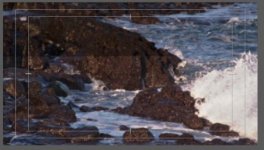
...On page one and i believe my 2nd post are frame grabs of the effected area and how it looks.
 
Flickering Clips in Timeline: CS 6 & 5.5
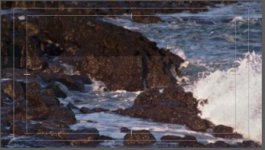
....so from an earlier post, i revealed some random clips that were flickering.......and many folks pointed out that it is likely due to a graphics card issue or conflicting 3rd party plug-ins or overheating. After pushing out an encode (24hours later)--the flickering did in fact transfer over to the Tiff files that I encoded to....Which in turn lead me to 2hours of looking into the clips themselves--everything from deleting them adding back and seeing no problems with the clips until i applied all of my effects.

END RESULT: when applying multiple instances of the effect Shadow/Higlight (in this case ANY clip that i put two of those effects on one clip....random flickering would result---it was hard to know if this was the culprit because the flickering would reveal itself not always on the same frame AND during frame by frame playback the flicker would show itself for a second or two on A frame...then if i waited on THAT frame...it would vanish. So...very strange. And stacking effects is nothing new....but THIS effect is just not liked by CS 5.5 or 6. So had to trash one of those effects and playback is not solid....I'm 99% sure this is the case---BUT, now have to encode again and can report back success or not tonight or tomorrow morning....
But this is a BUG as far as i can tell...so be careful if you are stacking effects. And the solution as many had told me would likely be to turn off GPU Acceleration and go Software---well this made my 24hour encode jump to several days....one clip alone at 10 secs showed 1.5 hours. So Software acceleration was just NOT an option here.

Attached are the resulting flicker effect look.
 

Attachments

  • Flicker.jpg
    Flicker.jpg
    20.5 KB · Views: 0
  • Flicker2.jpg
    Flicker2.jpg
    20.9 KB · Views: 0
  • Flicker3.jpg
    Flicker3.jpg
    9.5 KB · Views: 0
using red rocket card with Adobe Media Encoder AME

using red rocket card with Adobe Media Encoder AME

Here is what i found from Dave (the Adobe guru here):

Agreed it is a bit anti intuitive... Here is the thing. If you drop an R3D in AME and encode it you want the rocket on. AME is doing the decode in this case so it needs the rocket. However, if you drop a ppro sequence into AME something different happens. A background version of PPro will launch to do the rendering. As of now we can only have 1 app using the rocket. That app in this case is the background ppro. That means the UI version of ppro nor cine x should have the rocket if you want to work this way. The simplest way around this for now is to do the AME encode in ppro but clicking encode instead of queue.

Ok...that was from back in CS 5.5...I have three questions:
1. Has this remained the same then?
2. So if we send to Queue, then we no longer get accelerated debayer using AME when doing the encode FROM AME? I closed down PrPro after sending to the Queue and then began my encode from AME....but Sloooooow showing about 26mins per 1 minute of footage --- mixed codecs (r3d/avchd/.mov, etc...) and with effects applied from within premier and 3rd party plugins.

3. is the only way then to utilize rr acceleration to then Encode direct from PrPro and NOT send to que? therefore disabling our ability to work back in PrPro?

Thanks....
 
Talk about frustrating:
so after review of David's posts (i pasted them above)...i am now trying to Encode direct from PrPro....after going to Pr; flie; export and setup my output and then choosing EXPORT.....i see NOTHING happening....the Encode box comes up with % showing...but remains at ZERO....Then i go to Finder and to the folder where i selected my Tiffs be sent....and it's actually making my Tiffs....BUT, i get no preview of the images being encoded like we do in AME...NOR do i get a the Encode bar to show me % OR a bar going across to shoe me the progress....YET, it's encoding...at what speed or how long remaining is an unknown. Well, can't say that i'm too happy about all of this--and getting frustrated at how much time i've invested to figure this out....See Attached Image showing NO PROGRESS in Export Dialogue box as well as Finder window open to reveal Tiffs being added to the folder i chose---you clearly see 671 tiffs created. But no idea how long the encode will take nor a progress of where it's at.
 

Attachments

  • PrPro-Encode-direct.jpg
    PrPro-Encode-direct.jpg
    19.9 KB · Views: 0
CANCEL that....tried to encode from PrPro---see above. What a mess....back to encoding from AME---sure hope this gets figured out--i'm at a loss completely and am back at the drawing board...at least from AME i can see progress and know what's going on....did i mention frustrating? Now what? i guess i'll go back to prores transcodes since i just can't take advantage of the reasons i want to use PrPro.
 
Hey Johhny,

What's the main issue you are facing at the moment? Is it the flickering in some of your clips or did you manage to get that resolved by not stacking that particular effect?
 
Hey Johhny,

What's the main issue you are facing at the moment? Is it the flickering in some of your clips or did you manage to get that resolved by not stacking that particular effect?

Yes....Stacking that ONE effect cause flickering....so that's fixed.

BIGGEST ISSUE is AME & RR card. How to assign it to AME ? if i encode directly out of PrPro i've explained the problems with that and can only assume that there is a issue Adobe needs to attend to with that...since you get no progress bar; % left; nor an estimated time till completion AND no preview of the frames being rendered.
 
So what's wrong with exporting out through AME currently - is it just the amount of time that it's taking? Or is that you a frustrated by not being sure if the RedRocket is being utilized?

What % of your media in your final export is R3D Material?
 
Good question Brad. that may not have been clear then in my posts.....knowing IF RR was being utilized within AME....since my last encode of the same 52min timeline took right at 24hours. It sure seems a long time, but i cannot say if that is right or not....i'd say about 40% to 45% of the film is R3d material...in that range anyway. the remainder is .mov/avchd/and some material from D7000 and some other panni handy-cam. As mentioned i have 3-5 effects applied to about 80% of clips.....so this boils down to around 27mins 30sec of render per minute of actual footage---just seems a lot with the "junk" i have in my compt. Quadra 4000 card; rr card; 32gig ram.

I recall doing this from CS 5.5 with AME and got render times after 4 hours showing around 52 hours....that was when i first started and then took my project into CS 6.....so there's a drastic improvement...BUT, not knowing sure is a bummer. And not having any actual confirmation as to what SHOULD be expected is also a bit of a drag. I agree---much of this--well all of it (for me) is new....i've never cut R3d's before so don't know what is normal. BUT, i can't expect to do a 24hour encode or if i do, sure need to plan for it.
 
Can you fill me in on all of the effects you are using? I'm not sure if you have mentioned this previously?

We'll check if they are all hardware accelerated - if they aren't then this could explain some of the lengthy export times.
 
Hey Johnny,

3 of those effects aren't GPU accelerated: Unsharp Mask, Channel Mixer, Shadow/Highlight

Unsharp Masks can be quite demanding on high resolution files I've found.

Also Colorista II can be either CPU or GPU accelerated. It's probably worth checking that they are utilizing the GPU (it is by default), or else it would be added a fair amount to the CPU's workload too.

At what resolution do you get real-time playback within Premiere (without pre-rendering)?
 
Funny enough i get almost realtime playback at 1/4 res in the timeline with rr enabled and Quadra 4000 card--so this is very strange considering i should be getting better. I'd assume so anyway. rocket is enabled. I have latest drivers form NVIDIA etc...10.7.7 as of today.
 
Back
Top