Welcome to our community

Be a part of something great, join today!

  • Hey all, just changed over the backend after 15 years I figured time to give it a bit of an update, its probably gonna be a bit weird for most of you and i am sure there is a few bugs to work out but it should kinda work the same as before... hopefully :)

CS 5.5 - Premier Pro - Bug Reports bug Reports from a RED user

Johnny Friday

Well-known member
Joined
Feb 11, 2007
Messages
3,367
Reaction score
0
Points
36
Location
La Paz, Baja Ca. Sur, Mexico
Website
bajaproductions.com
This is merely a bug and performance report i'm putting together while using CS 5.5 & 6 to cut a documentary. For the most part we are very happy with the performance we are getting out of Premier.

System:
MacPro Early 2009
2 x 2.26 GHz Quad-Core Intel Xeon
Memory: 32 GB 1066 MHz DDR3 ECC
Graphics Cards: NVIDIA Quadro 4000 2048mb
Red Rocket Card
Matrox MXO2 LE output via HDMI & SDI to two monitors: 50" Plasma and FSI 2461w
Software: OSX Lion 10.7.3
Adobe CS 5.5
3rd party plugins: Magic Bullet Suite
Color Finesse


Project: 52minute Nat. History documentary
5 tracks of video that is mixed from 4 codecs: R1mx 16:9; Epic 5k 2:1; HVX200 @ 720p; Nikon D7000; Go Pro; Panasonic AVCHD @ 1080p;
stock footage: pro-res 1080p & 720p


I'll list details and snapshots as i go along....i have a long list already of issues and what i would like to see added. I thought this would be a place to post this to share with other red users in my position...cutting R3d material with other native codecs and using Premier as it claims we should use it--drop native codecs on the same timeline and get the most of those before outputting--which l do like the idea of this.

So i will share my thoughts and experiences from a practical working aspect here. Paul Herrin who is also working on this can also share his experience since he is 99% at the controls here. So a few tips we'll mention as well....since i find that it is not as cut and dry as most youtube videos i've seen and i'm sure those users must have had to overcome many of the same issues. Keep in mind, i'll probably bring up basic issues that are likely quick and easy fixes as well from you more experienced PPro users...i'm from FCP and this is rather a new setup for me. Had no problem with short clips here and there, but now a 52minute timeline and things have changed.

Here we go.......
 
Report 1:

Here is what i consider the biggest issue we've come across so far....(disclaimer: maybe these are local issues/problems, but i think worth discussion--meaning might be a bug with my system or Adobe)

I. Flickering of clips in timeline
What: adding effects to various clips in our 52minute timeline we get random flickering of the clips (about 5% of clips)...where and effect seems to be alternating on/off.
Cause: Using GPU Acceleration for some reason causes this to occur
Solution: Switch back to Software Acceleration and then go back to the clip and move your workspace bar only to that clip and delete previews for that clip only, then Re-Render the clip. Problem solved. BUT, what a LONG render time....sure would like to be back at GPU acceleration.

2. Red X in PrPro at bottom right: So seems this little bugger ALWAYS pops up (see image attached)...when you click on it, you then get the error box that tells you what went wrong and how many instances it went wrong. I actually have not been able to figure out when any of these errors mean, but they come up often and usually the same ones in my case. I am guessing (in my case) that one may have to do with what software has control of the Redrocket card and showing me that errer and the other may be something related to 3rd party plugins from Magic Bullet--but really i have no clue, but do know that whatever it is, Adobe recognizes it as a problem and it happens on every edit session: posted pics of all these errors and maybe somone with knowledge of these error codes could be more specific about what the issue may be and the fix so that they do not continue.

3. Encoding: AME Encoding Problem: EVERY-TIME we send from premier to AME to encode (we are doing dpx sequences with red material-epic and r1 and the other mixed codecs)--anyway, we get the encoding going and then walk away--it continues--we are only encoding 5mins of footage to DPX---it gets to a random place and then just freezes up. Tried this four times now and cannot get it to finish a job AT ALL! So, now did an export of 1minute from Premier and it goes---slowly, AND we cannot continue working inside of Premier....After searching the web, i've noticed a lot of this with AME and it seems to be random with no known fix. This is a BIG downturn for us since working back in Premier was just a killer solution...but now we have to wait---like FCP. So sure would be nice if there were a solution. what i kept hearing about on adobe forums was something about large still pic. files next to each-other---well, can that mean a few R3d files next to each-other causing a crash? I'm no tech, but this is tragic this end.
 

Attachments

  • Red-X-PrPro.jpg
    Red-X-PrPro.jpg
    5.7 KB · Views: 0
  • Red-X-DoClose.jpg
    Red-X-DoClose.jpg
    8.6 KB · Views: 0
  • Red-X-kPFColorParamSuite..jpg
    Red-X-kPFColorParamSuite..jpg
    17 KB · Views: 0
Encoding in CS 5.5 & CS 6
Where to start: ok, this is a tricky one since i'm not an advanced user, but i'd like to think i'm pretty much the average target person Adobe is going for....That said here are my stats for encoding:

Machine: (see post 1 for my machine specs)
Video size/time: 52minute video with up to 6 tracks of video with mixed codecs from R3d to AVCHD
Software: working inside of PrPro only (no after effects)
Effects applied: Almost all of the several hundred clips inside the timeline have multiple PrPro effects applied (more below)
Additional effects: 3rd party effects from Colorista as well as neat video and Mercali for both noise reduction and image stabilization
i realize Neat Video and Mercalli can eat up time on encoding and i will also point out that we have not used those two effects much...only on a certain few clips.

Encoding from CS 5.5:
Encode: encoding to Tiff files (for master)
settings: 1920x1080p @ 29.97 (there are a few clips in timeline shot at 24fps)
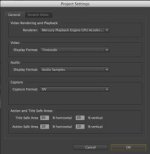
Project setings: Render using Mercury GPU
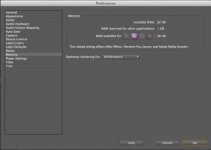
Memory settings: Ram for premier: 28GB & 4gb for other apps
Optimize for Performance

Exporting to Tiff via AME: send over to AME and process begins...starts out at slow pace, then gets even slower...after 4 hours of encoding i was up to render time showing me 51 hours remaining. About a 1.1 hour per minute of footage at these settings.

I CANCELLED this Encode then went to CS 6
(ps...All drivers are up to date by the way and all 3rd party components.)

Encoding from CS 6
Encode: encoding to Tiff files (for master)
settings: 1920x1080p @ 29.97 (there are a few clips in timeline shot at 24fps)
Project setings: Render using Mercury GPU
Memory settings: Ram for premier: 28GB & 4gb for other apps
Optimize for Memory

Exporting to Tiff via AME: Begin process and render times show up to 22 to 31 hours....i realize that as it processes each clip, the render times change, but this encode certainly is MUCH faster....so now my render is more around .52 hour per minute of footage with effects applied and R3d's and other mixed codecs....All with RR card and Quadra 4000.

*I'll know the actual render times and stats upon completion and report back when completed.

**I'll first state that i'm pleased i can even do such a job on my machine...NOW, my question is this: Is this what i should expect for performance for encoding even with the RR card and Quadra 4000? I do NOT get realtime playback and at 1/2 res it's choppy on my timeline...if i apply any effects...i must go to 1/4 rez and it's still choppy and stutters....THIS on CS 5.5 or CS 6. I here such great things about people editing on a laptop and getting great performance, but i have had nothing like that.....maybe it's because of all my effects etc...but sure seems far from what is being touted by other users...This seem correct or should we be trying OTHER system configurations?
 

Attachments

  • CS5.5-Project-GPU.jpg
    CS5.5-Project-GPU.jpg
    9.8 KB · Views: 0
  • CS5.5-Memory-performance.jpg
    CS5.5-Memory-performance.jpg
    9.8 KB · Views: 0
  • CS6-prooject-GPU.jpg
    CS6-prooject-GPU.jpg
    9.9 KB · Views: 0
  • CS6-encode-time.jpg
    CS6-encode-time.jpg
    17.3 KB · Views: 0
  • CS6-Memory.jpg
    CS6-Memory.jpg
    9.1 KB · Views: 0
Here is what i consider the biggest issue we've come across so far....(disclaimer: maybe these are local issues/problems, but i think worth discussion--meaning might be a bug with my system)

I. Flickering of clips in timeline
What: adding effects to various clips in our 52minute timeline we get random flickering of the clips (about 5% of clips)...where and effect seems to be alternating on/off.
Cause: Using GPU Acceleration for some reason causes this to occur
Solution: Switch back to Software Acceleration and then go back to the clip and move your workspace bar only to that clip and delete previews for that clip only, then Re-Render the clip. Problem solved. BUT, what a LONG render time....sure would like to be back at GPU acceleration.

2. Red X in PrPro at bottom right: So seems this little bugger ALWAYS pops up (see image attached)...when you click on it, you then get the error box that tells you what went wrong and how many instances it went wrong. I actually have not been able to figure out when any of these errors mean, but they come up often and usually the same ones in my case. I am guessing (in my case) that one may have to do with what software has control of the Redrocket card and showing me that errer and the other may be something related to 3rd party plugins from Magic Bullet--but really i have no clue, but do know that whatever it is, Adobe recognizes it as a problem and it happens on every edit session: posted pics of all these errors and maybe somone with knowledge of these error codes could be more specific about what the issue may be and the fix so that they do not continue.

Ok we don't know about this bug. We will need more info and a bug report. Please let us know your hardware info and a screen video or sample exported clip would help

Thanks

Dave
 
1) Almost sounds like the GPU's freaking out..? Could it be overheating? Any chance to attempt this on a different machine to confirm/deny whether it's machine specific?

2) Those are totally benign, but thanks for bringing it to our attention.
 
Ok we don't know about this bug. We will need more info and a bug report. Please let us know your hardware info and a screen video or sample exported clip would help

Thanks

Dave

Dave: I put all machine info up on my 1st post and any info that seemed pertinant. Once we get through our color/edit session, we'll submit this to Adobe---i have to say that i don't even know WHERE to submit....


[/QUOTE]1) Almost sounds like the GPU's freaking out..? Could it be overheating? Any chance to attempt this on a different machine to confirm/deny whether it's machine specific?

2) Those are totally benign, but thanks for bringing it to our attention.[/QUOTE]

Hi Wil: you could be correct. But i believe that is one of many possibilities....unfortunately we don't have another machine to test this. As for point 2: Well, i suspect that is good news to hear from you....but whenever I see a giant RED X with error messages, it gives me pause for concern. Not to be testy, but at what point would/ or should i be concerned about the RED X - will it be rather obvious when a report comes through that i "should" take action?
....thanks for the replies....
 
For bug reports go here: http://forums.adobe.com/thread/878528

I don't know about what is going on with 1. A video of it happening would really help.

As for 2 those look like errors coming from ColorFinese or Magic Bullet. They are looking for support that they would have in After Effects, they then do something else in premiere when it isn't there. They could silent those if they wanted to. We put messages in that area and let third parties as well.

Cheers

Dave
 
Got it....i'll see if i can make a vid later..now too busy for anything other than typing and screenshots...as to the BIG RED X: the "DoClose" error message has been there even before i've added 3rd party plugins...

Ok we will go look into that

Thanks

Dave
 
Here's bit of a game stopper for us Encoding out to AME (posted in my report above):
3. Encoding: AME Encoding Problem: EVERY-TIME we send from premier to AME to encode (we are doing dpx sequences with red material-epic and r1 and the other mixed codecs)--anyway, we get the encoding going and then walk away--it continues--we are only encoding 5mins of footage to DPX---it gets to a random place and then just freezes up. Tried this four times now and cannot get it to finish a job AT ALL! So, now did an export of 1minute from Premier and it goes---slowly, AND we cannot continue working inside of Premier....After searching the web, i've noticed a lot of this with AME and it seems to be random with no known fix. This is a BIG downturn for us since working back in Premier was just a killer solution...but now we have to wait---like FCP. So sure would be nice if there were a solution. what i kept hearing about on adobe forums was something about large still pic. files next to each-other---well, can that mean a few R3d files next to each-other causing a crash? I'm no tech, but this is tragic this end.
 
Ok.....ENCODING Hell.....this is the part that makes me sweat!

We have a trial version of CS 6 and had the idea to open the 5.5 project in 6....everything converted over and all 3rd party plugins--only item that does not work is my Matrox MXO2...we do not have the latest or working drivers. Have the besta drivers from Matrox, but it does not work and Matrox monitoring is not available. BUT, we sent a 5minute sequence to AME and it all seems to be working fine in CS 6 on the first try. We had 3 consecutive failures with 5.5 sending direct to AME where the encode just stalled midway through and would hang and not respond. So this is good news we hope on the CS 6 front. Since i have seen SO many people with this error from CS 4 up to 5.5 and there just seems to be no answer--a lot of speculation about pulling graphics cards, possible just over heating; re-load firmware and on and on....but looks like it just might be a good old bug that is "possibly" (after what looks like a few years) ZAPPED--i sure hope!. more to follow......

EDIT: NOT zapped! Ok, made the encode to about 95%, then i heard a sheep noise....which means (when using AME) that your encode failed....so it ALMOST made it...BUT, since they were Tiff files and saved one at a time, i can use them. BUT, what a drag that this fails EVERY TIME i have used it in 5.5 or 6. I can encode out of premier no problem, but then of course cannot use Premier. more to follow....

ERROR Messages Below-ScreenGrabs:
 

Attachments

  • AME-CS 6-error1.jpg
    AME-CS 6-error1.jpg
    8.4 KB · Views: 0
  • AME-CS 6-error.jpg
    AME-CS 6-error.jpg
    9.3 KB · Views: 0
Thanks Steve, awaiting when Matrox works since i really need my monitors and scopes working. I agree....i need an SSD drive for premier alone. My next system will be a dedicated work station with SSD's for apps only. Just wish i could get a clean go on 5.5 or 6 though. I'm impressed, but not as much with the hype i've been hearing. This is a full one hour doc with tons of red footage and other mixed codecs that should be the heart and soul of how PrPro works. I'm not getting these real time or close to real time playback i keep hearing about....could be any number of things with graphics cards to software.
 
i have an old mac pro (2008). I'm editing a 1080 sequence with R3D, prores hq, prores 422(iphone converted) and it's smooth. However, I'm currently not playing out to my broadcast monitor. but GPU is happy, editing seems snappy. I'm impressed, although I have a ton of testing still to go.
 
i have an old mac pro (2008). I'm editing a 1080 sequence with R3D, prores hq, prores 422(iphone converted) and it's smooth. However, I'm currently not playing out to my broadcast monitor. but GPU is happy, editing seems snappy. I'm impressed, although I have a ton of testing still to go.

Maybe i just have a bad graphics card then...or something else not working in my system. So hard to tell....
 
I'd have a bet that your machine is crapping out from heat during your export. With the machine you're using you'd want a huge tower with good ventilation and plenty of fans. Are you monitoring your temperatures (CPU, GPU) during export?
 
I'd have a bet that your machine is crapping out from heat during your export. With the machine you're using you'd want a huge tower with good ventilation and plenty of fans. Are you monitoring your temperatures (CPU, GPU) during export?

We specifically turned down the room a/c to see if this was the problem---i see this referred to on several google searches---but just does not seem to be the culprit since it's really not so hot with ambient air---now inside the machine is another thing....We are monitoring cpu usage and all via disk utilities. But a fan goes directly on it next time at the edit station---however, i think this is not the issue.
 
Back
Top