Welcome to our community

Be a part of something great, join today!

  • Hey all, just changed over the backend after 15 years I figured time to give it a bit of an update, its probably gonna be a bit weird for most of you and i am sure there is a few bugs to work out but it should kinda work the same as before... hopefully :)

Controlling Raven? Side Handle Equivalent?

there is no GIG-Ethernet on DSMC2 brain itself like there is on EPIC / SCARLET.
So far the only announced module with GIG-Ethernet connector is the REDVolt Expander.


right right, thanks for reminding me.


If you are driving the menus on the third party monitor with a Sidekick (or foolcontrol) you can set up everything on the camera.


So as long as wifi is on, foolcontrol app nav keys can drive the monitor menu to access all Camera settings out of the box

The only tricky parts may be the need of a force_preset file to enable wifi and set what display to use for on screen menus.

however, I think you can change display output menu option via the foolcontrol app itself.
(if so, all you'll need is a wifi on by default force_preset file loaded)
 
So as long as wifi is on, foolcontrol app nav keys can drive the monitor menu to access all Camera settings out of the box

The only tricky parts may be the need of a force_preset file to enable wifi and set what display to use for on screen menus.

however, I think you can change display output menu option via the foolcontrol app itself.
(if so, all you'll need is a wifi on by default force_preset file loaded)

yes with the iOS version you can do all this...

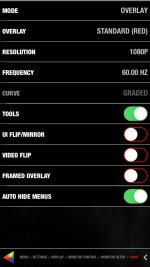
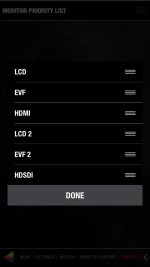
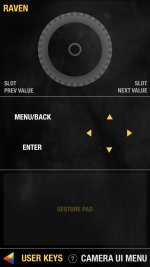
below are screenshots of the monitor setup page where you can enable the overlay, the monitor priority list to set HDMI or SDI out as your main monitor and the foolcontrol KEYS page where you can navigate thru all the camera menu using your monitor display.

The gesture pad at the bottom lets you quickly swipe up/left/down/right, tap to enter, tap with 2 finger or press long to simulate back/menu key and 2 finger left/right swipe for scroll wheel rotation without having to look at the phone screen :-)
 

Attachments

  • monitor setup.jpg
    monitor setup.jpg
    64.2 KB · Views: 0
  • monitor priority.jpg
    monitor priority.jpg
    32.1 KB · Views: 0
  • keys.jpg
    keys.jpg
    60.4 KB · Views: 0
I will verify fresh FW wifi status and let you know.
If RED does not provide one in their DSMC toolkit I will look into making a WIFI AdHoc enabled force preset file available so you can connect to the camera wifi.

Just wanted to quickly say thanks for all that you do. I'm really looking forward to getting foolcontrol running on my Raven.
 
yes with the iOS version you can do all this...

below are screenshots of the monitor setup page where you can enable the overlay, the monitor priority list to set HDMI or SDI out as your main monitor and the foolcontrol KEYS page where you can navigate thru all the camera menu using your monitor display.

The gesture pad at the bottom lets you quickly swipe up/left/down/right, tap to enter, tap with 2 finger or press long to simulate back/menu key and 2 finger left/right swipe for scroll wheel rotation without having to look at the phone screen :-)


Hi Mikael, just reading through this forum, and double checking i can turn my raven on with an external sdi/hdmi monitor plugged into my base expander...
1. connect straight to raven wifi
2 .bypass accept terms and conditions
3. control camera

not sure about this force preset file and how to do it.
Can you give me a good rundown, I will film my setup so other users can do it as well as im sure there will be a few users getting ravens still waiting on there 4.7 touch to show.
cheers
love your work
 
What would be great is something like the sidekick except for the top of the camera. Like a little dashboard. The sidekick is exactly the control i need except it's in the wrong spot.
 
Back
Top