

Navigation
Install the app
How to install the app on iOS
Follow along with the video below to see how to install our site as a web app on your home screen.

Note: this_feature_currently_requires_accessing_site_using_safari
More options
Welcome to our community
Be a part of something great, join today!
You are using an out of date browser. It may not display this or other websites correctly.
You should upgrade or use an alternative browser.
You should upgrade or use an alternative browser.
Continuing the discussion of why ETTR is bad when shooting HDR
- Thread starter Bill Ravens
- Start date

rand thompson
Well-known member
- Joined
- Aug 9, 2011
- Messages
- 18,999
- Reaction score
- 622
- Points
- 113
Thanks for this Link and corresponding video. I believe I have that exact Grey Card he has which is White on the other side and which folds down so that you can fit it into your pocket. I also had a stand with a C-Clip attached to hold the card perfectly perpendicular so as to get the most accurate results.
What he says does make alot of since. I think most of the people on this forum currently deliver for a Rec709 output and maybe not have considered that there may be different results with the ETTR technique in a HDR workflow.
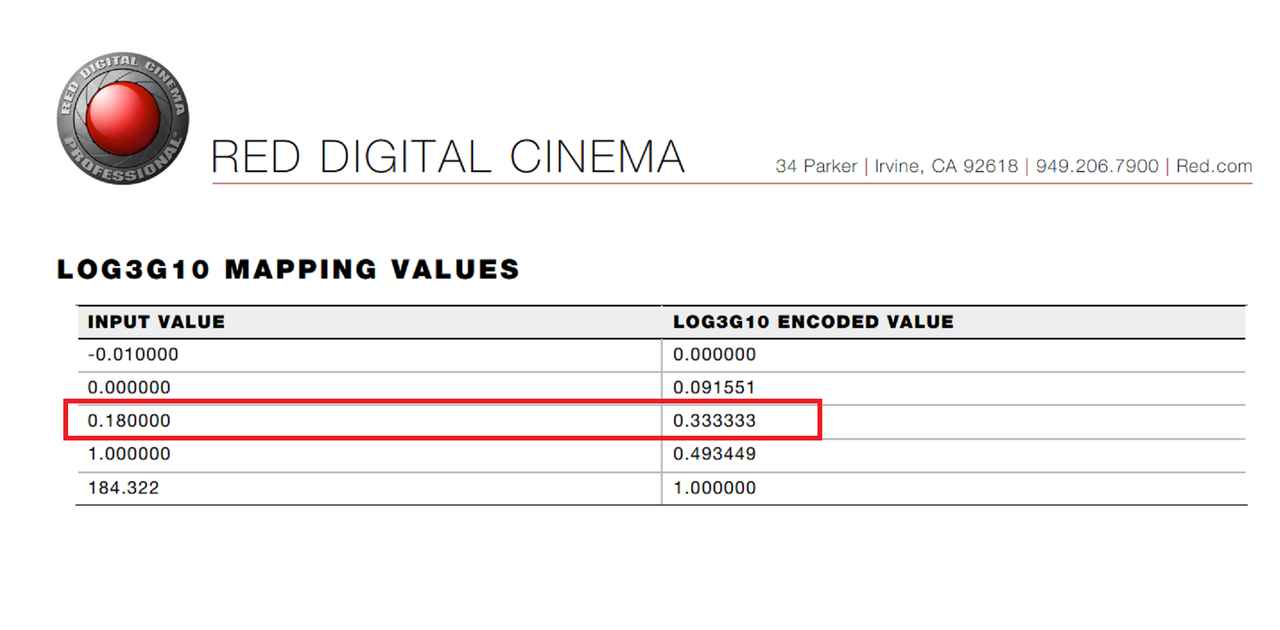
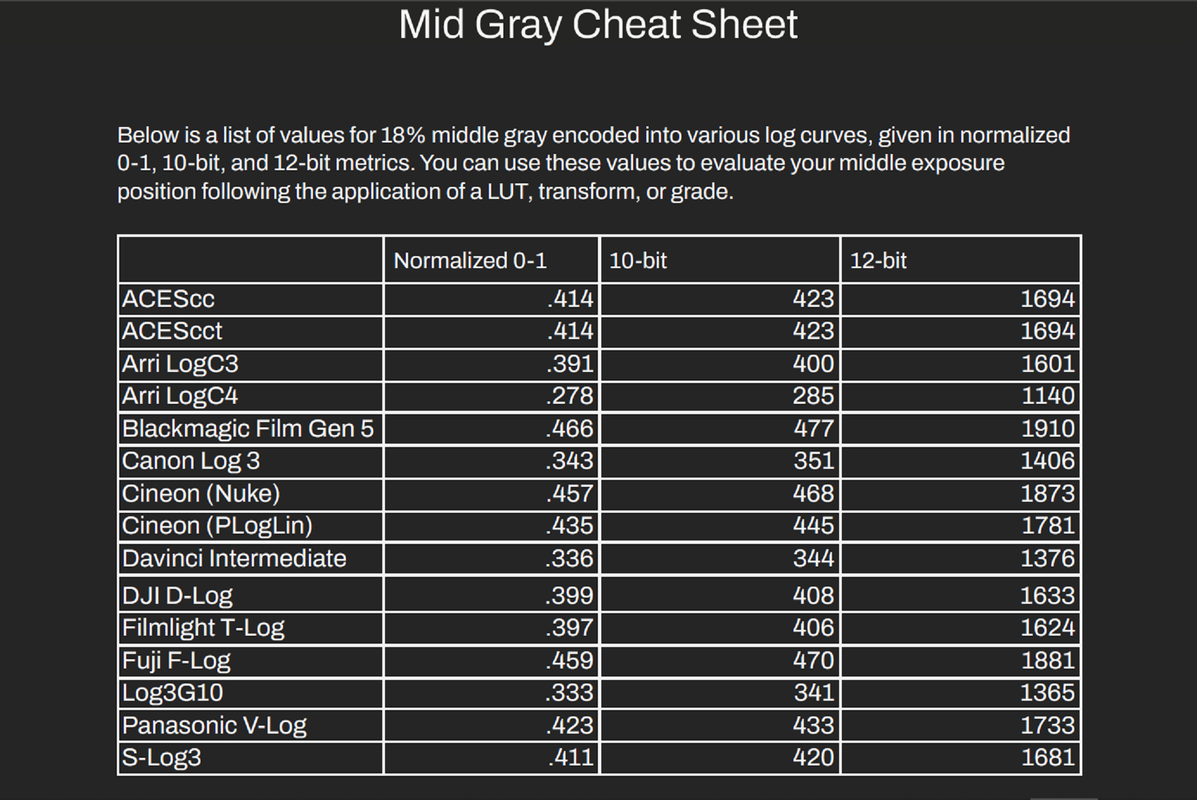
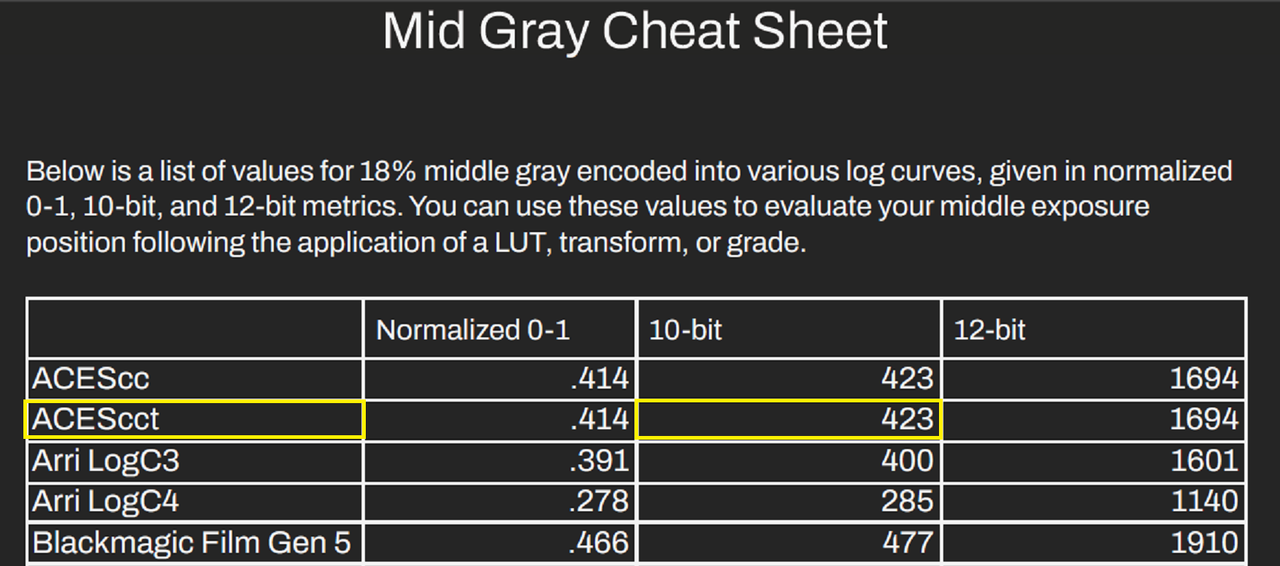
Here's a chart that I got from Cullen Kelly of the Different suggested 18% Grey Points at different bit depths for the many different Log Profiles from most all of the camera manufacturers. I was able to personally verify over 7 of them one being for RWG/LOG3G10.
Last edited:
- Thread starter
- #3
Bill Ravens
Well-known member
Yes, I have Kelly's mid-grey cheat sheet. I ran a few experiments of my own on the Lastolite target, illuminated by some studio lights. Exposing with either a gioscope or Ed Lachman's EI Zone, and, shooting Raw, I set the target to mid-grey. I'll note that the goalposts indicated a slight underexposure when the grey card was "properly" exposed. Bringing the files into Resolve, setting output to Rec2020, St2084/1000nit max, I verified that the grey card appeared pretty close to the 34% on a video waveform. That is , also, consistent with Cullen's exposure chart, given that the resolution of Resolves scopes ain't that great.
rand thompson
Well-known member
- Joined
- Aug 9, 2011
- Messages
- 18,999
- Reaction score
- 622
- Points
- 113
Yes, I have Kelly's mid-grey cheat sheet. I ran a few experiments of my own on the Lastolite target, illuminated by some studio lights. Exposing with either a gioscope or Ed Lachman's EI Zone, and, shooting Raw, I set the target to mid-grey. I'll note that the goalposts indicated a slight underexposure when the grey card was "properly" exposed. Bringing the files into Resolve, setting output to Rec2020, St2084/1000nit max, I verified that the grey card appeared pretty close to the 34% on a video waveform. That is , also, consistent with Cullen's exposure chart, given that the resolution of Resolves scopes ain't that great.
Yeah, I also wish that you could get a more precise reading on the Scopes instead of having to use general approximations based on the scale that resolve uses.

Audy Erel
Well-known member
- Joined
- Nov 27, 2016
- Messages
- 321
- Reaction score
- 16
- Points
- 18
- Location
- Jakarta-Bandung, Indonesia (Bali)
I have just begun to experience the new realm of HDR color grading since I got my XDR screen MacBook Pro barely a year ago, so this kind of information is valuable to me :encouragement:.
I think ETTR is only good when you don’t have total control of the lighting, like in a documentary situation and need to prioritize clouds in the sky over midtone color saturation or noise consistency.
I think ETTR is only good when you don’t have total control of the lighting, like in a documentary situation and need to prioritize clouds in the sky over midtone color saturation or noise consistency.
rand thompson
Well-known member
- Joined
- Aug 9, 2011
- Messages
- 18,999
- Reaction score
- 622
- Points
- 113
I have just begun to experience the new realm of HDR color grading since I got my XDR screen MacBook Pro barely a year ago, so this kind of information is valuable to me :encouragement:.
I think ETTR is only good when you don’t have total control of the lighting, like in a documentary situation and need to prioritize clouds in the sky over midtone color saturation or noise consistency.
Audy
Yeah, I always try and want to be ahead of the curve , however I feel like I'm falling somewhat behind because I haven't gotten a Mac with an XDR display with 1000nits plus capabilities to really enter into the HDR workflow territory. I have an older higher- end PC laptop but that's just not going to cut it for HDR. So I'll probably have to sell some lenses to get either a M2 Macbook Pro or maybe wait for the M3 Macbook Pros scheduled for the early part of 2024.
rand thompson
Well-known member
- Joined
- Aug 9, 2011
- Messages
- 18,999
- Reaction score
- 622
- Points
- 113
I decided to try a method similar to the guy in the video above with one of his images. Let me know if you see something I fucked up.
I will be using an ACES workflow
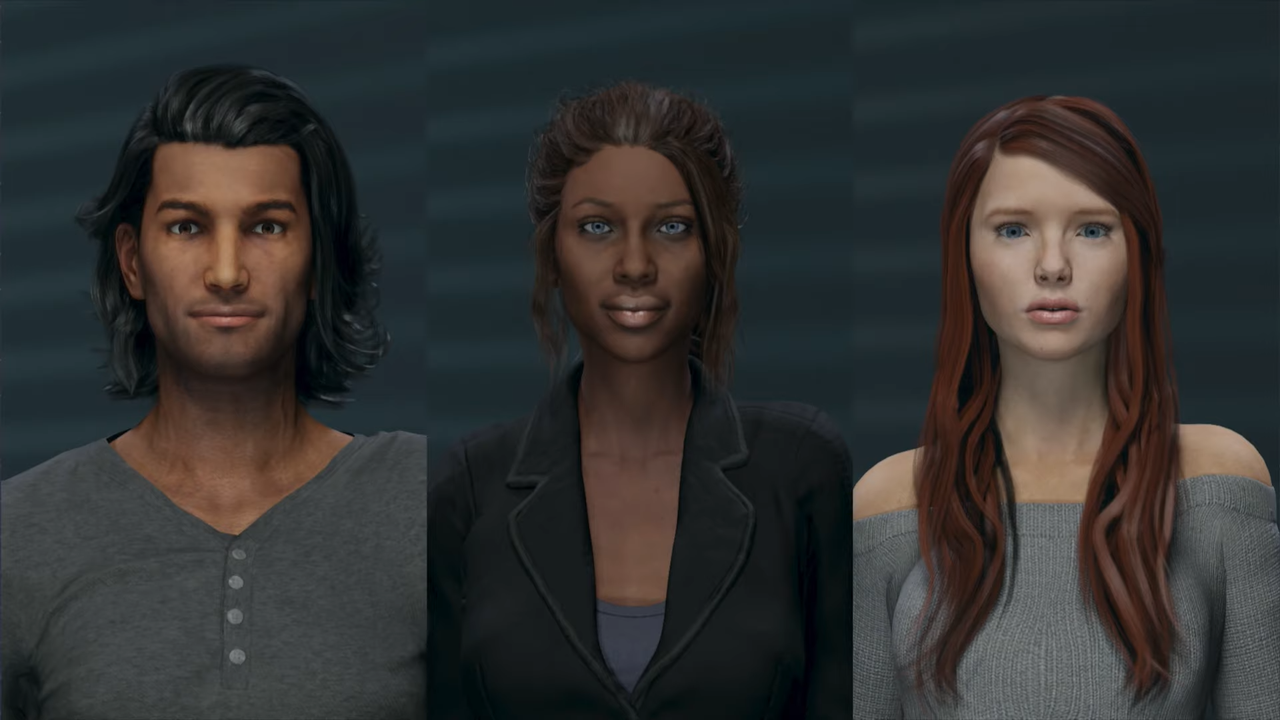
Here is the Reference Image I used from the webpage above
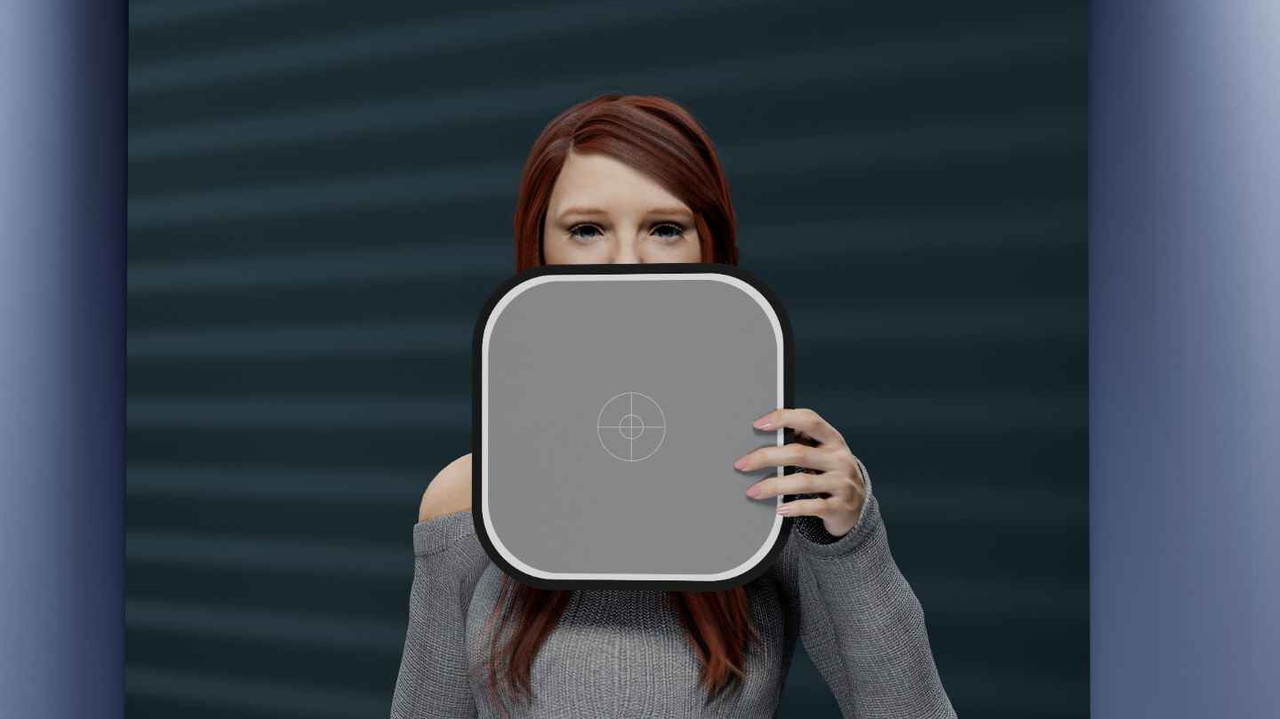
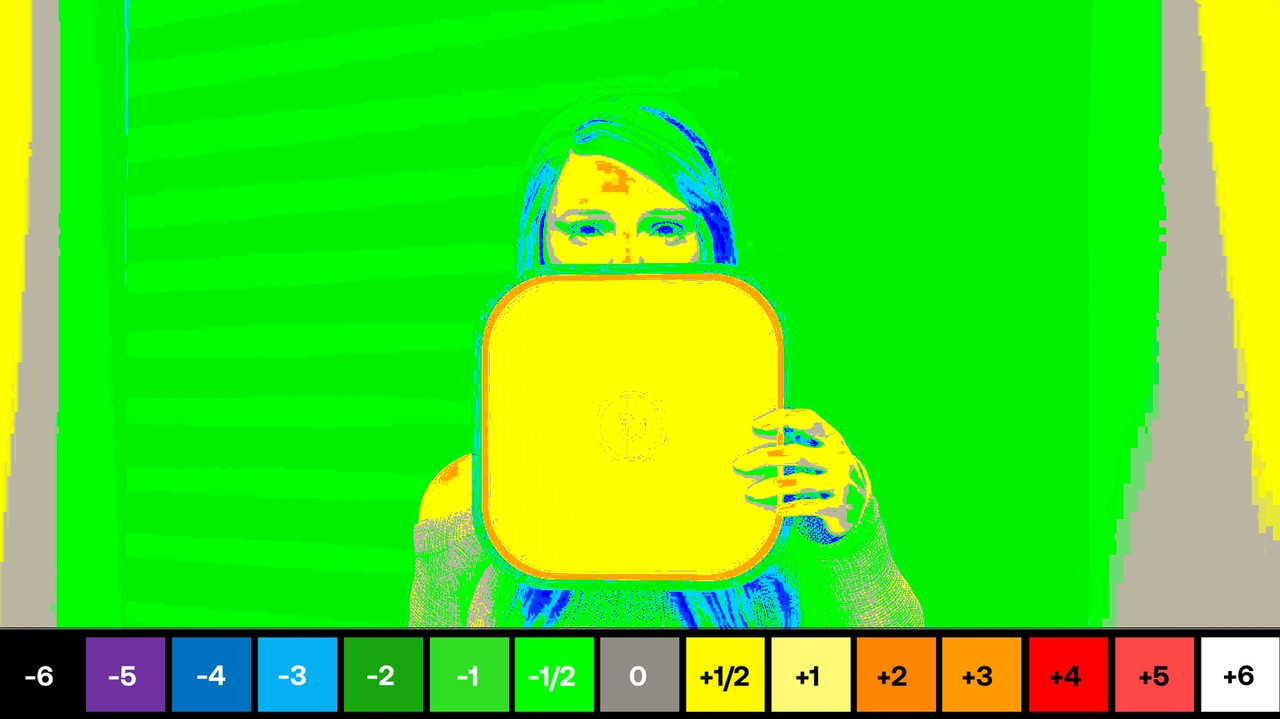
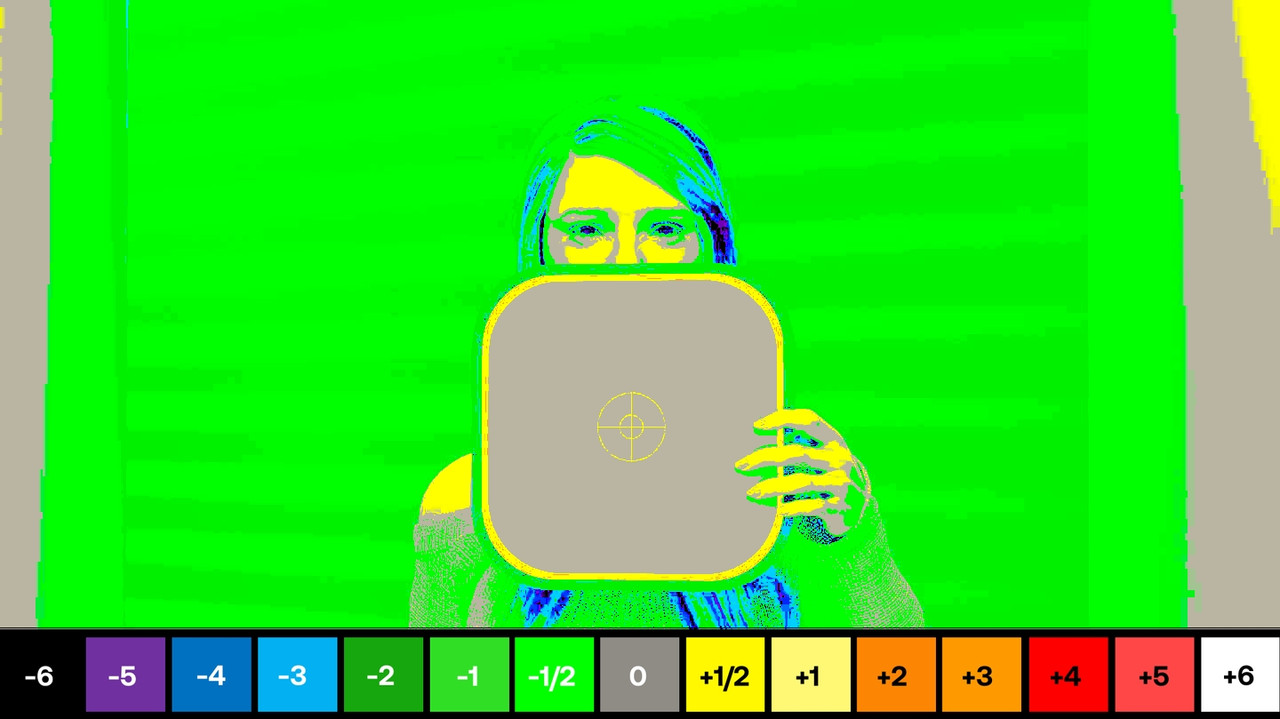
In a Non-Color managed Workflow, when I used the ED Lachman Zone Tool in a REC709 In/Out Node in LOOK DESIGNER after the ACES to REC709 transform (ED Lachman Zones only work in REC709 and not ACES which i am using in this demo, I'll show this later), 18% Grey appeared a 1/2 stop overexposed.
The ACES Workflow
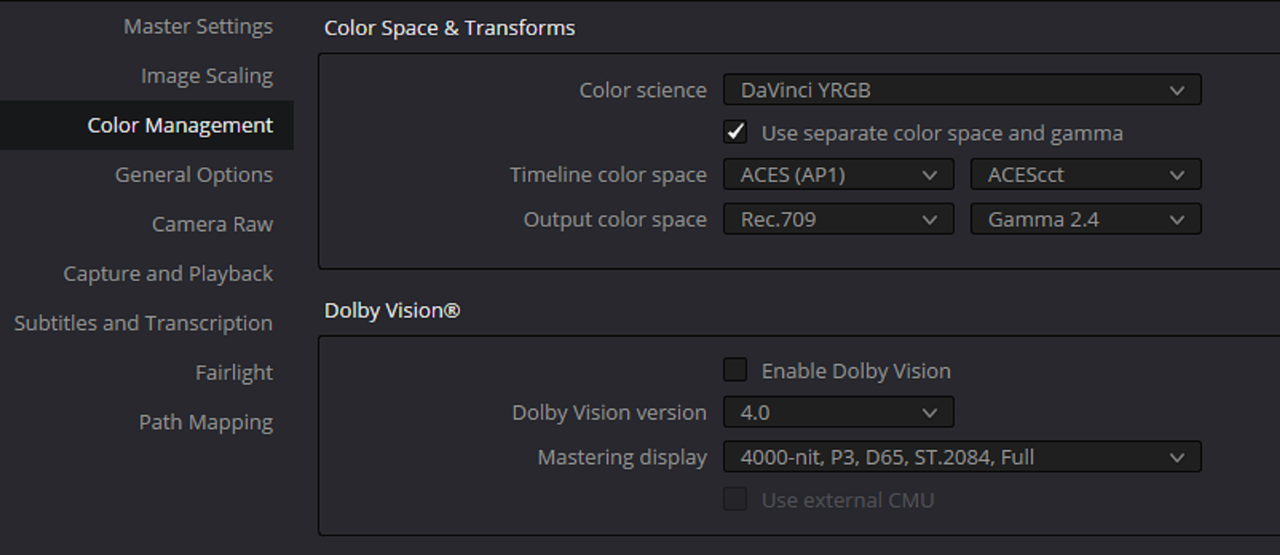
I used "SRGB" as the Input because i wasn't really sure if this computer generated image was in REC709 or not.
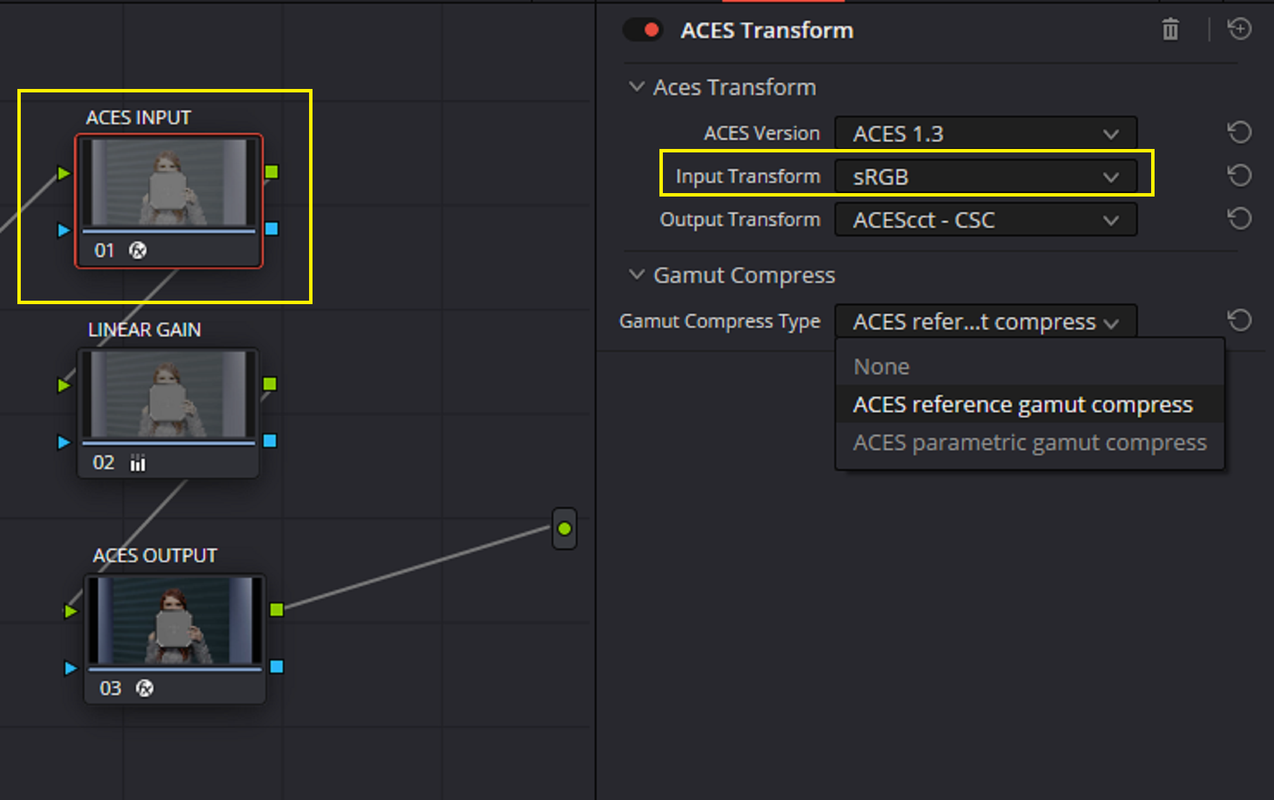
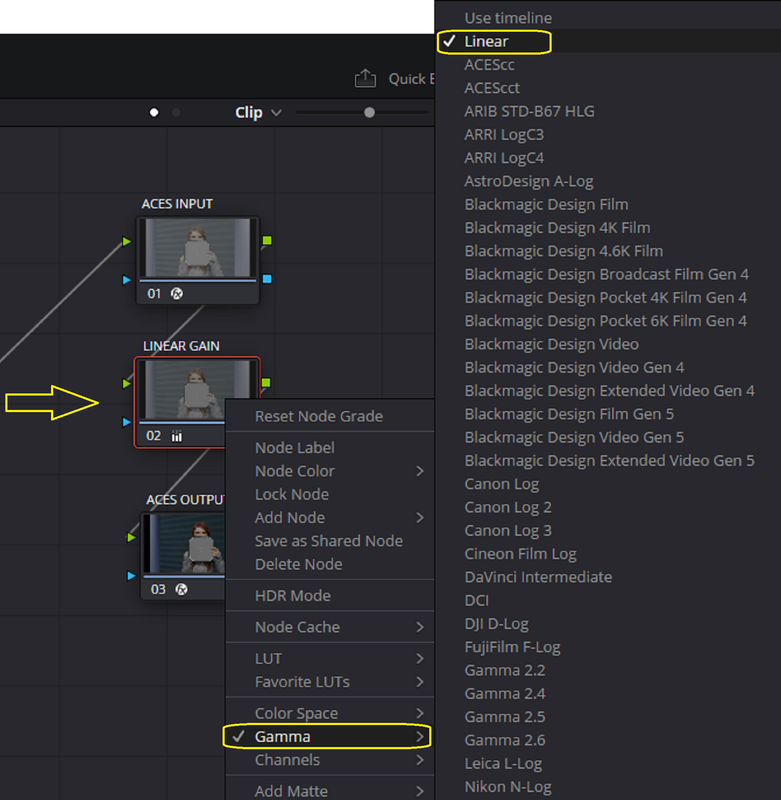
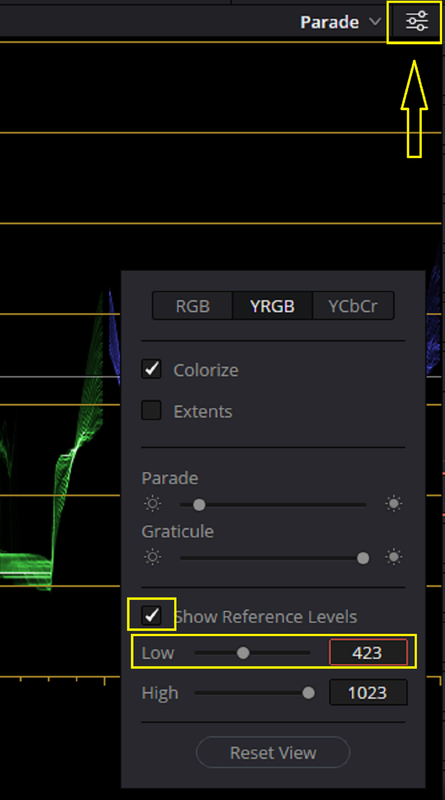
I used "LINEAR GAIN" to adjust for the correct 18% Grey point for ACES, which in 10Bit is 423.
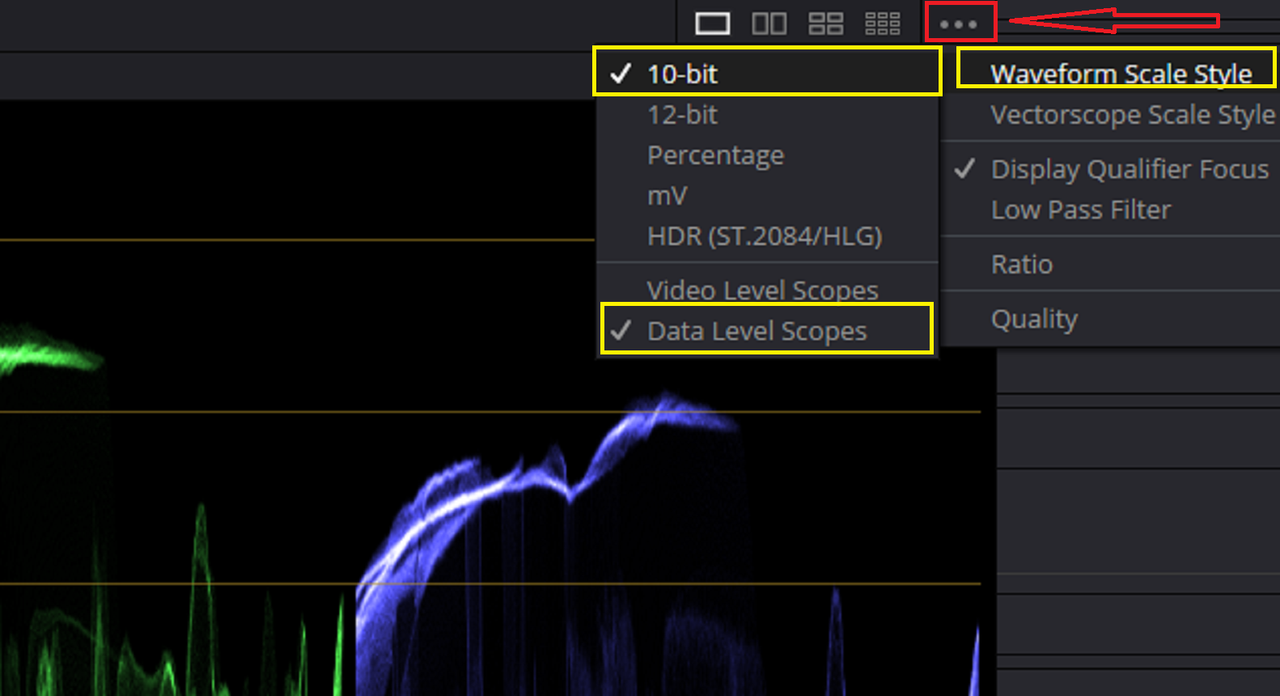
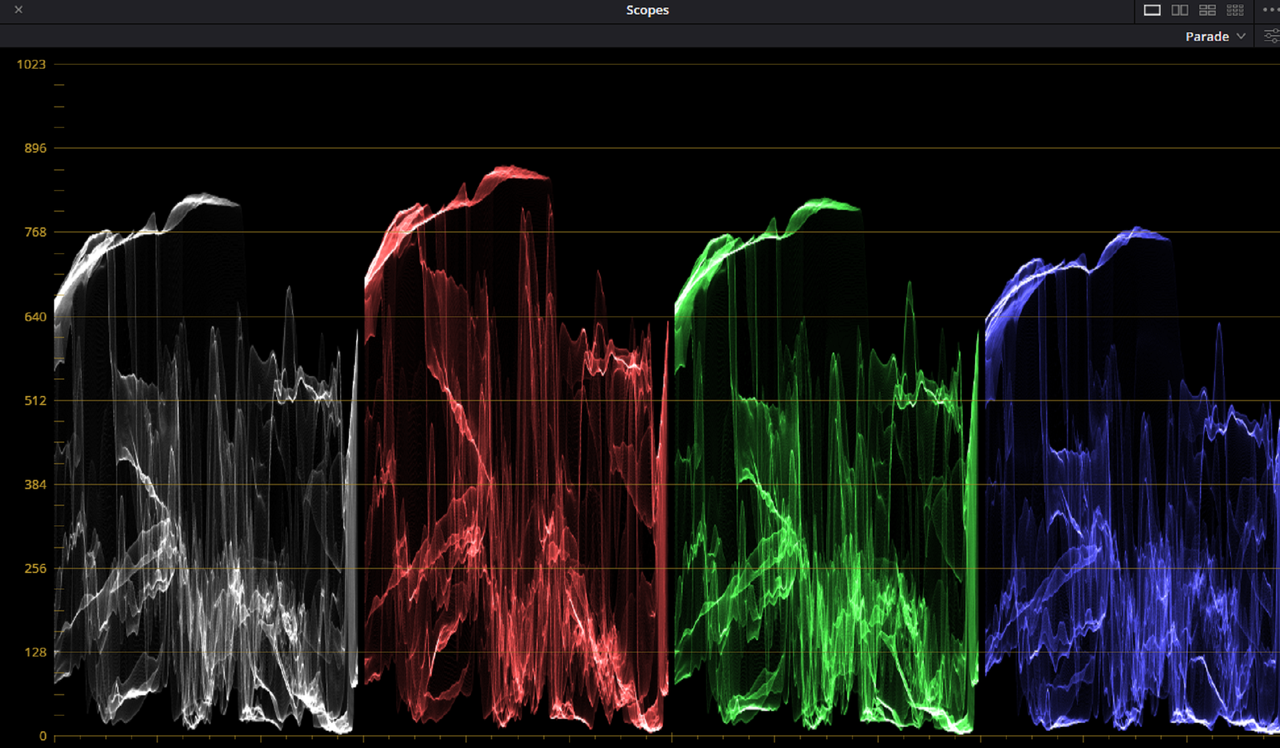
In the "PARADE" Scope under the three dots "...",select "WAVEFORM SCALE STYLE",I used these setting. I don't think the "Data" or "Video" selection is that import in this specific demo.
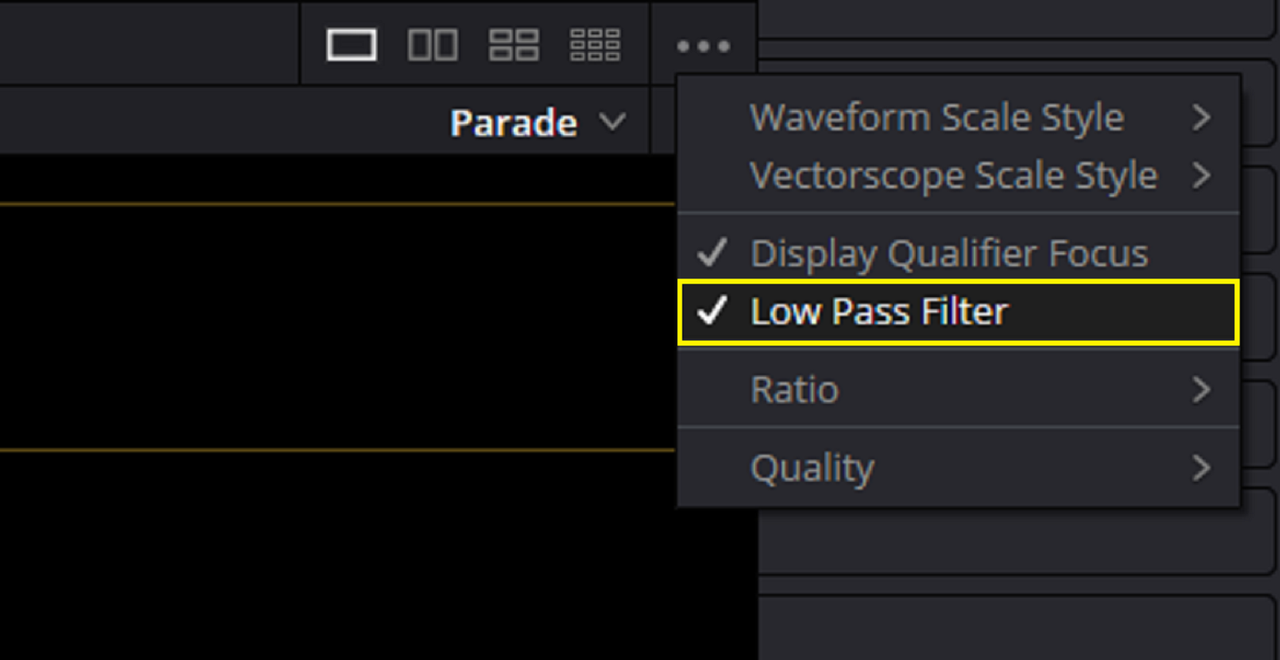
I cleaned up the RGB Values in the scope by using the"LOW PASS FILTER"
Before
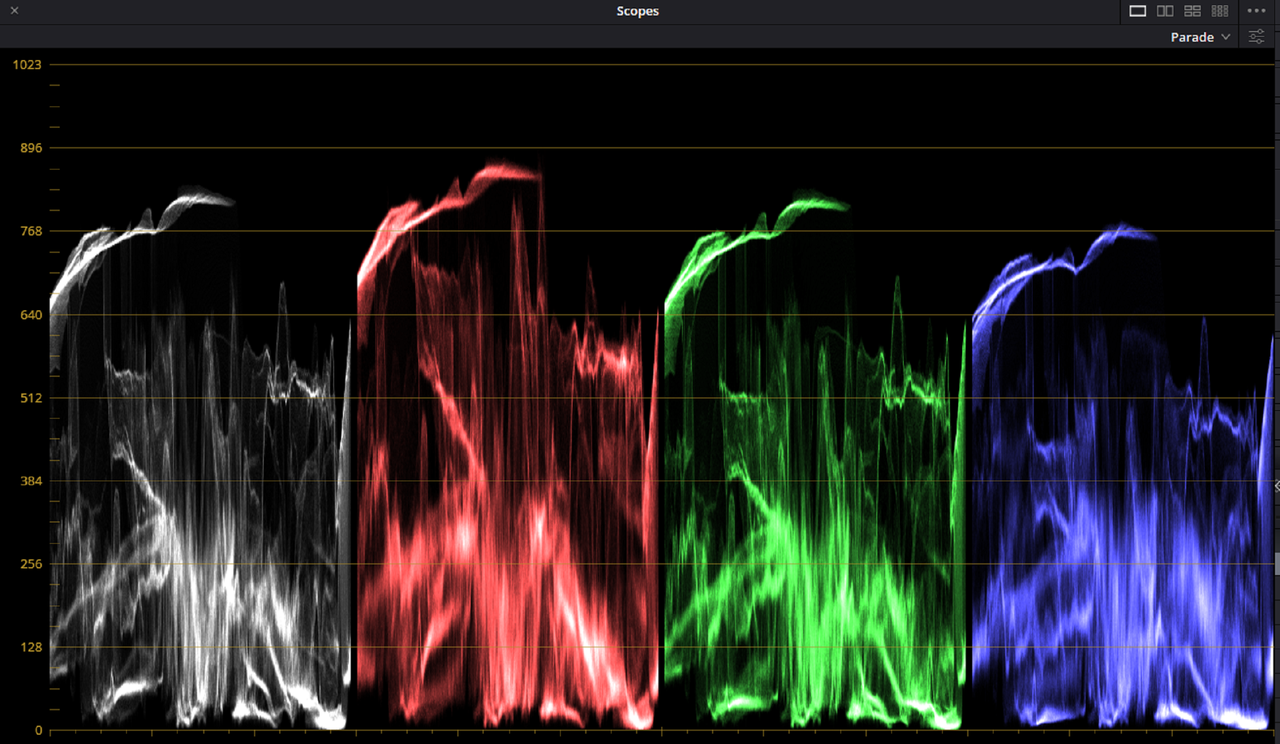
After
I had forgotten that you can use either the "REFERENCE LEVELS" "HIGH" or "LOW" lines to dial in a 18% Grey Reference point. So in this case I used the "LOW" reference line at 423 the 18% Grey point for ACES in 10bit.
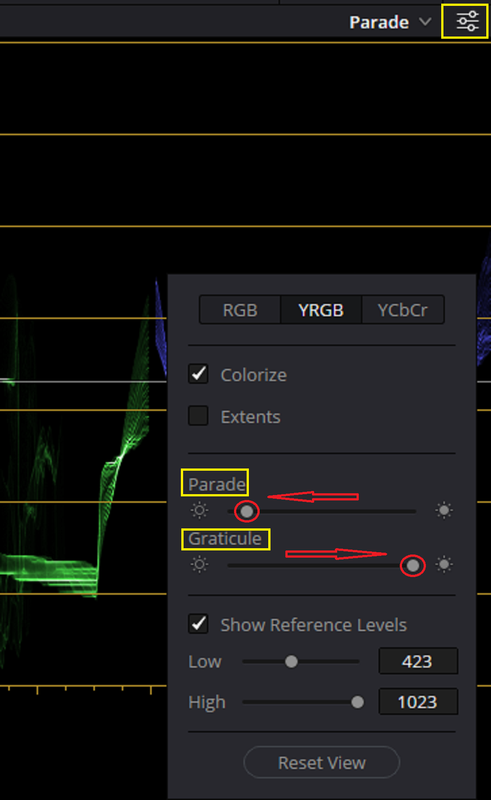
Also to display the Reference 18% Grey Line indicator better, I decreased the strength of the RGB Color Info in the "PARADE SCOPE" by decreasing the "Parade" info strength and I increased the strength of the "Gratical" (Line).
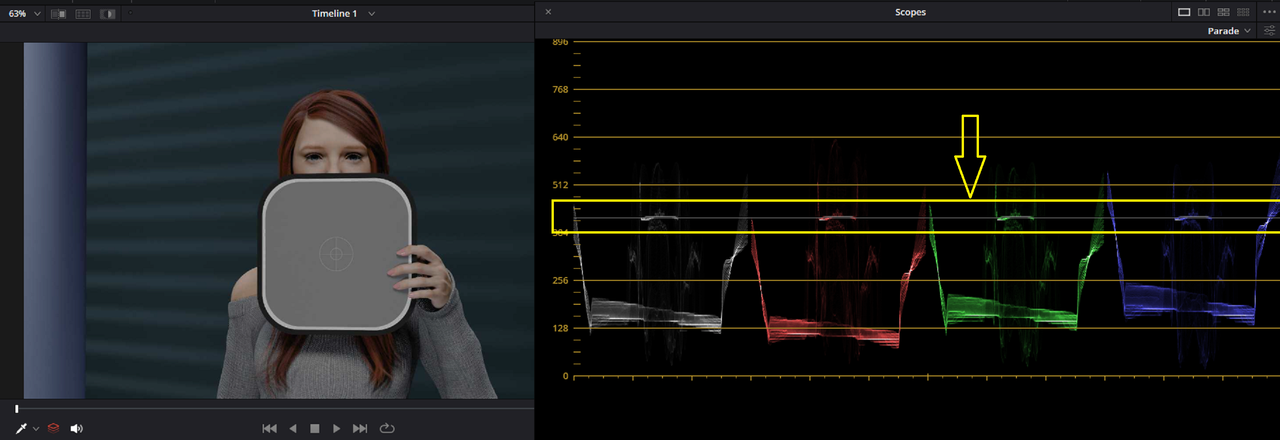
I used "LINEAR GAIN" to make the adjustment
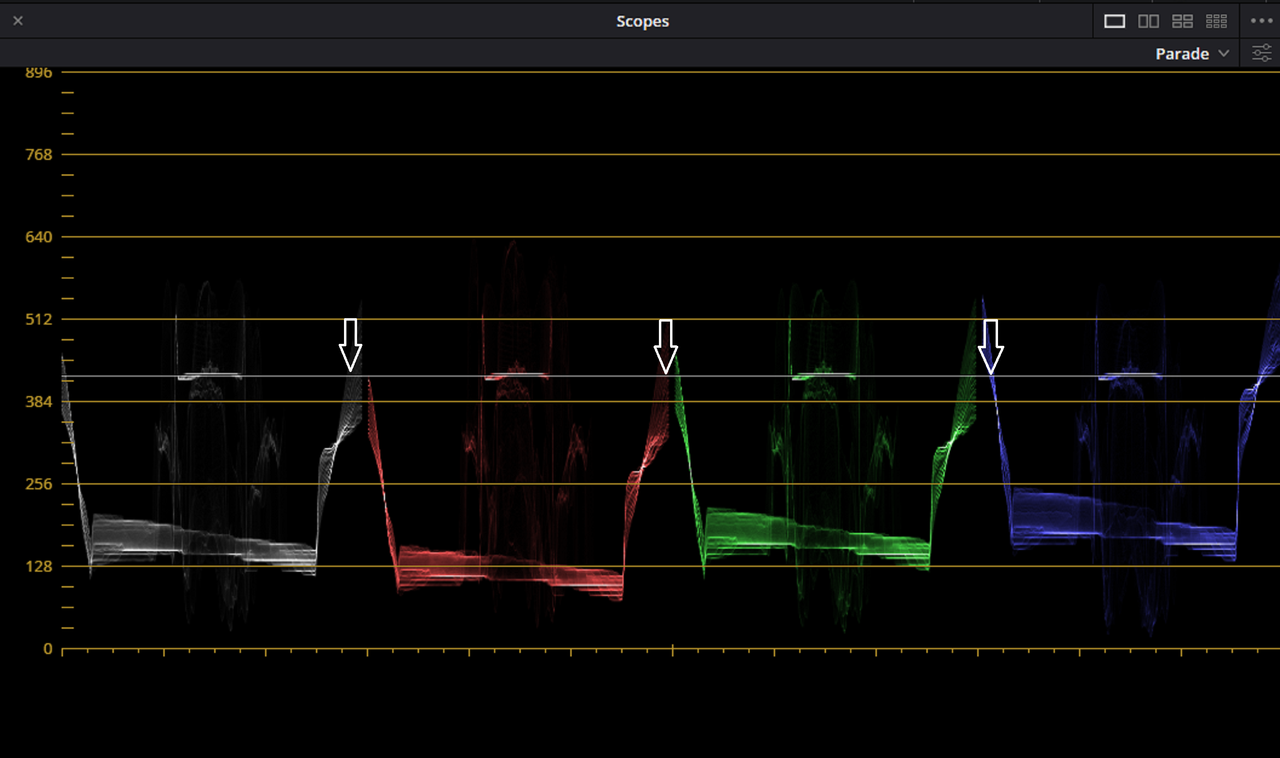
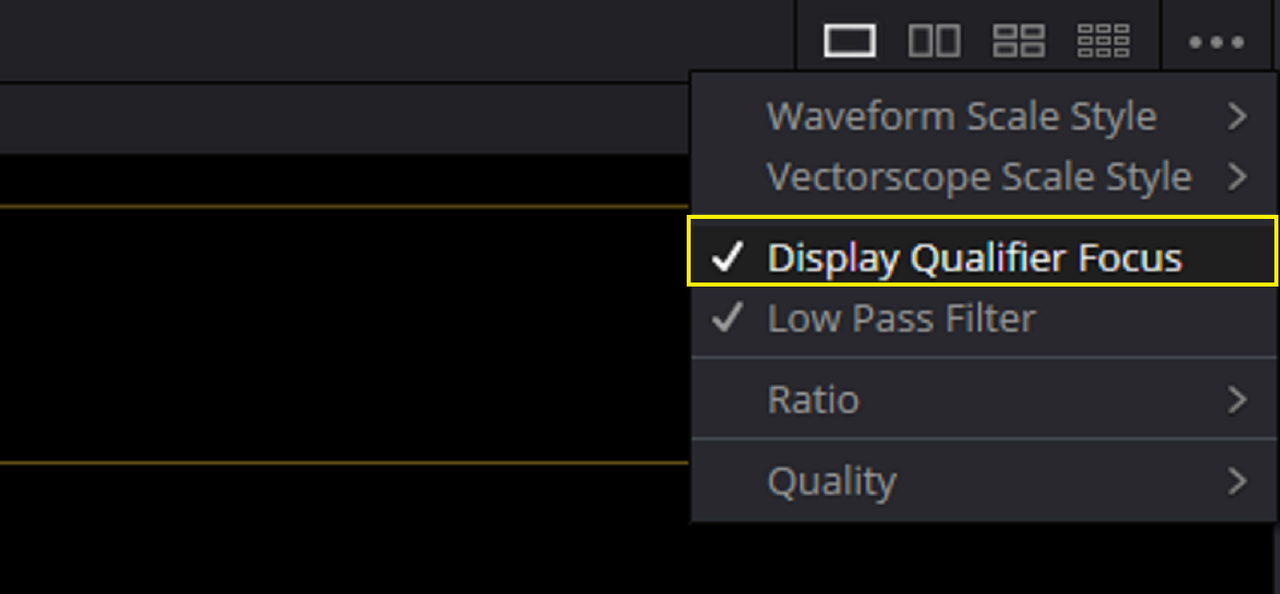
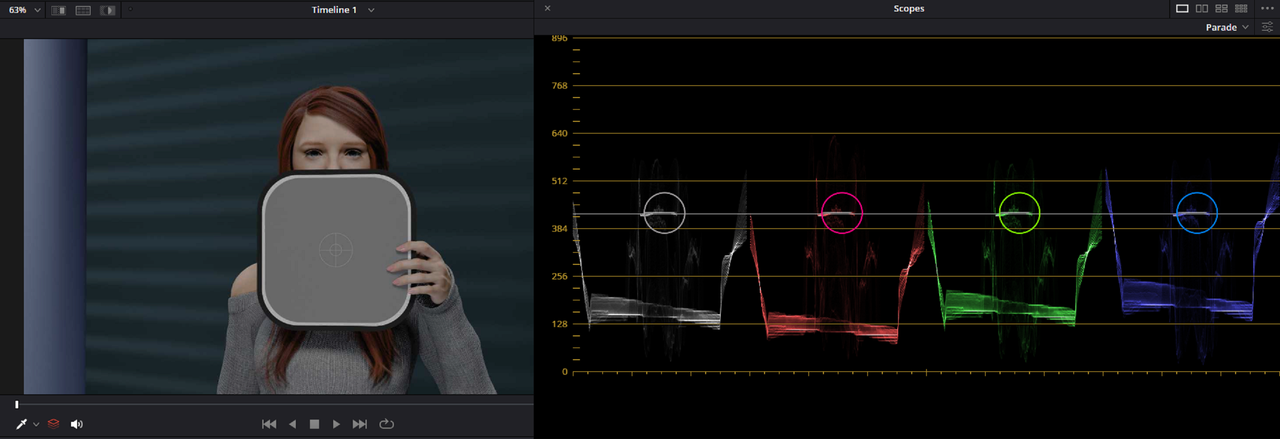
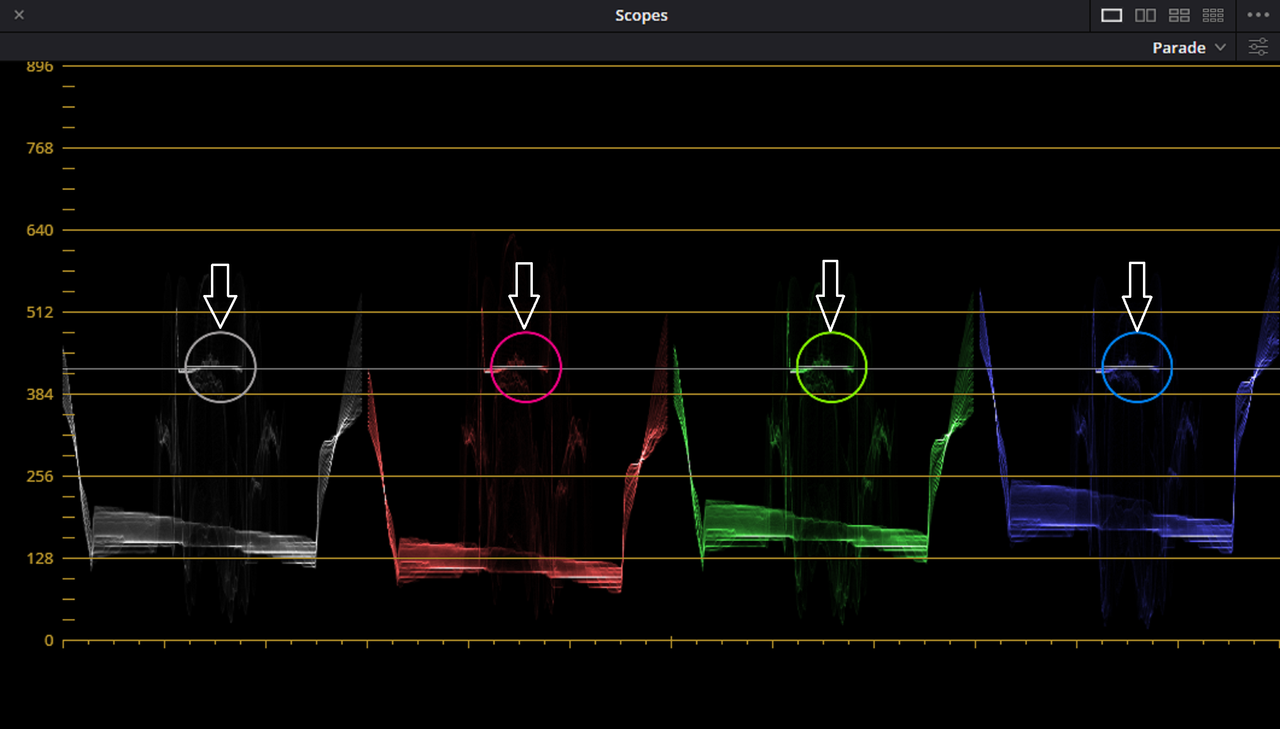
I also used the "DISPLAY QUALIFIER FOCUS" which when using the "EYEDROPPER" tool will show in whatever Scope that you are using the exact point in the scopes that you are hovering over. I had the Eyedropper tool on the Grey card which showed the corresponding relation in the "PARADE SCOPE".
The Final Corrected Exposure Image in ACES
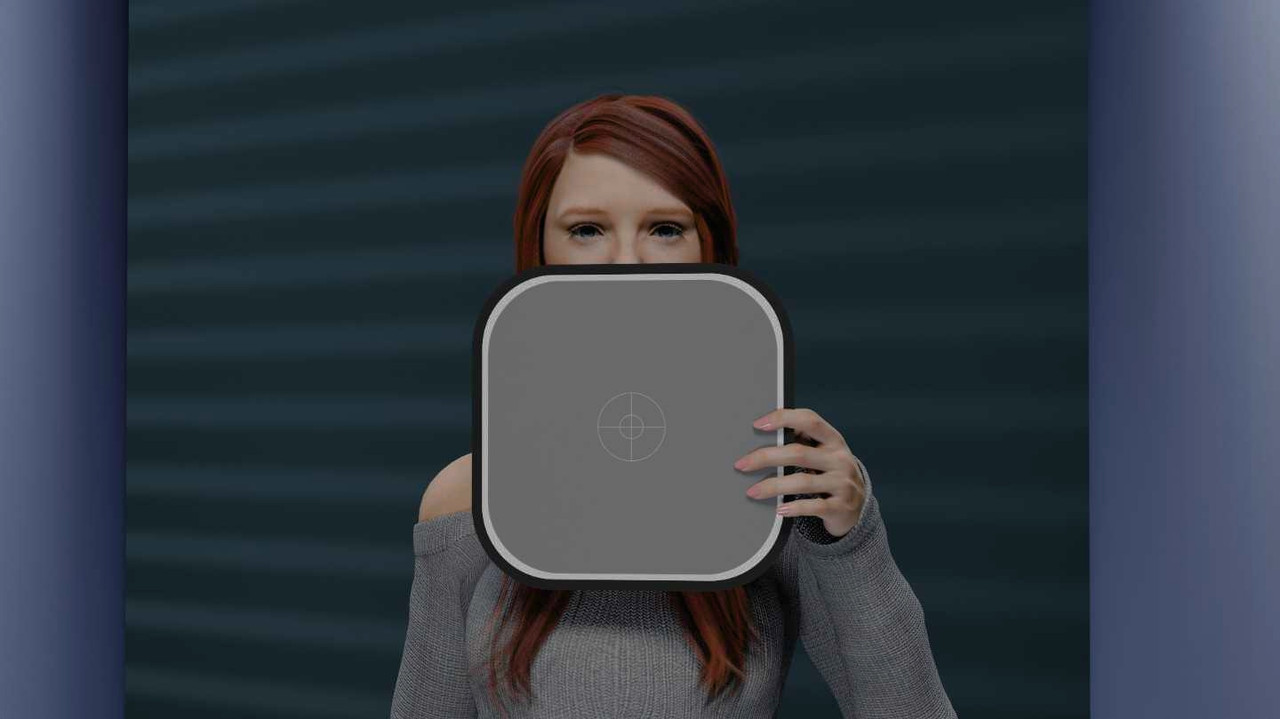
ALMOST FORGOT!
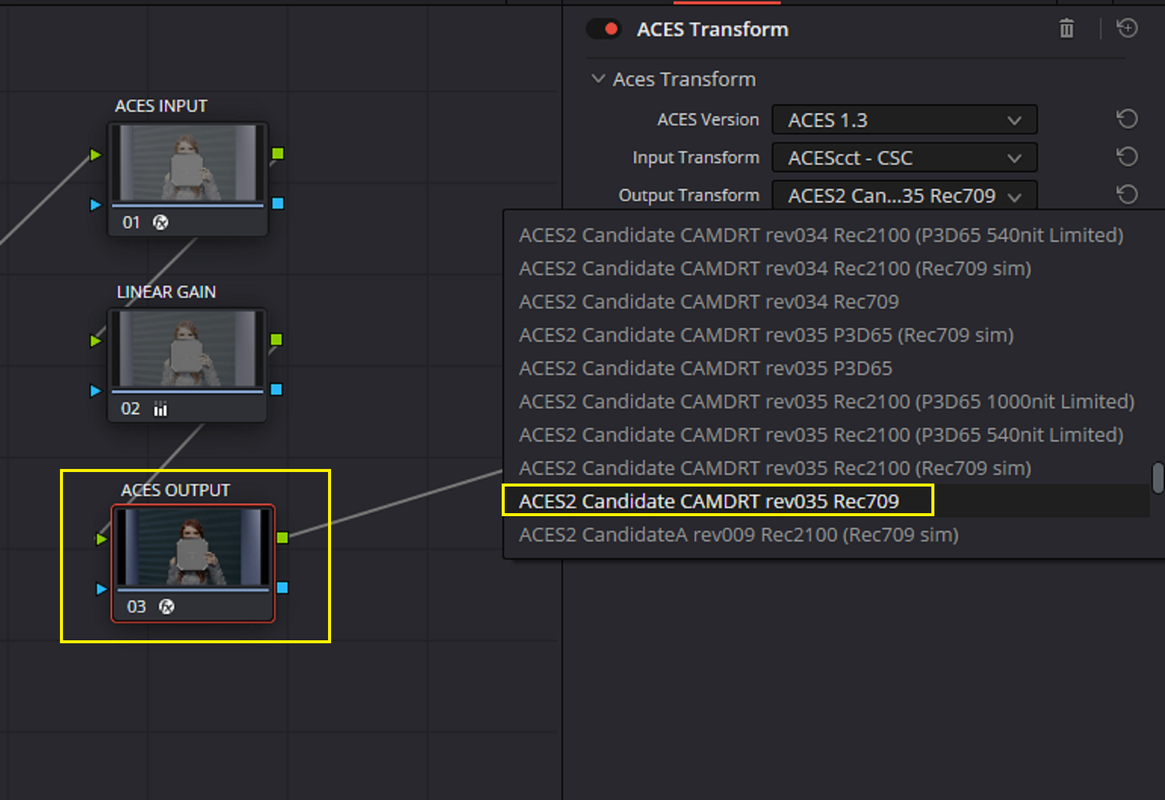
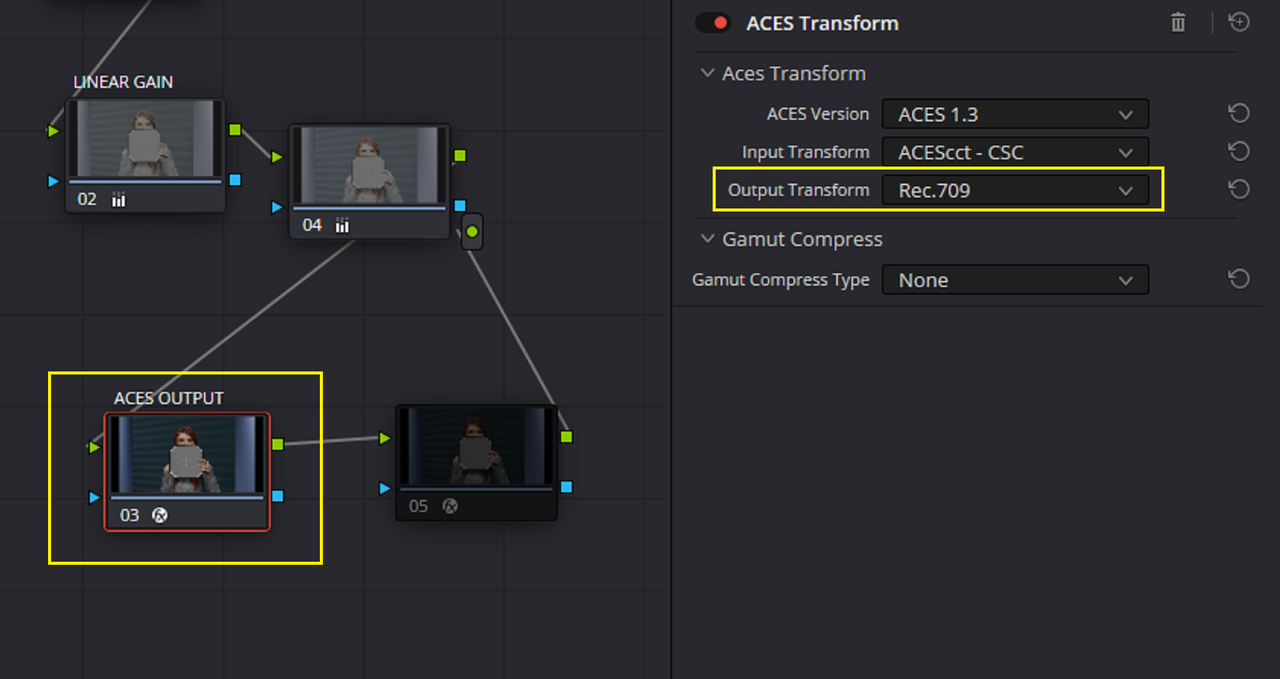
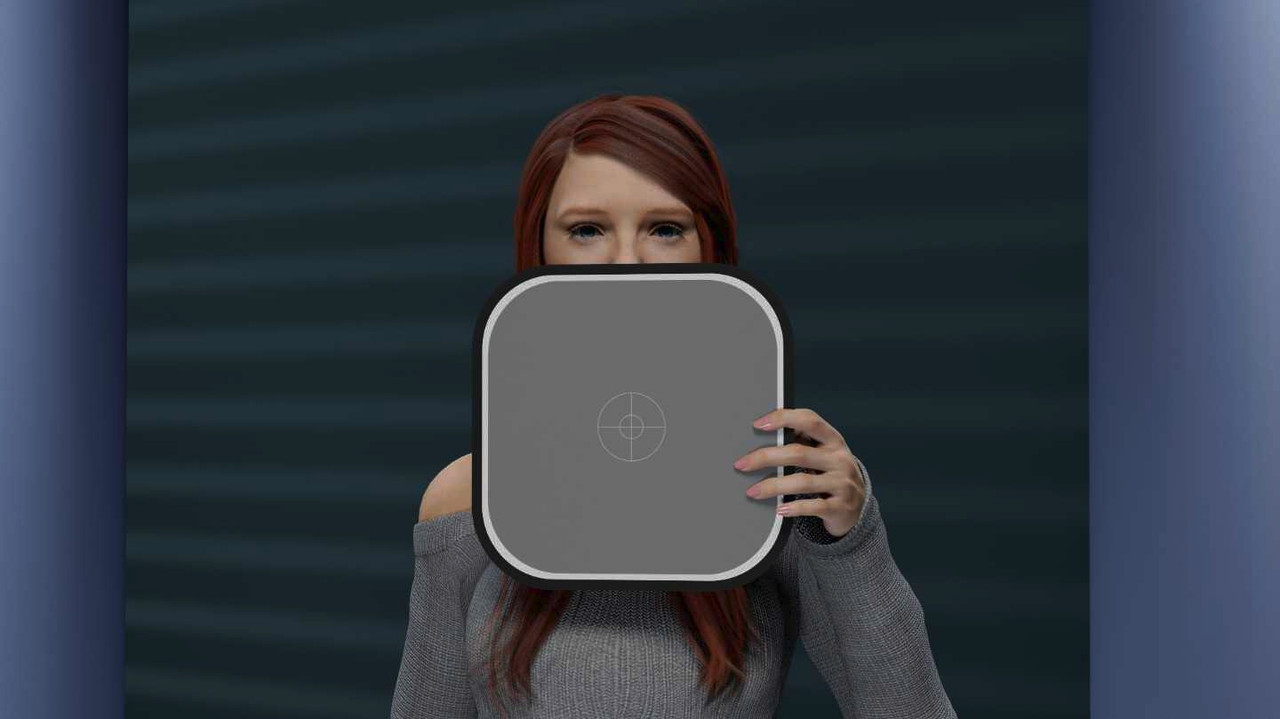
I almost forgot, I'm using an ACES 2.0 ODT Candidate ACES ODT that has a more controlled Highlight Roll-Off than the Default Resolve Standard REC709 ODT for ACES.
ACES 2.0 ODT Candidate for REC709
Resolve Standard REC709 ODT for ACES
Original Reference Image
ACES 2.0 ODT Candidate for REC709
Resolve Standard REC709 ODT for ACES
Here's The guy doing the video above multiple Skin tone 18% balanced image.
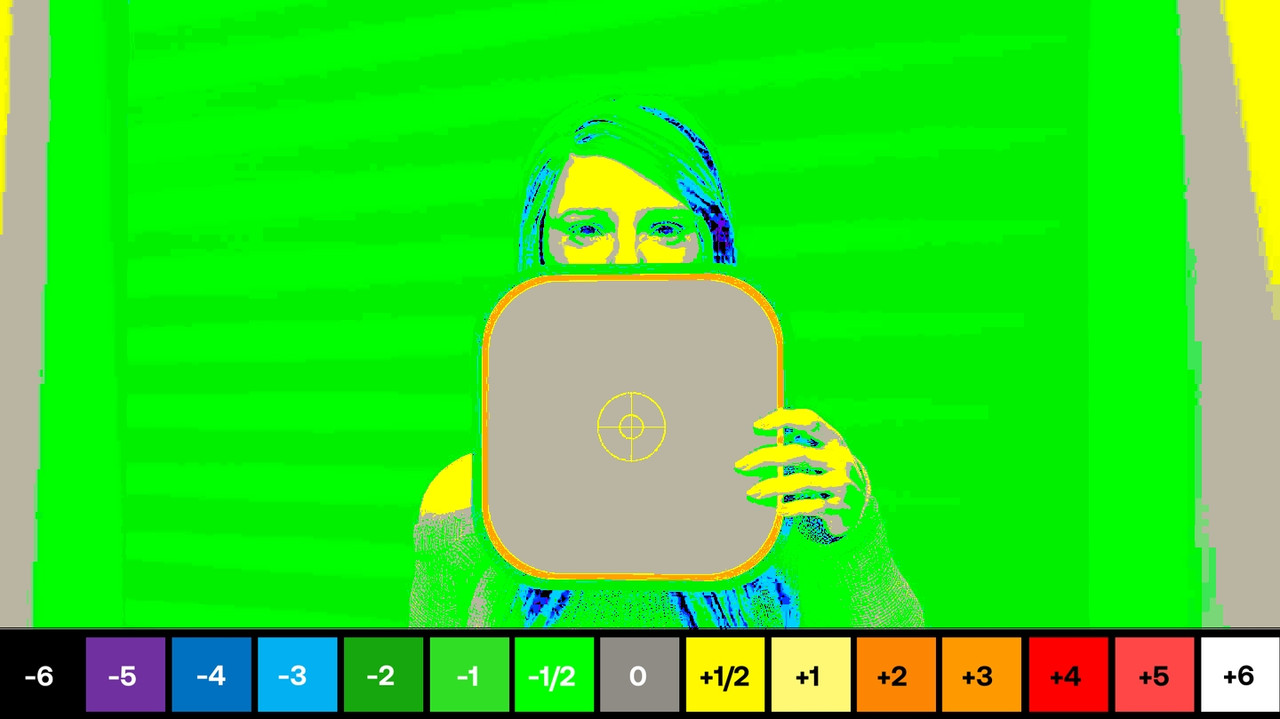
I wanted to get a second reference to make sure if the exposure was actually correct so I used the "LOOK DESIGNER" OFX Plugin I have to use the "ED LACHMAN" Zones tool. You can only use "ED LACHMAN" Zones in REC709. So I added a Node after the ACES to REC709 transform Node that would have both an REC709 Input and Output.
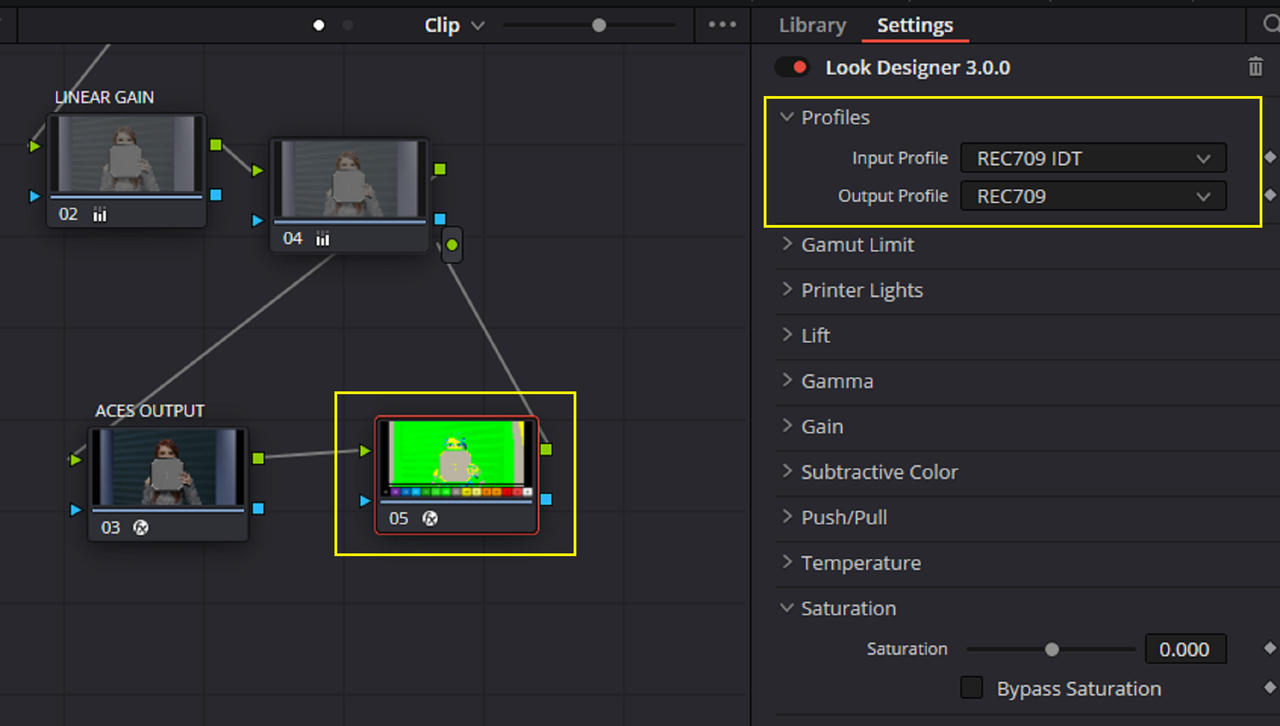
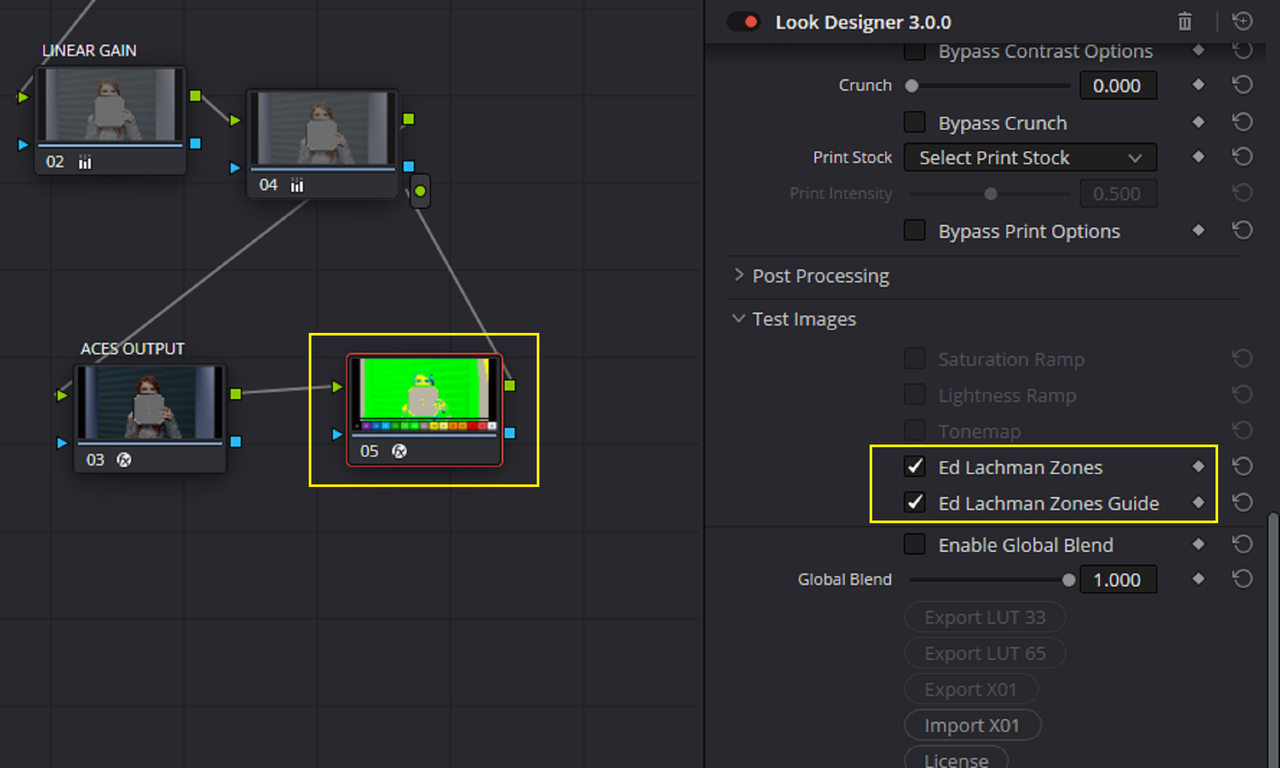
"ED LACHMAN" Zones image.
I will be using an ACES workflow
Here is the Reference Image I used from the webpage above
In a Non-Color managed Workflow, when I used the ED Lachman Zone Tool in a REC709 In/Out Node in LOOK DESIGNER after the ACES to REC709 transform (ED Lachman Zones only work in REC709 and not ACES which i am using in this demo, I'll show this later), 18% Grey appeared a 1/2 stop overexposed.
The ACES Workflow
I used "SRGB" as the Input because i wasn't really sure if this computer generated image was in REC709 or not.
I used "LINEAR GAIN" to adjust for the correct 18% Grey point for ACES, which in 10Bit is 423.
In the "PARADE" Scope under the three dots "...",select "WAVEFORM SCALE STYLE",I used these setting. I don't think the "Data" or "Video" selection is that import in this specific demo.
I cleaned up the RGB Values in the scope by using the"LOW PASS FILTER"
Before
After
I had forgotten that you can use either the "REFERENCE LEVELS" "HIGH" or "LOW" lines to dial in a 18% Grey Reference point. So in this case I used the "LOW" reference line at 423 the 18% Grey point for ACES in 10bit.
Also to display the Reference 18% Grey Line indicator better, I decreased the strength of the RGB Color Info in the "PARADE SCOPE" by decreasing the "Parade" info strength and I increased the strength of the "Gratical" (Line).
I used "LINEAR GAIN" to make the adjustment
I also used the "DISPLAY QUALIFIER FOCUS" which when using the "EYEDROPPER" tool will show in whatever Scope that you are using the exact point in the scopes that you are hovering over. I had the Eyedropper tool on the Grey card which showed the corresponding relation in the "PARADE SCOPE".
The Final Corrected Exposure Image in ACES
ALMOST FORGOT!
I almost forgot, I'm using an ACES 2.0 ODT Candidate ACES ODT that has a more controlled Highlight Roll-Off than the Default Resolve Standard REC709 ODT for ACES.
ACES 2.0 ODT Candidate for REC709
Resolve Standard REC709 ODT for ACES
Original Reference Image
ACES 2.0 ODT Candidate for REC709
Resolve Standard REC709 ODT for ACES
Here's The guy doing the video above multiple Skin tone 18% balanced image.
I wanted to get a second reference to make sure if the exposure was actually correct so I used the "LOOK DESIGNER" OFX Plugin I have to use the "ED LACHMAN" Zones tool. You can only use "ED LACHMAN" Zones in REC709. So I added a Node after the ACES to REC709 transform Node that would have both an REC709 Input and Output.
"ED LACHMAN" Zones image.
Last edited:
- Thread starter
- #8
Bill Ravens
Well-known member
I've discovered a simple truth with the Lachman False Color method, at least as relates to it's use on a Red Komodo. Changing the in-cam ISO, as one might expect, affects the El Zone, whereas, the goalposts are independent of the ISO setting. This makes sense, as the El Zone method uses a conversion to Rec709. So, with the Red, ElZone presumes the ISO is set to 800. If I change the ISO, the mid-grey point shifts accordingly.
rand thompson
Well-known member
- Joined
- Aug 9, 2011
- Messages
- 18,999
- Reaction score
- 622
- Points
- 113
I've discovered a simple truth with the Lachman False Color method, at least as relates to it's use on a Red Komodo. Changing the in-cam ISO, as one might expect, affects the El Zone, whereas, the goalposts are independent of the ISO setting. This makes sense, as the El Zone method uses a conversion to Rec709. So, with the Red, ElZone presumes the ISO is set to 800. If I change the ISO, the mid-grey point shifts accordingly.
I don't know if RED has incorporated the "ED LACHMAN" Zones system "in Camera" yet , since I don't own a RED camera. But I think along with RED's other unique Exposure Tools it can only give the user one more method for achieving correct exposure. I kinda wish some other universal Exposure Zoning system could be designed for Larger Wider Color Spaces like ACES.
- Thread starter
- #10
Bill Ravens
Well-known member
Ahhh, Rand.....I use a SmallHD Cine7 camera monitor. It has El Zone incorporated as one of the False Color Modes
rand thompson
Well-known member
- Joined
- Aug 9, 2011
- Messages
- 18,999
- Reaction score
- 622
- Points
- 113
Ahhh, Rand.....I use a SmallHD Cine7 camera monitor. It has El Zone incorporated as one of the False Color Modes
I thought at one time there was talk of ED Lachman Zones being added in the RED Cameras? Again, I don't own a RED Camera I kinda thought you were talking about a feature of a Monitor. But with all the firmware updates for most of the RED Cameras I thought maybe it was finally included in one of the updates. My Bad.
- Thread starter
- #12
Bill Ravens
Well-known member
Well, it's all learning for me. The Komodo has a Gioscope, which is advertised as a 1 stop per false color. The nice thing about the gioscope is that it applies to the log image(actually to the limits of the Red sensor) so it's not limited by the output transform.
- Moderator
- #13

- Joined
- Apr 19, 2007
- Messages
- 13,392
- Reaction score
- 796
- Points
- 113
- Location
- Los Angeles
- Website
- www.phfx.com
Well, it's all learning for me. The Komodo has a Gioscope, which is advertised as a 1 stop per false color. The nice thing about the gioscope is that it applies to the log image(actually to the limits of the Red sensor) so it's not limited by the output transform.
It applies to the linear sensor data and isn't effected by ISO, LUT, or Looks.
rand thompson
Well-known member
- Joined
- Aug 9, 2011
- Messages
- 18,999
- Reaction score
- 622
- Points
- 113
Well, it's all learning for me. The Komodo has a Gioscope, which is advertised as a 1 stop per false color. The nice thing about the gioscope is that it applies to the log image(actually to the limits of the Red sensor) so it's not limited by the output transform.
Yeah,
From all the fuss that was raised on the forum about the Return of the Gioscope like it was a sequel to a movie, I went back to a REDTECH video from around 8 years ago to see what it was all about.
But it did look like a very good exposure tool for Red cameras. I don't think any other Cinema Camera on the market has an equivalent of the Gioscope.
Les Hillis
Well-known member
- Joined
- Oct 24, 2010
- Messages
- 1,629
- Reaction score
- 120
- Points
- 63
Would be good if Gioscope had an optional way to see sub 1 stop increments, either by showing the 1/10th to 1/2 stop increments (or perhaps even Footcandle or Lux values) numerically with the display as it is, or by selecting and 'zooming' into any indicated stop level and having it expand into a visual representation of the fractions of a stop like it already does between the full stops. The top, number 16, stop already shows gradations like that to help control clipping, so I'm assuming the camera can be that precise with other stops as well.
Must admit I've never really used the built-in exposure tools much, but am appreciating them more lately, mainly for how they show what's actually hitting the sensor, rather than having to rely on numbers and measurements to calculate or even guess what 'should' be getting through to the sensor. They're a really good extra way to help make exposure decisions. Likewise with the post tools and methods to help identify and adjust and correct if necessary what was actually shot.
Must admit I've never really used the built-in exposure tools much, but am appreciating them more lately, mainly for how they show what's actually hitting the sensor, rather than having to rely on numbers and measurements to calculate or even guess what 'should' be getting through to the sensor. They're a really good extra way to help make exposure decisions. Likewise with the post tools and methods to help identify and adjust and correct if necessary what was actually shot.

Jon Pais
Well-known member
- Joined
- Jun 12, 2021
- Messages
- 287
- Reaction score
- 134
- Points
- 43
Regarding ETTR on HDR Productions
"I used to embrace the romantic idea of a dramatic underexposure and very thin negative and I have gone the other way." -Erik Messerschmidt
Filmmaker Magazine: With the early Red cameras—back in the Epic days—I remember people talking about how you needed to expose to the right on the histogram because if you underexposed you were in trouble. As Reds have evolved, do you not have to worry as much about the low end of the curve anymore?
Erik Messerschmidt: No, I just protect the highlights. I feel like the camera has detail for days in the shadows. I do subscribe generally to the “expose to the right” approach, though. I didn’t use to, but I’ve turned around on that just because I feel like the color fidelity is superior if you put a little bit more light onto the sensor. I have that same opinion for every digital camera, not just Red.
***
Eric Weidt: Erik made the choice early on to monitor in HDR right on set and I thought it was interesting, your reasons for that, what you thought you gained from that, in terms of being able to stay a bit more open, because you were visually assured by looking at an HDR monitor, that for example, the windows in the background weren't clipped, even though you can see the histogram. You were telling me that it's more of a psychological thing that if you see it, if you see that detail there, you're going to want to protect for it less and you're going to resist a little bit that urge to stop down in those situations.
Erik Messerschmidt: Exactly, and I found that as a result, I was using a lot less fill light. I could really comfortably expose far to the right and what I found when I was monitoring in SDR [is that] I was closing down early in the exposure curve, I was over-protecting the highlights and I was using more fill on the set and then we would get into the HDR grade and Eric would have to sort of re-equalize the curve and it turned out I didn't need the fill and I didn’t need to protect the highlights, so it really created a situation where I felt like I really understood the camera and I could really comfortably expose it and I also think to some degree, because I was effectively overexposing the camera without getting an overexposed image, that we would have more color fidelity in the grade and then the digital negative was thicker so to speak and Eric would have more density to work with and there was no real sacrifice. So it completely changed the way I work. And the movie I'm doing now, I'm monitoring in HDR and it's a theatrical release in P3, it's not even destined for an HDR release. I mean, I'm sure we'll do a grade, but I'm monitoring in HDR anyway, just because I feel like my exposures are better.
- From Dolby Webinar
Re:Exposing for Middle Gray on HDR Productions
Chasing middle gray
“We’re no longer exposing for middle gray and letting the rest “roll off.” […] Through all of these techniques, it’s important to recognize that our old friend and exposure aid, middle (18%) gray, will be of limited usefulness, as middle gray will shift with the audience’s adaptation to brightness changes. It may be possible for a cinematographer to “chase” middle gray with a light meter, but they’ll likely need to find their new middle gray value by sitting in front of an HDR monitor long enough that their vision adapts to the brighter or darker image in the same manner as the intended audience. The cinematographer can then visually identify a new middle gray value in the scene and adjust their light meter accordingly.” - Art Adams
https://www.provideocoalition.com/a-...derations/amp/
“Conventional exposure theory would suggest that with a camera like the Alexa that is ISO 800 it will reproduce a mid-grey as a mid-grey but if you set up for that in HDR then you are going to find objects in the frame over exposed. Candle flames, for example, tend to lose their color and can clip out very quickly and look unnatural. So, what I came up with as a solution, specifically because there are candles in every shot, was to expose from the top down. My starting point was not to over expose the candles in the HDR grade and let everything fall in underneath that. Since candles are usually the brightest object in the scene and I wanted to retain detail in them I began by setting the exposure so that the candles weren’t clipping with everything else being lit up to those levels.” - John Brawley on The Great
https://nofilmschool.com/the-great-john-brawley
"I used to embrace the romantic idea of a dramatic underexposure and very thin negative and I have gone the other way." -Erik Messerschmidt
Filmmaker Magazine: With the early Red cameras—back in the Epic days—I remember people talking about how you needed to expose to the right on the histogram because if you underexposed you were in trouble. As Reds have evolved, do you not have to worry as much about the low end of the curve anymore?
Erik Messerschmidt: No, I just protect the highlights. I feel like the camera has detail for days in the shadows. I do subscribe generally to the “expose to the right” approach, though. I didn’t use to, but I’ve turned around on that just because I feel like the color fidelity is superior if you put a little bit more light onto the sensor. I have that same opinion for every digital camera, not just Red.
***
Eric Weidt: Erik made the choice early on to monitor in HDR right on set and I thought it was interesting, your reasons for that, what you thought you gained from that, in terms of being able to stay a bit more open, because you were visually assured by looking at an HDR monitor, that for example, the windows in the background weren't clipped, even though you can see the histogram. You were telling me that it's more of a psychological thing that if you see it, if you see that detail there, you're going to want to protect for it less and you're going to resist a little bit that urge to stop down in those situations.
Erik Messerschmidt: Exactly, and I found that as a result, I was using a lot less fill light. I could really comfortably expose far to the right and what I found when I was monitoring in SDR [is that] I was closing down early in the exposure curve, I was over-protecting the highlights and I was using more fill on the set and then we would get into the HDR grade and Eric would have to sort of re-equalize the curve and it turned out I didn't need the fill and I didn’t need to protect the highlights, so it really created a situation where I felt like I really understood the camera and I could really comfortably expose it and I also think to some degree, because I was effectively overexposing the camera without getting an overexposed image, that we would have more color fidelity in the grade and then the digital negative was thicker so to speak and Eric would have more density to work with and there was no real sacrifice. So it completely changed the way I work. And the movie I'm doing now, I'm monitoring in HDR and it's a theatrical release in P3, it's not even destined for an HDR release. I mean, I'm sure we'll do a grade, but I'm monitoring in HDR anyway, just because I feel like my exposures are better.
- From Dolby Webinar
Re:Exposing for Middle Gray on HDR Productions
Chasing middle gray
“We’re no longer exposing for middle gray and letting the rest “roll off.” […] Through all of these techniques, it’s important to recognize that our old friend and exposure aid, middle (18%) gray, will be of limited usefulness, as middle gray will shift with the audience’s adaptation to brightness changes. It may be possible for a cinematographer to “chase” middle gray with a light meter, but they’ll likely need to find their new middle gray value by sitting in front of an HDR monitor long enough that their vision adapts to the brighter or darker image in the same manner as the intended audience. The cinematographer can then visually identify a new middle gray value in the scene and adjust their light meter accordingly.” - Art Adams
https://www.provideocoalition.com/a-...derations/amp/
“Conventional exposure theory would suggest that with a camera like the Alexa that is ISO 800 it will reproduce a mid-grey as a mid-grey but if you set up for that in HDR then you are going to find objects in the frame over exposed. Candle flames, for example, tend to lose their color and can clip out very quickly and look unnatural. So, what I came up with as a solution, specifically because there are candles in every shot, was to expose from the top down. My starting point was not to over expose the candles in the HDR grade and let everything fall in underneath that. Since candles are usually the brightest object in the scene and I wanted to retain detail in them I began by setting the exposure so that the candles weren’t clipping with everything else being lit up to those levels.” - John Brawley on The Great
https://nofilmschool.com/the-great-john-brawley
rand thompson
Well-known member
- Joined
- Aug 9, 2011
- Messages
- 18,999
- Reaction score
- 622
- Points
- 113
Jon,
There were some very good points that were made in your post. I confess that my knowledge of "BEST PRACTICES" for HDR content creation in still limited. Hopefully a more generally accepted consensus of these "BEST PRACTICES" will be established to reduce the amount of varying opinions.
There were some very good points that were made in your post. I confess that my knowledge of "BEST PRACTICES" for HDR content creation in still limited. Hopefully a more generally accepted consensus of these "BEST PRACTICES" will be established to reduce the amount of varying opinions.
Jon Pais
Well-known member
- Joined
- Jun 12, 2021
- Messages
- 287
- Reaction score
- 134
- Points
- 43
Andreas Bruekl is another experienced colorist and advocate of ETTR (if memory serves me) who’s graded a bunch of HDR projects. I’ll see if I can’t find his thoughts when I return from work.
rand thompson
Well-known member
- Joined
- Aug 9, 2011
- Messages
- 18,999
- Reaction score
- 622
- Points
- 113
Andreas Bruekl is another experienced colorist and advocate of ETTR (if memory serves me) who’s graded a bunch of HDR projects. I’ll see if I can’t find his thoughts when I return from work.
Thanks Jon, that would be very useful!
- Moderator
- #20
- Joined
- Apr 19, 2007
- Messages
- 13,392
- Reaction score
- 796
- Points
- 113
- Location
- Los Angeles
- Website
- www.phfx.com
I'm closing in on a decade of HDR mastering now for my own projects, for others, and even pipeline consultation. The best I can say is there are exposure considerations when mastering for HDR. However, standard exposure practices in function work well for both world. Nearly all professional filmmakers exposure to key or build off that in some way shape or form. And the other key thing is to know when exposing to the right is useful. If you are purely using ETTR mentality, you are likely setting yourself up for a really bad post experience through and through.
Referring back up to those considerations, perceptual mastering of an SDR and HDR deliverable, standard mindsets work great. However, if you're going further with your HDR grade and depending on your content, it's very useful to be even more aware of things like highlights, shadows, noise levels, and general contrast levels/ratios in frame. Judder, clipping, exaggerated image noise, curshed detail, etc. all very annoying to deal with HDR in practice. Tuning an artful clipped highlight or a purposefully crushed shadow is one of those "you have to make a choice" on what that should look like and what you want there with HDR.
Most professionals shoot pretty wrangled now though and the cameras are decent enough to handle a wide range of exposure scenarios. Sort of why we are all here anyways.
Referring back up to those considerations, perceptual mastering of an SDR and HDR deliverable, standard mindsets work great. However, if you're going further with your HDR grade and depending on your content, it's very useful to be even more aware of things like highlights, shadows, noise levels, and general contrast levels/ratios in frame. Judder, clipping, exaggerated image noise, curshed detail, etc. all very annoying to deal with HDR in practice. Tuning an artful clipped highlight or a purposefully crushed shadow is one of those "you have to make a choice" on what that should look like and what you want there with HDR.
Most professionals shoot pretty wrangled now though and the cameras are decent enough to handle a wide range of exposure scenarios. Sort of why we are all here anyways.