Welcome to our community

Be a part of something great, join today!

  • Hey all, just changed over the backend after 15 years I figured time to give it a bit of an update, its probably gonna be a bit weird for most of you and i am sure there is a few bugs to work out but it should kinda work the same as before... hopefully :)

Color Chip Chart and Grey/White Cards

Justin Quinn

Well-known member
Joined
Apr 16, 2013
Messages
100
Reaction score
0
Points
0
What is the reason to use grey/white cards or color chip cards with Red cameras?

I mean, I always thought that the grey or white cards were used for white balancing, but with Raw files, white balance simply becomes metadata which can easily be adjusted in post.

As for color charts, what are their purpose? Is it more of a tool for post?

Thanks!
 
Hello Justin

Yes there is a good reason to use a grey/white card. To get the most accurate color when you grade the footage, you need to know and set the accurate color temperature in Red Cine or Resolve. A White or Gray card works great for this.
 
Any recommendations for a good but inexpensive one?

The Macbeth chart fits that bill @$75..

http://xritephoto.com/ph_product_overview.aspx?catid=28&gclid=CP6Bpv6eoLkCFQya4AodYQsAOw

purchasing resources:
Macbeth ColorChecker aka MacBeth Color Checker Chart - Filmtools
Amazon.com: X-Rite Color Checker Exposure Aid, 8-1/2 - Inch x 11 ...

The Passport is small and portable (fits in a pocket), and closer to $70, while the Macbeth is more the size of a typical slate.

Colorchecker Passport
Passport_model1.jpg


DSC labs front boxes are excellent, but much more expensive and have a shiny surface, so care must be used when shooting them. I use all three but usually prefer the original Macbeth. (I generally color correct my own work.) If you have someone in particular grading your work, it might be good to ask them if they have a preference.

Going backward, I enthusiastically second this:

Hello Justin

Yes there is a good reason to use a grey/white card. To get the most accurate color when you grade the footage, you need to know and set the accurate color temperature in Red Cine or Resolve. A White or Gray card works great for this.

You can use scopes to set black and white levels in post, but mid grey will not necessarily fall into line in the process. There are plenty of top notch Colorists who can set mids by eye in a properly set up grading suite, but I am not that guy. I need more help. The only way I know to get skin tones and all color right is to nail the mids, and the only reliable way to nail the mids is to have a balls-on reference.

Props to you for having the sense to ask the question in the first place, Justin.

Just a side note: If you over expose your white card, all bets are off. If you only bring one chip, choose mid grey.
 
Last edited:
What is the reason to use grey/white cards or color chip cards with Red cameras?

I mean, I always thought that the grey or white cards were used for white balancing, but with Raw files, white balance simply becomes metadata which can easily be adjusted in post.

As for color charts, what are their purpose? Is it more of a tool for post?

Thanks!
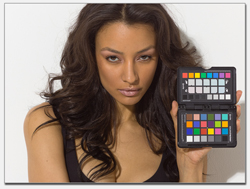
It's a lot easier and quicker and more accurate to use the Color Picker in RCX to find the white balance than it is to do so by eye. With cameras that "burn in the metadata" (as in, cameras that don't write raw files) it's important to dial in the settings on set/location, and so you can hold a chip chart in front of the camera in order to make your life easier. With cameras that write raw files, instead of dialing in on set/location, you hit record, and now you have a known-reference-point that was recorded under the same lighting conditions as your subject matter, and can always refer back to it throughout your post workflow.

It can certainly be helpful. It's just used in a different way than cameras that write to ProRes/H264/etc.
 
Last edited:
For any VFX/CG work, I would not want to work without.
 
It depends on your workflow. Trouble with charts on a narrative production is that they would be seen in dailies but not in the final edit, so they don't help in the final color-correction of the conformed master. For dailies, they would help if the dailies were being color-corrected, but if they are a straight conversion following metadata on the Red, or using a pre-built LUT for conversion of Log footage, then the charts aren't necessary either because the conversion is automatic.

Charts are useful when shooting film because dailies have to be set-up and balanced even for a one-light transfer often using the first image on the roll, so it helps if the first image is a correctly exposed chart that is not open to interpretation of the intended look, unlike a scene. And even if the dailies are timed incorrectly, the charts are useful to show this. If dailies come back greenish and my chart comes back greenish, then I know it was transferred incorrectly. But if the chart looks correct and the scene that follows looks green, then the culprit may be in the lighting or something.

And charts are useful for testing a camera and creating LUT's or other looks because they contain standard references like black and white, etc.

But for digital productions without any dailies colorist doing a one-light or scene-to-scene correction, I don't see the need to shoot charts every day, I just want them to convert what I shot following my metadata (if Red footage). If I lit the scene warm or picked a different color temperature on the camera to warm up the image, or exposed it dark for effect, then the conversion for dailies should show this without needing human intervention and interpretation. And if it looks wrong then I know that the conversion was done incorrectly and the metadata was not followed.
 
Lots of good info here, but I'll also add into this into the mix. Having a simple gray card handy and when combined with using the "video check" on your Red camera you can get extremely consistent exposures and not just for skin tones either. I still use light meters, but this allows for an additional level of control if you think about it.

Additionally, beyond simple white balancing. Having a full color chart tells you exactly what's right and what's not so right with a given light source or lighting situation. So if color correcting the elements to an accurate color rendition is important for the work you're doing, it's a good tool to have with you.

As David said, really depends on your workflow. VFX stuff, I typically shoot charts like crazy. Narrative, depends.
 
I expect you will find it useful. These may not be as simple in cinema use as a CamAlign chart, but the savings is justifiable for many people. I continue to use the Macbeth out of familiarity, I suppose. Videos like this one and this one would have you believe that the Macbeth charts are non-specific. These videos are sales tools and their remarks are fairly rhetorical. The other piece of info you will want is included with/on the charts themselves and can also be found here. The linked PDF gives you the targeted reference values in multiple formats. With the reference properly in frame and the known values at hand, you can use the Macbeth to correct your footage in just about any grading app..

Art's chart looks interesting and the price is comparable to the X-Rite stuff. Thanks Stu.


I just bought the Passport... It includes a larger gray card and other tinted white balance chips for creatively shifting your color balance.

http://www.amazon.com/X-Rite-MSCCPP...d=1377707829&sr=8-1&keywords=macbeth+passport

As an independent producer of my own material and sometimes color corrector of other indie film maker's work narrative and other, I always shoot charts and beg others to do the same. When someone gives me under exposed Red material shot under tungsten and no chart, it is extremely difficult to nail the skin tones and completely eliminate the orange cast. With a chart it is no problem. If I were a better Colorist, I suppose this would be easier for me.

I am not David Mullen, Mike Most or Jake Blackstone, so I use charts religiously. If you too are a boot strapping indie I respectfully suggest you do the same. FWIW
 
Last edited:
For clarification David if you please:

You are saying that your team uses a chart to build LUTs that follow the mag and/or dial in the camera to generate comprehensive metadata that is embedded in the files instead of sending footage of the chart... to streamline the workflow, yes? They do this for each setup, or are you profiling the camera once and building a single LUT, and then dialing the look into metadata with each setup change? Are you using RedCine to do this; what is essentially an on set correction loaded into the camera as a look or do you go a step further and set a creative look or "grade" and pushing it to the camera... Like a paint box on steroids?

Thank you very much.

It depends on your workflow. Trouble with charts on a narrative production is that they would be seen in dailies but not in the final edit, so they don't help in the final color-correction of the conformed master. For dailies, they would help if the dailies were being color-corrected, but if they are a straight conversion following metadata on the Red, or using a pre-built LUT for conversion of Log footage, then the charts aren't necessary either because the conversion is automatic.

Charts are useful when shooting film because dailies have to be set-up and balanced even for a one-light transfer often using the first image on the roll, so it helps if the first image is a correctly exposed chart that is not open to interpretation of the intended look, unlike a scene. And even if the dailies are timed incorrectly, the charts are useful to show this. If dailies come back greenish and my chart comes back greenish, then I know it was transferred incorrectly. But if the chart looks correct and the scene that follows looks green, then the culprit may be in the lighting or something.

And charts are useful for testing a camera and creating LUT's or other looks because they contain standard references like black and white, etc.

But for digital productions without any dailies colorist doing a one-light or scene-to-scene correction, I don't see the need to shoot charts every day, I just want them to convert what I shot following my metadata (if Red footage). If I lit the scene warm or picked a different color temperature on the camera to warm up the image, or exposed it dark for effect, then the conversion for dailies should show this without needing human intervention and interpretation. And if it looks wrong then I know that the conversion was done incorrectly and the metadata was not followed.
 
Last edited:
When I've made LUT's for dailies and on-set displays, it was for Genesis and then later Alexa projects recording in log gamma. For example, in the case of the pilot for "The Good Wife", I wanted a look that had deep blacks but low-contrast highlights (essentially what I think of as a film look, whereas I tend to think of a video look as the opposite, low-contrast shadows but high-contrast highlights.) That project was shot on the Genesis camera (the series switched to the Sony F35, and I assume now use the Alexa.) My basic method in testing to create a LUT is to shoot a DSC 11-step grey scale & color chart, full-frame, and to shoot a person in something like a typical contrasty lighting situation, maybe side-lit with the shadows being nearly 3-stops under. This way I can check how the LUT looks on a chart and how it looks on a face, and perhaps split the difference. The LUT is really for gamma and saturation, I figure that color bias is something I'll create in-camera using color temp settings, lighting gels, etc. Now in the case of the pilot, like most pilots, I could get a dailies colorist to actually correct the footage scene to scene, so the LUT was just a starting point to see what I intended for the scene.

I don't shoot charts when actually shooting the show, I don't see the point, the footage should look correct for the look I want if they just follow the metadata for ISO, color temp, and gamma. To shoot a chart properly takes some time because it has to be neutral relative to the scene, i.e. if the scene has dimmed down tungstens for warmth, then the chart would have to be shot under 3200K tungsten light or else my intended warmth would get corrected out. You can't just stick a chart under the scene's lighting because the lighting and the scene is too open to creative interpretation -- the chart has to be a fixed relative point, if the scene is supposed to be dark, under dim lighting, the chart can't be shot under dim lighting.

So I don't get these stories like "I got footage that was 3-stops underexposed and under really warm lighting and it was a good thing I had a chart so I could balance the scene" -- if I turn in a shot that is 3-stop underexposed and very warm, it better come back in dailies 3-stops under and very warm! I don't need my footage to be "saved", I need it to be shown the way it was shot. And if I did something wrong, I want to see that too, or else I'd never be able to find and solve a problem.

Now dailies for a commercial or a pilot are a bit different because they are being critically evaluated by the studio and producers, but dailies for a feature or a TV series are better-off if they actually show what was shot, because if there is a problem, or your exposure technique needs adjusting, you need to see that in dailies so you can fix it.

Yes, for a Red show, ideally they would just follow the metadata as the basis for how the image should look. Now in the case of "Big Sur", I had the DIT Dane Brehm making dailies in the camera truck using ColorFront, so he would make sure that the desaturated look I was selecting using the camera's settings was followed through. On "Manure" and "Stay Cool", which were early Red One movies, we had some problems with dailies using RedCine, for some reason occasionally the metadata wasn't being read in one of the two cameras, so A-camera would have the correct look but B-camera sometimes didn't.

My point about charts during production is that they only serve one purpose: to communicate with a person doing dailies who will be color-correcting in some manner, rather than automatically applying metadata or a LUT. And even if the dailies are being color-corrected, if the colorist follows the metadata then the footage should come up looking more or less correct. It's not like a telecine of film negative where the roll has to be balanced to the first image on the roll, which is why a neutral image like a chart that needs no creativity to interpret is a good thing, in case the first scene was lit orange for a sunset effect, or blue and underexposed for a moonlight effect. As a back-up, after the chart I always shot a sign that said things like COLOR: ORANGE SUNSET or COLOR: DIM BLUE MOONLIGHT, etc.

Charts are essential for testing and for setting up a LUT or something, but if dailies are going to be generated automatically following metadata, then why take time on a busy shooting day to shoot charts in correct lighting before every scene? No one is really going to be following the charts anyway, unless you are paying them for a scene-to-scene correction.

Also, I run around a lot and shoot under a lot of different conditions where there isn't even a way sometimes of getting a proper light for the chart. With film, that was a problem, but with digital, since I make the corrections in camera using color temp and ISO settings, it doesn't matter. Now for a visual effect shot, yes, probably the chart is a good idea because the raw data may be sent to the efx house rather than the converted dailies.

On my last show, "Smash", I just had one look built for the show's dailies, an ARRI Look file for the camera and a LUT for the post house that looked like our Look File (because the post house couldn't read ARRI Look Files) -- we recorded Log-C without any look, the Look File was just for the monitor output on set. And that one LUT was used for all dailies, for two years.

As I said, charts don't work for the final color-correction of the show or feature because all charts and slates are cut out of the movie, and the colorist starts clean from the original data.

I mainly shoot narrative TV shows or features, with a lot of footage generated each day over many weeks. People doing short form projects would need a different workflow because probably the footage converted from the raw files would probably be used for both dailies and then the final master right after that, rather than return to the raw data and convert again.
 
Last edited:
Great answer and totally agree David.

For narrative it's mostly a choice and usually I am choosing what I want to see rather than having a chart. For commercial I'm usually after a certain look that might be informed by a chart, but that's mostly for me to place skin in a particular zone. VFX. Well. Charts, balls, and other crazy things.

IMG_3358.jpg


_MG_6855.jpg
 
Thank you David. I believe I understand.

BTW my anecdote was exactly as you describe. I am correcting footage scene by scene, saving footage for directors who are working with guys who are still learning, just as I am. I did bring them in to see what happened, how it effected the work and find out where they wanted it to be.

Anybody got some minus green? I think I look a little green. ;-)
 
Last edited:
I just don't understand how, when shooting digital, which is WYSIWYG, one can be so off in exposing a scene. You'd have to be shooting with no monitors, no eyepiece, no exposure guides on, no light meter, etc.

Small mistakes, yes, that can happen when you are rushed, and in a semi-documentary style scene, sometimes an operator will pan into an unlit area -- even when I'm the one controlling exposure back at the village with a Preston for each camera, I've made some minor mistakes in those documentary situations because I was correcting one camera while the other panned into something they shouldn't have.

On "Smash" shooting the big Broadway numbers required me to ride the exposures a bit during the big lighting cues of the stage show, and with three cameras running and three remote Prestons at my village, and me with only two hands...
 
I just don't understand how, when shooting digital, which is WYSIWYG, one can be so off in exposing a scene. You'd have to be shooting with no monitors, no eyepiece, no exposure guides on, no light meter, etc.
I don't understand it either, but it just happens. I'm currently grading a slew of reality shows and the footage that comes in on those is just crazy: completely wrong white balance, three stops under, three stops over and sometimes all three in the same take on the same camera. I've also seen it a lot on cheaper documentary productions. Even had an awkward conversation with a "DOP" when I though they'd just shot available light but she had actually lit the scenes. They were just lit so horribly that essentially all the grading time in the budget went to saving the shots we could save. I'm sometimes wondering if some of these operators and "DOPs" are even aware of the exposure tools in the cameras they are using.

When I did more shooting I brought my own charts to sets and would use scopes to set up cameras to match on a multicam ENG shoot. Being on sets doing jobs other than shooting in the last few years I've only seen a backfocus chart and even that doesn't seem get much use considering all the out of focus wide shots I see in the online.
 
I don't understand it either, but it just happens.

<smiles. nods>


This is a great article by Art Adams about the rights and wrongs of color charts; http://provideocoalition.com/aadams/story/what-good-is-a-macbeth-colorchecker-chart

There is a lot of good info in there. Thank you. Art's chart seems to be very useful and easy for media production in ways that Macbeth charts are not... And the price is very reasonable. I am wondering how they are accounting for the price difference.

Having stated that, the article is a sales tool and Art is very upfront about his horse in the race.

This is a very carefully crafted statement:

"The problem is that while X-Rite "Macbeth" ColorChecker charts can be of some help to a colorist, they just aren't designed for video use. The only color patches that have any real meaning are the gray scale values that run along the bottom of the chart. X-Rite provides a legend that tells us an incredible amount of information about the color patches, including sRGB values, L*A*B* color space values, and Munsell Notation hue and chroma values, but none of that is relevant to a colorist using a waveform monitor and vectorscope.

Unless you're willing to do complex color space math the ColorChecker isn't going to be much help in grading dailies."

What it does not say is with an eye dropper tool, a Macbeth and a legend identifying color skew is easy. Correcting it can then be done by hand, referring back to the eye dropper and parade, or you can do the
simple math and drop in an exact correction that will get you right in the ballpark.

This isn't a method for cinema mastering, but for people who know they are not in a proper finishing suite and are creating programming for online,school and perhaps festival submissions, this may be the best way to leverage the available tools and produce the best looking material possible in that circumstance.

Art's chart looks like it may well replace the Macbeth for those kinds of people. It is a large audience, so the demand could be very good. I am one of those people.

Edit: I don't typically use this for dailies adjustments for two reasons.
1. The kind of production that would choose a Macbeth over more expensive charts isn't processing dailies. They may like to have a simple, primary correction for the Editorial department, and for that sampling B,W and 50% are plenty. (Each represented on the Macbeth.)

2. Because it is more labor intense it makes more sense for me to use it in a final correction process. Again, this is understood not to be a proper mastering for theatrical distribution, rather for computer, mobile devices and home viewing. It makes a kind of sense to use an X-Rite chart to balance footage on a grading system that is
primarily using an LCD that was calibrated with X-Rite hardware, in tandem with a plasma or broadcast reference monitor, but any reliable reference is fine with me. :-)

I hope others in similar situations find this useful, and maybe the RedUser brain trust can help ID flaws to refine the process.
 
Last edited:
Back
Top