Welcome to our community

Be a part of something great, join today!

  • Hey all, just changed over the backend after 15 years I figured time to give it a bit of an update, its probably gonna be a bit weird for most of you and i am sure there is a few bugs to work out but it should kinda work the same as before... hopefully :)

Camera setup for HDR question

Arguably, the single most significant feature distinguishing the various flavors of SDR and HDR(ST2084, HLG, HD10, HD10+) is the EOTF, aka power OR gamma curve. So, realistically, you gotta know what your delivery display format is gonna be because the EOTF is different for each. Likewise, within the ST2084 EOTF, there are various max brightness limits, from 1000, 4000, to 10000. The EOTF is the same for each of these ST2084, except the curve gets clipped at the corresponding brightness level. So, implicit is that the brightness of the delivery display also needs to be known. Click image for larger version  Name:	Capture.JPG Views:	0 Size:	24.7 KB ID:	3775158
 
You can adjust to some degree, if the image wasn't Hard Clipped in its respective Nit Brightness level, the "Highlight Roll-Off" of an image by some additional manual Tone-Mapping or with a better IDT. I like Dolby Vision because, unlike HLG and HDR10, Dolby Vision gives you the ability to adjust all of your image's properties with "Trim Tools" for lower Nit brightness images including their clipping point either over the entire project, Per Clip, a blend of clips, or individual Frame/s. HLG and HDR10 are more like one size fits all, but HR10+ has some additional similar image control capabilities as Dolby Vision.
 
I find this article very interesting in explaining the differences in HDR modes and particularly that ST2084/Dolby has no control over black levels, only peak brightness, so that is why trim passes are needed afterwards to "fix" the output for SDR displays or the blacks will be crushed. The quote of significance is, " In reality a 10 bit SDR image will have potentially better black/shadow detail than a PQ based HDR image." There is also some interesting info on human vision perception, that although in scanning humans have 24 stops of brightness detection, in a static mode it is more like 12 stops, and this is what is usually perceived in watching any screen of a reasonable size. The author also goes into some limitations of a 2020 color space and how for most all TV viewing, it requires a remap of the gamma and is less accurate than REC709. And in fact 90% of DCI-P3 (which is what is usually available) is not much bigger than REC709, and can lead to some color distortions with 2020 material.

I mostly read this to find out about HLG, and it does have significant benefits in how it maps the blacks/shadows as compared to ST2084 (without a trim pass). It only goes up to monitors that have 5000 nits, and has some limitations if used on standard 100 nit monitors, which is why it is nice that DaVinci Resolve switches back to Rec709 when needed with their color managed approach.

For a feature that is primarily aimed at theatrical presentation I understand that Dolby might have an edge, but for any content that will be viewed in the home, HLG seems to have a lot of benefits. It also seems to be the HDR standard that Apple has adopted for its phones and computer displays.

https://www.lightspace.lightillusion.com/uhdtv.html.
 
Jon,

HLG

HLG is the most easily displayed HDR content for SDR TVs and for TVs that are HLG compatible. And the Television Manufacturer doesn't have to pay any licensing fees to anyone to use it . However it doesn't allow for the individual optimization of images from scene to Scene. If one clip , a frame from a clip, or a group of clips need to be better optimized in relation to the clips around them, it can't be done in the Mastering for HLG HDR content.


HDR10

Also requires no Licensing fees for a Television Manufacturer to use. HDR10 generally looks better than HLG HDR content, and its 10bit and more TV manufacturers support HDR10 than Dolby Vision. It also doesn't allow for the individual optimization of images from scene to Scene. If one clip , a frame from a clip, or a group of clips need to be better optimized in relation to the clips around them, it can't be done in the Mastering for HDR10 HDR content. There's really no Standardized HDR10 HDR format so the individual Television Manufacturer can implement their own unique versions. So an image mastered in HDR10 could look completely different from brand to brand.

Dolby Vision

Generally capable of higher Nit brightness values than any other HDR Format at around 10000nits. It's also 12bit and generally speaking, can produce the best looking HDR content of any of the other HDR formats. It allows for a much greater control over an HDR mastered image on a Per Clip, Per Clip group and Per Frame basis. Dolby also will help the TV brand better optimize and standardize the Dolby Vision image from the Mastering stage to the final viewing of the Dolby Vision enabled TV. However, Dolby Charges a licensing fee For TV Brands to use Dolby Vision. Also for those whom will be mastering in Dolby Vision a licensing fee is required to use those Trim tools that allow for optimized control of dynamic metadata.
 
Phil,

Sorry I have not got my head around this like you have. Thankyou for clearing up the colour space question. So to actually setup a camera I have gone into Image>Image Pipeline>Options and selected Legacy mode with Colour Space 2020 and Gamma HDR-2084. Then I have gone into Monitoring>monitors>HD-SDI and in Display Preset I have chosen Rec2020/HDR2084. I assume both the EVF and LCD 7" should be left alone as they are not HDR capable? Alternatively could I use a LUT that has the HDR output transform built in to do this job ? If so can somebody point me to a link?

With so many different NIT levels specified by the HDR standard how do I know what the camera SDI output is at these settings?

In the PDF from the Red website titled "IPP2 Output Transforms" it says that many HDR monitors will hard clip when their brightness range is exceeded. In this case then you can use the "User Nit limit" to set a limit to the encoded HDR image from 1000 to 10,000 nits. Is this reference to the camera output as I cannot find these controls? Or is this "User Nit limit" at the monitor end? My head hurts.
 
Tom,

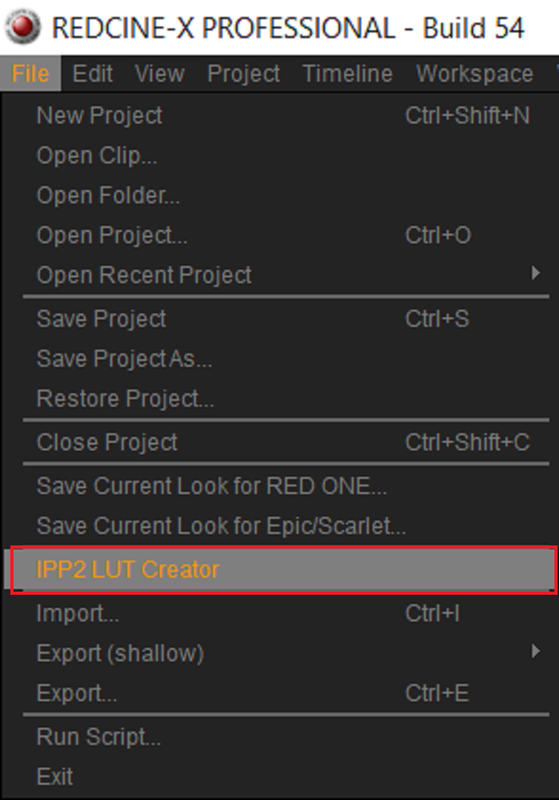
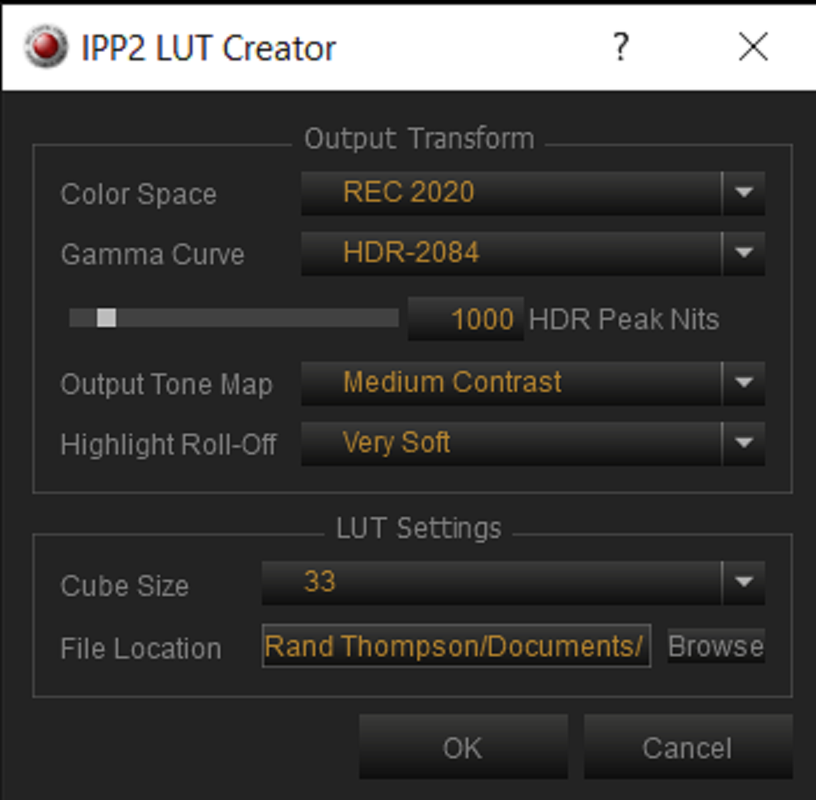
Phil would be the expert on the IN-CAMERA setting to use with Red cameras since I have never owned one. But you can make the 33cube sized 1000nit (to match the 1000nit on the Sony Monitor you will be using) Rec2020/HDR 2084 IPP2 lut yourself in REDCINE-X Pro using the "IPP2 Lut Creator" tool.

Screenshot-3303.png


Screenshot-3305.png
 
Phil,

Sorry I have not got my head around this like you have. Thankyou for clearing up the colour space question. So to actually setup a camera I have gone into Image>Image Pipeline>Options and selected Legacy mode with Colour Space 2020 and Gamma HDR-2084. Then I have gone into Monitoring>monitors>HD-SDI and in Display Preset I have chosen Rec2020/HDR2084. I assume both the EVF and LCD 7" should be left alone as they are not HDR capable? Alternatively could I use a LUT that has the HDR output transform built in to do this job ? If so can somebody point me to a link?

With so many different NIT levels specified by the HDR standard how do I know what the camera SDI output is at these settings?

In the PDF from the Red website titled "IPP2 Output Transforms" it says that many HDR monitors will hard clip when their brightness range is exceeded. In this case then you can use the "User Nit limit" to set a limit to the encoded HDR image from 1000 to 10,000 nits. Is this reference to the camera output as I cannot find these controls? Or is this "User Nit limit" at the monitor end? My head hurts.

Don't use Legacy. Use IPP2.

Menu>Monitoring>Monitors>HD-SDI

From there you can choose the appropriate signal.

Generally most on set monitoring for HDR has been 1000 nits or 2000 nits. There are presets in camera for both directions. Your first post mentions the 310, it's 1000 nits hard clipped and pretty much is the golden standard for HDR monitoring. Be aware that slightly off axis viewing is real, real bad. You need to be pretty much dead center to truly get the most off that display.

You can also use the IPP2 LUT generator to go the LUT route. Or if you know what you are doing you can create a custom LUT to tend to this.

Leave the Top LCD in Rec.709 as it's a Rec.709 screen. Pros to this is you can see on your HDR screen the HDR signal and also have SDR, which is useful.

Your REDCODE RAW is still RAW data no matter how you are doing any of this.

Hope that helps.
 
Back
Top