Welcome to our community

Be a part of something great, join today!

  • Hey all, just changed over the backend after 15 years I figured time to give it a bit of an update, its probably gonna be a bit weird for most of you and i am sure there is a few bugs to work out but it should kinda work the same as before... hopefully :)

Camera control

Technically you can with optional equipment and modules. The question is, why do you want to do this? Depending on the location of any camera in reference to lighting source/s, each camera needs to be controlled separately, unless you are recording a talk show or an interview with controlled lighting. You are going to get into a lot of trouble if all cameras change focus, zoom or anything else, that might be unique to a particular scene, at the same time. That is why even in controlled conditions of a well lit TV studio or a news broadcast, each camera is controlled separately. This goes true in modern TV newscast that use robotic camera pedestals and controls that's been used by major TV channels.

If you are adamant of going thru with all these negations, here are some options. FIY; they are not so inexpensive.

1). Canon RC-IP100 Touchscreen PTZ Joystick Controller(US$1999.95)

2). RED GIG-E Right-to-CAT5E Ethernet Cable (9')
(US$120.00)


Hope this answered your question.
 
Technically you can with optional equipment and modules. The question is, why do you want to do this? Depending on the location of any camera in reference to lighting source/s, each camera needs to be controlled separately, unless you are recording a talk show or an interview with controlled lighting. You are going to get into a lot of trouble if all cameras change focus, zoom or anything else, that might be unique to a particular scene, at the same time. That is why even in controlled conditions of a well lit TV studio or a news broadcast, each camera is controlled separately. This goes true in modern TV newscast that use robotic camera pedestals and controls that's been used by major TV channels.

If you are adamant of going thru with all these negations, here are some options. FIY; they are not so inexpensive.

1). Canon RC-IP100 Touchscreen PTZ Joystick Controller(US$1999.95)

2). RED GIG-E Right-to-CAT5E Ethernet Cable (9')
(US$120.00)


Hope this answered your question.

Can that Canon Controller really control Red Cameras? Is that documented somewhere? Or is that just a generic example?
 
I doubt the Canon controller is compatible. Don't know much about the Helium but the Canon XC protocol looks nothing like RCPV1.

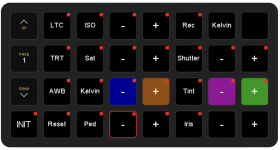
For DSMC3 cameras that use the RCPV2 protocol one can use RCPs from Cyanview or Skaarhoj. I built a simple RCP in Companion for free.

Good Luck
komodo rcp.png
 
I doubt the Canon controller is compatible. Don't know much about the Helium but the Canon XC protocol looks nothing like RCPV1.

For DSMC3 cameras that use the RCPV2 protocol one can use RCPs from Cyanview or Skaarhoj. I built a simple RCP in Companion for free.

Good Luck

Is that only for DSMC3 or will it work with DSMC2 as well.
 
Is it possible to control multiple red heliums at the same time? Like for instance changing iris on canon lenses?
With DSMC2 it is possible to have camera on same Group ID be controlled together once you enable the "camera to camera" checkbox in communication menu.
You will need to use GIG-Ethernet cables and a router to connect all cameras to a common wired network ("master / slave" will not work over wifi).

Then if you change a parameter on master camera it will also change on all cameras with Group ID matching that camera Target ID.

The "master" camera can be controlled locally or remotely using for example foolcontrol app for iOS or Android

but there are a few limitation notably Iris or Focus changes will not be propagated ... ISO, Shutter / white balance and other in camera settings will work fine but afaik lens settings are ignored.

See below for more info on "master / slave" operation :

http://docs.red.com/955-0185_v7.3/RANGER_MONSTRO_HTML_v7.3/Content/8_TC_Gen_Multi/Master_Slave.htm
 
Is that only for DSMC3 or will it work with DSMC2 as well.
The Skaarhoj sticks work with their older (deprecated) Unisketch platform on RCP1.

Don't know about Cyanview. I'd reach out and ask, they're beyond helpful. Vegas show in April of '23, we had problems with wireless on an FX9. The CEO, in town for NAB, showed up at the gig and rewrote the code on the spot. Team Cyanview for life!

Companion is just a shot box. A button or knob can send out one command or twenty, similarly it can address a single device or multiple with a single action.

Good Luck
 
The Skaarhoj sticks work with their older (deprecated) Unisketch platform on RCP1.

Don't know about Cyanview. I'd reach out and ask, they're beyond helpful. Vegas show in April of '23, we had problems with wireless on an FX9. The CEO, in town for NAB, showed up at the gig and rewrote the code on the spot. Team Cyanview for life!

Companion is just a shot box. A button or knob can send out one command or twenty, similarly it can address a single device or multiple with a single action.

Good Luck

But will your companion file work with DSMC2? Is it online somewhere? Are you just firing generic commands over ssh?

For my camera if looks like MSTRGAIN MSG_INT MASTER GAIN Range 0..360 unit: Db * 10

So unless I am clueless the command should be #$GhostUHD2:S:MSTRGAIN:100: should set the gain to 10db?
 
Back
Top