Welcome to our community

Be a part of something great, join today!

  • Hey all, just changed over the backend after 15 years I figured time to give it a bit of an update, its probably gonna be a bit weird for most of you and i am sure there is a few bugs to work out but it should kinda work the same as before... hopefully :)

Building a mobile DIT station

Stephen Brock

Well-known member
Joined
Dec 31, 2008
Messages
134
Reaction score
0
Points
0
Location
Kansas City, MO
Hey everyone,

My production house has assigned me the task of building a mobile DIT station for our feature documentary. So i've settled on building it around an SKB Studio Flyer 4U.

Right now we have a bunch of G-Tech Drive's we've been using we're afraid that if we mount those inside of the rack it could be problematic while traveling. I'd really like to ensure that there are no compromises due to vibration and shock since this case will spend a lot of time being, rolling on various surfaces and riding in the back of a cargo van.

I've heard of the Sonnet F3 is a good choice especially since it has built in drive isolation and it's already rack-mount-ready. Are there any other options that I should consider? Money is tight, but of course this is still a high priority.

UPDATE:

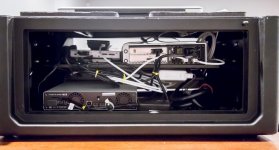
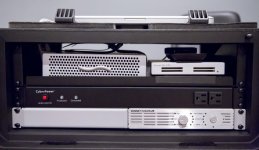
Okay here's the final product in all it's (version 1.0) glory!! Thanks so much for everyone's advice. It really helped me bring it together in a financially balanced way...
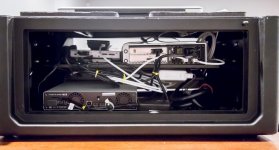
_B4A9158x.jpg _B4A9160x.jpg _B4A9161x.jpg

What we needed:
We are shooting a feature-length documentary all across the country over the course of 12 months. It's a small 4 to 7 member production crew. We are often only in a location for a few hours. Climate varies greatly. We are often ingesting and reviewing dailies out of the back of a van, in a hotel room, or in a interviewee's living room. We are also on a small budget but we still need it done right the first time so we can rely on it.

What I learned:
Most DIT Stations are either "mobile stations"--completely self-contained, usually within a pelican case; or a "DIT cart"--housed inside a rolling cart system, often housing entire MacPro desktop rigs along with RAIDS, multiple mointors, etc... DIT Carts offer alot of power and versatility and are most often seen on scripted shoots with 'proper' budgets and crew. DIT "mobile stations" are much easier to transport and faster to setup, but are often not appropriate for any color grading on-set and lack the ability to house large RAID solutions.

What I did differently:
So considering our needs, I was leaning towards a "mobile station". But most commercially available stations are out of our price range ($5k-$10k), though it's a fair price considering the elegant design, weather-proof materials, etc. Then there's DIY, which accomplishes much of the same but with less sexy appeal. :-) The problem that remains, regardless of price, was modularity. I really hate being locked into a design. If I ever want to swap out a hard drive, replace the laptop, upgrade the card reader, replace an interface chasis, etc--I'm often stuck re-designing the whole case. In my mind, there is such a thing as 'too custom'. By using a rackmount system, we are able to purchase rackmount products and zip-tie-mount most misc. accessesories. This gives a very open shell to work out of while still keeping everything very secure and reliable. The two areas we suffer: 1) Not 100% weather-proof; 2) A little more added bulk and weight. But we are never out in the jungle or mountain climbing with this thing. For us it's mostly from van --> to hotel --> back to van.

What did it cost?
Here's the price breakdown...
SKB 4U Flyer Case = $210
Power distrobuter = $65
Rack shelf = $30
Thunderbolt cables = $60
Sonnet F3(6TB) = $700 (we plan on getting a 2nd additional)
Sonnet Rack Kit = $90
Sonnet TB Chasis = $600
PCIe bus ext. card = $200*
PCIe eSata card = $150
Dedicated MBP power adapter = $50
Sonnet CF4 Card Reader = $500*
Total: $2,655 (not including MBP)
*We already owned the marked items
-------------------

So yea, it's not perfect and there's already a few minor modifications I want to make in the near future. But so far I'm fairly pleased considering the cash we put into it. I'd love to hear your feedback and suggestions. It's a fairly simple approach that can be easily duplicated without the need for much jimmy-rigging or workbench modifications/hacks. Hopefully this helps others with their needs. Setup time is awesome--wheel it inside, pop open the lid, run the power cord, turn on the MBP and press the hard drive power button. Done!

One thing I did not include in the price breakdown is our Tier 2 backups. We have a handful of 1TB Seagate 2.5" drives and the portable thunderbolt dock(daisy chained through the Sonnet Chasis) sitting on top of our card reader. This way we can just plug in each drive(via direct SATA port), duplicate our data, and then mail the redundant drive off to home base. Pretty neat, I think.

So...thoughts?
 
Hello! That's a cool enclosure.

I could imagine putting something like this in there: (I just assumed you had a thunderbolt enabled laptop)

http://www.maxxdigital.com/xmac-mini-server.html
http://www.maxxdigital.com/evo-minisas-rm.html

Put the R680 in the xmac rack enclosure.

And then find a rack mount UPS to power it all.

Not sure if that helps at all or if it's what you're looking for, but that's definitely something I'd like to use! Plus, you could put a Red Rocket in the xmac enclosure.
 
Two words...:

Thunderbolt

SSD

:sifone: Peter

Since we don't have a dedicated DIT on this skeleton field crew, I need to have the whole rig self-contained and ready to go as soon as it's opened up. Even pulling out a separate G-Tech and plugging it in is too much setup time for every evening. That being said, we shoot about 500GB a day on multiple cams for 1-3 weeks at a time with no breaks.

So unless we spent 10k+ on a dozen or so 750GB/1TB SSD's, I think we are stuck with HDDs. I'm aiming to keep everything under ~$2k if possible.

So far I'm thinking:
Bottom 1U space: CyberPower 300W UPS(http://www.newegg.com/Product/Product.aspx?Item=N82E16842102087)
2nd 1U space: Two Sonnet F3's (6TB of usable storage, 3TB+3TB R1 x2)
3rd/4th 2U space: A flat rack shelf for tying down AC adapters, a Lacie eSATA/Thunderbolt hub, and Sonnet Qio CF4.

Only one F3 will be connected at a time.

Once a week the crew will duplicate what's on the F3 onto a G-Tech and mail it back to me here at the studio.
 
Hello! That's a cool enclosure.

I could imagine putting something like this in there: (I just assumed you had a thunderbolt enabled laptop)

http://www.maxxdigital.com/xmac-mini-server.html
http://www.maxxdigital.com/evo-minisas-rm.html

Put the R680 in the xmac rack enclosure.

And then find a rack mount UPS to power it all.

Not sure if that helps at all or if it's what you're looking for, but that's definitely something I'd like to use! Plus, you could put a Red Rocket in the xmac enclosure.

Would the evo rack offer any protection against vibration/shock? Or am I being too paranoid?
 
Would the evo rack offer any protection against vibration/shock? Or am I being too paranoid?

I think it should be fine. You could contact Maxx Digital and ask them, they're really great and will help you with whatever you need. I think the setup I listed would really work great for your shoot although it would cost a bit more than $2k.
 
I would consider the SKB ShockRack enclosures since it will be housing HDDs
 
I would consider the SKB ShockRack enclosures since it will be housing HDDs

That would makes sense. Unfortunately, we really want to keep the MBP docked within the housing as well. Basically giving us one case for everything and virtually zero assembly.
 
Okay, so I think I've got the plan together:

We already owned a Sonnet CF4 card reader, as well as a sonnet esata pcie card and a sonnet pcie bus extender card. So I figured this would be a pretty good start and allow me to save some money...

Everything is housed in a 4U SKB Studio Flyer rack case and power by a racked cyberpower 900W battery backup unit.
We'll have two Sonnet F3 units for our mobile tier 1 storage, each in a Raid-1 Mirrored configuration. Mobile Tier 2 will be a series of FW800 portable drives kept separate and mailed back to home-base every week.

Again, all our assets come off CF cards, so the CF4 we'll be used as the exclusive offload reader.
As our interface 'hub', we'll go with a Sonnet Echo Express II Thunderbolt Expansion Chassis to house both our expansion cards. Then it's just a single TB cable to the MBP and we're set!

Should be pretty stinkin' fast compared to the cost. About ~$2,000, not including the CF4 and PCIe cards we previously owned. Otherwise it runs ~$2,700.

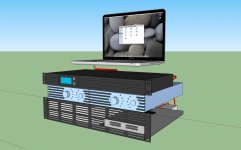
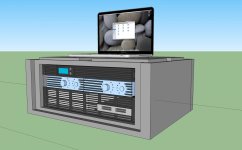
I drew up a google sketchup to figure out how everything fits and determine any airflow issues...
 

Attachments

  • dit station-3a1.jpg
    dit station-3a1.jpg
    77.7 KB · Views: 0
  • dit station-3a2.jpg
    dit station-3a2.jpg
    85.8 KB · Views: 0
  • dit station-3a3.jpg
    dit station-3a3.jpg
    85.3 KB · Views: 0
  • dit workflow.jpg
    dit workflow.jpg
    98.5 KB · Views: 0
If you're looking for portable and self-contained take a look at the offerings from 1Beyond. http://1beyond.com/product-categories/on-set

I have a Wrangler system, SSD for OS and RAID so there are no spinning drives whatsoever. Totally self contained with a built in RedMag reader. From there I offload to LTO tape (they have solutions for that too). Room in there for RR card, USB3, whatever. They will glue sata connectors and the box holds it's own monitor for GUI. Good guys, they know their stuff and are open to building a solution for you.
 
Hey, I finally got this thing ordered and built! The only change was that we forewent the battery backup since it was incredibily heavy and wouldn't fit instide the case(too deep). So instead we just installed a simple power distributor/surge protection strip(rackmounted as well). Not as safe but I figured it was unnecassary for short-term setups. If we end up leaving it plugged up to the grid for longer than a few days we can always bring along one of our spare desktop battery backups to sit next to it.

Anyway, I'll be posting pictures soon. It runs great! Easy to transport and setup time is next to none. Which was our top-priority while film this documentary. It's a little on the loud side but perfectly acceptable for our applications. Performance is awesome, I've been simultaneously ingesting four 64GB CF cards() in 23 minutes(206Mbps).

Pretty happy so far.
We also just bought a handful of 1TB portable(2.5") seagate drives for tier-2 backup (mailing back to home-base twice a week). These drives actually dock into a seagate thunderbolt interface. So now I've just got to figure out the best place to put it inside the case.
 
That would makes sense. Unfortunately, we really want to keep the MBP docked within the housing as well. Basically giving us one case for everything and virtually zero assembly.

I build this in 2011 - still working great. Just open the lid and push the power button -ready to rumble.

img_20111207_211731.jpg


Here are the details:
http://frankglencairn.wordpress.com/2011/12/07/my-new-editing-suite-in-a-box-and-dit-station/
 
Finished product!

Finished product!

Okay here's the final product in all it's (version 1.0) glory!! Ingesting at 206Mbps. Thanks so much for everyone's advice. It really helped me bring it together in a financially balanced way...
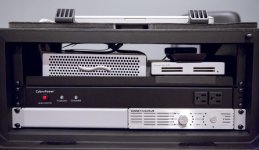
_B4A9158x.jpg _B4A9160x.jpg _B4A9161x.jpg

What we needed:
We are shooting a feature-length documentary all across the country over the course of 12 months. It's a small 4 to 7 member production crew. We are often only in a location for a few hours. Climate varies greatly. We are often ingesting and reviewing dailies out of the back of a van, in a hotel room, or in a interviewee's living room. We are also on a small budget but we still need it done right the first time so we can rely on it.

What I learned:
Most DIT Stations are either "mobile stations"--completely self-contained, usually within a pelican case; or a "DIT cart"--housed inside a rolling cart system, often housing entire MacPro desktop rigs along with RAIDS, multiple mointors, etc... DIT Carts offer alot of power and versatility and are most often seen on scripted shoots with 'proper' budgets and crew. DIT "mobile stations" are much easier to transport and faster to setup, but are often not appropriate for any color grading on-set and lack the ability to house large RAID solutions.

What I did differently:
So considering our needs, I was leaning towards a "mobile station". But most commercially available stations are out of our price range ($5k-$15k), though it's a fair price considering the elegant design, weather-proof materials, etc. Then there's DIY, which accomplishes much of the same but with less sexy appeal. :-) The problem that remains, regardless of price, was modularity. I really hate being locked into a design. If I ever want to swap out a hard drive, replace the laptop, upgrade the card reader, replace an interface chasis, etc--I'm often stuck re-designing the whole case. In my mind, there is such a thing as 'too custom'. By using a rackmount system, we are able to purchase rackmount products and zip-tie-mount most misc. accessesories. This gives a very open shell to work out of while still keeping everything very secure and reliable. The two areas we suffer: 1) Not 100% weather-proof; 2) A little more added bulk and weight. But we are never out in the jungle or mountain climbing with this thing. For us it's mostly from van --> to hotel --> back to van.

What did it cost?
Here's the price breakdown...
SKB 4U Flyer Case = $210
Power distrobuter = $65
Rack shelf = $30
Thunderbolt cables = $60
Sonnet F3(6TB) = $700 (we plan on getting a 2nd additional)
Sonnet Rack Kit = $90
Sonnet TB Chasis = $600
PCIe bus ext. card = $200*
PCIe eSata card = $150
Dedicated MBP power adapter = $50
Sonnet CF4 Card Reader = $500*
Total: $2,655 (not including MBP)
*We already owned the marked items
-------------------

So yea, it's not perfect and there's already a few minor modifications I want to make in the near future. But so far I'm fairly pleased considering the cash we put into it. I'd love to hear your feedback and suggestions. It's a fairly simple approach that can be easily duplicated without the need for much jimmy-rigging or workbench modifications/hacks. Hopefully this helps others with their needs. Setup time is awesome--wheel it inside, pop open the lid, run the power cord, turn on the MBP and press the hard drive power button. Done!

One thing I did not include in the price breakdown is our Tier 2 backups. We have a handful of 1TB Seagate 2.5" drives and the portable thunderbolt dock(daisy chained through the Sonnet Chasis) sitting on top of our card reader. This way we can just plug in each drive(via direct SATA port), duplicate our data, and then mail the redundant drive off to home base. Pretty neat, I think.

So...thoughts?
 
Very similar design to our 1st mobile DIT station Stephen (pictured below) - one thing we've discovered is that SKB 4U case isn't the most durable build, once we put a heavy UPS in there it started shaking itself apart. We've switched to a RoadReady case for our next system: heavier and harder to transport, but more durable

8uuy9ut.jpg
 
Very similar design to our 1st mobile DIT station Stephen (pictured below) - one thing we've discovered is that SKB 4U case isn't the most durable build, once we put a heavy UPS in there it started shaking itself apart. We've switched to a RoadReady case for our next system: heavier and harder to transport, but more durable

8uuy9ut.jpg


Oh Man! I completely forgot, I saw your build a while ago and it gave me the original inspiration to go rack-mount... Thanks so much for the inspiration. I love this design--It's brilliant!

I'm hoping the SKB 4U holds up for us since we decided to forego the UPS and just use a racked power distribution strip. Makes everything way lighter. I decided the UPS was overkill when we are only operating the rig a few hours at a time and then packing it up again. If we ever leave it plugged up for longer than that, we brought an external desktop UPS to sit next to it.

By the way, what specific RoadReady unit did you use for your new build?
 
Even if you carry the UPS in a separate bag, I highly recommend having it in the mix. Nothing kills a hard drive faster than cutting power midway through a data move.

I went with a Pelican 1510 as I travel with my setup a lot, but I do dig the rack mount kit. Nice work!
 
Oh Man! I completely forgot, I saw your build a while ago and it gave me the original inspiration to go rack-mount... Thanks so much for the inspiration. I love this design--It's brilliant!

I'm hoping the SKB 4U holds up for us since we decided to forego the UPS and just use a racked power distribution strip. Makes everything way lighter. I decided the UPS was overkill when we are only operating the rig a few hours at a time and then packing it up again. If we ever leave it plugged up for longer than that, we brought an external desktop UPS to sit next to it.

By the way, what specific RoadReady unit did you use for your new build?

Cheers - we didn't put the UPS in straight away, and it seemed to hold out pretty well without that extra weight, so I'd expect your rig to last a good long while. I do agree with Robert that having a UPS in your kit somewhere though is usually valuable - saved my ass countless times!

We're now building our system around a Road Ready RRLTWS4 - same rackmount concept which I love, plus an additional 4U slide-out tray we're looking at installing a grading panel into. I keep finding myself wishing for an additional few U of space, as I'd like to install a clone/RAID HDD unit where the card reader tray currently is, so looking into other places to mount those readers. No wheels, and it does take 2 people to carry it properly (or a small hand trolley). But it's tough.
 
Cheers - we didn't put the UPS in straight away, and it seemed to hold out pretty well without that extra weight, so I'd expect your rig to last a good long while. I do agree with Robert that having a UPS in your kit somewhere though is usually valuable - saved my ass countless times!

We're now building our system around a Road Ready RRLTWS4 - same rackmount concept which I love, plus an additional 4U slide-out tray we're looking at installing a grading panel into. I keep finding myself wishing for an additional few U of space, as I'd like to install a clone/RAID HDD unit where the card reader tray currently is, so looking into other places to mount those readers. No wheels, and it does take 2 people to carry it properly (or a small hand trolley). But it's tough.

Dang! Now that is an awesome mid-way solution between a full cart and a mobile station. I'd say a perfect setup for most 'indie' projects or lower budget commercial gigs. We're slated for another feature in a 2015, and that is what I'll likely push for. :-)
 
Quick Update:
That SKB Case is really well designed but unfortunately the constructed material has not been durable enough for our needs. We are still using it with extra precaution while transporting until we find a better solution. There's just a great deal of flex, creaking, and a few small exterior pieces have actually broken off during mild abuse.

I think the main problem is that we just have too much weight inside and transporting a little too often. I've seen several other more durable looking 4/5u mobile racks but none seem to have a suitable compartment for the laptop to travel inside the same case.

Anyone have any other ideas?
 
Back
Top