Welcome to our community

Be a part of something great, join today!

  • Hey all, just changed over the backend after 15 years I figured time to give it a bit of an update, its probably gonna be a bit weird for most of you and i am sure there is a few bugs to work out but it should kinda work the same as before... hopefully :)

Building a DIT cart...

i've been asked, but only would be half wiling to it with tc ran to the camera, and the sound guy was on board with it as well. but i generally just say that's post's job and i'm really never pressed about it again. again if tc is ran correctly, you just run auto sync in their NLE and it's a done deal. when i mention that to the producer, i really don't hear about it again. if there's no tc running, the assistant editor or editor will have to do it manually either via clapper, or we use a TC slate and they can match by eye in that fashion if there is no scratch track. if my job is to evaluate the picture and provide one light color, syncing sound manually all day will take me away from those duties. so generally i politely say I won't be able to do my job, if the issue is pressed that hard.

Really if you are fast and practiced at it, synccing/binning in FCP/Avid's just a couple extra mouse clicks, also a really good way to QC the transcodes

If you're transcoding for Avid, the only way to check the transcodes in the first place is in Avid, from there you just cut/paste bin names, find the sticks in picture and sound, and hit AutoSync

I suppose coming from an asst editorial background i might be a little biased though...
 
If audio syncing was a task I was asked to do, could I just simply do it in RCX?

Really if you are fast and practiced at it, synccing/binning in FCP/Avid's just a couple extra mouse clicks, also a really good way to QC the transcodes

If you're transcoding for Avid, the only way to check the transcodes in the first place is in Avid, from there you just cut/paste bin names, find the sticks in picture and sound, and hit AutoSync

I suppose coming from an asst editorial background i might be a little biased though...
 
Really if you are fast and practiced at it, synccing/binning in FCP/Avid's just a couple extra mouse clicks, also a really good way to QC the transcodes

If you're transcoding for Avid, the only way to check the transcodes in the first place is in Avid, from there you just cut/paste bin names, find the sticks in picture and sound, and hit AutoSync

I suppose coming from an asst editorial background i might be a little biased though...

i come from the same background, but if i'm evaluating shots live and offloaded for focus, and imagery problems. talking to the dp about looks and exposure, working with the AC'S and supporting camera department as a whole, plus throwing in company moves and other on set logistics, syncing sound is a extra responsibility i try to stay away from. doing dailies is more of a set it and forget it kind of deal.

case in point, the one time i did do production sound with tc synced audio, for whatever reason the sound guy's system had to reboot every time you put in a new card. it became a hassle and there was a 1 minute lag behind when camera was ready to shoot and when sound was ready again. not everybody's system was like that, but in that very case it was and held up production that little bit of a time. the goal is to keep it going and not have to hold up production if you don't have to. syncing sound, organizing the files and naming them inside of the NLE are all editorials job. they know how it should be done, better left for them. and the title is still Digital Imaging Technician. it's always about picture for me. if other DIT's have no issue syncing sound on set it's all them. I'd rather not even risk getting distracted from my primary duties.

all i really check is making sure the files have audio when they are supposed to , and see if there are any sync issues in case the camera is dropping frames but not putting a warning out. Being in Local 600 as well, I've been told that the guidelines strictly state that syncing audio is not a DIT's job whatsoever. Only time I sync audio is if i'm providing the dailies off set where I don't have to evaluate a live signal all day and can take my time with prepping the dailies.
 
If audio syncing was a task I was asked to do, could I just simply do it in RCX?

Sure but doing it in FCP/Avid creates a project file that editorial uses to edit with

Like I said, if you have it down it's just a couple extra mouse clicks

Also if you're transcoding for Avid, the DNxHD's only open in Avid - a few more clicks in Media Composer and you're synced

.
 
Ah, gotcha. Okay that makes sense. Thanks!

Sure but doing it in FCP/Avid creates a project file that editorial uses to edit with

Like I said, if you have it down it's just a couple extra mouse clicks

Also if you're transcoding for Avid, the DNxHD's only open in Avid - a few more clicks in Media Composer and you're synced

.
 
i come from the same background, but if i'm evaluating shots live and offloaded for focus, and imagery problems. talking to the dp about looks and exposure, working with the AC'S and supporting camera department as a whole, plus throwing in company moves and other on set logistics, syncing sound is a extra responsibility i try to stay away from. doing dailies is more of a set it and forget it kind of deal.

case in point, the one time i did do production sound with tc synced audio, for whatever reason the sound guy's system had to reboot every time you put in a new card. it became a hassle and there was a 1 minute lag behind when camera was ready to shoot and when sound was ready again. not everybody's system was like that, but in that very case it was and held up production that little bit of a time. the goal is to keep it going and not have to hold up production if you don't have to. syncing sound, organizing the files and naming them inside of the NLE are all editorials job. they know how it should be done, better left for them. and the title is still Digital Imaging Technician. it's always about picture for me. if other DIT's have no issue syncing sound on set it's all them. I'd rather not even risk getting distracted from my primary duties.

all i really check is making sure the files have audio when they are supposed to , and see if there are any sync issues in case the camera is dropping frames but not putting a warning out. Being in Local 600 as well, I've been told that the guidelines strictly state that syncing audio is not a DIT's job whatsoever. Only time I sync audio is if i'm providing the dailies off set where I don't have to evaluate a live signal all day and can take my time with prepping the dailies.

I really think it's just a matter of being fast and efficient at it. You can start binning/syncing before you even have the audio, by creating the bins and finding the sticks in the transcodes. And I don't even look at the audio TC - usually it's pretty obvious where the sticks are in the audio waveforms.

Also production loves it when they can just walk up to you and go "Show me scene 117 T04" without having to bug scripty for camera file names - which sometimes scripty doesn't even have...

I do most of my jobs that way, I get hired because of it now...
 
Also production loves it when they can just walk up to you and go "Show me scene 117 T04" without having to bug scripty for camera file names - which sometimes scripty doesn't even have...

That'd be what VTR is for.
 
From 3 days ago, or a week?

Organized by scene and take?

Synced to the mix track?

Absolutely from 3 days or a week ago. Definitely organized if they're not half-asleep. Maybe not synced to the mix track, but I'm with Tom; I don't sync audio on set for deliverable...

But I also don't do TV or features, so typically I don't have to worry about your first two questions.
 
Got my Maxx Digital Evo Mini today. Went for the 8TB version. Currently have it set up as a RAID 5. Hooked up to an Atto R680.

I've also added a CompressHD card to my Mac Pro.

I've ordered one of these, and I'm hoping it'll work with my g-safe going from the R680 to Esata.

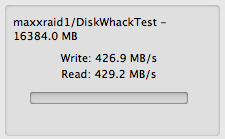
Attached a picture of my speeds with the Evo Mini. Probably far from the speeds you pros are getting, but it's a start! I used the AJA System Test app to get the speed.

All that's left is a Red Rocket!
 

Attachments

  • Screen Shot 2012-12-08 at 3.02.18 PM.png
    Screen Shot 2012-12-08 at 3.02.18 PM.png
    8.4 KB · Views: 0
From the 2011 IATSE Local 600 Setiquette guide I quote the stuff below:

Digital Imaging Technician: the DIT may set up and supervise end to end workflow to ensure the integrity of the image from the point of capture through to the hand off to post production

1. Responsible for all in-camera recording, digital audio acquisition, genlock and timecode processes in the camera with a complete understanding of how they are integrated into digital acquisition format and postproduction environment
2. Responsible for ordering, preparation, set up, operation, troubleshooting and maintenance of digital cameras (provides oversight of Camera Assistants and Utilities), wave form monitors, down converters (Hi-Def to other formats), monitors, cables, digital recording devices, terminal equipment, driver software and other related equipment
3. Performs advanced coloring/shading of cameras, encompassing traditional Video Controller duties; responsible for color timing including but not limited to: adjusting, balancing, registering and setting timing, matching electronic contrast, brightness, quality and edge definition; matching of cameras, color consistency (RGB) exposure (iris), density (master black), electronic color balance (chroma, hue and saturation), of each camera and its monitor and totally matching camera inputs to the VCU and checking the wave form monitor and the vectorscope
data management: performs or supervises the downloading, cloning/duplication of the digital media containing the image and inputting of metadata up to the hand off to Post production (may be performed by a Digital Loader)
4. Exercises supervisory responsibility for technical acceptability of the image.

Now,

What is all this nonsense I keep reading about DITs doing secondaries... and declining to sync sound?... if you are on my set and you do secondaries, you won't come back tomorrow. If you decline to sync the sound without a very valid reason, you won't come back tomorrow (read point number 1 from the Local 600 job description!).

The cream of the cream of the tools for doing DIT jobs is "On Set Dailes" from Colorfront. The tool is used by LightIron, Modern Video Film, Technicolor, Creative Science and almost every big budget project out there.

Just to get it straight... OSD has no true secondary color correction tools (yea it has some crappy power windows... but that doesn't really count), yet it has a wonderful audio sync tool that does the work for you.

Furthermore, I have never relied on the coloring done by a DIT for final color. We always load the footage from REDLogFilm straight on the whatever-finishing-tool and color from there. I have heard endless discussions about "how to export the LUT that the DIT does... how to import it here and there, etc. etc." yet I have never actually seen anyone do it.

One more thing. If the DP doesn't know how to put the false color on the camera to ensure proper exposure, then the DP won't come back tomorrow, although the DIT has supervisory responsibility for the image, I do not want to hear a DIT cry about overexposed highlights (you quietly make the remarks to the DP), I leave the exposure to the DP.

The reason I do not like DITs that do secondaries on set?... the result of the image on the proxies and/or stills can be deceiving. Then you go to do color correction and realize that what you "thought you have" is not there.

Things I do expect from a DIT:
- Total and absolute control over the files. A single file gets lost, you won't come back tomorrow. IMHO THIS IS THE SINGLE MOST IMPORTANT PART OF YOUR JOB!
- If the project is not a TV commercial, I expect proxies (with burned in timecode). Assistant editors do not get to touch my R3Ds, I don't care about Premiere Pro R3D support blah blah. If its a commercial I might not care for the proxies. The footage might go straight into a single tool where almost everything happens (read: Smoke).
- Ideally, H264 dailies so that the "producer that is 5000 miles away" can keep track with the project.
- Ideally stills in some sort of format that the DP can see on his iDevice or at your monitor in your station..
- Ideally some form of permanent backup. Although not a requirement, if you do LTO backups, you are my hero.
- If you sync the sound, get me the proxies (one light, or just in RC3) and an LTO backup, you will be my DIT until the end of times.

You mention the word pluraleyes in front of me, you won't come back tomorrow. You ramble some thing about how you are "not a data wrangler" and you won't come back tomorrow.

Sorry for the rant, but I get the impression that a lot of DITs somehow confuse their work with the colorist and downplay things that I consider critical (THE DATA!) in favor of doing coloring work that I really do not care about.
 
You better be prepared pay that DIT a good amount of money because that sure is a lot to expect from one single person. Effectively he'd need at least one assistant and another workstation. Also requires a boatload of equipment and quite expensive software. Colorfront's On-Set-Dailies cost a fortune! I asked them and they said the price for it was $40.000 USD.

Not that I don't agree with a lot of your points (most, in fact!) but not many productions are willing to pay the kind of money you'd need to pay for what you want. At least not in the market I'm working in.
 
I agree with Tony.. We're happy to provide everything you need, provided you are willing to pay for everything you want. :)

The rub comes in when a producer writes a post very similar to yours, and then wants to pay $450 per day.

Uhhhh... No.
 
I think the whole Chart thing is a bit over due. Having a full on grading suite on set is not really whats needed nor is a fully color calibrated screen. People who ask for it do not know whats important and in those cases I think it's better to inform them then actually give them what they ask for.
So what is important? Well, in order of priority I would say:

1. checking for data error.
2. backup the media.
3. provide files for editing.

You do not need any cart to do the above. And you do not need a rocket scientist to get the work done proper.

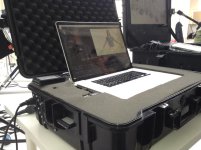
We use this pellicase with built in Esata card reader and 4 terabyte max digital rocket raid. Then backing up to FW drives. It does what needs to be done on set, the rest is better taken care of elsewhere in my opinion. And our clients seems to like it, as it comes with no fuss or big cart thats there is never any room for. And it's easy to take on flights etc. So before you build a big cart you should try it.
 

Attachments

  • bild.jpg
    bild.jpg
    88.2 KB · Views: 0
Point number one talks about audio acquisition in camera not for dailies. And dailies aren't even talked about in the handbook. It's something that's grown with the job over time but isnt a mandate, neither is syncing sound. And I've been told by 600 I shouldn't be syncing sound on set. secondaries aren't a requirement either and something I feel shouldnt be done until finishing. But the main point is, I have tried the sound sync route and realized that it does take me away from a certain amount of duties I'm hired for. Those are the kind of jobs I typically work, and decide on it job by job but typically it has never been an issue not syncing sound
 
@Tony:

The bare minimum I expect is total data control. That should not require more than one person, unless you are shooting with a plethora of cameras at the same time.

Yes I agree, OSD is a very expensive tool (Express Dailies is cheaper, like 15k, and runs like a champ on a retina MBP).

My point is that although the tool is very expensive, it DOES NOT do secondaries. That's why I get confused when some kid posts here asking for advice, and some "knowledgable DITs" immediately start talking about secondaries, and about how they are "more than just data wranglers"... I agree with Bjorn, you DO NOT NEED a full color grading suite on set. I do appreciate however the speed to be able to deliver the proxies immediately, because that allows the assistant editors to do their job fast. Note that fast proxies doesn't require a full Elements panel or anything like that. A Red Rocket will give you realtime debayering, a Matrox MXO2 will give you faster than realtime H264 encoding (and its like 350 dollars!).

And yes, if you have a 50k investment in equipment you should be compensated accordingly.

@Tom, I kind of agree with you. I've been there, when the sound guy is a total snob that doesn't cooperate, and the DIT cannot sync sound for whatever reason, and I understand it. My problem is with DITs that walk into set with that "I don't do that" attitude, among other things because, to an extend, Local 600 does acknowledge the work to be "part of the job", and to an extend, the tools are designed to do that (see OSD).

If the DIT can coordinate with the ACs and sound so that the camera has a wireless transceiver with a feed from the sound guy, so that all the takes can have some sort of reference sound, and you don't have to sync, even better! You just saved some work, made yourself look like a hero, and made everyone's life easier in post. And that fits exactly on the "digital sound acquisition" definition. But then, I've seen the sound guys look at you puzzled and say "why you want to do that? It's film right?"... show you their smart slate... talk nonsense about pluraleyes (hint... sound guys don't edit, so don't take post production tips from them), etc. etc. and in the end the camera crew doesn't get a sound feed (sometimes I feel that sound guys want to stay "within their department" and have nothing to do with the camera department, that has always bothered me, but that's another conversation).

In all honesty, outside of the LTO requirements, you should be able to do your job with R3D Data Manager($80) (or your favorite command line tool-FREE), RedCine-X (FREE), an accelerated H264 encoder ($350), and a wireless transceiver ($150 or FREE if you get it from the sound guy), and if you have a BT Red Rocket, you just made your life easier. Yes you still need some sort of RAID array, a solid computer, a decent monitor, etc. etc. but you should be able to do the job without the need for a 50k OSD setup.
 
I think the whole Chart thing is a bit over due. Having a full on grading suite on set is not really whats needed nor is a fully color calibrated screen. People who ask for it do not know whats important and in those cases I think it's better to inform them then actually give them what they ask for.
So what is important? Well, in order of priority I would say:

1. checking for data error.
2. backup the media.
3. provide files for editing.

You do not need any cart to do the above. And you do not need a rocket scientist to get the work done proper.

We use this pellicase with built in Esata card reader and 4 terabyte max digital rocket raid. Then backing up to FW drives. It does what needs to be done on set, the rest is better taken care of elsewhere in my opinion. And our clients seems to like it, as it comes with no fuss or big cart thats there is never any room for. And it's easy to take on flights etc. So before you build a big cart you should try it.

Hi Bjorn,

Question for you: how much data are you processing through that in a 12 hour day? We regularly see between 1 and 1.5 TB of R3D data downloaded to separate drives, synced with sound, transcoded to ProRes and/or Avids edit offline files (and then frequently those flies edited onto a timeline with circle takes to create a web daily reel). Are you saying that you're regularly accomplishing this (minus the webdailies) with your laptop setup? A friend tried the laptop route (which looks fantastic for some situations!) on feature film but gave up with it after he worked non-stop for 3 days... I drove our system out to him and he was able to sleep again. It may be the case that he had something set up wrong with his laptop system (and I love to help him get it sorted). Or we're describing different situations.

By the way, Eric -- we'll deliver the LTO too :).
 
@eric

the job isn't only RED's, there are a lot of competing cameras out there and I have to work on every one of them. most of my day is color correcting live signals, dropping and running a lot of bnc, making sure everybody is fed the same thing from VTR, to the AC's focus monitors. Than I spend a good portion of the day consulting with the DP on the image, and talk with the AC's over the walkies to make sure the iris is in the right spot, especially for multicam matching. Are there breaks or times I don't have to do as much on set? of course, but with all those duties, which are my primaries, I look as everything else as a secondary minus having to back up and qc the footage properly. So again, it depends on how time consuming it's going to be to sync sound, and that's how I'll determine if I should agree to do it or not. whatever saves the most time and maintains the same amount to effeciency. If i'm doing the dailies, and timecode is identical to the files as to the production sound, it's super fast for post to sync that side, avid does it in seconds. so very few people can convince me that syncing production sound on set when you have lockit's on all your cameras, and we are checking timecode at every setup that syncing production audio on set with the dailies is necessary. but if it's mandated, it's mandated, and I'd make it work either way. I've just always explained it the way I just have before to producers and post houses, and theyve all agreed with me on all those point. All said and done all the pieces Ive put together for my cart over the years keeping it modular so that it can scale up and down from job to job, and software Ive bought included such as Scratch Lab, etc. Ive probably spent close to 50 grand already on my cart. and its still always gets improvements. IMHO a DIT cart isnt a one buy deal and go forth kind of thing. Its always changing and evolving, just like the job. So whoever is interested in the field, expect a lot of equipment overhead. especially when it comes to electronics.
 
@Tony:

The bare minimum I expect is total data control. That should not require more than one person, unless you are shooting with a plethora of cameras at the same time.

Yes I agree, OSD is a very expensive tool (Express Dailies is cheaper, like 15k, and runs like a champ on a retina MBP).

My point is that although the tool is very expensive, it DOES NOT do secondaries. That's why I get confused when some kid posts here asking for advice, and some "knowledgable DITs" immediately start talking about secondaries, and about how they are "more than just data wranglers"... I agree with Bjorn, you DO NOT NEED a full color grading suite on set. I do appreciate however the speed to be able to deliver the proxies immediately, because that allows the assistant editors to do their job fast. Note that fast proxies doesn't require a full Elements panel or anything like that. A Red Rocket will give you realtime debayering, a Matrox MXO2 will give you faster than realtime H264 encoding (and its like 350 dollars!).

And yes, if you have a 50k investment in equipment you should be compensated accordingly.

@Tom, I kind of agree with you. I've been there, when the sound guy is a total snob that doesn't cooperate, and the DIT cannot sync sound for whatever reason, and I understand it. My problem is with DITs that walk into set with that "I don't do that" attitude, among other things because, to an extend, Local 600 does acknowledge the work to be "part of the job", and to an extend, the tools are designed to do that (see OSD).

If the DIT can coordinate with the ACs and sound so that the camera has a wireless transceiver with a feed from the sound guy, so that all the takes can have some sort of reference sound, and you don't have to sync, even better! You just saved some work, made yourself look like a hero, and made everyone's life easier in post. And that fits exactly on the "digital sound acquisition" definition. But then, I've seen the sound guys look at you puzzled and say "why you want to do that? It's film right?"... show you their smart slate... talk nonsense about pluraleyes (hint... sound guys don't edit, so don't take post production tips from them), etc. etc. and in the end the camera crew doesn't get a sound feed (sometimes I feel that sound guys want to stay "within their department" and have nothing to do with the camera department, that has always bothered me, but that's another conversation).

In all honesty, outside of the LTO requirements, you should be able to do your job with R3D Data Manager($80) (or your favorite command line tool-FREE), RedCine-X (FREE), an accelerated H264 encoder ($350), and a wireless transceiver ($150 or FREE if you get it from the sound guy), and if you have a BT Red Rocket, you just made your life easier. Yes you still need some sort of RAID array, a solid computer, a decent monitor, etc. etc. but you should be able to do the job without the need for a 50k OSD setup.

I want to work one of your jobs haha.

I feel like the minute you walk onto set as a DIT and say what you CANT or WONT do you've completely cut yourself off.

Granted I will never typically OFFER to sync sound unless it's a known fact that I have to and if camera doesn't mind me constantly checking time code along with the mixer if there isn't a lockit box on set (hm, I should buy one of those).

The job I'm currently on is 2 EPICs, shooting 5k HD 8:1 with NO scratch track. why? because it's hand held and the DP and operator dont want any additional gack and the mixer doesn't want to really cooperate. Does this make my job harder? a bit.. but when I do a quick adjustment in redcine or make my prores 4444 (red log gamma space) I'm able to sync the audio in redcine within seconds and choose my channels to output or bake in.

The hardest part I find about having to sync audio on set is having the mixer cooperate with it.. a lot of times I get grief when I tell them I need their CF card every time I reload camera. Eventually they get over it.

The dailies thing has become pretty much second nature now. I have a few big names talent wise on this project and they are also wearing the producer hats so they want to walk away with what they shot, especially if it's a scene they were acting in and didn't get to watch the monitors. So not only am I taking 2 camera, syncing audio, changing gamma space and adjust WB and tint before i export out my 444 files for a quick grade in resolve I'm also making my 264 circle takes as well. It's not a tough work flow I suppose, I wish I didn't have to do 2 exports (redcine/resolve) but it is what it is.

I feel adapting is the most important thing I can do on set as a DIT, personally. I try not to bend over backwards, but you sometimes have to if you want to come back and play next time. I'm also typically the first person getting a call if there is a post issue/workflow issue so I'd rather just get it all dialed in right there on set.

Tom, I've been doing more and more live grading and I can typically see what you mean about it taking you away from what I posted above.. you're constantly johnny on the spot with it.
 
Hi Bjorn,

Question for you: how much data are you processing through that in a 12 hour day? We regularly see between 1 and 1.5 TB of R3D data downloaded to separate drives, synced with sound, transcoded to ProRes and/or Avids edit offline files (and then frequently those flies edited onto a timeline with circle takes to create a web daily reel). Are you saying that you're regularly accomplishing this (minus the webdailies) with your laptop setup? A friend tried the laptop route (which looks fantastic for some situations!) on feature film but gave up with it after he worked non-stop for 3 days... I drove our system out to him and he was able to sleep again. It may be the case that he had something set up wrong with his laptop system (and I love to help him get it sorted). Or we're describing different situations.

By the way, Eric -- we'll deliver the LTO too :).

Offcourse there are shooting days when there could be a need for bigger gear. If the DP or director insist on shooting highspeed all day and keep the camera rolling just about constantly. For those days things will be stressfull. but those days are rare.

As the raid has 4tb raided storage and the SSD reader is connected to it with Esata we can empty a 128Gb card in about 20minutes. Usually there is time to render proxies to a FW drive before the next card comes in and a usually the setup covers a one camera regular shooting day. As in duplicating the r3d's and render proxies. If I also want to look trough all the proxies than that takes... realtime and if the setup is rendering it will lag. but usually it's time for browsing the files between renders as well. If not it's possible to use two firewire drives and a secondary laptop and do the browsing on the second laptop.

But it goes without saying the system is not digesting, rendering and browsing in real time... which would be needed if somebody would shoot non stop all day. But that is not the normal scenario. We do commercials mostly and each camera setup takes time and each scene takes time and so on, So for our day to day job this case does the job well. If there is a stress full day we might just backup the r3d's scroll them in 1/16 and then bring the case home over night and set it to backup and render proxies. But thats rare, normally it's managed during the shooting day. Towards the end of the day we snag the mags more frequently from the camera and by doing so we usually managed to have it all done before the lights are out and the shooting day is over.


Normall amount of r3d's is about a 1Tb / day.

we also got a fire wire feed coming out of our ref monitor so if we need to edit or such I usually hook up a laptop capture the video tap and test edit from that and such so that the "r3d case" can be left alone redering. Another cool thing with having fire wire out from the video feed is that we very often use that feed as our camera in SKype or Ichat and have agency people overlooking the shoot trough skype.. This works like a charm. They get the sound feed from the laptop and the video feed from the camera. The picture quality that goes tough is actually very good as it comes straight from the epic and is downconverted to FW pal so it is much better than the little facetime camera of a laptop. We have been shooting here in stockholm and had the creatives in kentucky and the agency producer in LA and they all love it, "does not even have to get out of bed to attend the shoot" where thier comment. The agency producer thought this way of working was so great so she actually made a little move about it... see: http://vimeo.com/50340269

The film does maybe not make much sense but you get a hint.
 
Back
Top