Welcome to our community

Be a part of something great, join today!

  • Hey all, just changed over the backend after 15 years I figured time to give it a bit of an update, its probably gonna be a bit weird for most of you and i am sure there is a few bugs to work out but it should kinda work the same as before... hopefully :)

Birger Lens Mount Reservations

The lens mount will provide power to the Impero over the cable. The MAC app needs the Impero to be in the bootloader, to be able to detect the Impero. With the power switch in the off position, hold the two speed buttons down, and plug the Lemo cable into the Impero. If you did it right, only one record light will be lit.

This may have been confusing and/or wrong in the directions. :banghead:
 
The lens mount will provide power to the Impero over the cable. The MAC app needs the Impero to be in the bootloader, to be able to detect the Impero. With the power switch in the off position, hold the two speed buttons down, and plug the Lemo cable into the Impero. If you did it right, only one record light will be lit.

This may have been confusing and/or wrong in the directions. :banghead:
OK ...

- Imperio switch left to off position
- Two speed button depressed, connected Imperio (using lemo-2-lemo cable) to middle lemo on the Birger mount (single record light on)
- launch Mac App
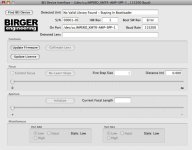
- click 'Find BEI Device' and it finds the Imperio (see attached screen grab) showing correct serial number and reporting 'Staying in Bootloader'
- on connections, lights on Imperio are now [one-F] and [one-DIR]

However, clicking on Update Firmware, the file [Impero Controller Application v1.5.ebin] is greyed out and cannot be selected :sad: ... I assume we DO NOT rename the file with a '.bei' extention

PS : to avoid conflict, I removed the BIRGER MOUNT pairing definition under my BlueTooth panel (for the time being)
 

Attachments

  • Mac_app.jpg
    Mac_app.jpg
    53.5 KB · Views: 0
However, clicking on Update Firmware, the file [Impero Controller Application v1.5.ebin] is greyed out and cannot be selected :sad:

Connect to the lens mount not the Impero. Two ways to force this to happen. The easiest: in "System Preferences" go to "Bluetooth" and delete the Bluetooth port associated with the Impero. The other way: in the MAC app, go to "Preferences" then "ports" and then click off the Impero port, so it won't connect.
 
Connect to the lens mount not the Impero. Two ways to force this to happen. The easiest: in "System Preferences" go to "Bluetooth" and delete the Bluetooth port associated with the Impero. The other way: in the MAC app, go to "Preferences" then "ports" and then click off the Impero port, so it won't connect.

Sorry mate ... I must be getting tired, but I've been here before ;-(

Here is the sequence I tried a while back :

- power up R1 with Birger mount connected
- Imperio switch in Off position
- Two speed button depressed, connected Imperio (using lemo-2-lemo cable) to middle lemo on the Birger mount (Imperio single REC light on)
- launch Mac App & find BEI device (see screen grab); App connects fine with Mount
- Imperio still with only the one-REC light on

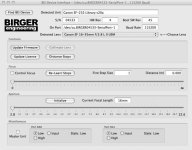
Clicking on Update Firmware, the file [Impero Controller Application v1.5.ebin] is greyed out and cannot be selected ?

If somebody else gets it to work, please do share SEQUENCE & HOW !
 

Attachments

  • birger.jpg
    birger.jpg
    61.5 KB · Views: 0
Clicking on Update Firmware, the file [Impero Controller Application v1.5.ebin] is greyed out and cannot be selected ?

I am not in the lab to test. But it worked for me this morning. Go to the menu bar, and under "Help" click "Check for Updates..." In the current version of software, this is the ONLY way to update an Impero.
 
Last edited:
I am not in the lab to test. But it worked for me this morning. Go to the menu bar, and under "Help" click "Check for Updates..." In the current version of software, this is the ONLY way to update an Impero.

Ok ... now THAT worked :hurray:

BTW : that was THE missing instruction ... I did'nt even check that menu option as I had assumed that it was for software updates to the 'BEI Interface s/w' ONLY.
 
It seems my Impero has an indipendent life. Focus is ok then indipendently goes beyond the point i stop, slowly but it keeps going, same with iris, when they reach an end they stop there with no way to move them back. When pull a long slow focus it goes smooth then a step ahead and two behind and smooth again till the next tango. Sometimes it freezes. A mark on the knob is never the same.
This behaviour with all lenses (16-35, 50L, 85L) and all the software up to date.

How can i make the Impero work?

ps i didnt notice any improvement from previous Impero sw version, like i never upgraded to 1.5.
 
Okay, the Auto Buttons are the speed buttons.

With the power switch in the off position, hold the two speed buttons down, and plug the Lemo cable into the Impero. If you did it right, only one record light will be lit.

The RECORD LED is not lit.

How can there possibly be more then one way to hold down two buttons and plug in the Lemo.

I've tried this with two Imperos - a Curt one from about two months ago and a recent Birger Impero - neither show any light at all from the centre port on the mount.
 
Hi Billy,
you right, the speed buttons are the auto buttons on the side. The Impero must be switched off and you have to push the 2 buttons and insert the lemo in the middle plug of the Birger mount at the same time. The far led on the right should be the only light on.
Dont get mad if i just repeated what you just did.

On an incoming production my Birger Impero has been dismounted for a traditional PL + wireless FF system due to the erratical behaviour of the Impero.
If these problems are not to be related just to my system I hope a general solid solution will come out in the next days.
For me, i'm not sure the gpio dtap issue "is presently the only remaining weekness of the system" to be concerned about.
 
I have upgraded my impero too now and all seems to be working apart from it is still a little 'sticky' on smooth focus pulls. It's better on L series lenses but on my 85mm 1.8, it's pretty jumpy.

I think Erik will eventually get this working smoothly. The lenses have the capability to do it as if you do a long focus calibration the focus ring moves slowly and smoothy to the other end with no jittering.

I hope just some software teething ptoblems.
 
How is everyone getting their impero to work with the birger mount?! I am lost... I've followed the instructions above about getting the mount to communicate with the controller, it worked! But now i cant communicate with the mount from my computer anymore...

How is everyone getting impero to work with the birger?!?!?!??!?!
 
How is everyone getting their impero to work with the birger mount?! I am lost... I've followed the instructions above about getting the mount to communicate with the controller, it worked! But now i cant communicate with the mount from my computer anymore...

Hmmm, now I can communicate from the mount to computer and computer to mount, but still no impero, any thoughts?!

There is only one inbound Bluetooth connection on the mount. You can either use the MAC or the Impero. If you want to switch you need to power down the Impero, or disable the connection on the MAC.
 
There is only one inbound Bluetooth connection on the mount. You can either use the MAC or the Impero. If you want to switch you need to power down the Impero, or disable the connection on the MAC.

Okay cool, I've got the connection between the computers and can manually update firmware, I'm on version 1.5 IMPERO, but still no way that the Birger Mount and Impero can communicate. Anything else I can try to get Impero to work?!?!
 
Okay cool, I've got the connection between the computers and can manually update firmware, I'm on version 1.5 IMPERO, but still no way that the Birger Mount and Impero can communicate. Anything else I can try to get Impero to work?!?!

You're saying the Impero isn't syncing to the Birger mount wirelessly (wired support is not yet implemented)? My experience is bluetooth syncing is very erratic. If you've never connected you might need to get the units paired by holding the I button on the Impero down as you turn the unit on. That should cause it to search for the mount. I finally synced when I put the Impero antenna physically right next to the Birger antenna. Not sure if that actually helped or was a coincidence.

I think there's something buggy in the bluetooth stuff somewhere. I've got 2 Imperos and they both act the same. One is from VF and one is via Birger with the 1.5 update.
 
Okay cool, I've got the connection between the computers and can manually update firmware, I'm on version 1.5 IMPERO, but still no way that the Birger Mount and Impero can communicate. Anything else I can try to get Impero to work?!?!

Assuming you have done the initial pairing (wired mode) the only way I get consistent wireless pairing is :

- power up the R1 with Birger mount plugged in
- once R1 is powered up, unplug the Birger mount power lead, wait a few seconds, and re-plug in (forcing the Birger mount to re-boot)
- switch on the Imperio (with f/w 1.5 or prior ... same behaviour) and the Imperio will pair ok

Unless I force the Birger mount to re-boot, I never seem to be able to pair the two reliably. I guess there is some start up conflict between the R1 start-up, the Birger boot ... and affects, somehow, BlueTooth ...

Hope this helps ...
 
Unless I force the Birger mount to re-boot, I never seem to be able to pair the two reliably.

I've had a number of occasions where forcing a Birger reboot still didn't work. I wonder if there's some kind of timing involved... like unplug Birger, wait X seconds, plug Birger in and wait X seconds, turn on Impero. Turn off Impero wait X seconds... turn back on.

Something... but I've cycled the Impero 10+ times and had it sync on the last time. I just can't figure out a recipe. Maybe a stronger antenna?
 
If you've never connected you might need to get the units paired by holding the I button on the Impero down as you turn the unit on. That should cause it to search for the mount. I finally synced when I put the Impero antenna physically right next to the Birger antenna. Not sure if that actually helped or was a coincidence.

Thank You Joel,
This made the difference for me. The focus is not smooth but it works.
 
Back
Top