Welcome to our community

Be a part of something great, join today!

  • Hey all, just changed over the backend after 15 years I figured time to give it a bit of an update, its probably gonna be a bit weird for most of you and i am sure there is a few bugs to work out but it should kinda work the same as before... hopefully :)

Best exposure for Landscapes

Owen Rennie

Well-known member
Joined
May 5, 2010
Messages
761
Reaction score
0
Points
0
Age
45
Location
Sydney
Website
www.driftwoodcinema.com
Hi, shooting on Dragon with Low light OLPF, iso 800

If i "expose to the right" the landscape images look very bright/ washed out.. However nothing is clipping on near clipping and in post i can bring back the contrast and get a usable image.. If i pull it back 2-3 stops in camera i will then fill my landscape with plenty on green (Middle grey) but my histogram will be pretty center (rather than exposed to the right) but still no crushing of blacks

So without seeing any R3Ds what would be the ultimate exposure? Should i always expose as far to the right as possible before clipping or should i fill my frame with plenty of green in exposure mode "Raw view"

I know for people its good to see lots of pink and green on their faces but what about Landscapes...

I hope this question isn't too stupid :)

Owen
 
im not sure of the exact answer to your question but it might help to understand the further away things are the less light that reflects off of them to reach the lens and they appear faded, it's atmospheric perspective. so professional landscape photographers shoot at deep stops, like 11-22 if possible. try and see if that helps, you are even better probably under exposing a little bit to capture the sky.
 
I dont want to sound wishy wash but the answer depends on the scene and what you want to feature in the scene. In these situations one excellent way to get great results is to use a zone system of exposure. You have to test a bit to understand where to place the middle of the zone of your scene in order to saturate the sensor with enough light.

THis said, if you do not see any stop lights then nothing is clipping and that means that nothing is lost. THE BIG BUT IS, that you could be placing parts of the image in the high of the zone and ending up a bit washed out (this can happen to the sky). So you have to also trust what you are seeing after testing.

In high contrast scenes you can rate at higher ISO's to pull out or "see" into the darker areas a bit, but it does mean you are hitting the sensor with less light because you will likely iris down. I get this alot in Florence where the narrow streets are MANY stops brighter than any sky in the frame and you really try to pull images out of the shadows.

Try to GIO scope as well as it is a zone based tool and just do a refresh read on Ansel Adams ZONE system.

David
 
Last edited:
im not sure of the exact answer to your question but it might help to understand the further away things are the less light that reflects off of them to reach the lens and they appear faded, it's atmospheric perspective.

That makes sense.

so professional landscape photographers shoot at deep stops, like 11-22 if possible.

That makes no sense.

try and see if that helps, you are even better probably under exposing a little bit to capture the sky.

That makes sense, but...

I dont want to sound wishy wash but the answer depends on the scene and what you want to feature in the scene. In these situations one excellent way to get great results is to use a zone system of exposure. You have to test a bit to understand where to place the middle of the zone in order to saturate the sensor with enough light.

THis said, if you do not see any stop lights then nothing is clipping and that means that nothing is lost. THE BIG BUT IS, that you could be placing parts of the image in the opt end of the zone and ending up a bit washed out (this can happen to the sky). So you have to also trust what you are seeing.

IN high contrast scenes you can rate at higher ISO's to pull out or "see" into the darker areas a bit, but it does mean you are hitting the sensor with less light because you will likely iris down. I get this alot in Florence where the narrow streets are MANY stops brighter than any sky in the frame and you really try to pull images out of the shadows.

Try to GIO scope as well as it is a zone based tool and just do a refresh read on Ansel Adams ZONE system.

David

That makes the most sense. Also, if you see how Ansel Adams used the Zone System, he cheated all the time by dodging and burning his images until he had the right balance of lights, darks, mids, etc. Modern software can do a lot with power windows and grading, and a good Zone-system exposure strategy is the first step of being able to push things around in post. It doesn't come easy nor free.
 
im not sure of the exact answer to your question but it might help to understand the further away things are the less light that reflects off of them to reach the lens and they appear faded, it's atmospheric perspective. so professional landscape photographers shoot at deep stops, like 11-22 if possible. try and see if that helps, you are even better probably under exposing a little bit to capture the sky.


Thanks Jordan, I never really thought of that but yes shooting landscape through the 800mm the other day I noticed everything looked a bit "faded".. I also don't really get what the high T stop will do to help the image appear less faded?

And and as mentioned, my sky was very washed out, didn't seem to have much detail on the monitor even though it wasn't clipping.. So is it really necessary to bring down exposure on sky? If it's not clipping give it more light I've always believed.

Thanks again for reply
 
I dont want to sound wishy wash but the answer depends on the scene and what you want to feature in the scene. In these situations one excellent way to get great results is to use a zone system of exposure. You have to test a bit to understand where to place the middle of the zone of your scene in order to saturate the sensor with enough light.

THis said, if you do not see any stop lights then nothing is clipping and that means that nothing is lost. THE BIG BUT IS, that you could be placing parts of the image in the high of the zone and ending up a bit washed out (this can happen to the sky). So you have to also trust what you are seeing after testing.

In high contrast scenes you can rate at higher ISO's to pull out or "see" into the darker areas a bit, but it does mean you are hitting the sensor with less light because you will likely iris down. I get this alot in Florence where the narrow streets are MANY stops brighter than any sky in the frame and you really try to pull images out of the shadows.

Try to GIO scope as well as it is a zone based tool and just do a refresh read on Ansel Adams ZONE system.

David

David, very interesting reply... This is the first I've heard about the Zone System. I had a read and even though I haven't fully understood how to apply it yet :) I will re-read and hopefully it will improve how I expose.. The GIO scope is something I've been meaning to play around with after reading Phils book again the other day.

My usual way of exposing is to just make sure nothing is clipping or crushing (unless it has too) and favour to the right.. However I'm always reading you pros talking about being 1/4 stop under or over ect and I've never really understood how you would know this.. It's seems to me that there's usually around 3-4 stops of play before the scene would be over or under.. Well in most scenes I seem to deal with anyway. Maybe these 1/4 under/over comments are due to light meter readings... Anyway I'm kinda just rambling now. I've spent all my filmmaking life as mainly a one man band, self taught and there's many things that confuse me :) but I really want to start nailing perfect exposures (even though I'm happy with my current work)
 
Thanks Jordan, I never really thought of that but yes shooting landscape through the 800mm the other day I noticed everything looked a bit "faded".. I also don't really get what the high T stop will do to help the image appear less faded?

And and as mentioned, my sky was very washed out, didn't seem to have much detail on the monitor even though it wasn't clipping.. So is it really necessary to bring down exposure on sky? If it's not clipping give it more light I've always believed.


Thanks again for reply


i think it will just widen your depth of field, especially on a long long lens, that helps create contrast and sharpness. i absorbed this information through a talk i had with john toll at an ASC event like 15 years ago when he was talking about legends of the fall film. he also was a big user of graduated NDs for his landscapes. he talked a lot about using high t-stops for all his scenes with big landscape shots and how it made them more contrasty and caused them to pop out more. of course this was with film!
but i tend to use his technique when i can and it's always worked well for me, i did a montana tourist campaign and the clients were like wow, we've never seen the landscapes pop like that.(shot on film) though another thing was that lower side-ier sun helps too, you are trying to being back in the contrast. i know on the revenant film they waiting for lower sun for all their big landscape shots to keep them from being faded. that's what the AC told me that worked on the film.
 
i think it will just widen your depth of field, especially on a long long lens, that helps create contrast and sharpness. i absorbed this information through a talk i had with john toll at an ASC event like 15 years ago when he was talking about legends of the fall film. he also was a big user of graduated NDs for his landscapes. he talked a lot about using high t-stops for all his scenes with big landscape shots and how it made them more contrasty and caused them to pop out more. of course this was with film!
but i tend to use his technique when i can and it's always worked well for me, i did a montana tourist campaign and the clients were like wow, we've never seen the landscapes pop like that.(shot on film) though another thing was that lower side-ier sun helps too, you are trying to being back in the contrast. i know on the revenant film they waiting for lower sun for all their big landscape shots to keep them from being faded. that's what the AC told me that worked on the film.

Increasing depth of field can be a good way of tricking the eye into paying attention to the higher contrasts that are in the foreground of the image, but it helps not at all with the fade-to-gray effect of atmospheric perspective. On second thought, to the extent that it encourages the eye to pay attention to high-contrast in the foreground and to let the background just be broad strokes, perhaps that's what causes the image to pop. But high T-stops not only do nothing at all for the sharpness/contrast of atmospheric perspective, but worse, it runs you into diffraction (which is also a contrast-killer). Full-frame 35mm can easily take f11 and will tolerate f16-f22 before diffraction really takes hold. S35 is very happy through f8 and starts to show diffraction around f11-f16. See here for more info on that topic.
 
If you want to talk sharpness then you have to consider diffraction. The lens has a sweet spot for sharpness (say between 11 and 5,6) so if you want to shoot deep, F16, F22, then you might not be shooting at the sharpest point of the lens. While it might be common to think that F22 will be deep and sharp, but diffraction can actually reduce the sharpness at these small apertures. So while you think that F22 means sharp deep images, you might actually be better off calculating the hyperfocal at 11 or 8 for sharper images. That might also means you are using filtration can also have an effect on sharpness.

Jordan, you make great great points about Time of day, it's nice to wait for the light to even out.

But Owen, if you are filming a landscape photographer, talk to him a bit as well, and shoot in the light he shoots in. My bet is you won't see him out much at high noon. So many factors come into play, every shot is unique.

David
 
i think it will just widen your depth of field, especially on a long long lens, that helps create contrast and sharpness. i absorbed this information through a talk i had with john toll at an ASC event like 15 years ago when he was talking about legends of the fall film. he also was a big user of graduated NDs for his landscapes. he talked a lot about using high t-stops for all his scenes with big landscape shots and how it made them more contrasty and caused them to pop out more. of course this was with film!
but i tend to use his technique when i can and it's always worked well for me, i did a montana tourist campaign and the clients were like wow, we've never seen the landscapes pop like that.(shot on film) though another thing was that lower side-ier sun helps too, you are trying to being back in the contrast. i know on the revenant film they waiting for lower sun for all their big landscape shots to keep them from being faded. that's what the AC told me that worked on the film.

Great, good to know, I'll definitely take this into consideration next time shooting landscapes, pretty much daily ;)
 
David, very interesting reply... This is the first I've heard about the Zone System. I had a read and even though I haven't fully understood how to apply it yet :) I will re-read and hopefully it will improve how I expose.. The GIO scope is something I've been meaning to play around with after reading Phils book again the other day.

My usual way of exposing is to just make sure nothing is clipping or crushing (unless it has too) and favour to the right.. However I'm always reading you pros talking about being 1/4 stop under or over ect and I've never really understood how you would know this.. It's seems to me that there's usually around 3-4 stops of play before the scene would be over or under.. Well in most scenes I seem to deal with anyway. Maybe these 1/4 under/over comments are due to light meter readings... Anyway I'm kinda just rambling now. I've spent all my filmmaking life as mainly a one man band, self taught and there's many things that confuse me :) but I really want to start nailing perfect exposures (even though I'm happy with my current work)

The Zone System is a great and general way to think about image-making. It is particularly well-suited to working with available light, meaning the sun and everything it illuminates, both directly and indirectly. With the Zone System, one can look at the tonal range present in a scene and one can think about how that tonal range can be brought within the range of a print while still honoring the light, excitement, composition, and balance of the true scene. In the video world, we largely think differently because lighting is something usually under our control. Of course in the landscape world, it's not so simple to set up three-point lighting on a mountain range 100 miles away. So it makes sense to borrow and adapt best practices from landscape photography into landscape videography.
 
And and as mentioned, my sky was very washed out, didn't seem to have much detail on the monitor even though it wasn't clipping.. So is it really necessary to bring down exposure on sky? If it's not clipping give it more light I've always believed.

You might need a graduated filter to reduce the exposure latitude

Brice
 
Landscapes can indeed be tricky to expose for.

After you've settled on the lighting condition that pleases you for a given composition, there's a few things I like to keep in mind when exposing:

- What do you want to see?
- What's the most important part of this image?
- Are there any problem spots/tricky spots in your shot? (example: sunlight shooting through trees, potential overexposure)
- What's the mood you are after for your given exposure?
- What do you want to be Middle Gray when you expose?

For those of you who picked up my DSMC Field Ops Guide I make mention in there regarding filming timelapses with HDRx enabled and that can indeed be a life saver as the lighting changes dynamically in frame over time.

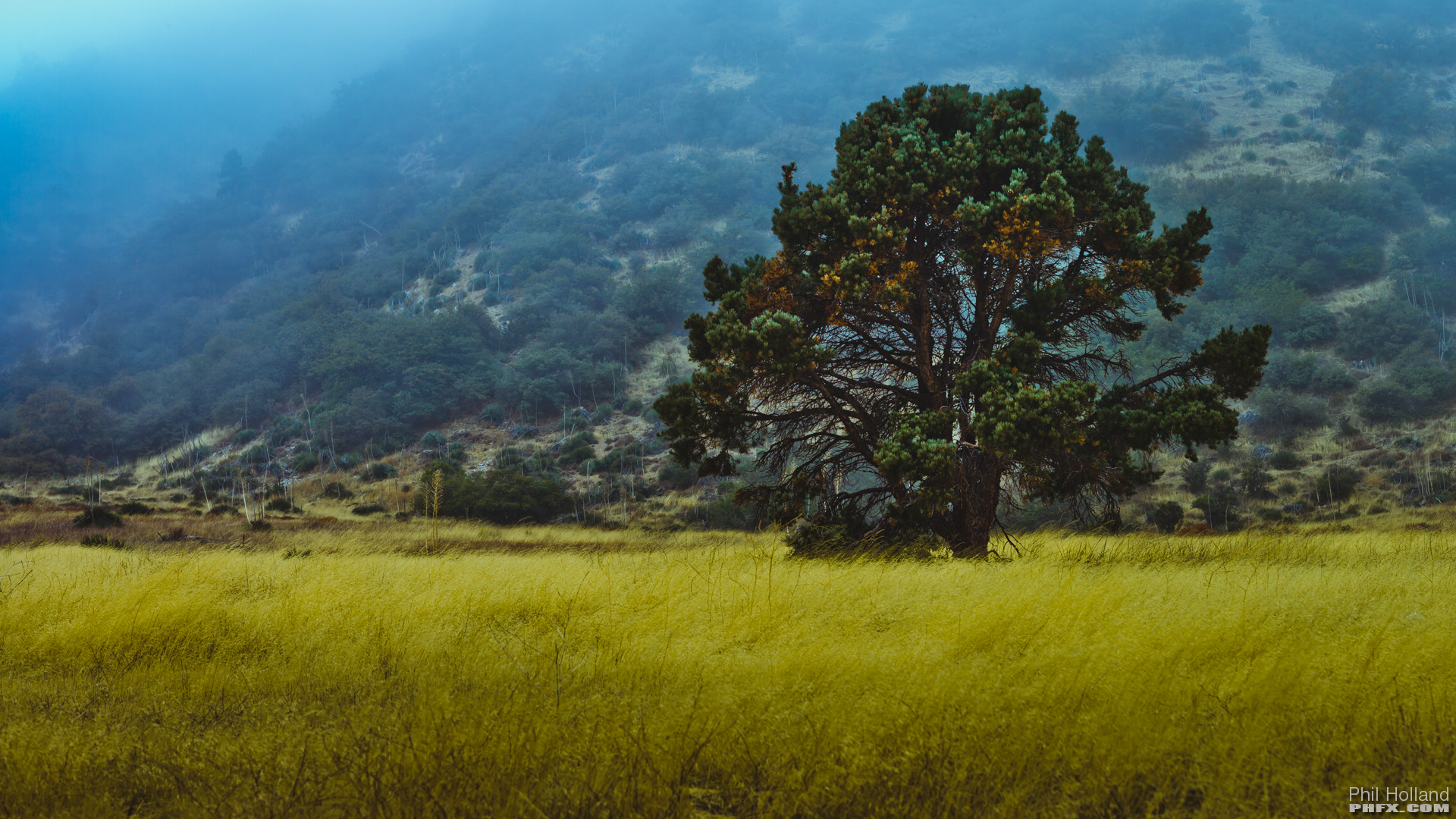
Pretty picture relevant to topic:

phfx_landscapes0002.jpg


This image "should" have been a different brighter exposure, however, my goals were to maintain some meat in the grass and fog despite what the meter wanted.
 
I had a similar situation as Phil above with this image.

David

Umbria.jpg


and this one poses other kinds of challenges.

Umbria02.jpg


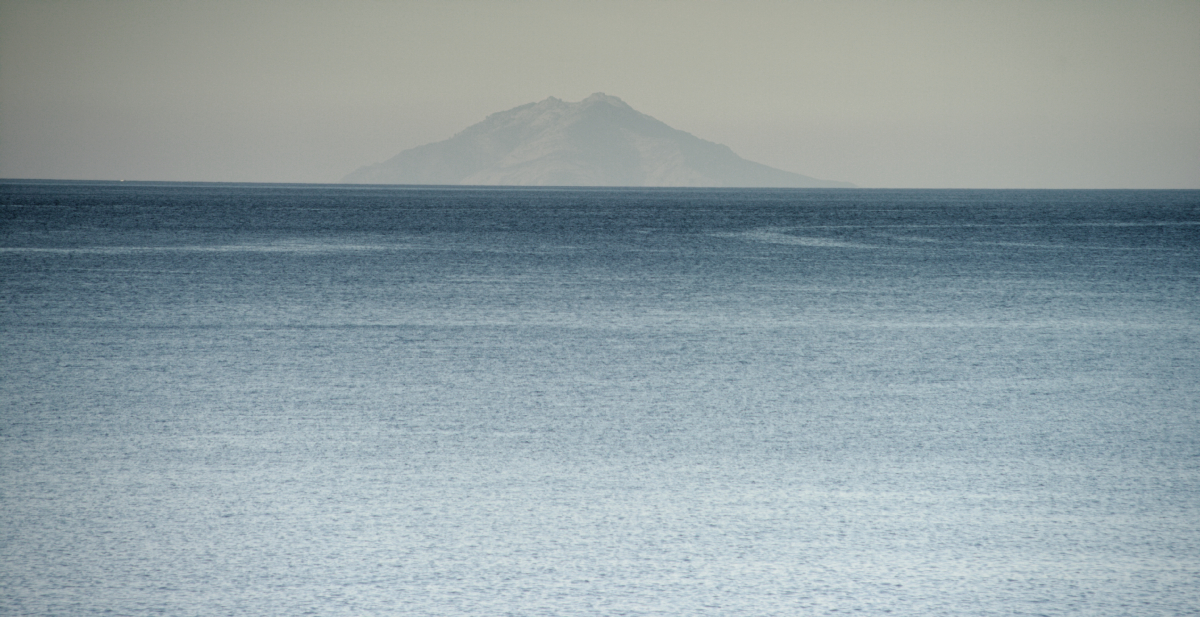
THese from the island of Elba, are both rated 500ISO right out of the camera DC2/RG4

elba_001.jpg


elba_002.jpg
 
Last edited:
Since ISO is not baked in and just a preview I use the ISO setting as a brightness control for the image. In this case, with plenty of light I would set the ISO to 250 so your image is not so washed out but you're still exposing to the right.
 
I am not against exposing to the right, but there are times when the lowest ISO and exposing to the right does not give you the results you want in your final image. This is where a ZONE system or "where you map middle grey" comes into play. You have to assess the scene and determining the luminance and color values you most want to see in that scene. you make that the middle value and then spot meter the stops above and below. EETR (whihc I also would refer to as "hit it hard") is what I do when I want super clean images from the sensor. WHen I want more "feel, modd or emotion" out of a shot, or if I want to enhance what Iam seeing, then this is not always the best guideline.

EETR can take away from the image you intend at times as well. It's a very good guideline for digital images, but sometimes you want to ride the lower end of exposure as opposed to the higher end.

One can think that you can bring back anything you want through a lot of correction but overexposure in a sky by say two stops, might take away the drama you intended in the sky.

I know you are travelling light for this Landscape trip, but consider packing a couple of Grads to control the DR of a scene and to reduce the amount of post work you need to do as well.

David
 
Yep this is great info and kinda what I thought.. I think I'm mailing my landscape exposures pretty well
 
Back
Top