Welcome to our community

Be a part of something great, join today!

  • Hey all, just changed over the backend after 15 years I figured time to give it a bit of an update, its probably gonna be a bit weird for most of you and i am sure there is a few bugs to work out but it should kinda work the same as before... hopefully :)

Attempting to match GH4 to DRAGON (my results thus far)

Excuse me for stepping in this cute, off topic-drifting thingy.

If the barn took up 50% of frame in one shot and 10% in the other, sure, I would agree with you (even though it still wouldn't matter as long as it was the same lens/same settings/same crop into footage). But we're talking a 2-5% difference here, it doesn't affect the final outcome AT ALL. If I matched it perfectly it wouldn't have affected the outcome one tiny bit.


When you zoom in 300-400% yes it does affect the final outcome.

Not that I think the difference matters in general on a grab of an UHD moving image.
For a publicly posted article affecting public opinion it matters.


Let me re iterate, the tests were for us and not Gavin.

If tests were for you only they wouldn't be published on a production tech related web site.

Which means they are directed to readers. And since Gavin is able to read he fits the category, no ?

:)

Walking around stating your personal opinions as fact has always caused friction. Life should have taught you this already. I know exactly what I need to know about the GH4 because I spent time with the files. We didn't offer any conclusions in the video. None. We uploaded it and the source files for people to come to their own.


54f0pd.png


:)


Just pulling your leg. I don't see the problem with stating findings and yes, it is a tricky position to be in when certain findings are presented to an audience.
With respect, the process to reach those findings did seem as a bit of a stretch though, so I agree with Gavin.
 
Yes, it affects what you're seeing in those two windows, obviously. No, it does not affect the sharpness/resolution between the two UNLESS you scale one up extra % to match...but there's absolutely ZERO reason to do that. None.

We didn't publish the video there, we posted the video to our channel and didn't offer our opinion IN THE VIDEO. We simply showed the shots and provided the source files. End of story. Our opinion on the test is just as relevant as Gavins but we didn't state that opinion in the video itself. We came to our own conclusions about the GH4 much later (hint, we aren't going to be using it much...lol!). It is a sharp camera but I'm not a fan of the image much at all.

Where did you pull that little JPEG from? NoFilmSchool? We didn't write that article dude. :)
 
the process to reach those findings did seem as a bit of a stretch though, so I agree with Gavin.

Stretching is usually required when comparing a $1,700 2x cropped sensor camera to the $20,000+ Epic. Variables have to be compromised, more or less, across the board to get those two on a level playing field.
 
I understand your points, but just to be sure we are all on a same page: while the framing difference does not affect the available acuity performance of the imaging device it affects how it is perceived.

As in - two imaging devices of same resolution containing same object in the frame will not contain same amount of captured detail of that object if its size in the frame is not the same, so the impression of overall captured detail may be affected, making that comparison misleading.

Also, regarding these types of tests:
- One sharp prime will bring much more objective results > Removing glass variables
- If exterior shoot conditions are affecting viewing and judging focus accuracy, slowly passing through focus range and taking out the sharpest grabs helps > Removing focusing variables
- If shooting exterior and nature fast shutter is preferable > Removing motion blur variables
 
LOL, how is it "impossible"? Use your eyes to see which is sharper. Very simple.

For those who do care about properly performed tests and not Luke who is somehow simultaneously adamant that his test was a perfect resolution test and also simultaneously insistent that it wasn't a resolution test at all... :D


Imagine you have a resolution chart. It has 2,000 little lines on it. If one sensor is let's say 4k and you frame it up perfectly you under a perfect situation would expect to see all 5,000 lines. Nice and sharp. Then let's say you have another sensor that's 2k and you frame it up to only half of the chart. Lo and behold it only sees 1,000 lines and all 1,000 lines are perfectly sharp. Take a 1:1 crop of both of these tests and both cameras will be equally sharp. Each of their FOVs of the resolution chart perfectly matches the number of lines their sensor can resolve. So in this hypothetical test (equivalent to Lucas' GH4 test) you would end up with two equally resolving cameras even though one has half the resolution.

No Lucas proposes a "simple solution" you just scale up the 2k plate to 4k! Problem solved! No, now you have lines which are twice as large on one as on the other. You can't compare two images which are different fields of view. Sure the 2k plate is now fuzzy but it's fuzzy on lines twice as thick. There are also clever upscaling algorithms which can do a pretty good job so now you're testing the scaling algorithm and not just the camera.

Lastly Lucas's wasn't a 2-5% difference it was precisely a 25% horizontal and 36% total resolution difference. That's pretty significant. Lucas is correct it wouldn't have affected much since the barn was out of focus anyway.

Back on topic. Michael's test is excellent. I think the 1080p is a pointless comparison for resolution--and said as much. But the Full Res vs Full Res is informative.
 
I understand your points, but just to be sure we are all on a same page: while the framing difference does not affect the available acuity performance of the imaging device it affects how it is perceived.

As in - two imaging devices of same resolution containing same object in the frame will not contain same amount of captured detail of that object if its size in the frame is not the same, so the impression of overall captured detail may be affected, making that comparison misleading.

You're comparing the overall detail, not the detail of a specific object in the frame. You're assuming you would blow the images up so that a certain object is the same size so comparisons could made easily, which isn't necessary. Blow both up the same % and as long as they are close, PERCEIVED sharpness/resolution is really unaffected. Why does the everything in the image need to be the same proportion to see which is sharper? Ha ha! It makes zero sense.

There were no glass variables. Same lens, same exposure, the only difference was the focal length (barely). Accounting for focal length with a prime lens...now you're talking a big difference in FOV. Zoom lens got it close enough (for us). We know how to focus our cameras. We used edge focus AND digital zoom for this, like I said, it was close and at that distance, at f 8, it didn't make much difference. Download the source files and look for yourself. Nothing in that Epic shot is as sharp as the GH4...lol!

You're just nitpicking something that doesn't need nitpicking. Download the files and do your own research and if that isn't enough by the camera and do your own.

Here we go. Epic on left, GH4 on right. 300%. This is of the tree. Focus wasn't off, no motion blur going on, FOV is very close (non issue anyways).

eq6xb387r8lthxffg.jpg


The GH4 is sharper. What does it matter? We know why we use the Epic. You should know why you use yours. Most people don't even want that sharp of an image. It's not even that surprising. The Epic has had no post work done and the GH4 in camera sharpness was at default. We did our own tests for our own reasons, if you KNOW anything about these cameras you will know that the Epic can be sharpened and that the GH4 sharpness is usually down a few notches but that in NO WAY makes the tests misleading or false. They are just the variables we worked with for this video. Deal with it.
 
Imagine you have a resolution chart. It has 2,000 little lines on it. If one sensor is let's say 4k and you frame it up perfectly you under a perfect situation would expect to see all 5,000 lines. Nice and sharp. Then let's say you have another sensor that's 2k and you frame it up to only half of the chart. Lo and behold it only sees 1,000 lines and all 1,000 lines are perfectly sharp. Take a 1:1 crop of both of these tests and both cameras will be equally sharp. Each of their FOVs of the resolution chart perfectly matches the number of lines their sensor can resolve. So in this hypothetical test (equivalent to Lucas' GH4 test) you would end up with two equally resolving cameras even though one has half the resolution.

No Lucas proposes a "simple solution" you just scale up the 2k plate to 4k! Problem solved! No, now you have lines which are twice as large on one as on the other. You can't compare two images which are different fields of view. Sure the 2k plate is now fuzzy but it's fuzzy on lines twice as thick. There are also clever upscaling algorithms which can do a pretty good job so now you're testing the scaling algorithm and not just the camera.


Both tests were done in 4K with the only "scaling" coming when moving the Epic 5K down to 4K (which you agreed would give the Epic an advantage). So, non issue. Your example is absurd and makes no sense whatsoever. Where are you getting that there was any unfair scaling? There wasn't, if anything it was done to the Epic by condensing the 5K pixels down to meet the 4K GH4.
 
This is why you have to match FOV.

1:1 crop. This tells us nothing. If you have a 320x240 cell phone camera zoomed into the same framing as the 320x240 section of a 10k sensor... the 10k sensor will be way "sharper" if you aren't using a tiny fraction of its resolution.

1:1 crop to a 1.25:1 crop with non-matching FOV. Not very useful since the scale doesn't match.

1:1 crop to 1.25:1 crop with matching FOV. Useful since we can see exactly what resolution costs we get from two different "sensors".


And this is a more accurate crop of Luke's test. Also note Luke that you really have to match the grade like Michael did in his comparison to make an accurate sharpness comparison. Medium gray to darker medium gray will be perceptually less sharp than black on white. So the GH4's reduced dynamic range and increased contrast gives the false perception of sharpness. You could achieve the same thing by adjusting the black and white points in your RED color settings.


Note the macro blocking destroying resolution on the GH4, as well as the flower in particular being softer. (Or more out of focus? Who knows, nobody knows.)
 
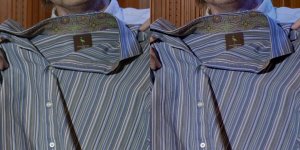
Also trying to bring things back on track, here's a side-by-side comparison of some crops from the TIFF files. I see no aliasing from the RED, but lots from the GH4.

Note also the fine gradations of blues, greens, purples, etc from the RED. It is uncanny how much the image on the monitor agrees with the actual shirt itself.

Note that this test is not really a resolution test because the only point of critical focus is the right hand side resolution trumpet of the Chroma Du Monde. My face is behind the image plane and the shirts vaguely intersect the image plane, both of which affect the RED more than the GH4 due to the 2+ stops less DOF of the RED vs. the GH4. So let's not talk too much about resolution, but more about color.
 

Attachments

  • GH4_DRAGON_ALIASING.jpg
    GH4_DRAGON_ALIASING.jpg
    103 KB · Views: 0
You don't need the Yaghi breakout box to go to an external recorder. HDMI 4k straight into the new Atmos or according to Mitch at Convergent Design they are going to mod the Osyssey 7q to accept 4k hdmi from the gh4 or the sony a7s. I am hoping this comes about as I have a 7q and love it.

I don't have an HDMI cable long enough to reach the new Atmos. My cable only extends to May 2014, and I need one that will reach September (if they release on time). Ditto the 7Q. The YAGHI is a product I can have delivered to the studio next week.
 
That doesn't apply to our shot...at all. Break it down to its simplest form. If you're shooting on the GH4, does FOV yield a difference in resolution? If you're using a zoom lens and you're all the way out at 80mm getting a shot of downtown Seattle, is there ANY less resolution in that shot than there is if you zoomed up to 200mm on an individual building? It's "different" pixels but it's the exact same amount.

Your example is an arrangement of pixels, naturally zooming into them produces worse results. Real life doesn't have pixels.

Take it a step further than your example, instead of something that is made of pixels, use someones face. Two 4K cams. Same lens, same settings, only thing that's different is FOV. One shot has the subjects eye filling the frame, the other has their entire face.

Zoom in 300% on the eye shot and you have an eyelash filling most of the frame, zoom in 300% on the other and you have one eye filling most of the frame. Is this an IDEAL situation for comparing the two? Not at all, you'd prefer them to be exact. CAN you compare them? Yes! It's the same number of pixels. If the eye in the second shot wasn't that sharp do you think it would be any different if FOV was matched?? No, the image gets soft at 300% REGARDLESS. When you're dealing with lines that are made up of pixels? OK, then it matters. For everything else (ie. everything) it's not a requirement.

You honestly think moving the Epic closer here would yield anything different? (50mm Nikkor Ai-s f 1.2 @ 5.6 (sharpest for this lens) PERFECT FOCUS). The difference between the two can be attributed to many different things, FOV is NOT (repeat...NOT) one of them. It's pretty simple. Two 4K images, both with the same lens at the same setting, zoomed up 300% will show you what you need to see regardless of FOV.

3xk9c7cpk923dw8fg.jpg
 
Also trying to bring things back on track, here's a side-by-side comparison of some crops from the TIFF files. I see no aliasing from the RED, but lots from the GH4.

Note also the fine gradations of blues, greens, purples, etc from the RED. It is uncanny how much the image on the monitor agrees with the actual shirt itself.

Note that this test is not really a resolution test because the only point of critical focus is the right hand side resolution trumpet of the Chroma Du Monde. My face is behind the image plane and the shirts vaguely intersect the image plane, both of which affect the RED more than the GH4 due to the 2+ stops less DOF of the RED vs. the GH4. So let's not talk too much about resolution, but more about color.

Agreed, sorry Michael :)

I'm not a fan of the color on the GH4 to be honest. I have always felt it's the one thing they should focus on, as far back as the GH2.
 
Zoom in 300% on the eye shot and you have an eyelash filling most of the frame, zoom in 300% on the other and you have one eye filling most of the frame. CAN you compare them? Yes! It's the same number of pixels.

If you think comparing an eyelash to an eye is an apples to apples test then people can judge for themselves whether they should bother listening to you or waste their time looking at your tests. Your batman "test" is a great example of how poor of a comparison your testing regiment was. You might as well had batman in one frame and superman in the other. It's honestly laughable as a sharpness test.
 
Hey Michael, I want to know more about the recording studios... What's up there?

We have a nice little studio 40 minutes from RDU airport. Lots of info here: http://manifoldrecording.com/

This round of testing was done in the Annex Control Room (where we do digital mixing and audio post). We also shoot (real) talent in the Main Studio. If DropBox played nicer as a source for inline images in postings, I'd link a bunch here. But it's a pain to have to upload them via "Manage Attachments". So I post to the blog: http://blog.miraverse.com/

Here's a YouTube video of a recent session with Kat Robichaud (contestant from The Voice, Season #5):


In that video, the RED is in the Control Room and I have a Blackmagic Cinema Camera in the Music Room with Kat. I have a RED SCARLET DRAGON on order to replace the BMCC. Hopefully it will ship before my next project ;-)
 
Based on my early testing of the GH4 the sharpness setting of -5 is still sharpening the image to a degree. There is additional processing going on there which in terms of a drawn edge where the MX and Dragon material will look different.

Remember there is no noise reduction or sharpening done on MX or Dragon cameras. That is up to you in post if you want to effect that look that way.

So more or less in terms of side by sides for the purpose of matching you are either going to want to soften the GH4 material or sharpen the MX material. Dragon would require slightly less sharpening due to it's weaker OLPF and smaller pixels.

As for color, yes dynamic range is a concern. You will be able to actually do a nice direct match in Resolve 11 very soon and you can create your LUT based on that information. There are other ways to do this now of course, but it will be much easier for most people to deal with very soon.
 
99% of nofilmschool readers shoot everything on DSLRs, so they for sure blast something like a Dragon and ludicrously overstate how great anything that costs less than $3000 is - because it makes their readers feel good and think that the writers are "smart" and "on their team". Just like Phillip Bloom and Zacuto - they aim for the buttered side of their bread.

What a horrible name for a website by the way. It's almost the same as "untrained, uneducated and proud!".
 
If you think comparing an eyelash to an eye is an apples to apples test then people can judge for themselves whether they should bother listening to you or waste their time looking at your tests. Your batman "test" is a great example of how poor of a comparison your testing regiment was. You might as well had batman in one frame and superman in the other. It's honestly laughable as a sharpness test.

Agreed. Luke you need more training and reading before doing tests like this. It seems you don;t even know how to understand the critiques being leveled at your tests. I'm not trying to be a D--k, but really trying to give you advice. Books are cheap and worth endless millions in value. There are many excellent cinematography books on amazon, let alone a specialized creative bookstore in a major city. I try to read them all at least once, many twice.
 
Based on my early testing of the GH4 the sharpness setting of -5 is still sharpening the image to a degree. There is additional processing going on there which in terms of a drawn edge where the MX and Dragon material will look different.

Remember there is no noise reduction or sharpening done on MX or Dragon cameras. That is up to you in post if you want to effect that look that way.

So more or less in terms of side by sides for the purpose of matching you are either going to want to soften the GH4 material or sharpen the MX material. Dragon would require slightly less sharpening due to it's weaker OLPF and smaller pixels.

As for color, yes dynamic range is a concern. You will be able to actually do a nice direct match in Resolve 11 very soon and you can create your LUT based on that information. There are other ways to do this now of course, but it will be much easier for most people to deal with very soon.

As soon as you introduce a lesser cam into the mix, you must dumb down all the others to match. That's my issue with cheap B-cams
 
So let's not talk too much about resolution, but more about color.

As much as I appreciate your efforts in conducting this test, I find it of only limited usefulness (mainly due to my own uncertainty) in terms of color, which is your main focus.

This camera has the old OLPF. If you were going to use an old OLPF camera to shoot a project, then this test is an excellent indicator of what to expect.

If, however, you're using it to judge color performance of a future Dragon purchase or new OLPF Dragon rental, it seems to me you'd have to do the test again with a current camera.

The camera changed significantly enough (according to the people that actually have one and have done their own tests) to call the color response of this test into question (IMO) based on how shipping Dragons perform today, especially in the orange/red/yellow area of the spectrum, where Graeme made improvements and a lot of your shirts show a marked difference.

My understanding is that DRAGONcolor/RG4 have been tuned to best compliment the new OLPF and sensor calibrations, although they can be used on non-Dragon footage.

Yes, the results between the two Dragon incarnations will be similar and I have no doubt a currently shipping Dragon will be that much better at color than both the GH4 and the old OLPF Dragon.

My concern is that it will be better in a subtle, yet significantly different way which would require another reshoot.

A new test with current cams would be a nice juxtaposition to what you've shot on Dragon already. In that regard your test is informative and the comparison would be the only one of its kind I know of (i.e. old OLPF vs. new OLPF with DRAGONcolor and a person in frame).

I guess I feel your post should be accompanied by some sort of caveat alerting people to the possible differences between shipping cams and the cam this test was shot on.

For some, the enhancements made to currently shipping Dragons seem to be inconsequential. I just don't see it that way and I've yet to read a compelling argument as to why they would be.

This is now a game of inches (or centimeters) and those little enhancements are going to be what make an image appear more refined and pleasing, without being able to readily point to a specific reason why without detailed scrutiny.
 
Last edited:
As much as I appreciate your efforts in conducting this test, I find it of only limited usefulness (mainly due to my own uncertainty) in terms of color, which is your main focus.

This camera has the old OLPF. If you were going to use an old OLPF camera to shoot a project, then this test is an excellent indicator of what to expect.

Thanks!

If, however, you're using it to judge color performance of a future Dragon purchase or new OLPF Dragon rental, it seems to me you'd have to do the test again with a current camera.

The camera changed significantly enough (according to the people that actually have one and have done their own tests) to call the color response of this test into question (IMO) based on how shipping Dragons perform today, especially in the orange/red/yellow area of the spectrum, where Graeme made improvements and a lot of your shirts show a marked difference.

Let me say two things about that. First, I'm not claiming in any way to be qualified to produce an absolute test of the DRAGON camera to allow somebody to make a purchase decision based on that test. My objective was to figure out whether and/or how I might be able to marry two very different cameras into an A/B relationship.
Second, the NAB firmware update (that gave us DRAGONcolor) transformed the DRAGON from promising to HOLY CRAW! Because my principle shooting environment is a recording studio and there are lots of red, green, yellow, blue, and other colors of lights, buttons, indicators, etc., I'm very sensitive to how faithfully the camera records those sources, as well as the human and architectural scenery. Pre-NAB, DRAGON's great dynamic range gave me lots of headroom to capture these elements without having them blown out (the way other sensors do), but it did not really get the color any better than anything else. Which was disappointing. With DRAGONcolor, it's bang-on true. With the old OLPF.

I expect the new OLPF to give me better flare resistance, better color, better resolution, etc., but from the images I'm seeing, it's more like getting the shot closer to the center of the bullseye. The old OLPF still hits the bullseye, which is all that matters when keeping score.

My understanding is that DRAGONcolor/RG4 have been tuned to best compliment the new OLPF and sensor calibrations, although they can be used on non-Dragon footage.

Yes, the results between the two Dragon incarnations will be similar and I have no doubt a currently shipping Dragon will be that much better at color than both the GH4 and the old OLPF Dragon.

My concern is that it will be better in a subtle, yet significantly different way which would require another reshoot.

If the new OLPF moves the DRAGON so far that I need to adjust the GH4 settings, I will do that. But as Phil Holland (and others) have pointed out, this may be somewhat moot when Resolve 11 comes out. I look forward to that release!
 
Back
Top