Welcome to our community

Be a part of something great, join today!

  • Hey all, just changed over the backend after 15 years I figured time to give it a bit of an update, its probably gonna be a bit weird for most of you and i am sure there is a few bugs to work out but it should kinda work the same as before... hopefully :)

Attempting to create this look (Grade my R3D)

Scott Talbot

Well-known member
Joined
Apr 28, 2013
Messages
62
Reaction score
0
Points
0
Location
Los Angeles
Hey everyone,

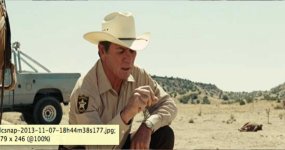
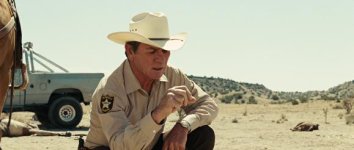
So I'm grading my new film and am having trouble getting the "look" that I'm going for. My reference is taken from No Country For Old Men. It roughly the only scene that is in a field with hard sunlight.


REFERENCE:
Apparently dropbox lost the ability to embed photos that are uploaded.
https://www.dropbox.com/s/his2ttnhtotceds/vlcsnap-2013-11-07-18h44m38s177.png

R3D:
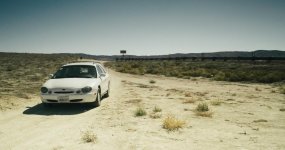
#1
https://www.dropbox.com/s/wxc8u2jhhqzzvgy/A002_C006_1019J5.0001098F.R3D
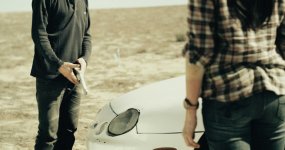
For this shot I would like to grab his shirt and make it more blue to make the hue of the jeans but other than keyframing each frame as he turns and plays with the gun... I can't figure it out.


#2
https://www.dropbox.com/s/8orqhe20zbbw1uq/A002_C003_1019VH.0000570F.R3D


I've probably just been playing with it too much but I figured I would reach out for some help.

Thanks guys!
 

Attachments
  • vlcsnap-2013-11-07-18h44m38s177.jpg
    vlcsnap-2013-11-07-18h44m38s177.jpg
    20.4 KB · Views: 0
Last edited:
It's not just the look in post. Having Roger Deakins as the DP helps a lot.
 
Hey man, if you upload a single frame of the R3D that would be better :)

Well part of my problem, not for this shot specifically, was tracking. So in my mind, I can make a frame look good but I haven't been able to get everything tracking to complete the shot.

Also I don't know how to upload a single frame :P
 
Well part of my problem, not for this shot specifically, was tracking. So in my mind, I can make a frame look good but I haven't been able to get everything tracking to complete the shot.

Also I don't know how to upload a single frame :P

Ahhh okay, well in any case, if I have to wait 45 mins for it to download, I probably wouldn't bother you know what I mean?....but as for a single frame, you click the r3d snapshot button in RCX (at the bottom of the viewer r3d camera icon button).
 
Okay the original post has been updated with just the R3D snapshots. Thanks Matthew!
 
Desert_211_zps8ed43b96.jpg
 
Matthew that looks good. Can you explain your process? For example how did you handle his shirt? And how about skin?
 
Thanks man, the skin is over saturated I think, but yeah, qualified the skin, the grass and the blue clothes, also cooled the deep shadows and warmed the highlights slightly.
 
The season differ a bit, reference has green vegetation and your shots does not. But I used the flame Flame color warper to fake the greens and Kodak Print 3dLut got me pretty close in regards of look I think.
 

Attachments

  • 3dLUT_ KODAK_ COLOR MATCHFLAME.000001.jpg
    3dLUT_ KODAK_ COLOR MATCHFLAME.000001.jpg
    97 KB · Views: 0
  • 3dLUT_ KODAK_ COLOR MATCHFLAME2.000001.jpg
    3dLUT_ KODAK_ COLOR MATCHFLAME2.000001.jpg
    91 KB · Views: 0
  • 3dLUT_ KODAK_ COLOR MATCHFLAME3.000001.jpg
    3dLUT_ KODAK_ COLOR MATCHFLAME3.000001.jpg
    84 KB · Views: 0
Matt I like your second last grade. The blue shirt adds to the scene.
 
Love this thread ;)
 
That's pretty close there Bjorn.

Looks like RD's shot has less blue in the sky than this one.

The season differ a bit, reference has green vegetation and your shots does not. But I used the flame Flame color warper to fake the greens and Kodak Print 3dLut got me pretty close in regards of look I think.
 
Yeah, I think Bjorn's matches…. Although the skin in No Country is pink/saturated compared to the brown/desat of the .r3ds in this thread…. Should be key-able though.
 
Back
Top