Welcome to our community

Be a part of something great, join today!

  • Hey all, just changed over the backend after 15 years I figured time to give it a bit of an update, its probably gonna be a bit weird for most of you and i am sure there is a few bugs to work out but it should kinda work the same as before... hopefully :)

Ask David Mullen ANYTHING

David: I've got a question about out of focus lights as they appear in the bokeh. They can range from perfectly round to triangular, ovoid, and 5-, 6-, or 8-sided. I've read that the number of iris blades determines the shape. I've also read that the shape formed by the iris blades as they come together determines the appearance. Is there a definitive answer? Also, is there a list anywhere of lenses and the resulting appearance (i.e., Cooke Series II = pentagonal shape, Coopke S4 = perfectly round, old Angie zooms = triangular, new Angie zooms = round. etc..) or is there a rule of thumb such as the # of blades = round, 7 blades = six-sided or alternatively, the shape of the iris (scalloped, round, pentagonal, - or the double iris of Super Baltars) that can predict the light shape in the bokeh? Such a list would be very useful in choosing lenses? Thanks
 
I'm sure there are people out there who can describe all the bokeh characteristics of each lens at different f-stops; I'm not one of them. I tend to shoot on either Panavision Primos or Zeiss Ultra Primes these days and the bokeh doesn't jump out at me for those as anything unusual. I know that Cooke S4's have a certain look to their bokeh when slightly stopped down because of the fewer number of iris blades (I believe) compared to the Primos and Ultra Primes.

It's just not the number of iris blades but the shapes they form (some curve into a circle better) and whether the corners between the blades have indents, notches, etc. For example, when I did the flare tests of the new Zeiss Compacts, which have a lot more iris blades than most prime lenses, I still noticed a slight multi-point star filter effect (many points to the star because of the higher number of iris blades). I guess this suggests that the iris blades, though many, do not form a clean circular shape and have some "hooks" or notches where the blades meet.

When I use zoom lenses, I often find that the bokeh is not as "clean", i.e. there is some distortion to out-of-focus circles near the corners of the frame, and some chromatic aberration to them.

Except for those early Zeiss Super-Speeds that produce that odd triangular bokeh, most modern lenses don't bother me too much in terms of their bokeh.
 
David,

Do you have an agent? What are the advantages/disadvantages of having one?

Thanks
 
I worked about seven years without an agent and shot 14 features or so, all low-budget non-union affairs. But my thirteenth feature (lucky for me) was an indie movie called "Twin Falls Idaho", made in 17 days for $500,000, shot in 35mm, and it went to Sundance in 1999. After a screening there, I was approached by a couple of agents, but by the time I got back to Los Angeles, only one was still enthusiastic about my possibilities so I signed with her.

The movie came out in theaters in August 1999, I wrote a short article in "American Cinematographer" about it, and by the end of the year, I got a Spirit Award nomination for my work on it.

So I've had the same agent since then. I don't see any downsides to having an agent in general, unless you have a problem with giving them 10% of everything you make as a cinematographer. There are a lot more upsides since few producers take a cinematographer seriously if they are not represented, and it's much easier to negotiate your rate when you can leave it to your agent to play tough, so you don't have to get your hands dirty dealing with money issues. Agents also send out your reel, send you scripts, talk about you to other people that they meet (directors and producers).

But I find that, when someone asks me whether they should get an agent, it's much better when you reach a point in your career when an agent comes to you rather than the other way around. Before 1999, when I attempted to find an agent, there was too much of a hostile vibe of "what can you do for us?" as they contemplated whether I was going to make them any money. That was depressing so I put getting an agent on the backburner. It's a lot nicer now when they are the ones calling me...
 
I wanted to amplify what David said- if you have to ask 'should I get an agent' you're probably not at the stage in your career where you are ready for one. When they start seeking you out on a regular basis, it's time.

And they generally don't get the jobs for you. They simply work out the business mechanics of jobs won mainly on the basis of your own talent and reputation.

Noah
 
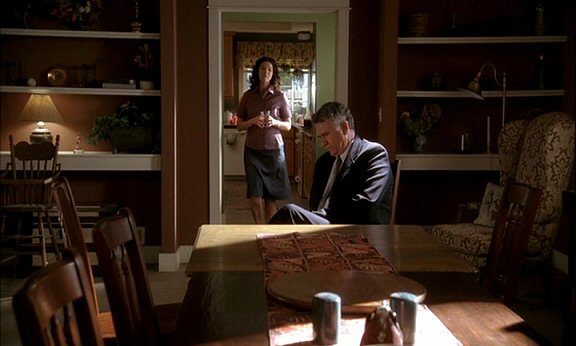
In this scene from "Big Love", I used Source-4 lights inside the room to get the bright slashes of hard light:

biglove11.jpg


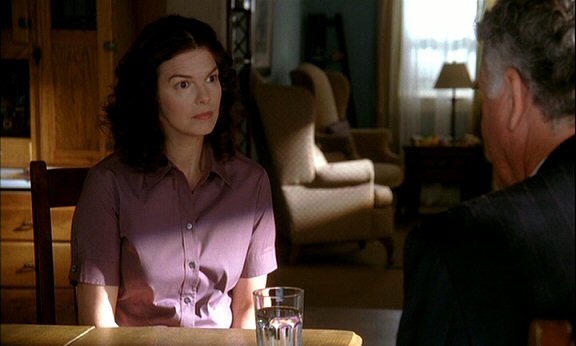
biglove12.jpg


The color fringe is sort of unavoidable to some extent, though I sometimes justify it as being caused by the window glass that the light is supposedly going through.

I haven't tried internal window pattern gobos yet. Putting pattern shapes in front of the Source-4 light tends not to work well for getting sharp patterns.


Hi - When I use Joker 800 - source fours, I get SERIOUS color fringing. I now shoot the lights through empty frames with a little black foil around the edges - I let the CA bits hit the foil, and the rest of the light pass through. This is kind of a pain. What are you doing to minimize the CA? If I bounce or diffuse the light its not an issue at all, but if i want a hard light to project things its a real killer.

Any thoughts?
 
As you defocus/focus the Source-4, you sort of have the option of a blue fringe or an orange fringe from the CA (in that close-up of Jeanne Tripplehorn above, you can see some of the blue fringe on her and the orange fringe on the chair in the background). In wide shots, I just let it go because no one is going to look that closely at the CA. Also some colored objects sort of hide the color fringing, like a blue fringe on a blue shirt, etc.

In close-ups, I often defocus the slash a little, which helps reduce the CA, but if I think it's still too distracting, I'll add a little 18"x24" black flag in front of the Source-4 and line it up so that the color fringe is just on the edge of the flag rather than the subject, then the flag itself is helping to create the slash.

As the lenses get dirtier in the Source-4, or if you add any gel in front, you do get more side spill, enough to throw a faint shadow or slightly flare the lens, etc. So for that, I sometimes just tape a little piece of blackwrap along one edge, like a little barndoor, to cut the spill. But after awhile, you need to get the lenses cleaned.

The CA though is one reason I haven't used gobo slide patterns that much unless the pattern is going to only fall in the background, like a window frame, venetian blind, or tree branch pattern.
 
I have again a very basic question which I hope will be quick to answer:

All these different brands of PL-mount 35mm cinema lenses (Cooke, Zeiss, Panavision), is there a kind of hierachy? I mean, I assume that, when one of the names and modell numbers comes up here in the forum, a professional DoP like you David, has a "mental map" on which all the lenses are related to each other somehow.
Of course there are things like price etc. but I'd be more interested in a more "respect" rating.
I know of course that a question like this calls for an opinion rather than the truth. I'd just like to know if there is a certain common knowledge that people in the field share.
It's hard to pick up on that :)

Thank you for the answer in advance!
 
Last edited:
The most common prime lenses on well-budgeted professional 35mm shows, until the recent addition of the Zeiss Master Primes, as been:

Panavision Primo
Cooke S4
Zeiss Ultra Primes

Big-budget movies have been shot on all three so there isn't really a respect issue involved, it's more of a Panavision versus Arri issue in terms of whether you end up with Primos. They all perform well.

The cliche, which has some truth to it, is that Cooke S4's have a lower-contrast, "mellower" look compared to Zeiss Ultra and Master Primes and Panavision Primos. Or to be blunter, they are a bit softer but not necessarily in a bad way -- many people feel they are more flattering to actors for example. Maybe "smoother" is a better descriptor than "softer". And if the lighting is contrasty enough, then the Cooke image seems fairly snappy anyway. The last "Die Hard" movie was shot on Cooke S4's for example.

Truth is that some big-budget movies are still using Zeiss Super-Speeds ("Where the Wild Things Are" for example) and if they are shot at f/2.8 and deeper, the sharpness is comparable with most modern lenses.

Anyway, if the look that the lens creates is appropriate for the movie, and you know how to get the best out of the lens, then it doesn't really matter much to me which lens gets more "respect" than another. Ultimately I get judged for the quality of my work, not whether I look cool standing next to an Arricam or Panavision Millenium, or using a Cooke or a Zeiss lens, or Kodak or Fuji film stock, or using a Genesis or a RED camera for that matter. I don't really care much about the sort of people who would judge me based on that anyway.

Of course, there is a lot of shallowness in Hollywood -- a DP, who drove a nice car, told me that after he shot a major feature, the director then saw what sort of car the DP drove and said "if I knew you drove that sort of car, I would have never hired you." I mean, what an idiotic thing to say, to base hiring criteria on what you are wearing or what car you drove, etc.
 
The most common prime lenses on well-budgeted professional 35mm shows, until the recent addition of the Zeiss Master Primes, as been:

Panavision Primo
Cooke S4
Zeiss Ultra Primes

Big-budget movies have been shot on all three so there isn't really a respect issue involved, it's more of a Panavision versus Arri issue in terms of whether you end up with Primos. They all perform well.

The cliche, which has some truth to it, is that Cooke S4's have a lower-contrast, "mellower" look compared to Zeiss Ultra and Master Primes and Panavision Primos. Or to be blunter, they are a bit softer but not necessarily in a bad way -- many people feel they are more flattering to actors for example. Maybe "smoother" is a better descriptor than "softer". And if the lighting is contrasty enough, then the Cooke image seems fairly snappy anyway. The last "Die Hard" movie was shot on Cooke S4's for example.

Truth is that some big-budget movies are still using Zeiss Super-Speeds ("Where the Wild Things Are" for example) and if they are shot at f/2.8 and deeper, the sharpness is comparable with most modern lenses.

Anyway, if the look that the lens creates is appropriate for the movie, and you know how to get the best out of the lens, then it doesn't really matter much to me which lens gets more "respect" than another. Ultimately I get judged for the quality of my work, not whether I look cool standing next to an Arricam or Panavision Millenium, or using a Cooke or a Zeiss lens, or Kodak or Fuji film stock, or using a Genesis or a RED camera for that matter. I don't really care much about the sort of people who would judge me based on that anyway.

Of course, there is a lot of shallowness in Hollywood -- a DP, who drove a nice car, told me that after he shot a major feature, the director then saw what sort of car the DP drove and said "if I knew you drove that sort of car, I would have never hired you." I mean, what an idiotic thing to say, to base hiring criteria on what you are wearing or what car you drove, etc.


Thank you David, that was really the kind of answer I was looking for. Maybe the term "respect" wasn't right here. Maybe I should have used something like "trust" in a product. You are certainly right that it isn't as much about the tools as it is about the artist using them.

How would you think the REDs would fit in there optically and what about still lenses in comparison?

About the car: my old man always says that it can be bad business for him as a tax lawyer/consultant to show up at a client's place with a too flashy car. Some customers will think: "Ah, that's what I'm paying for." On the other hand it should not be too shabby because then people will think that he might not be good enough in his job. In a nutshell: a Porsche is not a good idea for a tax lawyer :tongue_smilie:
(He's not too serious about it. Still, no Porsche...)
 
I just want a fuel-efficient car that gets me from A to B... I drove my beat-up Toyota Tercel for 16 years after film school, to the point where some crew members threatened to pitch in and get me a new car. Then I got hired on "Big Love" and had to commute every day from Venice to Santa Clarita -- on the first day, my car flashed a warning light so I took it and found that it needed about $6000 or more of repairs, from two cracked axles, etc. Anyway, since I was starting a nice new job that was going to run for seven months, I decided I could pay for a new car, so I got a Prius... which I'll probably drive into the ground.

Fashion-wise, I have a closet full of Lands End stuff (polo shirts, slacks, sweaters) and I wear the more worn-out versions to work. I'm definitely not a slave to fashion.

Anyway, enough about my attitude towards cars and clothes...

The RED Pro Primes are nice, solid lenses -- and sharp. They will compete well with the big boys. Using still camera lenses on a narrative cinema shoot, that gets into other issues that we've talked about before, though it's been done on movies. Truth is, for example, any telephoto cine lens is usually an adapted still camera lens. And most large format efx cameras like VistaVision use still camera lenses. And there are some cases in history of part of a movie being shot with certain cameras using still camera lenses -- for example, the desert island stuff in "The Black Stallion", a lot of that used a 35mm Cameflex with Nikon lenses owned by director Carol Ballard.

But for run of the mill narrative work, the main problem with still camera lenses, unless they have been modified, is that they are not well-suited for traditional cine-style focus-pulling. The barrel rotation is way too short and the distance marks are too close together. The other problem is that some of them have optical defects that are only apparent in motion during live focusing and zooming, rather than in a still image -- simply because there was no reason to spend the extra money to fix problems that only are apparent in real time while focusing and zooming if the purpose is to take a still picture with the lens. However, there are many still camera lenses that work fine in terms of optics for cinema shooting.
 
Hey David,

Did you ever try out the "Hard Drive - Bat Belt" concept? :) --It was a thread within a thread about a year ago when I was last hanging out on RedUser. I (in humor) suggested a belt of RAID hard drives, maybe using one of the old Arri-S battery belts.. you chimed in and suggested it as a "Batman Utility Belt". ha!

re: cars and clothes
I agree with you guys!

~s
 
rolling shutter problem with dolly?

rolling shutter problem with dolly?

Hi David,

Can you help me out on this one? Today I tested a very nice dolly but got confronted with I assume a rolling shutter artefact. You can see the shots on: http://www.vimeo.com/7551202
, password is "shutter".
The camera was Build 20, 4K 16x9, Redcode 28, 25fps and the shutter was 50.
I checked my timeline settings in FCP but can't find a solution or major change there.
It also looks like a compression problem. I changed speedsettings in FCP to 50% and did not use blending. The result is that I see vertical lines dancing (don't know an english term for this kind of vibartion) Would Redcode 36 solve the problem?
I followed another thread on this but haven't found a good solution yet. Speeding up a project to 50 fps might be solution but for the project I have in mind I will need all available light I can get.
 
I can't see much problems in the clip other than the overexposure and the barrel distortion when using the wide-angle end of the zoom, which is causing that pole to not be straight. My computer can't play back the clip without some stuttering so I can't really comment on compression issues.
 
Would you take precautions when making such dollyshots? I know you have to be carefull with fast movements. The traveling speed on these shots is not that fast. The effect is hard to see on vimeo but on my timeline it's pretty obvious.
I am thinking of compression problems because there is a lot detail in the background, and I see problems when for instance passing the bamboo in the background of my garden.
 
How to get low key and high contrast look in a bright room

How to get low key and high contrast look in a bright room

Hi Mr. Mullen,

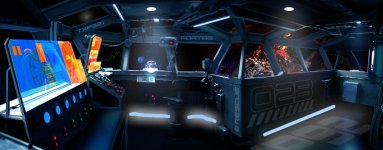
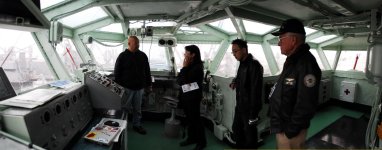
I'm shooting a scene in a flight control room on a retired aircraft carrier. It has many windows(see attached photo). We want to turn it into the bridge of a space ship(see concept art). The idea is to green screen all windows and replace what's outside of the windows with a CGI space. Since we're only allowed t shoot it during the day. I wonder what's the best way to get that low key and high contrast look.

We did some quick green screen test the other day. The ultimatte green tape produced best chroma key(see attached photo). The reason for that is the sun light soak into the green tape and created a very even chroma key. The green opaque card board we also brought to the location was not so lucky. If I use the ultimatte green(not 100% opaque), the room will not be as dark as we want to be. So I guess the key here is to get the right ratio of light.

Any suggestions?

1r6aev.jpg


2v27692.jpg


29vzbcm.png
 

Attachments

  • ship_bridge_comments.jpg
    ship_bridge_comments.jpg
    95.4 KB · Views: 0
  • hornet_bridge.jpg
    hornet_bridge.jpg
    103.1 KB · Views: 0
Would you take precautions when making such dollyshots? I know you have to be carefull with fast movements. The traveling speed on these shots is not that fast.

Dolly moves are usually motivated by something specific, so it's hard to change the speed just to deal with some artifact problem - for example, if the camera is moving to follow an actor, then the speed is motivated by the actor. If the actor is moving fast and the camera is keeping up with him, audiences usually accept strobing, skewing, or whatever artifacts come up in the attempt to keep up with the actor, partly because their eyes are looking at the actor... and since the camera is keeping up with him, he's not moving as much in the frame as the world and objects surrounding him, so the motion artifacts are not appearing where the viewer's attention is, i.e. on the subject.

If it's a move during an establishing shot or something, usually it's fairly slow so motion artifacts don't show up.

That sort of leaves fast camera moves not related to following some action -- you have to first decide why the camera has to move that fast, what the emotional reason is. If there is a good reason, again, audiences sort of accept that the camera has to move that fast and forgives most motion artifacts. It's really when the fast move is not well-motivated that the audience has time to think about the motion artifacts, like "hey, why is that pole skewing?" I mean, honestly, if the shot is well-designed and dramatically motivated, then the viewer shouldn't be noticing peripheral stuff. Or at least, they notice it less.

Now there is a point where some artifacts get so obvious as to become distracting, but that comes under the issue of personal taste and judgement. For example, I'll set the shutter to 270 degrees now and then for the extra exposure, but I will try to avoid doing that if the scene has a lot of motion in it because the motion smear may get too distracting. I don't want the artifacts to become front and center to the scene, but if they are more in the background, you can get away with them. Sometimes.
 
It's sort of a bad situation to have to cover the windows with green material -- you not only have spill problems from the green being that close to the actors, room objects, and window frames, but you lose the ability to edge light the window frames.

Ideally, if you can't shoot at night, I'd get a talented Key Grip who can figure out how to build a tent around the windows, sort of a black box surrounding a green box, so the green is on frames outside the windows at some distance so that the green can be lit separately from everything else. Maybe there's a way to rig speedrail sticking out from the roof above the windows and then drape a tent around that.
 
Back
Top