Welcome to our community

Be a part of something great, join today!

  • Hey all, just changed over the backend after 15 years I figured time to give it a bit of an update, its probably gonna be a bit weird for most of you and i am sure there is a few bugs to work out but it should kinda work the same as before... hopefully :)

Ask David Mullen ANYTHING

Inverse square law only works for point sources (Or something approximating it because it's far enough away) - the photons are emitted from a point onto the surface of a sphere with surface area 4 x Pi x r x r (or radius squared). So from the point source the distance you are away determines the surface area of that sphere and therefore the number of photons you receive.

Non-point source are miles more complicated. Lasers being the ultimate in sending the photons in the same direction (Not coherence, that's to do with the waves being in phase).
So you can imagine with a soft source the photons are being sent all over the place, whilst a reflection off a shiny surface can actually end up focussing the light more - you receive more photons.

The light then diminishes according to scattering and how parallel the rays are from the source (or new source in the case of reflection and diffusion) - the less parallel the less you receive.

Hope that helps!
 
Yes, but I think his question is why, for example, when we dolly the camera away from the subject, it doesn't get dimmer? After all, it is receiving less and less of the light reflected off of the subject. But I think that's because the eye or the camera only needs a few representative photons, it doesn't use the entire volume of reflected light.

I've always wondered about this, too. I asked about it a couple years ago, actually, and my friend said it was a stupid question, so I'm hesitant to even post about it.

I still have no idea, but my original guess was (in video terms), let's say we're filming a white square against a black background and the white square is exposed at 50 IRE and takes up 400 X 400 pixels when you're 10 feet from it.

Let's say you dolly out to 20 feet. The white square should then take up 200 X 200 pixels, but still be 50 IRE. So, the brightness is the same, but the perceived size of the source is 1/4 the area, so the camera is ultimately only receiving 1/4 the light. So the object retains its brightness, but the inverse square law holds.

Please don't quote this post since I'd like to delete it if proved wrong; I've already experienced enough derision as a result of asking this question.
 
Policar, I think you are 100% right in that explanation. It's a tricky question which seems to bring a slew of controversy and spreads like a cold sore. I'd say we can probably leave it at that. :)

Thanks for everyone's input. From what has been said a couple of times here and what I have gathered since from other sites and people, I think it is a fair assumption that the light weakens as we move away, but the light is then falling over a proportionally smaller area of our sensor/eye, therefore the same brightness. Thank goodness we have that optical 'correction' otherwise I think we'd be walking around in a 'fog of war' scenario. A shadowy fog, if you will!

But that is another topic altogether!

Best,

-Rpo
 
Hello David.

To set the scenario i am going to Poland in Aug to shoot a series of surrealist films all shot with available light. I am worried, having not seen the locations yet about the amount of light. One sequence, a large one, is shot in a compartment of a train, another in the woods. I want to be able to punch in some additional light particularily in the train compartment. There is no budget to hire anything. I was wondering if you know of any good cheap battery powered solutions. I was going buy a PAG C6 video light to add a bit of a punch but even that is slightly outside us. I guess I am looking for a poor man's sun gun.

Is there any way of battery mounting a few MR16's to add a bit of punch?

EDIT: What I was thinking I could do is buy a few 12v MR16 LED Daylight balanced bulbs, find some kind of workable housing and wire them up to 10 x 1.2v batteries. As long as I used NiMH 2500 mAh batteries they should last for a few hours. I think these bulbs throw around 120 Lummens so if I had about three or four of these I am hoping it would give a good punch to the available light in the woods or in a shaded train compartment.

Thanks for your thoughts...as always.
 
Sure, you could probably build your own battery-powered LED set-up, but just remember that large batteries are often heavy to carry and they get drained quickly. You may be smarter to at least splurge for a rechargeable battery belt (or two or three) or something like that and build your set-up around that output level.

You could also consider buying a LitePanels Micro LED (four AA batteries) or Pro Micro (I think eight AA batteries) and using rechargeable AA batteries, plus these lights do allow external power supplies when available.

They are small lights but perhaps you could bundle them into a larger LED panel and just carry a s---load of AA batteries around!

Trouble with little lights is that they are directional and spotty, often the complete opposite of an available light look where you'd want a larger soft source to augment or simulate a natural effect. In which case, you are talking more about an HMI sungun and a bounce card, let's say (of Flexfill). Which gets expensive.

Some Kinoflos can be run off of large batteries too.

You can't really rely on batteries though for any long sequences because they always drain faster than you think.
 
Hello David, my name is Nils Streutker and I am planning on making a short movie with my new Canon hv20. I know it's nothing compared with what you work with but at least it is a start.

I'm very into lightning lately, because I want all my shots to look like an beautifull picture. Now I only have some worklights to work with. Im just a student and I don't have a lot of money. I do have money for some Lee color filters and soms bouncing boards. That's it.

Well .. enough about me ... I have a question for you and I was hoping you could explain to me how to light the given scene from the Lord of the Rings.

PDVD_709.jpg


twotowers222.jpg


Is this filming Day for Night? Very curious ....
 
No, this is night-for-night or stage-for-night work using a lot of light due to the areas involved.

Basically big backlight through smoke, then soft side key lighting and fill lighting, all underexposed a bit. In this case, often Kinoflos were used for the key lighting in close-ups, or for the fill / eyelight.

You could try doing it day-for-night, but you will need reflectors and bounce cards for the faces. When you underexpose a scene to make it seem moonlit, it's a bit of a contradiction, but you sometimes need to add more light to certain areas, flatten it out a bit, so that shadow detail still appears once you underexpose or darken everything in post.

Let's say that you end up making your key light two-stops under to look like it is moonlight -- if a shadow on a face is nearly black when it's four-stops under, then in this case, the fill can't be more than two-stops under the key since the key is already two stops under. Which works out to be a fairly low-contrast key-to-fill ratio. IF you want shadow detail, sometimes you do want black shadows in a moonlit scene.

But in terms of lighting, just some worklights are tough to deal with, partly because they are naturally tungsten balance and don't take gels easily if you need to blue-up the lighting. Fluorescents will work well for the close-up lighting of faces because they are naturally softer and you can get tubes that are bluer or blue-green in color cast. You can even try putting daylight compact flos inside a Chinese Lantern for a soft moonlight effect.

Metal halide / mercury vapor industrial lights from a hardware store may work if you can deal with the issues of noise, power, slow start-up time - they put out a blue-green color which may work for a moonlight effect. Those roadside working lamps you see roadcrews using that put out a blast of that blue-green light may work for lighting a small area of woods. They come with their own generators, but they are noisy.
 
Thanks david for the advice on the filters etc a few pages back, we have one more small question, we recently tested different filters and found the Soft fX 1 to be quite nice, we are wondering if you know if we get a noticeable resolution loss if going for the big screen, or is it not really an issue?

Thanks David


Regards Stricko
 
Please don't quote this post since I'd like to delete it if proved wrong; I've already experienced enough derision as a result of asking this question.

No one really understands how the eye makes a moving image. Especially from still frames. This question is no different.

It seems totally baffling once you've had the experience of moving a light back a few feet and halving its power on an object. :beer:

Edit: sorry to resurrect this q. I'm done now
 
Thank you David for your reply. Do you find it ok if I will post some more examples from other movies? I'm really learning very much from these examples and I hope the rest does to.
 
Thanks david for the advice on the filters etc a few pages back, we have one more small question, we recently tested different filters and found the Soft fX 1 to be quite nice, we are wondering if you know if we get a noticeable resolution loss if going for the big screen, or is it not really an issue?

Diffusion is supposed to reduce resolution... the only way to really answer the "how noticeable" question that is to shoot a test and look at it on the big screen. And if can't do that and you're not sure, then use the next lighter strength of filter (like the Soft-FX 1/2) because you can always add more softness in post if you underdid it.

Soft-FX 1 is a pretty filter -- I think one example of it would be Catherine Zeta Jone's close-ups in the "Zorro" movies.

The thing is that the tighter the close-up gets, the more diffusion you can get away with, so perhaps use the Soft-FX 1/2 for regular close-ups and Soft-FX 1 for tight close-ups when you need a little more glamorizing.

Also, other factors influence the perception of sharpness, so you can compensate for a heavier diffusion filter but adding more contrast to the lighting or a strong back light or edge light that creates stronger edges and lines. Conversely, use less diffusion when shooting in softer, flatter light.
 
Nice ! I'll try and find some more.

I have a question about the tungsten balanced worklights. These are very low color temperatures. About 3200k if i'm not mistaken. Those professional HMI lights are a much higher color temperature. I think about 6000k? Let's say more to the color blue. What are the advantages of these color temperature except the color?

I ask this question because when I white balance my camera into a 20watt light bulb and then film my footage with my tungsten worklights I get the same blue color as those HMI lights right?

I know very little of cinematography so my questions may be a bit silly.
 
HMI's are also more power efficient than tungsten's -- a 575watt HMI is about as bright as a 2000watt tungsten. It's just like how compact flos use much less wattage than tungsten bulbs for the same lumens.

Sure, how blue or orange a light is is relative to your base color temp -- so if your base color temp is 2000K (Kelvin), then 3200K is going to look bluer in comparison. If your base is 5600 Kelvin, then a 3200K is going to look orange in comparison.

However, the digital camera has a color temperature that it works best at, with the least amount of noise in it, just as there are tungsten and daylight balanced film stocks. So using a very low color temp as "white" on a camera that is best shot in high color temps closer to daylight, means that the blue channel has to be pumped up quite a bit to compensate for blue information being starved of exposure, so you end up with a noisy blue channel.

Your video camera may do OK when set to 3200K tungsten balance, but sensors naturally prefer a higher color temp, so you are already pushing the limits in the blue channel by shooting at 3200K -- going even lower is probably not a good idea except in an emergency.

Now if everything in the frame is lit with 3200K light, you could then add a blue filter on the lens to create a blue-ish image, if you have enough exposure for that.
 
Thanks for your answer. So if i get it right it is better to film with high temperature lights then low temperature lights on a digital camera?

But what is the real use of the white balance on a camera? Is it to create a kind of look that can't be created in post? Or is it only to make sure that white is real white on the picture.

I ask this because when I lit a light in my room. Let's say a tungsten 300 watt houselight. I see a yellow glow on the wall. It gives a nice contrast on a white wall. When I frame this in my camera and set the white balance to tungsten I lose the yellow glow. What's the reason of this? To make sure what's real white also stays white in the frame? Say I want to keep the yellow glow. How do I know which white balance to use?
 
White balance is a tool to allow you to decide what "white" is, just be aware that there's no free lunch, you are often pushing RGB gain levels around to make things balance to white, and may or may not have some noise as a result. Now if the camera is fairly low-noise to begin with, it's not so bad which is why most digital cameras take OK pictures in 3200K light even if they prefer something bluer. But trying to make even lower color temps (like 2000K) look white is asking for a lot of blue channel noise.

Plus the whole problem gets worse if you underexpose due to low levels of light. For example, the RED camera is OK in 3200K light at 320 ASA but at higher ASA ratings, or if you have to add more blue to the image in post, you can have problems with blue channel noise.

Now let's say you have a light bulb that is lower than 3200K, sort of orangey, and you want it to look that way -- then you'd white balance by pointing the camera at a white card lit by a 3200K light, so that the lower-than-3200K color temp light still looked lower in comparison.

Or just use the preset color temp balances that many cameras have, like 3200K / tungsten / "lightbulb" symbol. Now if that corrects your lightbulb too much to white, it means that your light bulb is close to 3200K and you'd need to use an even higher color temp preset, like 5600K (daylight / "sun" symbol), which will make the lightbulb look orange. Some pro cameras have a nice halfway in between choice too, around 4300K.

Some people use white balance creatively by using colored paper to white balance off of -- for example, if you used a sheet of light blue paper to white balance, then the resulting image would be more yellow-orange under that light. White balancing off of pink paper would result in a greenish image, etc. Try getting some pale blue paper and white balancing off of that -- you may like the warming effect it has on tungsten lights.
 
I tried white balancing on pale blue paper. It indeed gives a very nice redlike glow of the tungsten lights. It is very warm. I'll keep one of those blue papers in my camera bag :thumbsup:

I'm planning a scene in a desert like environment. It also has some trees in it. I'm trying to blow out the sky so I can replace it with a red sky. Think of it as in the movie Mission to Mars from De Palma. (Can't think of another example right now)So the overal color is red, but when I film black it has to be black. Not red-black. I have not tested it yet, because the weather ain't that good around here and it has to be a sunny day.

Do you perhaps know of a way to do this? Can I do this with the white balance or do you think I should add the red in post?
 
Sky replacement is tricky in post -- sometimes you're better off getting a rich blue sky so you can pull a chroma key and shift the blue to some other color, as opposed to a white sky. Other times, a warm grad filter may work best.

Sure, you can try white-balancing to warm up the landscape. If you want a heavier effect though, it may be better to use a filter. But that all depends on if you plan on pulling chroma keys off of the blue sky, in which case it would be better to shoot normal, get maximum color differences in the shot, and pull the keys in post, change the sky, and then do an overall color-correction of the image towards orange, etc.

The opposite approach would be all in-camera with warming filters plus a warming grad filter for the sky.
 
I've got an method in After Effects where I can do a track motion and place null objects to where I can link the sky to. The problem is that I also want to do some kind of chase scene so it will involve a lot of work replacing the sky in after effects. I'd find a picture of a red sky and place them on the null objects and color correct the sand and the trees so that it will look the same as the sky.

The chroma key is a good idea. Had not thought about it yet. But far in the background there are some trees visible. I don't know if the chroma key will work around the edges of the three. I'll try though.

I very much like the idea of using filters. So I would use one filter for the overal image to make it red. And one grad filter for the sky? So placing two filters on my lens? But does the grad filter for the sky not make the lower half of the footage look very dark? Or do I only apply the grad filter on the upper half of the lens? I have very little knowledge of filters.

I want to try the filter approach. I think it will work best and look more natural. The faces of the actor also must look natural.

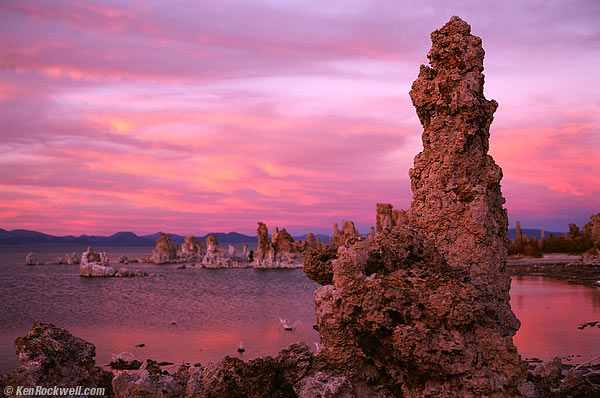
Sort of like this, but then more red then purple and a little bit darker.

32440023-tufa-600.jpg
 
Back
Top