Welcome to our community

Be a part of something great, join today!

  • Hey all, just changed over the backend after 15 years I figured time to give it a bit of an update, its probably gonna be a bit weird for most of you and i am sure there is a few bugs to work out but it should kinda work the same as before... hopefully :)

Ask David Mullen ANYTHING

David,

I am shooting a commercial for a new machine readable test company in a few weeks. The entire spot takes place in a classroom and after seeing the recent kraft mac n cheese ads, decided to immitate that look.

Here is a link to the video:

http://www.youtube.com/watch?v=5k0OTE_Ivu0&feature=youtube_gdata_player

I liked how strong the light is from the window, but how gradual and even the the fill is. How would you achieve that light from the side and would you use any top light? Also, what matter and sources would you use for the fill?

Thanks,

J
 
Hello David,

Do you know what camera lens Filtration was used on the movie "Burlesque" (2010)?
 
Just wanted to thank you for your time and efforts here. As a new film maker I never seem to have enough contact with the wise. If only a mind meld . . .
 
Do you know what camera lens Filtration was used on the movie "Burlesque" (2010)?
Note that there was some diffusion in the camera, smoke on set, and lots of specific defocus effects applied with Baselight by colorist Trent Johnson at Colorworks in Culver City, under the supervision of DP Bojan Bazelli. Sometimes it was more one than the other, but a lot of the close-ups were all three. Very nice-looking film.
 
I couldn't find any clips from "Burlesque" (2010) on the web that looked right.

No worries.
 
Dear David,
I got your comment on the gray card as overexposed white in white balance. Forgive me as I am still blur. When white balance on white paper under warm ambiance, the warmth under whatever colour temperature will be 'bleached' to pure white. What happens if white balance on 18% gray? Will the gray be 'bleached' to pure white? Then those wearing 18% gray dresses will be captured as white dresses.
 
Hi David,

This has been bugging me for a while...do you know the origin of the terms "high key" and "low key" lighting? They don't make a whole lot of sense to me. If anything, I would think they would be the opposite (low key has a higher key-to-fill ratio).

Thanks!
 
You're confusing color with exposure. You make an 18% grey dress look grey, i.e neutral, by proper white balancing (whether using a white or grey card) -- but you make the grey dress look white by overexposing it.

White balancing doesn't make a tan paper look "white", it make it look neutral -- i.e. grey -- and overexposing grey would make it whiter, i.e brighter. White balancing involves changing the separate RGB levels to adjust the color, exposure makes that color lighter or darker... you are raising and lower the RGB levels equally when you change exposure, the white balancing is changing the RGB levels individually.
 
Apparently it comes from art, i.e. painting -- "high key" means tones that are light, above middle grey in brightness, "low key" means tones that are below middle grey in brightness.

In lighting, "high key" means that the frame is dominated by light tones, "low key" means that the frame is dominated by dark tones. In a low key scene, there may be a small area of the frame that is at key exposure or brighter, but most of the frame is way below full exposure.

In a high key scene, most of the frame is filled with midtones and lighter, hence why it also tends to be a lower-contrast scene -- though there are exceptions, in theory a set painted mostly in bright whites with some black objects in the frame would there be high in contrast but also technically high key.

And usually a low key scene is higher-contrast due to the low levels of fill compared to the small area at key exposure -- but there are also exceptions, you could have a scene that is just very dim and murky and thus be low in contrast but also be low key.
 
Last edited:
Can feel that I am getting into a clearer picture now. Thanks. Still with a little doubt :- So using 'white paper' for white balance is not the reason that 'white' is made up of all colours. I am always of the opinion that whatever tan paper is 'white balanced' to pure white, all colours captured then will be in their natural colours without being influenced by the 'tan'. Does this make sense?
 
If you white balance off of a tan piece of paper, or a white piece of paper lit with a pale orange light, etc. the camera will attempt to rebalance RGB until the tan or warm paper is neutral. The camera can't tell if it's the paper that is colored or the light on the paper, it is working with the wavelengths of colors reflecting off of the paper. White balancing off of a tan piece of paper will cause the camera to do something to neutralize the tan, by adding blue and/or subtracting red, plus a bit of green one way or another... once the tan paper is neutralized to grey, everything else in the scene will have a different color bias, generally towards the blue -- the scene will look cooled off.

"White" in theory is made up of all wavelengths but what gives it a color temperature is that not all wavelengths are of equal amounts, there is an excess of blue in daylight and an excess of red in tungsten. Under some fluorescent and industrial light, there are sometimes missing wavelengths and an excess of green so they are not what you'd call "full spectrum" sources.

As for white balancing off of white paper versus grey paper, it doesn't matter much if both are neutral (i.e. don't have some color bias in them) but the camera doesn't like an excess of light when trying to white balance so you often have to stop down when pointing the camera at something very bright to white balance off of it, whereas a grey card is generally never too bright (sometimes it can be too dim on the other hand and you have to open up.)

Also keep in mind that with the Red camera, white balance is only metadata, the image on the R3D file is RAW.
 
Last edited:
Do we have to specificly use 18% grey? Or use any other grey with different %? Why grey but not any other color?
 
Last edited:
If you are talking about white balancing, any grey will work as long as it is perfectly grey -- most 18% grey cards are very neutral which is why they are used... some general piece of grey art paper may have a color tint to it, they may be brown-grey or blue-grey or green-grey, etc.

Why grey or white instead of some other color? Because they are neutral in color. If you white balance to a colored card, the camera will try to take that color away, correct it to neutral, by adding the opposite / complementary colors. So if you white balance to an orange piece of paper, the camera will add blue to get rid of the orange and the following shot will turn out blue. Sometimes that's OK if you want to deliberately misbalance the color.

Generally you are white balancing to correct for some color cast in the main light so that colors of objects will reproduce correctly without an overall bias in one direction or another. So by pointing at a white or grey card under that lighting, you are telling the camera that this white or grey card should look neutral, i.e. white or grey, not pinkish or greenish or blueish, etc.
 
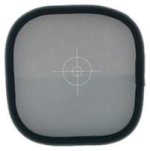
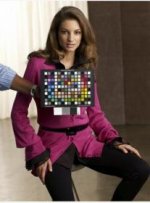
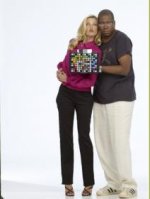
I've been a big advocate of using the gray card as a TA in the first 5 REDucations (AKA the VonCard), and also my own DIT workshops. Actually, I've been using the the gray card since 2000, in the digital still world. I built my business in New York on color management, and 90% of all commercial still shooters use the gray card on a daily basis. For an easier color workflow, I always use this.
 

Attachments

  • web.jpg
    web.jpg
    93.4 KB · Views: 0
  • graycard.jpg
    graycard.jpg
    4.7 KB · Views: 0
  • Screen shot 2011-10-18 at 3.54.34 AM.jpg
    Screen shot 2011-10-18 at 3.54.34 AM.jpg
    10.2 KB · Views: 0
  • Screen shot 2011-10-18 at 3.54.18 AM.jpg
    Screen shot 2011-10-18 at 3.54.18 AM.jpg
    7.9 KB · Views: 0
  • Screen shot 2011-10-18 at 3.54.00 AM.jpg
    Screen shot 2011-10-18 at 3.54.00 AM.jpg
    8.9 KB · Views: 0
Last edited:
Back
Top