Welcome to our community

Be a part of something great, join today!

  • Hey all, just changed over the backend after 15 years I figured time to give it a bit of an update, its probably gonna be a bit weird for most of you and i am sure there is a few bugs to work out but it should kinda work the same as before... hopefully :)

Ask David Mullen ANYTHING

Ha, Yes I guess I meant before you starting working on the bigger budget projects but bigger budget more problems I'm sure so you are still dealing with that issue.
Got one more question for you. Filming a Roof scene tomorrow and want the ground to feel as far away as possible So my thoughts are to shoot as wide as my primes go. So we don't compress the image at all. I don't have a zoom lens so can't use any zoom tricks. Any other advice to shooting looking down from a roof top?
Also have you ever had to fake a moon in a shot? HMI with something in front of it?
Thank you!
 
Start watching at 00:39:16
https://www.youtube.com/watch?v=JPXTpyx9b6s

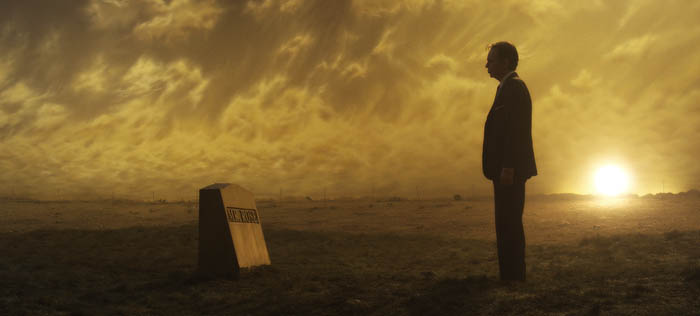
You see Kurosawa design and set-up this amazing night scene for "Ran" that he never used in the final edit, a field lit at night to give the effect of gold leaf on black lacquer. There is a gold moon on a stick on top of the hill.

I've faked the sun in shot many times but not a moon yet, other than a long time ago I faked a telephoto shot of the moon by making a blow-up of a slide of the moon I bought at Griffith Observatory and then backlighting the transparency and reshooting it on film (this was before digital, before the internet, etc.)

One of my faked suns on stage (a 5K sitting on top of the rise):
700manure157.jpg


In terms of rooftop stuff, yes, high, wide-angle, and looking down -- what really helps is some jib arm type moves so you get the perspective shift of the foreground roof edge and the distant ground below, to create a 3D feeling. Anything to create scale too, like having someone walking around on the ground below so you know how far things are.
 
Hi David,
I wanted to ask what is the current way of generating flickering sources (flames, gun flashes, lightning,e.t.c) on set? Any specific good flicker generator being used nowadays or tricks?
If there are any, is it worth having the generator or just rely on the tricks itself? I live in a place where you can hardly rent such stuff if you need it.

I suspect you might have been asked this somewhere sometime within this massive great thread, And i promised myself i would read it all one day, but i am not there yet. Forgive me.
Thanks.
 
Funny thing is that recently I got to shoot something for another talented cinematographer who was directing, and I wanted to light a scene with a strong backlight (not a day interior with only one obvious window source, but something where you could justify the light coming from multiple angles) and I told him "I always have this conundrum when I use a strong backlight on an over-the-shoulder angle -- should I flip everything for the reverse to keep the same consistent backlit look, or should I stick to the logic of the lighting and have the reverse angle in a strong frontal light?" I thought I'd get his pearls of wisdom as a DP but he laughed and said "you're the DP, now it's your problem!" In other words, he didn't have an answer either, it's sort of something you play by ear and use your taste.

.


Hi David,
This is not a question, but a thought on something you talked about before. I do subscribe to this thread, so when you talked about this, i have kept mulling over it.
And i feel there might be a "science to the art" of the reverse shot lighting, or an easier way to approach that dilemma.

I feel when your director friend laughed and said, its your problem now, you are the DP, shouldn't be the case. I feel and suspect it is the director's decision to decide.
Why do i feel it is the director? Because it is the director who decides on Contrast and Affinity of a scene.

The first set of shots, the one with the consistent backlit look will produce less contrast and more affinity when cut together.
The second set of shots, the one that keeps the logic of the lighting, will produce more contrast when cut together.

So depending on the conflict content of the scene, two lovers talking about their future, or one lover asking for divorce, e.t.c, It can be easier to make a choice btw the two sets of the shots.
Because, when they cut, viscerally, they will support the scene, and story.

A creative choice, nonetheless, but one that can have logic, and be less "dilemmaic".

Which is why i feel the director might be in a better position to solve it.
 
It's a standard aspect of the job of cinematographer to make lighting and contrast decisions based on the dramatic needs of the scene. It's not some purely technical decision, we are storytellers too. How do you think we resolve these lighting dilemmas normally? We don't run to the director and ask him how to light the scene and what contrast ratios to use, etc. otherwise it's the director lighting the scene and having his time pulled away from other directorial needs. It's a collaboration to be sure. If the choice affected story or the proper mood for the scene, sure the director has an opinion but it's not always a clear-cut issue that it falls into the director's job arena when deciding whether to backlight both directions or not. Besides, don't take a DP-turned-director's joking with me in this case too seriously.
 
You are right, David. I wasn't thinking as fast as i was typing.
I apologize. I should have thought of it that way too...
 
That's OK, no need to apologize... the thing is that there are all types of directors and any number of those types can make excellent movies, not all directors are as visually literate and sophisticated as others. The best of the best usually are, but below that, there are plenty of good directors whose main strengths lie in getting good performances or developing a good script. Some are more editor-directors than camera-directors. It takes all kinds in life.

Most directors who come from a camera background usually end up hiring a cinematographer even when they are skilled enough to do it themselves, the reason being that directing is a demanding job and cinematography is a demanding job, so it is hard to do both full-time on a movie set unless one has a generous schedule or lean heavily on gaffers, operators, etc. Often when a scene is being lit and dolly tracks are being laid and a cinematographer is their busiest on set, a director isn't taking a nap in their trailer, they are dealing with a thousand other things demanding their attention, casting, editing, scheduling, financing, dealing with management... So many cinematographers-turned-directors are more than happy to get a good cinematographer at their side, which allows them to concentrate on other things.
 
David,

Could you describe your working relationship with the Polish Brothers? What kind of "blank"-directors are they?
 
Michael Polish is an extremely visual director and has shot two of his own features himself -- he has excellent taste in everything that goes in front of the camera and then how it is shot. I basically try to shoot the movie the way I think he'd like it to look (funny thing is that when he shot his own movies, he said he tried to shoot them the way I would have!) We have very similar tastes, which makes everything easier.
 
Hi David-

First, thanks for this thread. What an amazing resource you've provided.

I know that outside, when wind is possible, a flag or foam board can become a sail, and be dangerous. So how do productions generally bounce/diffuse/shape light outdoors safely, and what grip do they use?

Say a scenario where you want to bring light in through a first floor window to simulate daylight, maybe using a big bounce source. How are gaffers and grips approaching that? What if you're in a relatively open field, say near one tree, and want to diffuse the part of the shot that's in direct sunlight? Are people sometimes just holding things up out of frame? Are you weighing a c-stand down with extra sandbags? Are c-stands even part of the equation?

I know that's not really your job, but figured you'd have some top-notch first-hand insight.
 
Hi David.

I just shot a very low key indoor scene. A steadicam shot through three connecting rooms. I carefully set lights where I wanted detail and got the exposures right in those places. Shot at 320 iso. The thing is that in the other parts of the room where it was considerably darker I still got a good amount of noise. Nothing that ruins the image but more than I'd like. To be fair the red bars on the left were showing me that I had noise in the darks but I presumed that it was a result of the scene being so low key. What is the best way to avoid that. Should I light the whole scene up more and then darken it in post or is there some other technique to use? I would rather set the scene as close to the final product as possible so I can give the director the best confidence about the scence. Shooting Epic MX btw.. And thanks a lot.....
 
Hi David-

First, thanks for this thread. What an amazing resource you've provided.

I know that outside, when wind is possible, a flag or foam board can become a sail, and be dangerous. So how do productions generally bounce/diffuse/shape light outdoors safely, and what grip do they use?

Say a scenario where you want to bring light in through a first floor window to simulate daylight, maybe using a big bounce source. How are gaffers and grips approaching that? What if you're in a relatively open field, say near one tree, and want to diffuse the part of the shot that's in direct sunlight? Are people sometimes just holding things up out of frame? Are you weighing a c-stand down with extra sandbags? Are c-stands even part of the equation?

I know that's not really your job, but figured you'd have some top-notch first-hand insight.

First of all, some materials are more porous than others and thus breathe a little in the wind -- a silk, for example, as opposed to an UltraBounce. I haven't looked, but there may even be White Scrim instead of Black Scrim that can be used on a frame for a bounce - it would be as bright as a solid white but it would hold up in a wind better.

Grips use multiple lines of rope tied down to something solid to hold a frame in a wind, and if there is nothing like a tree to tie to, then you'll use large spikes pounded into the ground.

But at some point, it simply is too windy for large frames of any material to go up in the air.
 
Hi David.

I just shot a very low key indoor scene. A steadicam shot through three connecting rooms. I carefully set lights where I wanted detail and got the exposures right in those places. Shot at 320 iso. The thing is that in the other parts of the room where it was considerably darker I still got a good amount of noise. Nothing that ruins the image but more than I'd like. To be fair the red bars on the left were showing me that I had noise in the darks but I presumed that it was a result of the scene being so low key. What is the best way to avoid that. Should I light the whole scene up more and then darken it in post or is there some other technique to use? I would rather set the scene as close to the final product as possible so I can give the director the best confidence about the scence. Shooting Epic MX btw.. And thanks a lot.....

You shouldn't have noise problems at 320 ISO. Either you (1) didn't do a correct black shade, (2) underexposed the scene overall and once in post color-corrected back up, thus defacto rating it higher than 320 ISO, (3) underexposed the shadows overall and then lifted them in color-correction, bringing out their noise, (4) am watching the image in the wrong display gamma, like viewing log images on a Rec.709 monitor -- once the blacks and shadows are normalized, are darkened, the noise should be less visible.

That's the only thing I can guess what happened. Using shadows or dark objects or even black curtains in a scene shouldn't make it noisier any more than if the scene were brightly lit and at some point, almost all of the lighting were switched off, the noise wouldn't suddenly increase. It wouldn't increase if the camera panned from a white card to a black card.

I suspect #1 wasn't the issue, so probably #2 or #3, unless you are judging the noise by looking at flat log images, then #4. The key with #2 and #3 is the lightening the image or shadows in post -- if left very dark, then the noise shouldn't increase.

Of course, one mistake people make is when working in a very dim set, they tend to underexpose the image because the set monitor is the brightest light in the room, so they underexpose in order to make it look right on the monitor, but when they look at the footage in another room on another monitor later, it looks too dark.
 
Normally I'd say that the conservative thing to do, exposure-wise, when doing a dark scene is to darken it by lowering the ISO value on the camera before you do it by stopping down the lens, that way you aren't actually underexposing the sensor. But I think that 320 ISO is already fairly conservative in terms of a rating, so I'm not sure why you'd have noise at 320 ISO. Of course, no camera is noiseLESS so perhaps you're seeing what I would call a normal amount of noise, I don't know.

Also, compression rate can affect some of the visibility of noise I think.
 
Hi David. Thanks a lot for the very thorough answer. I probably did underexpose a little and as you said with color correction the 320 iso isnt really what is achieved. Tomorrow I'll be reviewing the images on a proper grading monitor.. I'll try to export a frame or two and post them. I might be a bit too picky for noise as well..

My biggest problem with exposure was that the scene was lit as desired but the character needed needed a little more kick so to lift him up I had to increase the lift and gamma thus increasing noise. In the grading suite I might make mask the skin tones and lift only those up a bit. Probably it will help.. I'll try to post results.. Thanks again for the reply..
 
This is why sometimes it is better to have a more contrasty image set-up on the monitor so that it forces you to add a little more fill light. Now some people, however, like muted blacks and more open shadows rather than deep blacks and contrasty shadows but with more fill light added. It's just a look issue. You could try doing a noise reduction pass on the footage.
 
Hi David, I'd like to know how to go about matching two shots of the same actor in the same shot size - say, a CU - so that the facial features match exactly. I don't know how this is done. Example: the actor is looking to camera in shot A in scene one, then we cut to shot B of the same actor looking to camera in a different location. The shot is seamless because the match is perfect. Do you overlay a freeze frame of shot A on the monitor and match the actor's eyes in shot B?
 
Back
Top