Welcome to our community

Be a part of something great, join today!

  • Hey all, just changed over the backend after 15 years I figured time to give it a bit of an update, its probably gonna be a bit weird for most of you and i am sure there is a few bugs to work out but it should kinda work the same as before... hopefully :)

ARRI Christmas LUT

Kenneth, I think it's the opposite. Red at 800 iso 'looks like' arri at 400 iso as far as the brightness of the image, but that has nothing to do with noise or clipping i.e. how to rate the sensor. Arri looks like it has a brighter midtone as well as lifted shadows compared to red. You could put a curve on the red to get the same effect, so that 400 iso on red looked like 400 iso on arri.

From what I understand of John's info, he's saying that the LUT increases exposure of the original raw image by +1 stop "to better match the Alexa at equivalent ISOs." That would suggest that if both cameras are set to 800 ISO, the Red image ends up looking darker than the Alexa's and must be boosted in post.

If the above is true, then to get equivalent luma values between the two cameras, you would have to rate the Red at a lower ISO (400) on set in order to give it more light and gain you that +1 stop so that the light gathered in the final image is the same value as that in the Alexa.

Unless you're correct that it's just a tonal mapping issue where the Alexa maps midtones brighter than the Red. But then the LUT shouldn't be increasing overall exposure by +1 stop, just the midtones.
 
hqdefault.jpg


I think we're saying the same thing. Here's an old test done by someone else. Arri looks brighter at the same settings.

You're right, if you rate the red at 400 while simultaneously setting it to 800 that also gives you +1 stop. If you look on John's website, on the page selling the alexa lut, you'll see the package includes a 1D curve which will remap tonalities to make red's come nearer to arri's for cameras like the epic dragon which cannot load LUTs. I imagine that curve is doing something more than just doubling the linear light values, but I didn't purchase it so I don't know if it's simply +1 stop or not.
 
Last edited:
I worked on two reality shows. On one of them I was given 8 hours, but that included playout to tape (this was a few years ago) and addressing client notes. So it was more like 6-7 hours. On the other I was given 6 hours.
Yes, I'd say that's closer to the norm. There are the huge, top-rated reality shows like Survivor and Amazing Race that are sometimes done in pieces, and it might be more like 2 days. I've only worked on four or five reality shows, but even when I pushed a little bit, it was 10 hours tops -- and that included shows with massive color/brightness shifts, surveillance videos, and 1000 cuts. My fingers were bloody at the end of the session, I took no breaks, and ate while working. And no LUTs were involved.

From what I understand of John's info, he's saying that the LUT increases exposure of the original raw image by +1 stop "to better match the Alexa at equivalent ISOs." That would suggest that if both cameras are set to 800 ISO, the Red image ends up looking darker than the Alexa's and must be boosted in post.
Either the LUT is boosting the signal or the colorist boosts the signal in post. It's exactly the same thing: both are just adjusting pixels. There is no real difference. Boosting the mids or changing the mid curve will provide the same effect.

One stop is quite a bit -- I would say we're talking about 15-20 ire. It's all doable and one stop is not that much, unless you're trying to dig deep into crushed shadows and there's not enough fill. If you've blown out and clipped the whites by a stop, you may not be able to get much back by pulling the whites down 15-20 units... LUT or no LUT. We can always make it look better, but making it look great is not always possible.

I had a film about 2 years ago where I had to match a GoPro to an Alexa. Initially, the GoPro was going to be "Surveillance" footage, but as I was dialing it in, the producer said, "hey! That looks better than we thought it could. Could we match it to the wide shot?" We did it, but it was dicey. What helped is that the DP lit and exposed everything very well, and for a 2-second shot, it wasn't terrible. I don't think it would be a problem to match an Alexa and a Red Epic or Helium under optimum circumstances, but that's a big "if."
 
hqdefault.jpg


I think we're saying the same thing. Here's an old test done by someone else. Arri looks brighter at the same settings.

You're right, if you rate the red at 400 while simultaneously setting it to 800 that also gives you +1 stop. If you look on John's website, on the page selling the alexa lut, you'll see the package includes a 1D curve which will remap tonalities to make red's come nearer to arri's for cameras like the epic dragon which cannot load LUTs. I imagine that curve is doing something more than just doubling the linear light values, but I didn't purchase it so I don't know if it's simply +1 stop or not.

Yup, we're saying the same thing!
 
I noticed the same thing in Christoph Tilley's test. For the same lighting setup, 800 on Alexa looks closer in brightness to ISO 1600 on RED:

Alexa - ISO 800 f/8 + Rec709 LUT on it.

test_1_3_4.jpg


Helium - ISO 800 f/8 - RWG/Log3G10 + IPP2 LUT

test_1_2_5.jpg


Helium - ISO 1600 f/8 - RWG/Log3G10 + IPP2 LUT, besides ISO, same raw settings as above.

test_1_2_6.jpg


(white balance settings might be off, this is more of a demonstration of brightness)
 
Last edited:
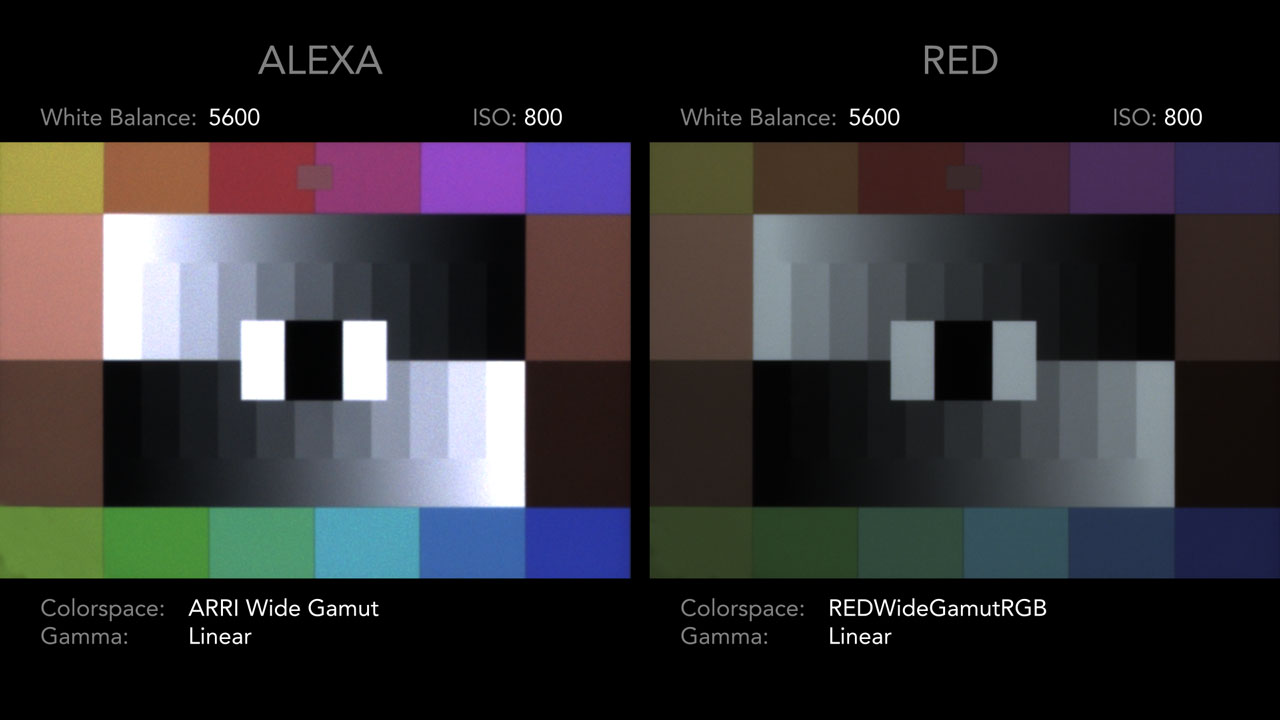
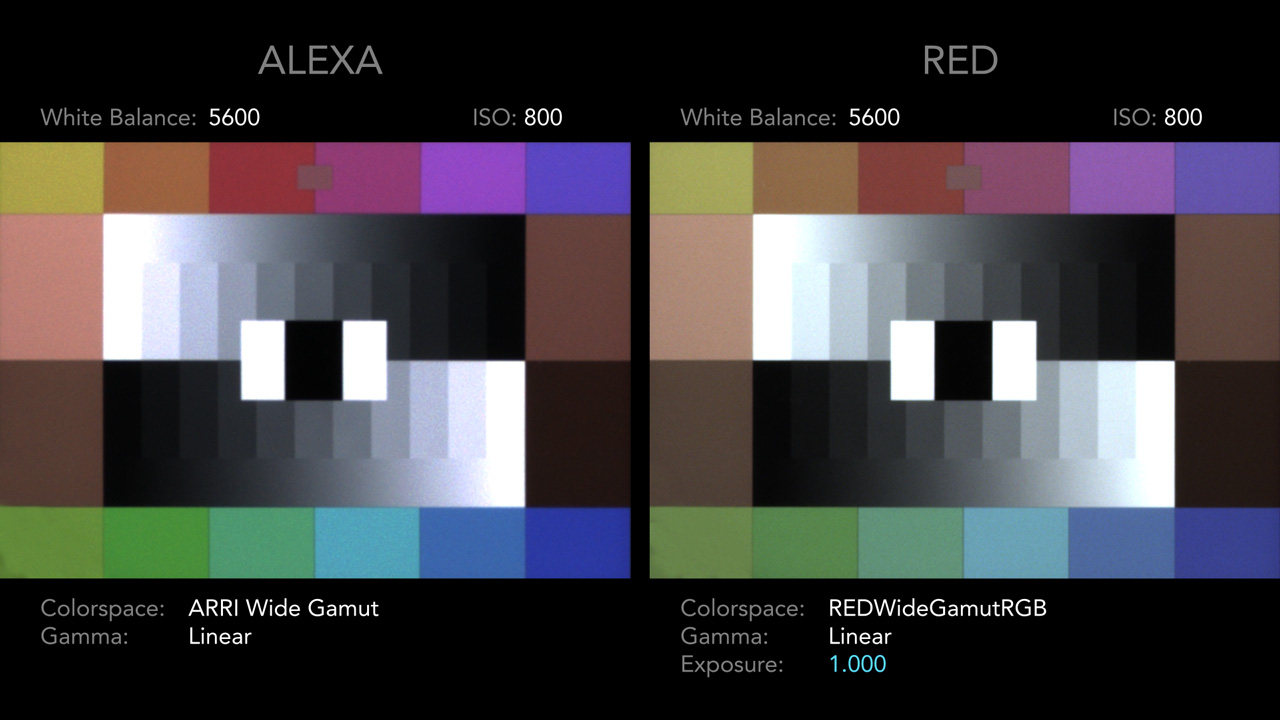
It may be harder to tell without looking at the linear light values but from the tests I've done, after converting REDlogFilm (Cineon) and an Alexa LogC footage to linear light, the Alexa is roughly 1 stop brighter than RED at identical ISOs.

In this image, both cameras are at 800 ISO viewed in linear light (click for larger images):


After the +1 stop exposure increase on the RED (still in linear light):


Finally, after adding the colorspace adjustments, LogC output, and ARRI's LogC to Rec709 LUT:


I'm not completely sure why the difference exists. I think it is primarily due to Cineon and LogC using different transform curves for mapping the data. There could possibly be other variables on the camera-side.

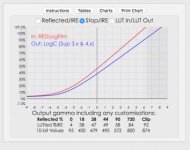
One useful tool is LUTCalc, which lets you visualize how various camera curves compare to each other:
https://cameramanben.github.io/LUTCalc/LUTCalc/index.html
Screen Shot 2017-01-17 at 12.47.58 AM.jpg
 
Just in reference to the above image John, I'm thinking that was shot with the Low Light OLPF. It would be interesting to see that specific chart with the Skin Tone - Highlight OLPF.

I believe you are correct in regards to the variance with Cineon and LogC having different specs + other chaos.
 
That's why on light meters you have to use a -1 stop exposure compensation, at least I do. It's been like this for years guys
 
MArc have right is about 15-20 ire...
usually by being equal to alexa I imposed Dragon iso 1280, but if you want to also have the same mapping DR close the iris + -1/2 compared to alexa.


example:
Alexa t3 800 iso
Dragon t4 ISO 1280/1600
 
Just in reference to the above image John, I'm thinking that was shot with the Low Light OLPF. It would be interesting to see that specific chart with the Skin Tone - Highlight OLPF.

I believe you are correct in regards to the variance with Cineon and LogC having different specs + other chaos.

You're right Phil, that image was from the Low Light OLPF / Epic Dragon (great eye btw).

And the difference isn't always exactly 1 stop (that's just a nice round number to use). Each sensor / OLPF combination may produce various results. According to this 2015 CML test using the Epic Dragon, the Skintone / Highlight OLPF is in-between the Low Light OLPF and Alexa in terms of exposure (using the same lens / ISO / etc.)
http://cinematography.net/edited-pages/CML-UWE-RAW.html

For those interested, I also updated the online demo to include the IPP2 Preview & REDgamma4 options, so you can see how the added +1 stop adjustment compares to the default gamma settings (you can also test it on your own images):
http://truecolor.us/products/red-to-alexa-lut-demo/?src=red_ipp2_preview&lut=arri_rec709#frame
 
Hey John when you made your transform did you also use a number of 'popular' lenses to get some kind of average in the way each camera's image is affected by various lenses. I.E. Cook's, Master and Ultra primes, Angenieux, Leica's, Canon CN-E...

Lens choice makes a significant difference in color and contrast rendition.
 
Hey John when you made your transform did you also use a number of 'popular' lenses to get some kind of average in the way each camera's image is affected by various lenses. I.E. Cook's, Master and Ultra primes, Angenieux, Leica's, Canon CN-E...

Lens choice makes a significant difference in color and contrast rendition.

Yes, that's a good point about the lenses. Ideally both cameras will use the same lens for the profile (which should cancel out a lot of the lens characteristics). I ultimately did end up averaging multiple samples from both cameras to arrive at the result, which helped even out any potential optical differences.
 
Hey John did you calibrate your LUT mainly to the standard OPLF? Or did you somehow take an average of the standard and the skintone/highlight OPLF?
 
Hey John did you calibrate your LUT mainly to the standard OPLF? Or did you somehow take an average of the standard and the skintone/highlight OPLF?

As far as I'm aware, John's LUT is a mathematical transform from REDWideGamutRGB/Log3G10 to Alexa Log C/Arri's Wide Gamut (or Film Matrix).

This would mean that the different OLPFS and sensors will still retain their individual characteristics.
 
As far as I'm aware, John's LUT is a mathematical transform from REDWideGamutRGB/Log3G10 to Alexa Log C/Arri's Wide Gamut (or Film Matrix).

This would mean that the different OLPFS and sensors will still retain their individual characteristics.

Yes, that's primarily the case, though I did use some actual camera data to dial in the results of the color transform (with samples from both the Low Light OLPF & Skintone/Highlight OLPF). These results were then averaged together for the final result.

Because of this, if you are shooting with two different sensor / OLPF combinations you will still need to balance the cameras in the grade (I would start with adjusting the raw White Balance, Tint, & Exposure).
 
Sorry to bring up an older thread but I was just wondering based on the extra exposure from the Alexa at matched ISOs, if you have the Alexa ISO at 400 and the Red ISO at 800 to get a closer match which camera starts to show more noise first? IE if the Alexa starts showing more noise at 1600 then the Red at 3200, even though they are close to equal in exposure at this point?
 
It depends on what LUT your using. If you use John's LUT you're rating the ISO about a full stop higher so ISO 800 with John's LUT becomes 1600 for default RED color science. From my own experience, 1600 ISO with John's LUT is about as high as I go. You may even need a little noise reduction depending how much of the image is in shadow. At this point your effectively at 3200 ISO for the native RED settings which is still usable with the Helium sensor but would be too noisy for Dragon DSMC 1 (Dragon DDMC 2 could probably go there as well). Also with John's LUT the ISO between an Alexa and RED camera should match.
 
Back
Top