Welcome to our community

Be a part of something great, join today!

  • Hey all, just changed over the backend after 15 years I figured time to give it a bit of an update, its probably gonna be a bit weird for most of you and i am sure there is a few bugs to work out but it should kinda work the same as before... hopefully :)

ACTUAL DESQUEEZE RESOLUTION IN ANAMORPHIC?

Rick LaLonde

Well-known member
Joined
Dec 15, 2011
Messages
79
Reaction score
0
Points
0
For example if I shoot 4K ana, do the horizontal pixels get doubled to add up to 4K or does the sensor squeeze true 4K into 4:3 and then desqueeze to actual 4K resolution? Appreciate your help anyone.
 
At first I though... well.. duh, of course it's stretched, but then I thought; If 5K or 6K Ana has more resolution, are those pixels used when downsizing to a wide 4K image?
What's the algorithm for downscaling higher than 4K ANA down to 4K? Is it possible to shoot in ANA mode and downscale to a pixel mapped wide image instead of just stretching the pixels?
 
I want to explain this whole thing pretty clearly as I get anamorphic questions pretty often.

First, let's talk about 4K DCI and 4K UHD.

4K DCI is 4096x2160 which yields an aspect ratio of 1.9:1. The common CinemaScope 2:39:1 container for a 4K DCI film is 4096x1716.
4K UHD is 3840x2160 which yields an aspect ratio of 1.78:1 or more widely known as 16x9. This is the common aspect ratio used by all home displays and you can fit anything you want in that container really if your production allows for that.


The three most important questions.

The very, very, very first questions you need to ask yourself are:

1. What aspect ratio are you shooting for upon delivery?
2. What sort of anamorphic lenses will you be using?
3. Are you finishing for 2K, 4K? UHD/DCI?


The common choices are 2X (most common) and 1.3X (still common these days, but not as common or desired as 2X typically).

RED digital cinema cameras have a few common formats that are used for anamorphic filming.

I made a graphic to help with this some time ago:

phfx_redDragon_anamorphicShooting.jpg


Quick dirty thoughts on widescreen aspect ratios.

There's a few options when it comes to shooting for widescreen. Common aspect ratios these days are (from widest to tallest) 2.40:1, 2.39:1, 2.37:1, and 2.35:1.

A little annoying having all those options, but there are some who have very strong feelings regarding day 2.40:1 versus 2.35:1 for instance.

What is important to know? DCI CinemaScope delivery is 2.39:1, if it's necessary to hit that target.

Also, RED's WS format when shooting with rectilinear lenses is 2.37:1. Some productions bounce back and forth from anamorphic filming and spherical filming, this is useful to have in mind.


4:3, 6:5, HD (16x9/1.78:1) What the hell should I shoot?![/B]

This comes back to those first two important questions.

Let's talk 4:3 first. Using 2X anamorphic lenses yields a 2.67:1 aspect ratio image that you will likely "trim" the sides off to hit the common widescreen aspect ratio 2.40:1-2.35:1 delivery. Which means you are slicing pixels off the left and right of the frame. No big deal if this is the workflow you choose. However, since the original question is about hitting a precise 4K resolution it's very relevant to both capture and workflow.

4:3 with 1.3X anamorphic lenses equates to a 16x9/1.78:1 image which is useful if you need to fill the HD or UHD screen with image and have no black borders.


Anamorphic Squeezed to Squashed or Stretched Typical Workflows

Here's where it comes together when hitting specific delivery resolutions.

There's 3 general ways to work with anamorphic footage. Some are more common than others and I know what I prefer doing.

1. Squash the image in height.
- Squashing your image maintains the width of the original footage, however your image height will be smaller as you squash the pixels down to a normal looking image.

2. Stretch the image in width.
- Stretching your image maintains the height of the original footage, however your image width with be much wider that before as you stretch the pixels up to your normal looking image.

3. Scale to fit your "delivery container.
- If your Squash or Stretch doesn't specifically fit within the width of your targeted delivery format you will need to either scale the image up or down to fit within that container.


So let's talk workflow and delivery. If your anamorphic format and lens selection hits your target delivery resolution in width or exceeds that resolution, most would just simply use the Squash Method and if necessary scale down the image to the target resolution.

However, if your anamorphic format and lens choice is smaller than your target delivery in width you must "scale up" to your format size.

Wait though. There's more to it than that bad "scaling" word.

One of the allures outside of the general visual aesthetic of anamorphic is the "resolution gain" you get by squashing those pixels down to hit the appropriate widescreen aspect ratio. Often there's a balancing act that can be achieved between squashing, stretching, and scaling to maximize your resolution and image quality. And this is where it can get tricky when we are talking about the higher possible quality for a specific anamorphic project.

The simple, yet most costly technique is just to go with the Stretch Method and have that larger image in width and keep that going until you finish your project. If you're dealing with VFX and say DPX sequences though, that can produce data "weights" that might be pretty heavy for some to handle. Though this is a method that's certainly used.

Often the most sensible thing to do is the Squash method and Scale to Fit your Container if necessary.


Phil, dammit man, you went way off course! Just answer my question!


Back to your original question Rick, and I apologize about the breathy long winded reply, but you're about to see why I went through all of that first.

You are talking about the 4K 4:3 RED format, and you mentioned doubled, so I'm assuming you mean 2X anamorphic.

4K 4:3 is 3840x2880, which does indeed "hit" UHD 4K's width. Yet, not DCI 4K.

So lets take that 4K 4:3 2X image. Unsqueezed you are looking at an aspect ratio of 2.67:1, which is not so common though useful for reframing if necessary.

If we simply use the Squash Method you'll end up with a 3840x1440 pixel image. However, you are likely targeting somewhere between a 2.40:1 and 2.35:1 aspect ratio image for your finish. So let's just try to crop out the 2.40:1 image from that. Now you have a 3456x1440 image that adheres to no delivery standard, though if you are finishing for 2K you can simply scale that down and run with that method. However, if you to attempt to deliver 4K I would recommend the Stretch Method, which in this case would yield a 7680x2880 image. Then trim out your 2.40:1 aspect ratio image from that, which ends up as 6912x2880 that can then be scaled down to your 4K DCI or 4K UHD container.

Just to stir the pot a bit more, I often prefer to shoot 6K 6:5 for anamorphic which is 3792x3160. However, 6:5 actually unsqueezes to 2.40:1 from the get go using 2X anamorphic glass. And to stir the pot even more further, you can actually use any of the RED formats with anamorphic desqueeze enabled, so you can actually have much more image area at your disposal for re-framing if your lenses cover formats like 6K FF.


Hope all of that info helps. The reality is it's not as complicated as what I'm describing above, but it's important to understand some of those concepts when it comes down to hitting hard delivery resolutions.
 
I think the question was if it records a 4:3 image and then stretches out those pixels to a proper wide image. So if you say that the 4K ANA mode is 3840 x 2880, what is the final resolution of the proper 2.35:1 image? If I shoot in 5K ANA, does it use the extra pixels when downsizing or just stretch out the pixels?

If I shoot in 5K ANA and it uses all the pixels to create a square-pixel pixel-mapped wide image, what would be the final resolution of that? Because if the density of the 4:3 4K image is 3840 pixels wide, it would be a true 4K anamorphic wide image?
 
I think the question was if it records a 4:3 image and then stretches out those pixels to a proper wide image. So if you say that the 4K ANA mode is 3840 x 2880, what is the final resolution of the proper 2.35:1 image? If I shoot in 5K ANA, does it use the extra pixels when downsizing or just stretch out the pixels?

If I shoot in 5K ANA and it uses all the pixels to create a square-pixel pixel-mapped wide image, what would be the final resolution of that? Because if the density of the 4:3 4K image is 3840 pixels wide, it would be a true 4K anamorphic wide image?

Read the post above as the answer is in there.
 
When you shoot ana x2 with a 4:3 crop of the sensor then "your real image" when displayed properly is simply a 8:3 image. Then how you decide to fit that 8:3 canvas into a your mastering format is up to taste really.
But shooting 4k does not make sense to me. As I see it the more pixels / sensor area you use the better so 6k 6:5 is where the cream is at the moment.
 
There is this myth that somehow by shooting with 2X anamorphic lens, you double your horizontal pixel resolution.

You should think of it this way: the 2X anamorphic lens creates an image that looks squeezed horizontally, that's all. Forget for a moment that it has to be stretched out horizontally to look normal and think of the image itself as just having objects that look skinnier.

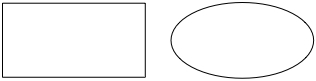
In fact, imagine creating a drawing like this, with a "fat" square and circle:

stretched.jpg


And then shooting it with a 2X anamorphic lens. It would look something like this:

stretched2.jpg


Now if you had also created a drawing that already looked like the second, a normal square and circle, and shot it with a spherical lens, it would look the same as the first drawing shot with an anamorphic lens. So would the fat square squeezed optically to look normal have any more resolution than the normal square shot spherically if the number of pixels used to capture either of them were the same? No.

There's nothing magical here, an anamorphic lens just gives you an image that looks squeezed. The fact that you have to unsqueeze it to look normal doesn't give it more resolution, just because you chose, let's say, to unsqueezed it by upscaling the horizontal dimensions by 2X as opposed to downsampling the vertical only by 2X.

Also, you have to ask yourself, if you are claiming that anamorphic photography gives you more resolution, in comparison to what? Yes, it would if you had a sensor that was square-ish and you were comparing the anamorphic image to a spherical one that had to be cropped in half vertically to get the same aspect ratio, where both originally shared the same horizontal pixel resolution.

6K 6:5 "anamorphic" on the Dragon is 3792 x 3160 (1.20 : 1). Having to upscale the horizontal to 7584 pixels to get rid of the squeeze doesn't mean you magically gained resolution.

6144 is the max you can record horizontally on the Dragon, so if you shot with a spherical lens and cropped to 2.40 : 1, you'd have something like 6144 x 2560.

So basically, ignoring the optical quality of the anamorphic versus spherical lens, you are talking about the resolution difference between 3792 x 3160 (11.98MP) versus 6144 x 2560 (15.73MP) for anamorphic versus spherical when the goal is a 2.40 : 1 image.
 
As a side note, effects people sometimes used to do the opposite of what I drew with the square and the circle -- they created models or artwork with a built-in 2X horizontal squeeze and shot them with normal lens, which was then cut into live action that was shot with a 2X anamorphic lens. Disney did this first on one of the earliest CinemaScope movies, "20 Thousand Leagues Under the Sea" - not having enough anamorphic lenses to go around, the built a model of the Nautilus that looked skinny and shot their underwater photography of it with a normal lens. Once cut into the negative, the anamorphic projection stretched everything out laterally by 2X.
 
Yep, agree David and these days it's truly more about the general aesthetic and look anamorphic provides for those who shoot with it.

My notes regarding the specific resolutions and workflows are more about how to "hit" specific standards like DCI and UHD/HD resolutions and the "best way" to do that. There's ways to make that easier on post and ways to make that worse. But it always depends on the chosen workflow and very much importantly the capture format itself.
 
The only resolution advantage to anamorphic over spherical on the same camera is when it saves you from having to crop the image to get 2.40 : 1, which would only be true on square-ish film formats or sensors.

There's that, but there's also the different look to the noise/texture/grain as well.
 
Sure, there is a huge difference in look optically, particularly if you shoot at wider apertures. The look of stretched noise, well, that depends on how noisy the original image was.

Yes, on film, the fact that you are using more negative on a 4-perf 35mm camera using anamorphic lenses for 2.40 means less grain. In theory, on a digital camera with a 4x3 sensor, anamorphic may also mean less noise compared to cropping to 2.40 but it all depends on the degree of enlargement of the image.
 
Yep. I actually think once Weapon 8K Dragon comes out with the taller (21.60mm) and higher resolution sensor we'll see a bit of a resurgence of interest in anamorphic, or at least more than what we see now.

8K 6:5 should be somewhere around 5184x4320. That to me is a pretty big difference than anything available now.

I also wonder if we'll see 1.5X pop up again. Happened before very briefly, but I could see it happening for these larger formats. I still think in terms of the aesthetic 2X is where it's at though.
 
As a side note, effects people sometimes used to do the opposite of what I drew with the square and the circle -- they created models or artwork with a built-in 2X horizontal squeeze and shot them with normal lens, which was then cut into live action that was shot with a 2X anamorphic lens. Disney did this first on one of the earliest CinemaScope movies, "20 Thousand Leagues Under the Sea" - not having enough anamorphic lenses to go around, the built a model of the Nautilus that looked skinny and shot their underwater photography of it with a normal lens. Once cut into the negative, the anamorphic projection stretched everything out laterally by 2X.
Wow, i didn't know that, this gives me a cool idea. I am saving about half the cpu & disk time by going 2x squeeze through the entire post process, but every now and then the vfx is still done in square pixels and/or rendered with spherical simulated optics. With this "disney" trick I'll do the vfx model scaled in half ... will actually save 50% of time in some circumstances, render with the same squeeze ... then send that to compositing which is already in 2x squeeze so will align perfectly. Will also create some amusing effects on vfx caustics for water and glass (i.e. right now my vfx optical caustics don't have anamorphic effects).
 
David, you ignoring one big thing with your way of reasoning which is "virtual sensor size" in lack for a better term.

Basically 6kFF is 30.7x 15.8mm
Now the Virtual sensor size of 2x ana 6k 6:5 is 37,92mmx15.8mm

So in a sense when only using a 6:5 center crop of the dragon sensor the virtual size of the sensor actually trumpf dragon 6kFF with as much as 7.2 mm in width. Which to me is far more interesting than the actual pixel or measured resolution.
 
David, you ignoring one big thing with your way of reasoning which is "virtual sensor size" in lack for a better term.

Basically 6kFF is 30.7x 15.8mm
Now the Virtual sensor size of 2x ana 6k 6:5 is 37,92mmx15.8mm

So in a sense when only using a 6:5 center crop of the dragon sensor the virtual size of the sensor actually trumpf dragon 6kFF with as much as 7.2 mm in width. Which to me is far more interesting than the actual pixel or measured resolution.

That only affects the focal length / field of view / depth of field issues, just as with anamorphic lenses on a 35mm camera. I mean, you could say that the 4-perf 35mm anamorphic negative, 21mm x 17.5mm, is "virtually" 42mm x 17.5mm if you wanted to, which would explain some of the field of view / depth of field issues, though it would be a mistake to then suggest that it actually was a 42mm wide negative in terms of resolution. This is the problem with this notion of anamorphic giving you a "virtual" larger sensor area, people start to think you literally mean it becomes a larger sensor area.
 
Wow, i didn't know that, this gives me a cool idea. I am saving about half the cpu & disk time by going 2x squeeze through the entire post process, but every now and then the vfx is still done in square pixels and/or rendered with spherical simulated optics. With this "disney" trick I'll do the vfx model scaled in half ... will actually save 50% of time in some circumstances, render with the same squeeze ... then send that to compositing which is already in 2x squeeze so will align perfectly. Will also create some amusing effects on vfx caustics for water and glass (i.e. right now my vfx optical caustics don't have anamorphic effects).

Keep in mind today though that vfx for an anamorphic production would probably be done "flat" since a squeeze may never be necessary if no film-out to 35mm anamorphic is ever done, since digital scope projection is done with spherical lenses. In other words, the anamorphic live-action would be unsqueezed for post work and vfx then added that were not squeezed.

Other examples of squeezed effects, I recall that the computer generated drifting stars done for "Star Trek 2" were created with a built-in 2X squeeze and then transferred to film with a normal lens on the camera for optical compositing. I think there are some examples of matte paintings that were also painted with a visual squeeze so that they could be photographed with a normal lens.
 
That only affects the focal length / field of view / depth of field issues, just as with anamorphic lenses on a 35mm camera. I mean, you could say that the 4-perf 35mm anamorphic negative, 21mm x 17.5mm, is "virtually" 42mm x 17.5mm if you wanted to, which would explain some of the field of view / depth of field issues, though it would be a mistake to then suggest that it actually was a 42mm wide negative in terms of resolution. This is the problem with this notion of anamorphic giving you a "virtual" larger sensor area, people start to think you literally mean it becomes a larger sensor area.

I think people understands the difference, between virtual sensor size, sensor size and pixel density. Even the film kids today buys speedbosters for their bmpcc cameras and so on.

Also if You aim for a 4k 2.40:1 finnish then 6k 6:5 gives you pretty much full width and hardly any resampling had to be done in Horisontal direction, then you get, pretty much, a full 2:1 even numbers, downsample in Vertical direction which really helps the Cmos debayering.
Now if you compare this to shooting 6k FF you only get a downsample of about 1:3 for 6KFF when going to 4k 2.40:1. Even if that 1:3 downsample is done both H and V its not an even number and its actually not much more source pixels going onto the final framing.
And one can also argue that with anas you could shoot FF6k and get a 4:1 canvas to pan around in kind of like David Finsher soot 6k for 5k. But yes sphericals are possibly a better option for the most part, sharper more rectliniear etc. But to me anas simply looks more apealing 9 times out of 10 :)
 
And whatever you do, please shoot framing charts so that everything can be checked in post (particularly charts with circles so we can verify accurate anamorphic sizing). I'm amazed that more people don't do this.
 
Back
Top