Welcome to our community

Be a part of something great, join today!

  • Hey all, just changed over the backend after 15 years I figured time to give it a bit of an update, its probably gonna be a bit weird for most of you and i am sure there is a few bugs to work out but it should kinda work the same as before... hopefully :)

about SMALLHD DP6 and SCARLET...

jaadgy akanni

Well-known member
Joined
Feb 15, 2007
Messages
1,108
Reaction score
0
Points
0
Location
Manhattan, Uptown Baby!
So, while we wait for our Scarlet, I'm worried about the following:

Since smallhd's DP6-SLR monitor can only connect to the Scarlet via HDMI, should upgrade to DP6-SDI? IS HDMI a definite no-no? I'd like to avoid the extra expense of upgrading the monitor to HD-SDI input capability, but I'm totally in the dark on these matters. Thank you in advance.
 
HDMI is enabled on the Scarlet and works. I believe you can run the 5.0" LCD Touch (or Bomb EVF) and HDMI at the same time as well.
 
Bottom line here is HD-SDI is a locking connector whilst HDMI is not. You can buy HDMI locking connector adapters however. Other point, the standard for pro video I/O is HD-SDI. Will you get more from HD-SDI v HDMI? As long as your monitor it connects to is properly calibrated then, no.
 
HDMI is enabled on the Scarlet and works. I believe you can run the 5.0" LCD Touch (or Bomb EVF) and HDMI at the same time as well.

Thanks guys, seems like I'll go with HDMI and see how I like it.
Hey Phil, have tried using 2 different displays at once the way you describe it? assuming you own an Epic or a Scarlet that is
 
Get the SDI. I hooked my SmallHD up to my Canon 7D (I'm sure the Scarlet connections are better) and it dropped the signal about every minute or so. Just losing the signal a few times in a shoot is going to drive you nuts. Plus, the SDI version has pass-through.
 
Thanks guys, seems like I'll go with HDMI and see how I like it.
Hey Phil, have tried using 2 different displays at once the way you describe it? assuming you own an Epic or a Scarlet that is

I've used a few Epics and am awaiting a Scarlet, but haven't set things up that way. But was told this "works that way" now. I'll know for sure soonish.
 
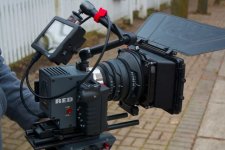
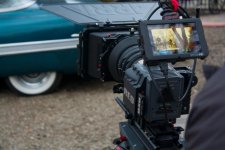
SmallHD DP6 HDMI works great on the Scarlet! used it last weekend for a shoot, and no problems at all! Stayed connected the entire time, even when moving around, never lost input.

***One major thing to note though. Scarlet does have HDMI enabled, but not by default, in this current build of firmware, it must be turned on in the menus. By default, HD-SDI is enabled, and you cannot have both running at the same time. So in order to turn on HDMI, you must have an HD-SDI monitor or Red monitor, in order to enable HDMI. I learn this the hard way.

-Mackenzie
 

Attachments

  • 388675_10150507942406457_504071456_10236546_1272886989_n.jpg
    388675_10150507942406457_504071456_10236546_1272886989_n.jpg
    41.4 KB · Views: 0
  • 379497_10150507947756457_504071456_10236573_1282616480_n.jpg
    379497_10150507947756457_504071456_10236573_1282616480_n.jpg
    37.5 KB · Views: 0
SmallHD DP6 HDMI works great on the Scarlet! used it last weekend for a shoot, and no problems at all! Stayed connected the entire time, even when moving around, never lost input.

***One major thing to note though. Scarlet does have HDMI enabled, but not by default, in this current build of firmware, it must be turned on in the menus. By default, HD-SDI is enabled, and you cannot have both running at the same time. So in order to turn on HDMI, you must have an HD-SDI monitor or Red monitor, in order to enable HDMI. I learn this the hard way.

-Mackenzie

Hey Mackenzie, how do you like that tripod? A bit off topic, I know, but I haven't been able to gauge if this one is an improvement on the marginal quality of Manfrotto's other "fluid" heads.
 
HDMI is enabled on the Scarlet and works. I believe you can run the 5.0" LCD Touch (or Bomb EVF) and HDMI at the same time as well.

I haven't tried it yet, but I do think it works also.

I played with mine just now and you can go into the settings by going to "Settings" - "Audio/Video" - "Monitor Control" and then from their you get the options of choosing clean feeds and different output resolutions.
 
good to know, thanks for the reply. Seems like a good match for a Scarlet kit.

EDIT: matches pretty damn well in color, too!
 
Mackfind enzie:

1) What battery did you go with for the SmallHD DP6?
2) What arem is that? Looks like the RED arm, and what connector is that on the Scarlet-X top body?
3) Did you manage to navigate ALL the menus with the side handle? I had heard here that for example, you couldn't adjust the audio levels if without the rouch screen.

Thanks

SmallHD DP6 HDMI works great on the Scarlet! used it last weekend for a shoot, and no problems at all! Stayed connected the entire time, even when moving around, never lost input.

***One major thing to note though. Scarlet does have HDMI enabled, but not by default, in this current build of firmware, it must be turned on in the menus. By default, HD-SDI is enabled, and you cannot have both running at the same time. So in order to turn on HDMI, you must have an HD-SDI monitor or Red monitor, in order to enable HDMI. I learn this the hard way.

-Mackenzie
 
As an aside, according to SmallHD themselves, their monitors have a warm cast that cannot be changed or calibrated out of them. This means, if I understand correctly, that unless your picture profile also has a similar warm cast you cannot make a SmallHD monitor look like what your camera "sees" even after calibrating to bars. I returned a DP6 for this reason and purchased a TV Logic.
 
I believe the 5.6 Tvlogic uses the same panel as the SmallHD, and it also has a very warm color cast. I own the TVLogic and have used the SmallHD. Both fine monitors for focus and framing, though I prefer TVlogic for the extra features (HDMI to SDI is wonderful).
 
Back
Top